メインコンテンツ

Transition Legacy Neural Network Code to dlnetwork Workflows

Legacy neural network functionality (for example, functionality that relates to the network object) will be removed in a future release. Use dlnetwork objects and related functionality instead.

Legacy neural network objects are outdated and are not well suited for modern workflows. Some of the functionality being removed was introduced before R2006a (for example, network objects and the train function). Using dlnetwork objects (introduced in R2019b) and related features such as the trainnet function (introduced in R2023b) instead is recommended and offers these advantages:

  • dlnetwork objects support a wider range of network architectures, which you can train using the trainnet function or import from external platforms.

  • dlnetwork objects provide more flexibility and have wider support with Deep Learning Toolbox™ functionality.

  • dlnetwork objects provide a unified data type that supports network building, prediction, built-in training, compression, Simulink®, code generation, verification, and custom training loops.

For tabular data workflows, you can train neural networks using the fitrnet (Statistics and Machine Learning Toolbox) and fitcnet (Statistics and Machine Learning Toolbox) functions and convert them to dlnetwork objects.

mdl = fitrnet(X,T);
net = dlnetwork(mdl);

For other types of data or additional flexibility, you can train a neural network using the trainingOptions and trainnet functions.

options = trainingOptions("adam");
net = trainnet(X,T,layers,"mse",options);

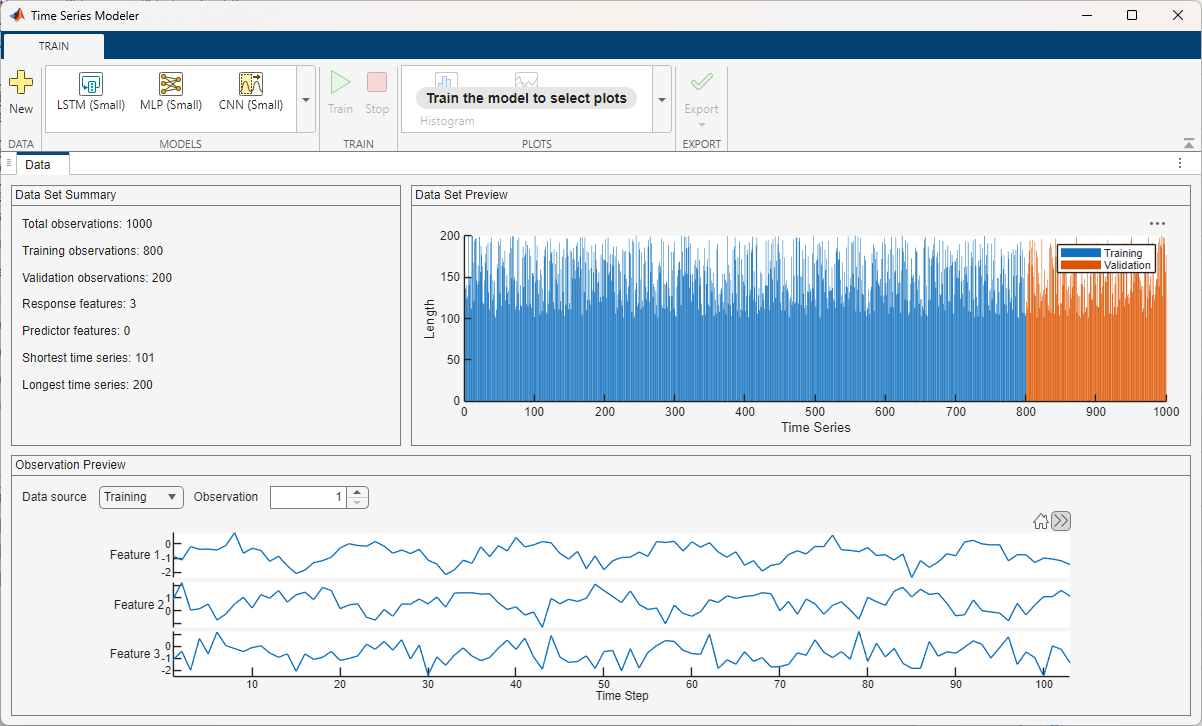
Alternatively, you can recreate your workflow interactively in apps such as the Time Series Modeler, Deep Network Designer, Regression Learner (Statistics and Machine Learning Toolbox), and Classification Learner (Statistics and Machine Learning Toolbox) apps and then export your model.

Time Series Modeler Data tab showing a summary of imported data, a plot of time series lengths, and a preview of the selected observation.

You can use these apps for deep learning workflows:

To update your code, the best approach is usually to take code from examples and reference pages and adapt it for your task. You can use these examples to get started:

This table provides recommendations for updating your code. For more specific information, refer to the reference page of the affected functionality.

Note

The training options, model architectures, and algorithms that these examples use are well suited to use or adapt for most tasks. For greater flexibility or to reproduce algorithms exactly, you can implement a custom training loop. For more information about custom training loops, see Custom Training Loops.

CategoryFunction or Object to be RemovedRecommendation
Appsnnstart

These apps and Live Editor tasks are recommended for deep learning workflows instead:

Neural Net Time Series, ntstool

Time Series Modeler app

Neural Net Pattern Recognition, nprtool

Classification Learner (Statistics and Machine Learning Toolbox) app

Neural Net Fitting, nftool

Regression Learner (Statistics and Machine Learning Toolbox) app

Neural Net Clustering, nctool

Cluster Data (Statistics and Machine Learning Toolbox) Live Editor task

Time series data workflows

adapt, adaptwb, adddelay, closeloop, con2seq, distdelaynet, elmannet, extendts, getsignals, gettimesteps, narnet, narxnet, nncorr, noloop, openloop, preparets, removedelay, setsignals, settimesteps, tapdelay, timedelaynet

To learn more about time series data workflows, see these examples and topics:

Network building

cascadeforwardnet, competlayer, configure, feedforwardnet, fitnet, gridtop, hextop, isconfigured, linearlayer, lvqnet, maxlinlr, network, newgrnn, newlind, newpnn, newrb, newrbe, patternnet, perceptron, regression, unconfigure, tritop

To design and customize your own neural network for these workflows, you can create a network using an array of deep learning layers or a dlnetwork object. To create and edit neural networks interactively and generate code, use the Deep Network Designer app. To learn more about neural network building workflows, see these examples and topics:

Training and prediction

train, sim

To learn more about neural network training and prediction, see these examples and topics:

Visualization

errsurf, plotconfusion, plotep, ploterrcorr, ploterrhist, plotes, plotfit, plotinerrcorr, plotpc, plotperform, plotpv, plotregression, plotresponse, plotroc, plottrainstate, plotvec, plotwb, view

To learn more about visualization workflows, see these examples and topics:

Data processing

catelements, catsamples, catsignals, cattimesteps, cellmat, combvec, getelements, divideblock, divideind, divideint, dividerand, dividetrain, fixunknowns, fromnndata, getsamples, gpu2nndata, ind2vec, lvqoutputs, mapminmax, mapstd, nncell2mat, nndata, nndata2gpu, nnsize, numelements, numfinite, numnan, numsamples, numsignals, numtimesteps, processpca, quant, removeconstantrows, removerows, seq2con, setelements, setsamples, tonndata, vec2ind

To learn more about data processing for neural networks, see these examples and topics:

Transfer and activation functionscompet, elliotsig, elliot2sig, hardlim, hardlims, logsig, netinv, netprod, netsum, poslin, purelin, radbas, radbasn, satlin, satlins, softmax, tansig

To learn more about using activation and transfer functions in neural networks, see these examples and topics:

Metrics and loss functions

confusion, crossentropy, mae, mse, perform, roc, sae, sse

To learn more about using metrics and loss functions when you train neural networks, see these examples and topics:

Simulink and code generation

gensim, nndata2sim, sim2nndata, genFunction, getsiminit, setsiminit

To learn more about Simulink and code generation for neural networks, see these examples and topics:

Mathematical operations

boxdist, convwf, dist, dotprod, gadd, gdivide, gmultiply, gnegate, gsqrt, gsubtract, linkdist, mandist, meanabs, meansqr, minmax, negdist, normc, normprod, normr, pnormc, scalprod, sumabs, sumsqr

To learn more about supported mathematical and deep learning operations and layers, see these examples and topics:

Autoencoders

Autoencoder, decode, encode, generateFunction, generateSimulink, network, predict, plotWeights, stack, trainAutoencoder, view

To learn more about autoencoder workflows, see these examples and topics:

Self-organizing maps

learnsom, learnsomb, plotsom, plotsomnc, plotsomhits, plotsomnd, plotsomplanes, plotsompos, plotsomtop, selforgmap

To learn more about self-organizing map workflows, see these examples and topics:

Pruning

prune, prunedata

To learn more about pruning and other neural network compression workflows, see these examples and topics:

Weights and bias functions

concur, formwb, getwb, init, initcon, initlay, initlvq, initnw, initwb, initzero, midpoint, randnc, randnr, rands, randsmall, randtop, revert, separatewb, setwb

To learn more about initializing and customizing neural network learnable parameters, see these examples and topics:

Training and learning algorithms

learncon, learngd, learngdm, learnh, learnhd, learnis, learnk, learnlv1, learnlv2, learnos, learnp, learnpn, learnwh, trainb, trainbfg, trainbr, trainbu, trainc, traincgb, traincgf, traincgptraingd, traingda, traingdm, traingdx, trainlm, trainoss, trainr, trainrp, trainru, trains, trainscg, tribas, srchbac, srchbre, srchcha, srchgol, srchhyb

To learn more about customizing training algorithms, see these examples and topics:

Derivative functions

bttderiv, defaultderiv, fpderiv, num2deriv, num5deriv, staticderiv

To learn more about automatic differentiation workflows, see these examples and topics:

See Also

(Statistics and Machine Learning Toolbox) | (Statistics and Machine Learning Toolbox) | | | | | | (Statistics and Machine Learning Toolbox) | (Statistics and Machine Learning Toolbox)

Topics