Implement Unsupported Deep Learning Layer Blocks
R2026bThe exportNetworkToSimulink function exports neural networks to
Simulink® by converting supported layers to deep learning layer blocks.
For layers that the exportNetworkToSimulink does not support, the
function generates placeholder subsystems for you to replace manually.
After you export a neural network to Simulink, you can replace these placeholder systems manually to better suit your task. You can use one of these approaches:
Remove unneeded blocks — Some layer operations are not needed for simulation. You can remove the corresponding placeholder subsystems.
Implement unsupported layers using Simulink blocks and subsystems — To better integrate into Simulink workflows, you can replace the with equivalent Simulink blocks or subsystems. This approach can result in faster simulations.
Implement unsupported layers using a Predict block — For unsupported layers that you can specify as a
dlnetworkobject, you can replace the placeholder systems with Predict blocks that evaluate thedlnetworkobject. This can be the simplest approach, but it can result in slower simulations.Implement unsupported layers using MATLAB® code — For additional flexibility, you can replace the placeholder subsystems with MATLAB Function blocks that evaluate the equivalent MATLAB code. This approach can result in slower simulations.
Remove Unneeded Blocks
Some layer operations are not needed for simulation. For example, dropout layers and similar have no effect during prediction. For unsupported layers that are not needed for simulation, you can simply remove the corresponding placeholder subsystem and reconnect the surrounding layers.
To remove a Predict block for an unneeded operation, remove the layer block and replace it with a signal line.
For example, suppose you have a neural network with a custom dropout layer. Expand the model subsystem.

Remove the placeholder subsystem and replace it with a signal line.

Implement Layer Using Simulink Blocks
To better integrate into Simulink workflows, you can replace unsupported layers with an equivalent Simulink block or subsystem. This approach can result in faster simulations.
For example, suppose you have a neural network with a custom element-wise affine layer that adds a constant term to the layer inputs.

Remove the placeholder subsystem and replace it with an equivalent block or subsystem.
For this example, use an Add Constant block and specify the constant
stored in the Offset property of the layer.

Optionally, convert the newly added blocks to a subsystem.

Implement Layer Using Predict Block
For unsupported layers that you can specify as a dlnetwork object,
you can replace the placeholder systems with Predict blocks that evaluate the
dlnetwork object. This can be the simplest approach, but it can
result in slower simulations.
For example, suppose you have a neural network with a custom element-wise affine layer that adds a constant term to the layer inputs.
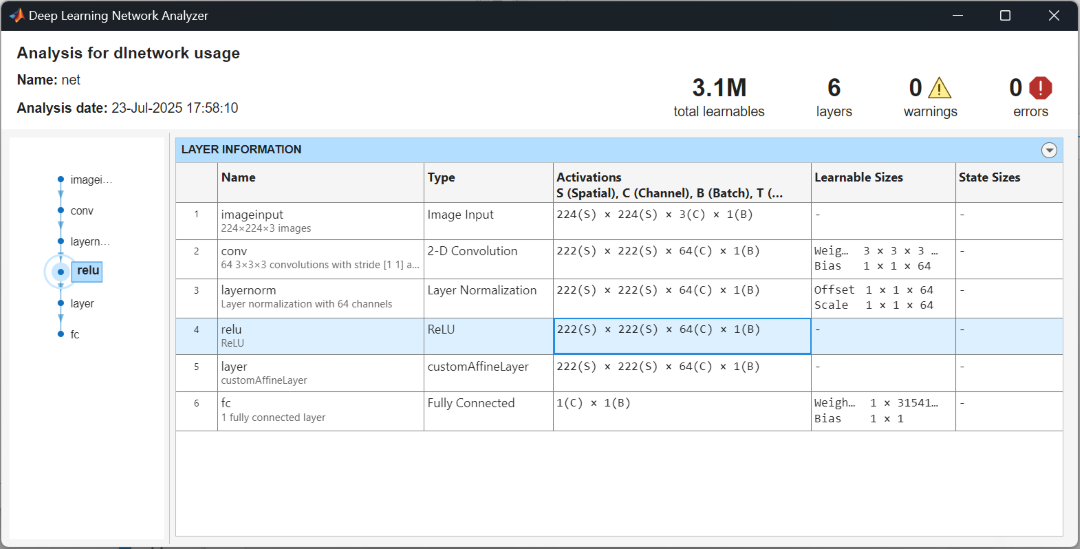
In MATLAB, analyze the neural network using the analyzeNetwork
function. View the size and formats of the input data to the unsupported layer. In this
case, the previous layer outputs 222-by-222-by-64-by-1 arrays with format
"SSCB" (spatial, spatial, channel, batch).
analyzeNetwork(net)
Create a dlnetwork object that applies the custom layer operation and
save it in a MAT file. Extract the layer from the network and add an input layer. For
the input layer, specify the size and formats from the network analyzer. For the batch
dimension, specify a size of NaN.
layers = [
    inputLayer([222 222 64 NaN],"SSCB")
    net.Layers(5)];

affinenet = dlnetwork(layers);

save("affinenet.mat","affinenet")
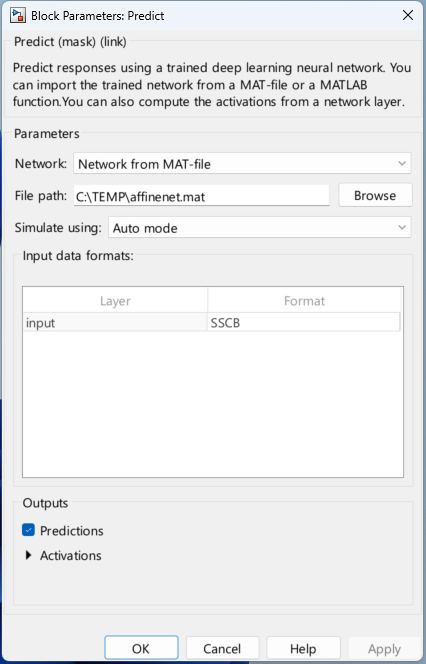
In Simulink, remove the placeholder subsystem and replace it with a Predict block.

In the Predict block, specify the MAT file of the saved neural network.
Implement Layer Using MATLAB Function Block
For additional flexibility, you can replace the unsupported layers with MATLAB Function blocks that evaluate the equivalent MATLAB code. This approach can result in slower simulations.
For example, suppose you have a neural network with a custom layer.
Remove the predict block and replace it with a MATLAB Function block.

For the MATLAB Function function, implement the layer forward function.
function y = fcn(u)

% Implement layer predict function here.
u = ...

