triangulateMultiview
R2026b3-D locations of world points matched across multiple images
Syntax
Description
worldPoints = triangulateMultiview(pointTracks,cameraPoses,intrinsics)pointTracks
specifies an array of matched points. cameraPoses and
intrinsics specify camera pose information and intrinsics,
respectively. The function does not account for lens distortion.
[
additionally returns the mean reprojection error for each 3-D world point using all
input arguments in the prior syntax.worldPoints,reprojectionErrors]
= triangulateMultiview(___)
[
additionally returns the indices of valid and invalid world points. Valid points
are located in front of the cameras.worldPoints,reprojectionErrors,validIndex]
= triangulateMultiview(___)
Examples
This example shows how to reconstruct 3-D structure from a sequence of images. To process non-sequential images, follow the steps in the Structure from Motion from Multiple Views example.
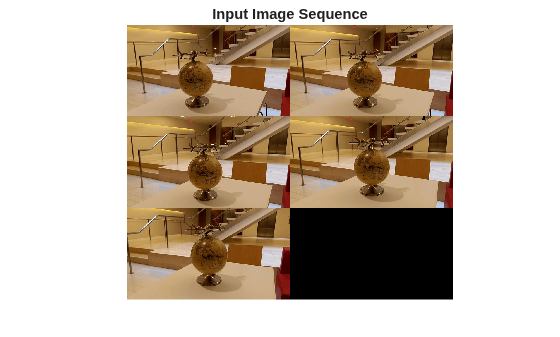
Read and display the image sequence.
% Use imageDatastore to get a list of all image file names in a directory
imageDir = fullfile(toolboxdir("vision"), "visiondata",  "structureFromMotion");
imds = imageDatastore(imageDir);

% Display the images
figure
montage(imds.Files);
title("Input Image Sequence");
% Load camera intrinsics
data = load(fullfile(imageDir, "cameraParams.mat"));
intrinsics = data.cameraParams.Intrinsics;

% Undistort the images.
images = cell(1, numel(imds.Files));
for viewId = 1:numel(imds.Files)
    images{viewId} = undistortImage(readimage(imds, viewId), intrinsics);
end

% Convert the image to grayscale.
I = im2gray(images{1});

% Detect SIFT features. Use an ROI to eliminate spurious
% features around the edges of the image.
border = 50;
roi = [border, border, size(I, 2)- 2*border, size(I, 1)- 2*border];
prevPoints   = detectSIFTFeatures(I, ROI=roi);

% Extract features. Using 'Upright' features improves matching, as long as
% the camera motion involves little or no in-plane rotation.
[prevFeatures, prevPoints] = extractFeatures(I, prevPoints);

% Create an empty imageviewset object to manage the data associated with each
% view.
vSet = imageviewset;

% Add the first view. Place the camera associated with the first view
% and the origin, oriented along the Z-axis.
viewId = 1;
pose1  = rigidtform3d;
vSet = addView(vSet, viewId, pose1, Points=prevPoints, Features=prevFeatures);

% Process the rest of the views
for viewId = 2:numel(images)
    % Convert the image to grayscale.
    I = im2gray(images{viewId});

    % Detect, extract and match features.
    currPoints   = detectSIFTFeatures(I, ROI=roi);
    [currFeatures, currPoints] = extractFeatures(I, currPoints);

    % Match features between the previous and current image.
    indexPairs = matchFeatures(prevFeatures, currFeatures, MatchThreshold=20, MaxRatio=0.2, Unique=true);

    if viewId == 2
        % Select matched points
        matchedPoints1 = prevPoints(indexPairs(:, 1));
        matchedPoints2 = currPoints(indexPairs(:, 2));

        % Estimate the camera pose of current view relative to the previous view.
        % The pose is computed up to scale, meaning that the distance between
        % the cameras in the previous view and the current view is set to 1.
        [currPose, inlierIndex] = helperEstimateRelativePose(...
            matchedPoints1, matchedPoints2, intrinsics);

        indexPairs = indexPairs(inlierIndex, :);
    else
        % Triangulate points from the previous two views, and find the
        % corresponding points in the current view.
        [worldPoints, imagePoints] = helperFind3Dto2DCorrespondences(vSet, ...
            intrinsics, indexPairs, currPoints);

        % Estimate the world camera pose for the current view.
        currPose = estworldpose(imagePoints, worldPoints, intrinsics, MaxReprojectionError=3);
    end

    % Add the current view to the view set.
    vSet = addView(vSet, viewId, currPose, Points=currPoints, Features=currFeatures);

    % Store the point matches between the previous and the current views.
    vSet = addConnection(vSet, viewId-1, viewId, Matches=indexPairs);

    % Find point tracks across all views.
    tracks = findTracks(vSet);

    % Get the table containing camera poses for all views.
    camPoses = poses(vSet);

    % Triangulate initial locations for the 3-D world points.
    xyzPoints = triangulateMultiview(tracks, camPoses, intrinsics);

    % Refine the 3-D world points and camera poses.
    [xyzPoints, camPoses, reprojectionErrors] = bundleAdjustment(xyzPoints, ...
        tracks, camPoses, intrinsics, FixedViewId=1, ...
        PointsUndistorted=true, AbsoluteTolerance=1e-6);

    % Store the refined camera poses.
    vSet = updateView(vSet, camPoses);

    prevFeatures = currFeatures;
end
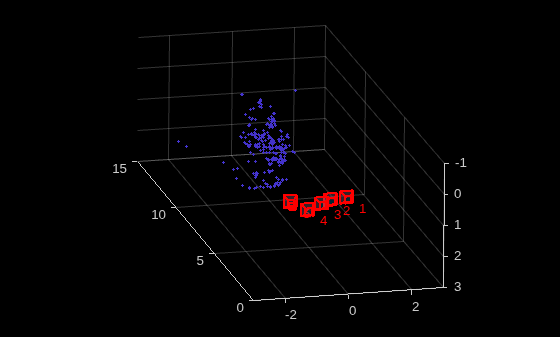
Display the camera poses and 3-D world points.
% Display camera poses
figure;
plotCamera(camPoses, Size=0.2);
hold on

% Exclude noisy 3-D points
goodIdx = reprojectionErrors < 5;

% Display the dense 3-D world points
pcshow(xyzPoints(goodIdx, :), VerticalAxis="y", VerticalAxisDir="down", MarkerSize=40);
grid on
hold off

% Specify the viewing volume
loc1 = camPoses.AbsolutePose(1).Translation;
xlim([loc1(1)-3, loc1(1)+3]);
ylim([loc1(2)-1, loc1(2)+3]);
zlim([loc1(3), loc1(3)+15]);
camorbit(0, -30);
Input Arguments
Output Arguments
3-D world points, returned as an N-by-3 matrix. Each row represents one 3-D world point and is of the form [x, y, z]. N is the number of 3-D world points.
Data Types: single | double
Reprojection errors, returned as an N-element vector. To calculate
reprojection errors, first the function projects each world point back into
each image. Then, in each image, the function calculates the distance
between the detected and the reprojected point. Each element of the
reprojectionErrors output is the average
reprojection error for the corresponding world point in the
worldPoints output.
Validity of world points, returned as an M-by-1 logical
vector. Valid points, denoted as a logical 1
(true), are located in front of the cameras. Invalid
points, denoted as logical 0 (false),
are located behind the cameras.
The validity of a world point with respect to the position of a camera is determined by projecting the world point onto the image using the camera matrix and homogeneous coordinates. The world point is valid if the resulting scale factor is positive.
Tips
Before detecting the points, correct the images for lens distortion by using by using the
undistortImage function. Alternatively,
you can directly undistort the points by using the undistortPoints function.
References
[1]
Version History
Introduced in R2016aSee Also
Apps
Functions
undistortImage|estimateCameraParameters|bundleAdjustment|bundleAdjustmentMotion|bundleAdjustmentStructure|undistortPoints|estrelpose

