Get Started with SOLOv2 for Instance Segmentation
R2026bPerform instance segmentation using the Computer Vision Toolbox™ Model for SOLOv2 Instance Segmentation support package. To learn more about instance segmentation, see Get Started with Instance Segmentation Using Deep Learning. Use the Computer Vision Toolbox Model for SOLOv2 Instance Segmentation support package for the tasks in these sections.
To segment object instances in an image using a pretrained SOLOv2 network, or to perform inference on a test image using a trained SOLOv2 network, see the Segment Image with Pretrained SOLOv2 Network section.
To configure and train a SOLOv2 network to perform transfer learning on your own data, see the Perform Transfer Learning with SOLOv2 section.
The Segmenting Objects by LOcations version 2 (SOLOv2) model for instance segmentation offers the advantage of lightweight, scalable, and memory-efficient architecture [1]. SOLOv2 achieved state-of-the-art performance on the COCO instance segmentation benchmark, outperforming previous models. The model can process inputs of various resolutions due to its multiscale feature pyramid network (FPN), enabling it to capture object details across an extensive range of object sizes. SOLOv2 does not require external region proposal networks, and directly estimates the object centers and associated masks through anchor point localization and mask segmentation modeling.
Install Support Package
You can install the Computer Vision Toolbox Model for SOLOv2 Instance Segmentation from Add-On Explorer. For more information about installing add-ons, see Get and Manage Add-Ons. The support package also requires Deep Learning Toolbox™ and Computer Vision Toolbox. Processing image data on a GPU requires a supported GPU device and Parallel Computing Toolbox™.
Segment Image with Pretrained SOLOv2 Network
Use the process in this section to segment a test image using a pretrained SOLOv2 network with default settings, or to perform inference using a trained SOLOv2 network.
At inference, a fully convolutional network (FCN) backbone of the SOLOv2 network extracts a set of feature maps of various spatial resolutions, or levels, from the input image. The network feeds the extracted feature maps into parallel category and mask branches to generate the final predictions: semantic categories (classes) and instance masks. You can overlay the predicted instance segmentation masks on the image to create the visualization of each object instance, and generate corresponding class labels.
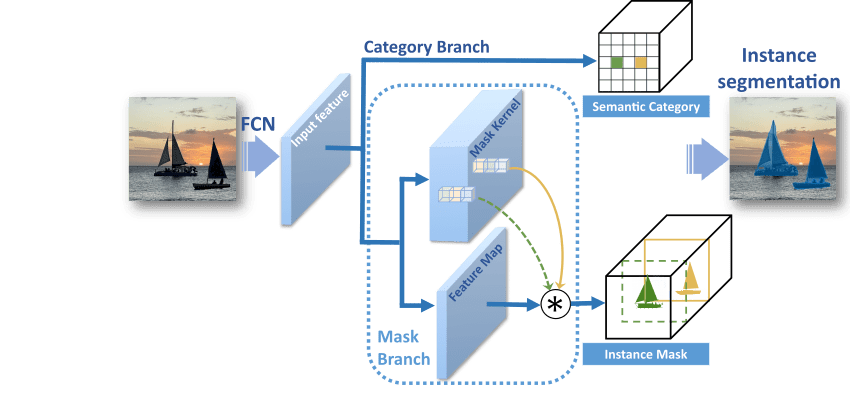
You can perform inference on a test image with default network options using a pretrained SOLOv2 network.
Load an image or image datastore to segment from the workspace. The SOLOv2 model supports RGB or grayscale images.
I = imread("kobi.png");Create a
solov2object to configure a pretrained SOLOv2 network with a ResNet-50 or ResNet-18 backbone as the feature extractor. To increase inference speed at the possible cost of detecting less objects, specify the lightweight ResNet-18 backbone with a reduced number of features,"light-resnet18-coco".model = solov2("light-resnet18-coco");Perform instance segmentation by using the
segmentObjectsobject function on the pretrained network, specifying that the function return the object masks, labels, and detection scores.[masks,labels,scores] = segmentObjects(model,I);
Visualize the results by using the
insertObjectMaskfunction.maskedImage = insertObjectMask(I,masks); imshow(maskedImage)

Perform Transfer Learning with SOLOv2
To modify a network to detect additional classes, or to adjust other network parameters, you can perform transfer learning. This section shows how to prepare your training data, configure the SOLOv2 model, and train the network to perform transfer learning.
To train a SOLOv2 network, your training datastore must return data in a four-column
format: {images, bounding boxes, labels, masks}. SOLOv2 supports both
RGB and grayscale images.
Create SOLOv2 Training Datastore from groundTruth Object
To train a SOLOv2 instance segmentation network, you can use the labeled ground
truth data exported from the Image
Labeler app stored in a groundTruth object. The instanceSegmentationTrainingData function extracts the mask stack
data and associated labels from the groundTruth object and converts
them into a training‑ready datastore for instance segmentation. The output datastore
reads the data in the required {RGB images, bounding boxes, labels,
masks} format and can be used directly for Mask R-CNN training without
any additional preprocessing.
Create SOLOv2 Training Datastore from Custom Instance Segmentation Data
If you have custom image or video data and corresponding labeled mask data that
does not originate from a groundTruth object, you must manually
create a combined datastore that reads all inputs together. The datastore must
return a 1-by-4 cell array in {RGB images, bounding boxes, labels,
masks} format.
You can create a datastore in this format for your custom data using these steps:
Create an
imageDatastorethat returns RGB image data.rgbDatastore = imageDatastore(imageFolderPath);
Create a
boxLabelDatastorethat returns bounding box data and instance labels as a two-column cell array.labelDatastore = boxLabelDatastore(labelFolderPath);
Create an
imageDatastoreand specify a custom read function that returns mask data as a binary matrix.% For mask data stored as individual MAT files, define a custom read function function mask = customReadMaskFcn(filename) % Load the MAT file loadedData = load(filename); % Extract the mask data from the MAT file mask = loadedData.maskData; end % Create an imageDatastore with the custom read function and specify the file extension ".mat" maskDatastore = imageDatastore(maskFolderPath,ReadFcn=customReadMaskFcn,FileExtensions=".mat");Combine the three datastores using the
combinefunction.trainingDatastore = combine(rgbDatastore,labelDatastore,maskDatastore);
For more information, see Datastores for Deep Learning (Deep Learning Toolbox).
Train the SOLOv2 Network
To configure a SOLOv2 network for training, specify the class names when you
create a solov2
object. You can optionally specify additional network properties, such as the
network input size to use during training and inference. For example, specify a
SOLOv2 network that uses ResNet-50 as the base network to detect the classes in
ClassNames during training.
ClassNames = ["person","traffic light","car","bus"];
Network = solov2("resnet50-coco",ClassNames);
Specify the network training options using the trainingOptions (Deep Learning Toolbox) function. To learn more about using
trainingOptions to fine-tune network parameters for
training, see Set Up Parameters and Train Convolutional Neural Network (Deep Learning Toolbox).
To train the network, pass your training data, the configured solov2
object, and the trainingOptions function output to the
trainSOLOV2 function. The function returns a trained SOLOv2
network.
trainedNetwork = trainSOLOV2(trainingData,Network,options);
To perform inference on a test image I using the trained
network, pass the trained network as input to the segmentObjects object function. For more details, see the Segment Image with Pretrained SOLOv2 Network section.
For a detailed example of a custom training workflow, see the Perform Instance Segmentation Using SOLOv2 example.
Evaluate Instance Segmentation Results
Evaluate the quality of the instance segmentation results using the evaluateInstanceSegmentation function. Ensure that your ground truth
datastore is set up so that calling the datastore with the read function returns a cell array
with at least two elements in the format {masks labels}.
To calculate the prediction metrics, specify the output of the segmentObjects function and your ground truth data as input to
evaluateInstanceSegmentation function. The function calculates
metrics such as the confusion matrix and average precision. The instanceSegmentationMetrics object stores the metrics.
References
[1] Wang, Xinlong, Rufeng Zhang, Tao Kong, Lei Li, and Chunhua Shen. “SOLOv2: Dynamic and Fast Instance Segmentation.” ArXiv, October 23, 2020. https://doi.org/10.48550/arXiv.2003.10152.
[2] Brostow, Gabriel J., Julien Fauqueur, and Roberto Cipolla. "Semantic Object Classes in Video: A High-Definition Ground Truth Database." Pattern Recognition Letters 30, no. 2 (January 2009): 88–97. https://doi.org/10.1016/j.patrec.2008.04.005.
See Also
Apps
Functions
solov2|instanceSegmentationTrainingData|trainSOLOV2|segmentObjects|evaluateInstanceSegmentation
Topics
- Perform Instance Segmentation Using SOLOv2
- Get Started with Instance Segmentation Using Deep Learning
- Get Started with Image Preprocessing and Augmentation for Deep Learning
- Deep Learning in MATLAB (Deep Learning Toolbox)
- Datastores for Deep Learning (Deep Learning Toolbox)
- Data Sets for Deep Learning (Deep Learning Toolbox)

