Getting Started with Mask R-CNN for Instance Segmentation
R2026bInstance segmentation is an enhanced type of object detection that generates a segmentation map for each detected instance of an object. Instance segmentation treats individual objects as distinct entities, regardless of the class of the objects. In contrast, semantic segmentation considers all objects of the same class as belonging to a single entity.
Mask R-CNN is a popular deep learning instance segmentation technique that performs pixel-level segmentation on detected objects [1]. The Mask R-CNN algorithm can accommodate multiple classes and overlapping objects.
You can create a pretrained Mask R-CNN network using the maskrcnn
object. The network is trained on the MS-COCO data set and can detect objects of 80
different classes. Perform instance segmentation using segmentObjects function with the maskrcnn object.
If you want to modify the network to detect additional classes, or to adjust other parameters of the network, then you can perform transfer learning. Transfer learning for Mask R-CNN generally follows these steps:
Configure a Mask R-CNN model for transfer learning using the
maskrcnnobject.Prepare training data.
Train the model using the
trainMaskRCNNfunction.Evaluate the Mask R-CNN model using the
evaluateInstanceSegmentationfunction.
For an example that shows how to train a Mask R-CNN, see Perform Instance Segmentation Using Mask R-CNN.
Design Mask R-CNN Model
To configure a Mask R-CNN network for transfer learning, specify the class names and
anchor boxes when you create a maskrcnn
object. You can optionally specify additional network properties including the network
input size and the ROI pooling sizes.
The Mask R-CNN network consists of two stages. The first stage is a region proposal network (RPN), which predicts object proposal bounding boxes based on anchor boxes. The second stage is an R-CNN detector that refines these proposals, classifies them, and computes the pixel-level segmentation for these proposals.

The Mask R-CNN model builds on the Faster R-CNN model. Mask R-CNN replaces the ROI max
pooling layer in Faster R-CNN with an roiAlignLayer that provides more accurate sub-pixel level ROI pooling.
The Mask R-CNN network also adds a mask branch for pixel level object segmentation. For
more information about the Faster R-CNN network, see Getting Started with R-CNN, Fast R-CNN, and Faster R-CNN.
This diagram shows a modified Faster R-CNN network on the left and a mask branch on the right.

Prepare Mask R-CNN Training Data
To train a Mask R-CNN network, your training datastore must return data in a
four-column format: {RGB images, bounding boxes, labels, masks}. Mask
R-CNN requires RGB images (not grayscale).
Create Mask R-CNN Training Datastore from groundTruth
Object
To train a Mask R-CNN instance segmentation network, you can use the labeled
ground truth data exported from the Image
Labeler app stored in a groundTruth object. The instanceSegmentationTrainingData function extracts the mask stack
data and associated labels from the groundTruth object and converts
them into a training‑ready datastore for instance segmentation. The output datastore
reads the data in the required {RGB images, bounding boxes, labels,
masks} format and can be used directly for Mask R-CNN training without
any additional preprocessing.
Create Mask R-CNN Training Datastore from Custom Instance Segmentation Data
If you have custom image or video data and corresponding labeled mask data that
does not originate from a groundTruth object, you must manually
create a combined datastore that reads all inputs together. The datastore must
return a 1-by-4 cell array in {RGB images, bounding boxes, labels,
masks} format.
You can create a datastore in this format for your custom data using these steps:
Create an
imageDatastorethat returns RGB image data.rgbDatastore = imageDatastore(imageFolderPath);
Create a
boxLabelDatastorethat returns bounding box data and instance labels as a two-column cell array.labelDatastore = boxLabelDatastore(labelFolderPath);
Create an
imageDatastoreand specify a custom read function that returns mask data as a binary matrix.% For mask data stored as individual MAT files, define a custom read function function mask = customReadMaskFcn(filename) % Load the MAT file loadedData = load(filename); % Extract the mask data from the MAT file mask = loadedData.maskStack; end % Create an imageDatastore with the custom read function and specify the file extension ".mat" maskDatastore = imageDatastore(maskFolderPath,ReadFcn=customReadMaskFcn,FileExtensions=".mat");Combine the three datastores using the
combinefunction.trainingDatastore = combine(rgbDatastore,labelDatastore,maskDatastore);
The size of the images, bounding boxes, and masks must match the input size of the
network. If you need to resize the data, then you can use the imresize to resize the RGB images and masks, and the bboxresize function to resize the bounding boxes.
For more information, see Datastores for Deep Learning (Deep Learning Toolbox).
Visualize Training Data
To display the instance masks over the image, use the insertObjectMask. You can specify a colormap so that each instance
appears in a different color. This sample code shows how display the instance masks
in the masks variable over the RGB image in the
im variable using the lines colormap.
imOverlay = insertObjectMask(im,masks,Color=lines(numObjects));
imshow(imOverlay);
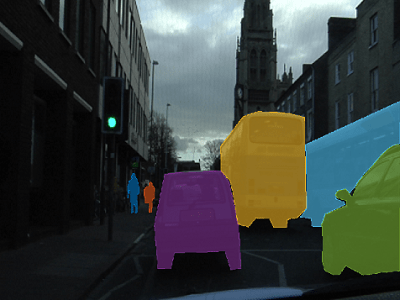
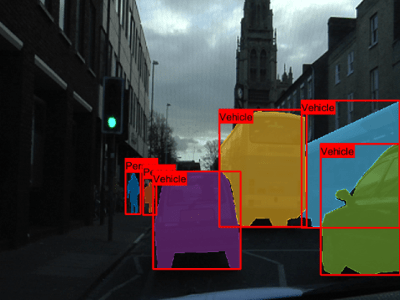
To show the bounding boxes with labels over the image, use the showShape function. This sample code shows how to show labeled
rectangular shapes with bounding box size and position data in the
bboxes variable and label data in the
labels variable.
imshow(imOverlay)
showShape("rectangle",bboxes,Label=labels,Color="red");
Train Mask R-CNN Model
Train the network by passing the configured maskrcnn object and the
training data to the trainMaskRCNN function. The function returns a trained
maskrcnn object.
Perform Instance Segmentation and Evaluate Results
Perform instance segmentation by passing the trained maskrcnn object
to the segmentObjects function. The function returns the object masks and
optionally returns labels, detection scores, and bounding boxes.
Evaluate the quality of the instance segmentation results using the evaluateInstanceSegmentation function. The function calculates metrics
such as the confusion matrix and average precision. The instanceSegmentationMetrics object stores the metrics.
References
[1] He, Kaiming, Georgia Gkioxari, Piotr Dollár, and Ross Girshick. "Mask R-CNN." ArXiv:1703.06870 [Cs], January 24, 2018. https://arxiv.org/pdf/1703.06870.
[2] Brostow, Gabriel J., Julien Fauqueur, and Roberto Cipolla. "Semantic Object Classes in Video: A High-Definition Ground Truth Database." Pattern Recognition Letters 30, no. 2 (January 2009): 88–97. https://doi.org/10.1016/j.patrec.2008.04.005.

