Main Content

loss

R2026b

Classification loss for Gaussian kernel classification model

Description

L = loss(Mdl,X,Y) returns the classification loss for the binary Gaussian kernel classification model Mdl using the predictor data in X and the corresponding class labels in Y.

example

L = loss(Mdl,Tbl,ResponseVarName) returns the classification loss for the model Mdl using the predictor data in Tbl and the true class labels in Tbl.ResponseVarName.

L = loss(Mdl,Tbl,Y) returns the classification loss for the model Mdl using the predictor data in table Tbl and the true class labels in Y.

L = loss(___,Name=Value) specifies options using one or more name-value arguments in addition to any of the input argument combinations in previous syntaxes. For example, you can specify a classification loss function and observation weights. Then, loss returns the weighted classification loss using the specified loss function.

example

Examples

collapse all

Load the ionosphere data set. This data set has 34 predictors and 351 binary responses for radar returns, either bad (b) or good (g).

load ionosphere

Partition the data set into training and test sets. Specify a 15% holdout sample for the test set.

rng("default") % For reproducibility
Partition = cvpartition(Y,Holdout=0.15);
trainingInds = training(Partition); % Indices for the training set
testInds = test(Partition); % Indices for the test set

Train a binary kernel classification model using the training set.

Mdl = fitckernel(X(trainingInds,:),Y(trainingInds));

Estimate the training-set classification error and the test-set classification error.

ceTrain = loss(Mdl,X(trainingInds,:),Y(trainingInds))
ceTrain = 
0.0067
ceTest = loss(Mdl,X(testInds,:),Y(testInds))
ceTest = 
0.1140

Load the ionosphere data set. This data set has 34 predictors and 351 binary responses for radar returns, either bad (b) or good (g).

load ionosphere

Partition the data set into training and test sets. Specify a 15% holdout sample for the test set.

rng("default") % For reproducibility
Partition = cvpartition(Y,Holdout=0.15);
trainingInds = training(Partition); % Indices for the training set
testInds = test(Partition); % Indices for the test set

Train a binary kernel classification model using the training set.

Mdl = fitckernel(X(trainingInds,:),Y(trainingInds));

Create an anonymous function that measures linear loss, that is,

L=∑j-wjyjfj∑jwj.

wj is the weight for observation j, yj is response j (-1 for the negative class, and 1 otherwise), and fj is the raw classification score of observation j.

linearloss = @(C,S,W,Cost)sum(-W.*sum(S.*C,2))/sum(W);

Custom loss functions must be written in a particular form. For rules on writing a custom loss function, see the LossFun name-value argument.

Estimate the training-set classification loss and the test-set classification loss using the linear loss function.

ceTrain = loss(Mdl,X(trainingInds,:),Y(trainingInds), ...
    LossFun=linearloss)
ceTrain = 
-1.0851
ceTest = loss(Mdl,X(testInds,:),Y(testInds), ...
    LossFun=linearloss)
ceTest = 
-0.7821

Input Arguments

collapse all

Binary kernel classification model, specified as a ClassificationKernel model object. You can create a ClassificationKernel model object using fitckernel.

Predictor data, specified as an n-by-p numeric matrix, where n is the number of observations and p is the number of predictors used to train Mdl.

The length of Y and the number of observations in X must be equal.

Data Types: single | double

Class labels, specified as a categorical, character, or string array; logical or numeric vector; or cell array of character vectors.

  • The data type of Y must be the same as the data type of Mdl.ClassNames. (The software treats string arrays as cell arrays of character vectors.)

  • The distinct classes in Y must be a subset of Mdl.ClassNames.

  • If Y is a character array, then each element must correspond to one row of the array.

  • The length of Y must be equal to the number of observations in X or Tbl.

Data Types: categorical | char | string | logical | single | double | cell

Sample data used to train the model, specified as a table. Each row of Tbl corresponds to one observation, and each column corresponds to one predictor variable. Optionally, Tbl can contain additional columns for the response variable and observation weights. Tbl must contain all the predictors used to train Mdl. Multicolumn variables and cell arrays other than cell arrays of character vectors are not allowed.

If Tbl contains the response variable used to train Mdl, then you do not need to specify ResponseVarName or Y.

If you train Mdl using sample data contained in a table, then the input data for loss must also be in a table.

Response variable name, specified as the name of a variable in Tbl. If Tbl contains the response variable used to train Mdl, then you do not need to specify ResponseVarName.

If you specify ResponseVarName, then you must specify it as a character vector or string scalar. For example, if the response variable is stored as Tbl.Y, then specify ResponseVarName as "Y". Otherwise, the software treats all columns of Tbl, including Tbl.Y, as predictors.

The response variable must be a categorical, character, or string array; a logical or numeric vector; or a cell array of character vectors. If the response variable is a character array, then each element must correspond to one row of the array.

Data Types: char | string

Name-Value Arguments

collapse all

Specify optional pairs of arguments as Name1=Value1,...,NameN=ValueN, where Name is the argument name and Value is the corresponding value. Name-value arguments must appear after other arguments, but the order of the pairs does not matter.

Example: loss(Mdl,X,Y,LossFun="quadratic",Weights=weights) returns the weighted classification loss using the quadratic loss function.

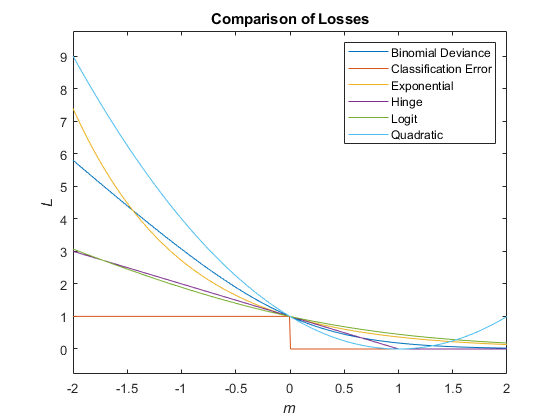
Loss function, specified as a built-in loss function name or a function handle.

  • This table lists the available loss functions. Specify one using its corresponding value.

    ValueDescription
    "binodeviance"Binomial deviance
    "classifcost"Observed misclassification cost
    "classiferror"Misclassified rate in decimal
    "exponential"Exponential loss
    "hinge"Hinge loss
    "logit"Logistic loss
    "mincost"Minimal expected misclassification cost (for classification scores that are posterior probabilities)
    "quadratic"Quadratic loss

    "mincost" is appropriate for classification scores that are posterior probabilities. For kernel classification models, logistic regression learners return posterior probabilities as classification scores by default, but SVM learners do not (see predict).

  • To specify a custom loss function, use function handle notation. The function must have this form:

    lossvalue = lossfun(C,S,W,Cost)

    • The output argument lossvalue is a scalar.

    • You specify the function name (lossfun).

    • C is an n-by-K logical matrix with rows indicating the class to which the corresponding observation belongs. n is the number of observations in Tbl or X, and K is the number of distinct classes (numel(Mdl.ClassNames)). The column order corresponds to the class order in Mdl.ClassNames. Create C by setting C(p,q) = 1, if observation p is in class q, for each row. Set all other elements of row p to 0.

    • S is an n-by-K numeric matrix of classification scores. The column order corresponds to the class order in Mdl.ClassNames. S is a matrix of classification scores, similar to the output of predict.

    • W is an n-by-1 numeric vector of observation weights.

    • Cost is a K-by-K numeric matrix of misclassification costs. For example, Cost = ones(K) – eye(K) specifies a cost of 0 for correct classification and 1 for misclassification.

Example: LossFun=@lossfun

Data Types: char | string | function_handle

Since R2026b

Class weights, or prior probabilities, specified as "empirical", "uniform", or a numeric vector.

ValueDescription
"empirical" loss uses the class frequencies in Y or Tbl.ResponseVarName. The function returns an unweighted loss, with respect to class.
"uniform" loss assigns a weight of 1/K to each class, where K is the number of classes.
Numeric vectorSpecify a custom weight for each class. The sum of the weights must equal 1.

By default, loss uses the class prior probabilities specified in the Prior property of the classification model.

Example: Prior="empirical"

Data Types: single | double | char | string

Observation weights, specified as a numeric vector or the name of a variable in Tbl.

  • If Weights is a numeric vector, then the size of Weights must be equal to the number of rows in X or Tbl.

  • If Weights is the name of a variable in Tbl, you must specify Weights as a character vector or string scalar. For example, if the weights are stored as Tbl.W, then specify Weights as "W". Otherwise, the software treats all columns of Tbl, including Tbl.W, as predictors.

If you supply weights, loss computes the weighted classification loss and normalizes the weights to sum up to the value of the prior probability in the respective class.

Data Types: double | single | char | string

Output Arguments

collapse all

Classification loss, returned as a numeric scalar. The interpretation of L depends on LossFun, Prior, and Weights.

More About

collapse all

Tips

  • By default, loss uses the class probabilities specified during training (which are stored in the Prior property of the classification model) to compute the classification loss. To return the class-unweighted loss, specify Prior="empirical". (since R2026b)

  • If the predictor data in X or Tbl contains any missing values and LossFun is not set to "classifcost", "classiferror", or "mincost", the loss function might return NaN. (since R2022a)

    If loss in your code returns NaN, you can update your code to avoid this result by doing one of the following:

    • Remove or replace the missing values by using rmmissing or fillmissing, respectively.

    • Specify the name-value argument LossFun as "classifcost", "classiferror", or "mincost".

Extended Capabilities

expand all

Version History

Introduced in R2017b

expand all