cwt
R2026bContinuous 1-D wavelet transform
Syntax
Description
wt = cwt(x)x. The
cwt uses the analytic Morse wavelet with the
symmetry parameter, gamma (), equal to 3 and the time-bandwidth product equal to 60. The
function uses 10 voices per octave and determines the minimum and maximum scales
automatically based on the energy spread of the wavelet in frequency and
time.
The cwt function uses L1
normalization. With L1 normalization, if you have equal
amplitude oscillatory components in your data at different scales, they have
equal magnitude in the CWT. L1 normalization more
accurately represents the signal. See L1 Norm for CWT and Continuous Wavelet Transform of Two Complex Exponentials.
[___,
returns the filter bank used in the CWT. For more information, see coi,fb] = cwt(___)cwtfilterbank.
[___,
returns the scaling coefficients for the wavelet transform.fb,scalingcfs] = cwt(___)
[___] = cwt(___,
specifies one or more additional name-value arguments. For example, Name=Value)wt
= cwt(x,TimeBandwidth=40,VoicesPerOctave=20) specifies a
time-bandwidth product of 40 and 20 voices per octave.
cwt(___) with no output arguments plots the
CWT scalogram in the current figure window or specified target parent container.
The scalogram is the absolute value of the CWT plotted as a function of time and
frequency. The function plots the frequency on a logarithmic scale. The function
also plots the cone of influence, which shows where edge effects become
significant. Gray regions outside the dashed white line delineate regions where
edge effects are significant.
For a complex-valued input signal, if you do not specify a target parent container, the function plots the positive (counterclockwise) and negative (clockwise) components in separate scalograms in the current figure window. Otherwise, the function plots the concatenation of the positive and negative components in the target parent container.
If you do not specify a sampling frequency or sampling period, the function plots the frequencies in cycles per sample. If you specify a sampling frequency, the frequencies are in hertz. If you specify a sampling period, the function plots the scalogram as a function of time and period. If the input signal is a timetable, the function plots the scalogram as a function of time and frequency in hertz and uses the RowTimes as the basis for the time axis.
To see the time, frequency, and magnitude of a scalogram point, enable data tips in the figure axes toolbar and click the desired point in the scalogram.

Note
The cwt function clears the current figure
before plotting the scalogram on it. To learn how to display the
scalogram in a subplot, see Plot CWT Scalogram in Subplot.
Examples
Obtain the continuous wavelet transform of a speech sample using default values.
load mtlb;
w = cwt(mtlb);Load the file mtlb. The file contains the speech sample mtlb and sample rate Fs.
load mtlbDisplay the scalogram of the speech sample obtained using the analytic Morlet wavelet.
cwt(mtlb,"amor",Fs)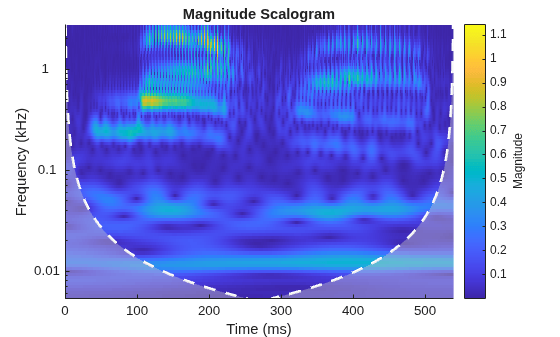
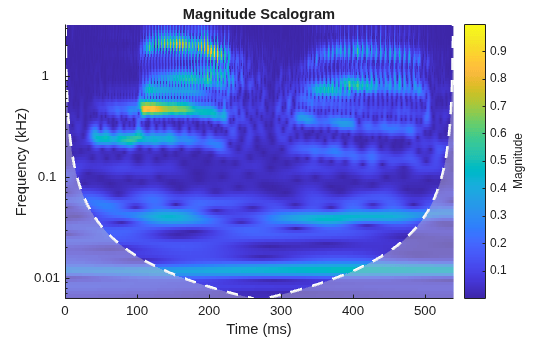
Compare with the scalogram obtained using the default Morse wavelet.
cwt(mtlb,Fs)
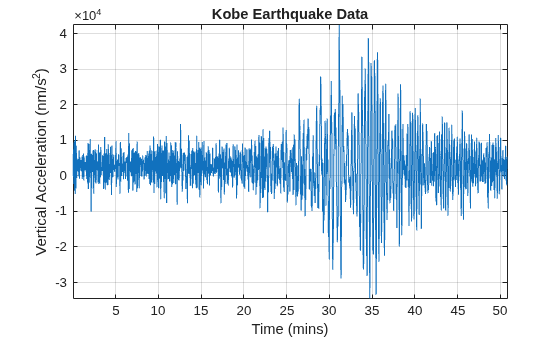
Obtain the CWT of the Kobe earthquake data. The data are seismograph (vertical acceleration, nm/sq.sec) measurements recorded at Tasmania University, Hobart, Australia on 16 January 1995 beginning at 20:56:51 (GMT) and continuing for 51 minutes. The sampling frequency is 1 Hz.
load kobePlot the earthquake data.
plot((1:numel(kobe))./60,kobe)
xlabel("Time (mins)")
ylabel("Vertical Acceleration (nm/s^2)")
title("Kobe Earthquake Data")
grid on
axis tight
Obtain the CWT, frequencies, and cone of influence.
[wt,f,coi] = cwt(kobe,1);
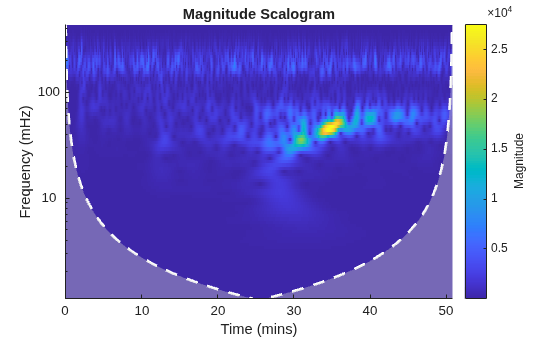
View the scalogram, including the cone of influence.
cwt(kobe,1)
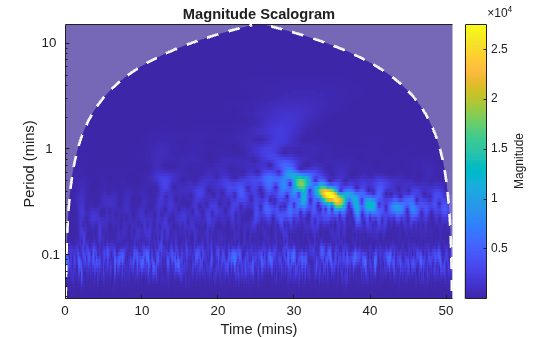
Obtain the CWT, time periods, and cone of influence by specifying a sampling period instead of a sampling frequency.
[wt,periods,coi] = cwt(kobe,minutes(1/60));
View the scalogram generated when specifying a sampling period.
cwt(kobe,minutes(1/60))
Create two complex exponentials, of different amplitudes, with frequencies of 32 and 64 Hz. The data is sampled at 1000 Hz for one second. The exponentials have disjoint support in time.
Fs = 1e3;
t = 0:1/Fs:1;
z = exp(1i*2*pi*32*t).*(t>=0.1 & t<0.3) + ...
    2*exp(-1i*2*pi*64*t).*(t>0.7);
Add complex white Gaussian noise with a standard deviation of 0.05.
wgnNoise = 0.05/sqrt(2)*(randn(size(t))+1i*randn(size(t)));
z = z+wgnNoise;
Obtain and plot the CWT using a Morse wavelet.
cwt(z,Fs)
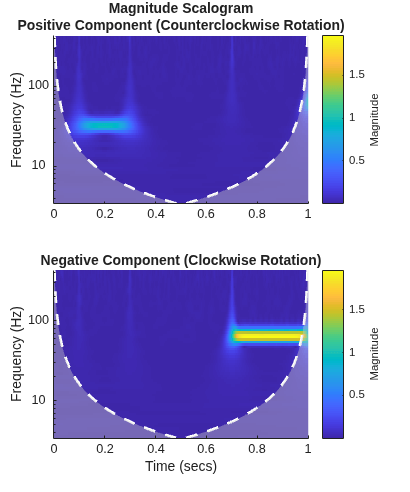
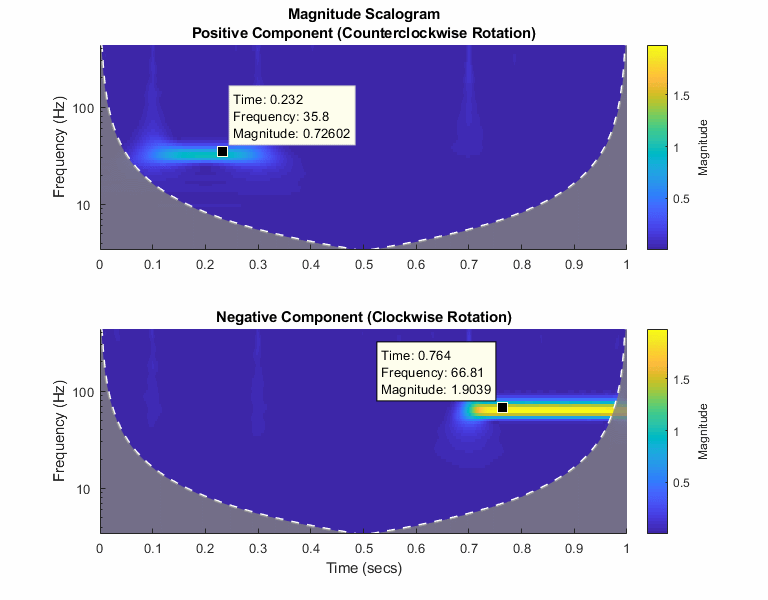
Note the magnitudes of the complex exponential components in the colorbar are essentially their amplitudes even though they are at different scales. This is a direct result of the normalization. You can verify this by executing this script and exploring each subplot with a data cursor.
Since R2026a
Load the NPG2006 dataset [5]. The data, which is complex valued, is the trajectory of a subsurface float trapped in an eddy. Plot the eastward and northward displacement. The triangle marks the initial position.
load npg2006
plot(npg2006.cx)
hold on
plot(npg2006.cx(1),"^",MarkerSize=11,Color="r", ...
    MarkerFaceColor="r")
hold off
grid on
xlabel("Eastward Displacement (km)")
ylabel("Northward Displacement (km)")
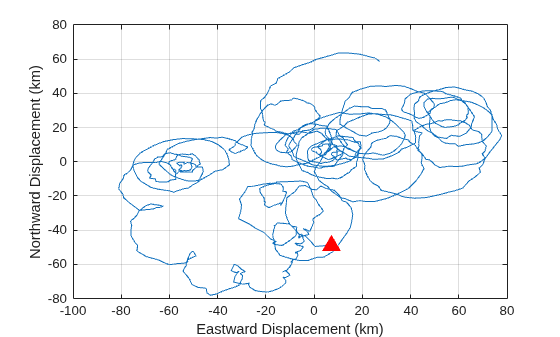
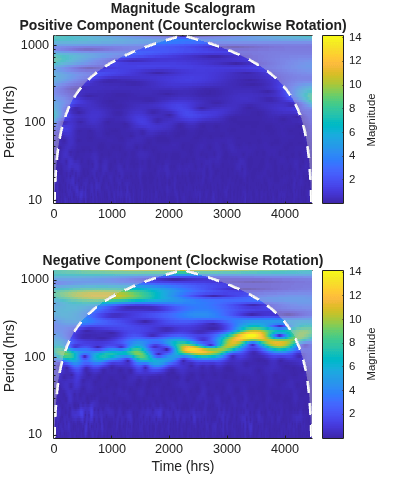
Visualize the continuous wavelet transform of the data. The sampling period is 4 hours. Because the data is complex valued, the function plots the positive (counterclockwise) and negative (clockwise) components in separate scalograms. The clockwise rotation of the float is captured in the clockwise rotary scalogram.
cwt(npg2006.cx,hours(4))
This example shows that the amplitudes of oscillatory components in a signal agree with the amplitudes of the corresponding wavelet coefficients.
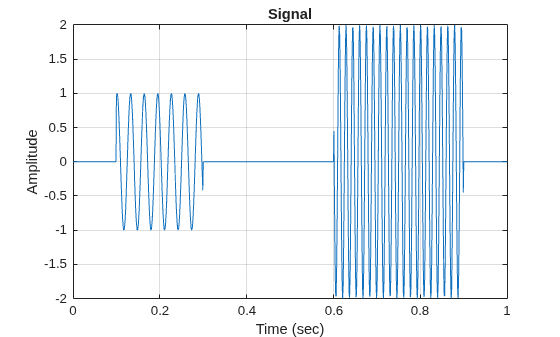
Create a signal composed of two sinusoids with disjoint support in time. One sinusoid has a frequency of 32 Hz and amplitude equal to 1. The other sinusoid has a frequency of 64 Hz and amplitude equal to 2. The signal is sampled for one second at 1000 Hz. Plot the signal.
frq1 = 32;
amp1 = 1;
frq2 = 64;
amp2 = 2;

Fs = 1e3;
t = 0:1/Fs:1;
x = amp1*sin(2*pi*frq1*t).*(t>=0.1 & t<0.3)+...
    amp2*sin(2*pi*frq2*t).*(t>0.6 & t<0.9);

plot(t,x)
grid on
xlabel("Time (sec)")
ylabel("Amplitude")
title("Signal")
Create a CWT filter bank that can be applied to the signal. Since the signal component frequencies are known, set the frequency limits of the filter bank to a narrow range that includes the known frequencies. To confirm the range, plot the magnitude frequency responses for the filter bank.
fb = cwtfilterbank(SignalLength=numel(x),SamplingFrequency=Fs,...
    FrequencyLimits=[20 100]);
freqz(fb)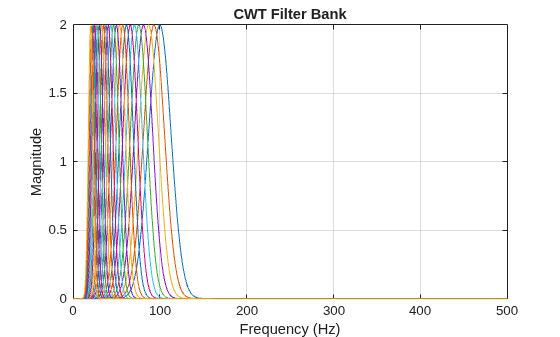
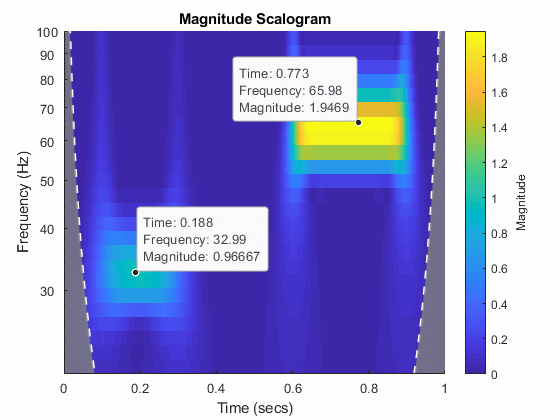
Use cwt and the filter bank to plot the scalogram of the signal.
cwt(x,FilterBank=fb)
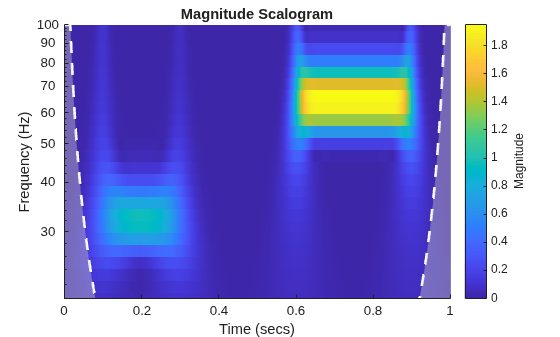
Use a data cursor to confirm that the amplitudes of the wavelet coefficients are essentially equal to the amplitudes of the sinusoidal components.
Since R2026a
This example shows how the different boundary extensions can affect the scalogram.
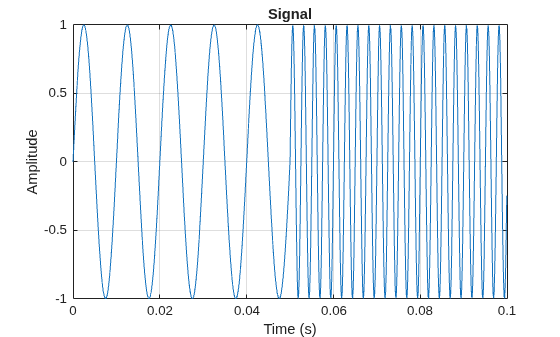
Generate a signal that consists of two sinusoids with disjoint time support. The sinusoids have different frequencies, 100 Hz and 400 Hz. The signal is sampled at 10 kHz for 1/10 of a second.
frq1 = 100;
frq2 = 400;

Fs = 10e3;
tm = 0:1/Fs:0.1-1/Fs;
len = length(tm);
brk = tm(floor(len/2)+1);

sig = sin(2*pi*frq1*tm).*(tm>=0 & tm<brk)+ ...
    sin(2*pi*frq2*tm).*(tm>=brk & tm<=tm(end));
plot(tm,sig)
grid on
title("Signal")
xlabel("Time (s)")
ylabel("Amplitude")
For each supported boundary extension, obtain the CWT of the signal using that extension.
[wtr,f] = cwt(sig,Fs,Boundary="reflection");
wtp = cwt(sig,Fs,Boundary="periodic");
wtz = cwt(sig,Fs,Boundary="zeropad");
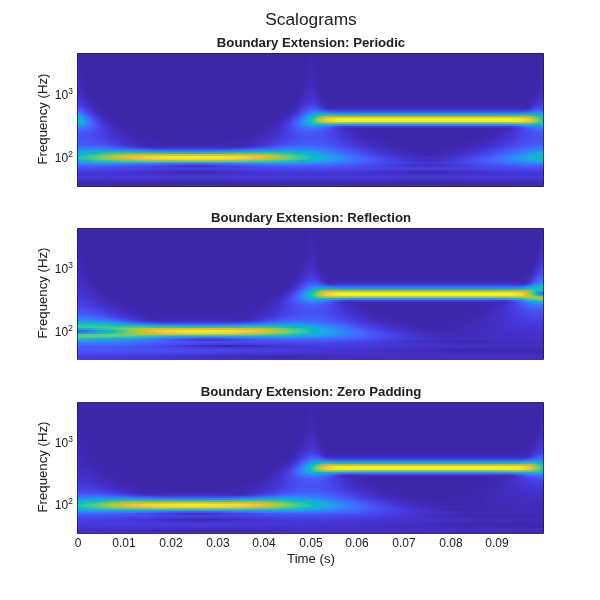
Plot the scalogram of each CWT. Because different frequencies occur at the boundaries, using periodic boundary extension ("periodic") results in wrap-around effects. Using symmetric boundary extension ("reflection") creates artifacts because you are reflecting the sinusoids. For this signal, using zero padding ("zeropad") does not create boundary artifacts.
figure(Position=[0 0 600 600]);
t=tiledlayout(3,1);

nexttile
pcolor(tm,f,abs(wtp),EdgeColor="none")
xticks([])
yscale("log")
ylabel("Frequency (Hz)")
title("Boundary Extension: Periodic")

nexttile
pcolor(tm,f,abs(wtr),EdgeColor="none")
xticks([])
yscale("log")
ylabel("Frequency (Hz)")
title("Boundary Extension: Reflection")

nexttile
pcolor(tm,f,abs(wtz),EdgeColor="none")
yscale("log")
title("Boundary Extension: Zero Padding")
xlabel("Time (s)")
ylabel("Frequency (Hz)")
title(t,"Scalograms")
This example shows how using a CWT filter bank can improve computational efficiency when taking the CWT of multiple time series.
Create a 100-by-1024 matrix x. Create a CWT filter bank appropriate for signals with 1024 samples.
x = randn(100,1024);
fb = cwtfilterbank;
Use cwt with default settings to obtain the CWT of a signal with 1024 samples. Create a 3-D array that can contain the CWT coefficients of 100 signals, each of which has 1024 samples.
cfs = cwt(x(1,:));
res = zeros(100,size(cfs,1),size(cfs,2));
Use the cwt function and take the CWT of each row of the matrix x. Display the elapsed time.
tic
for k=1:100
    res(k,:,:) = cwt(x(k,:));
end
toc
Elapsed time is 0.928160 seconds.
Now use the wt object function of the filter bank to take the CWT of each row of x. Display the elapsed time.
tic
for k=1:100
    res(k,:,:) = wt(fb,x(k,:));
end
toc
Elapsed time is 0.393524 seconds.
This example shows how to generate a MEX file to perform the continuous wavelet transform (CWT) using generated CUDA® code.
First, ensure that you have a CUDA-enabled GPU and the NVCC compiler. See The GPU Environment Check and Setup App (GPU Coder) to ensure you have the proper configuration.
Create a GPU coder configuration object.
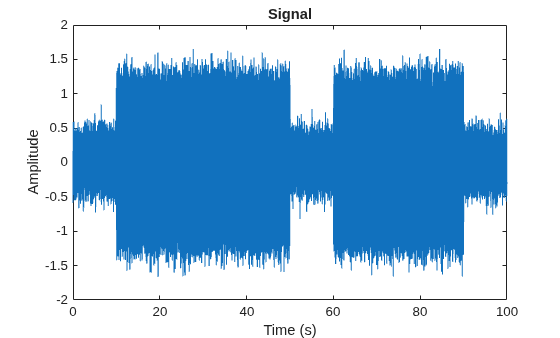
cfg = coder.gpuConfig("mex");Create a signal that consists of two sinusoids with disjoint time support. Sample the signal for 100 seconds. The sample rate is 1000 Hz. The result is a signal with 100,000 samples.
Fs = 1e3;
t = 0:1/Fs:100-1/Fs;
x = cos(2*pi*32*t).*(t>10 & t<=50)+ ...
    cos(2*pi*64*t).*(t>=60 & t<90)+ ...
    0.2*randn(size(t));
plot(t,x)
title("Signal")
xlabel("Time (s)")
ylabel("Amplitude")
Cast the signal to use single precision. GPU calculations are often more efficiently done in single precision. You can generate code for double precision if your NVIDIA® GPU supports it.
x = single(x);
Generate the GPU MEX file. In order to do so, you must specify the properties (class, size, and complexity) of the three input parameters: input signal, wavelet name, and sample rate:
coder.typeof(single(0),[1 1e5])specifies a row vector of length 100,000 containing realsinglevalues.coder.Constant("morse")specifies the wavelet name"morse"as a compile-time constant.coder.typeof(0)specifies a realdoublevalue.
sig = coder.typeof(single(0),[1 1e5]);
wname = coder.Constant("morse");
srate = coder.typeof(0);
codegen cwt -config cfg -args {sig,wname,srate} % -report
Code generation successful.
The -report flag is optional. Using -report generates a code generation report. In the Summary tab of the report, you can find a GPU code metrics link, which provides detailed information such as the number of CUDA kernels generated and how much memory was allocated.
Run the MEX file on the data and plot the scalogram. Confirm the plot is consistent with the two disjoint cosine waves.
[cfs,f] = cwt_mex(x,"morse",Fs);
figure
image("XData",t,"YData",f,"CData",abs(cfs),"CDataMapping","scaled")
set(gca,"YScale","log")
axis tight
xlabel("Time (Seconds)")
ylabel("Frequency (Hz)")
title("Scalogram of Two-Tone Signal")
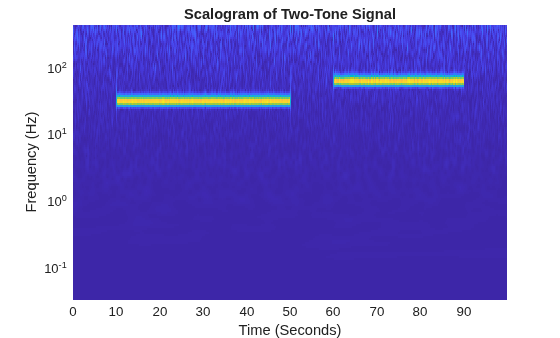
Execute the function cwt with the same input arguments. Confirm the MATLAB® and the GPU MEX scalograms are identical.
[cfs2,f2] = cwt(x,"morse",Fs);
max(abs(cfs2(:)-cfs(:)))
ans = single
7.5218e-07
This example shows how to change the default frequency axis labels for the CWT when you obtain a plot with no output arguments.
Create two sine waves with frequencies of 32 and 64 Hz. The data is sampled at 1000 Hz. The two sine waves have disjoint support in time. Add white Gaussian noise with a standard deviation of 0.05. Obtain and plot the CWT using the default Morse wavelet.
Fs = 1e3;
t = 0:1/Fs:1;
x = cos(2*pi*32*t).*(t>=0.1 & t<0.3)+sin(2*pi*64*t).*(t>0.7);
wgnNoise = 0.05*randn(size(t));
x = x+wgnNoise;
cwt(x,1000)
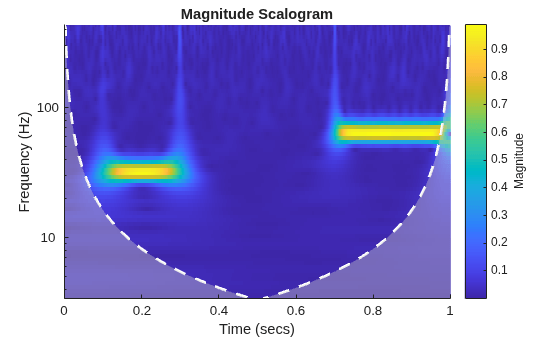
The plot uses a logarithmic frequency axis because frequencies in the CWT are logarithmic. In MATLAB, logarithmic axes are in powers of 10 (decades). You can use cwtfreqbounds to determine what the minimum and maximum wavelet bandpass frequencies are for a given signal length, sampling frequency, and wavelet.
[minf,maxf] = cwtfreqbounds(numel(x),1000);
You see that by default MATLAB has placed frequency ticks at 10 and 100 because those are the powers of 10 between the minimum and maximum frequencies. If you wish to add more frequency axis ticks, you can obtain a logarithmically spaced set of frequencies between the minimum and maximum frequencies using the following.
numfreq = 10;
freq = logspace(log10(minf),log10(maxf),numfreq);
Next, get the handle to the current axes and replace the frequency axis ticks and labels with the following.
AX = gca;
AX.YTickLabelMode = "auto";
AX.YTick = freq;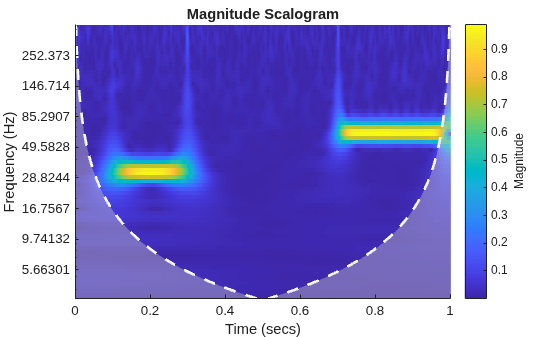
In the CWT, frequencies are computed in powers of two. To create the frequency ticks and tick labels in powers of two, you can do the following.
newplot
cwt(x,1000)
AX = gca;
freq = 2.^(round(log2(minf)):round(log2(maxf)));
AX.YTickLabelMode = "auto";
AX.YTick = freq;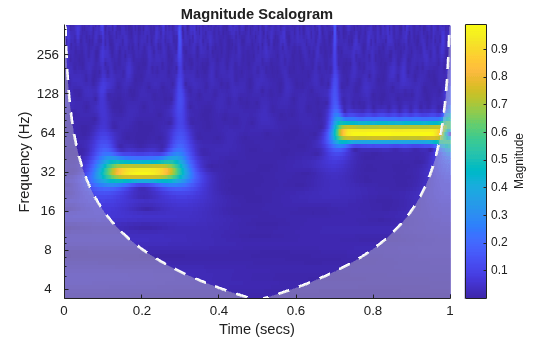
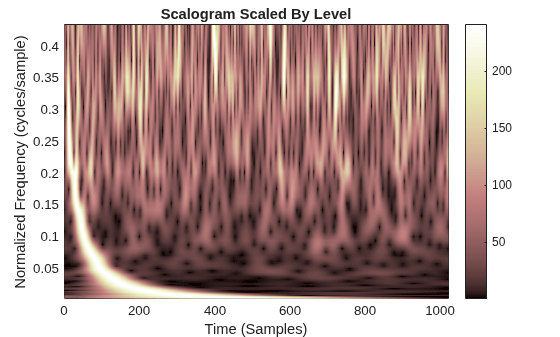
This example shows how to scale scalogram values by maximum absolute value at each level for plotting.
Load in a signal and display the default scalogram. Change the colormap to pink(240).
load noisdopp
cwt(noisdopp)
colormap(pink(240))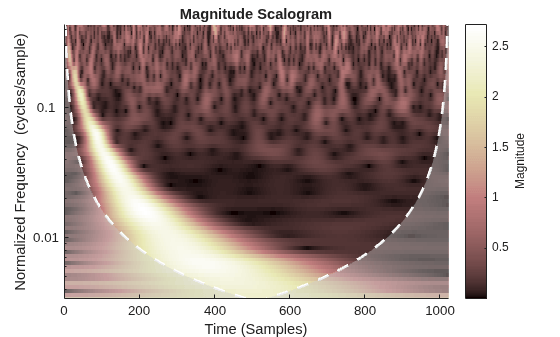
Take the CWT of the signal and obtain the wavelet coefficients and frequencies.
[cfs,frq] = cwt(noisdopp);
To efficiently find the maximum value of the coefficients at each frequency (level), first transpose the absolute value of the coefficients. Find the minimum value at every level. At each level, subtract the level's minimum value.
tmp1 = abs(cfs);
t1 = size(tmp1,2);
tmp1 = tmp1';
minv = min(tmp1);
tmp1 = (tmp1-minv(ones(1,t1),:));
Find the maximum value at every level of tmp1. For each level, divide every value by the maximum value at that level. Multiply the result by the number of colors in the colormap. Set equal to 1 all zero entries. Transpose the result.
maxv = max(tmp1);
maxvArray = maxv(ones(1,t1),:);
indx = maxvArray<eps;
tmp1 = 240*(tmp1./maxvArray);
tmp2 = 1+fix(tmp1);
tmp2(indx) = 1;
tmp2 = tmp2';
Display the result. The scalogram values are now scaled by the maximum absolute value at each level. Frequencies are displayed on a linear scale.
t = 0:length(noisdopp)-1;
pcolor(t,frq,tmp2)
shading interp
xlabel("Time (Samples)")
ylabel("Normalized Frequency (cycles/sample)")
title("Scalogram Scaled By Level")
colormap(pink(240))
colorbar
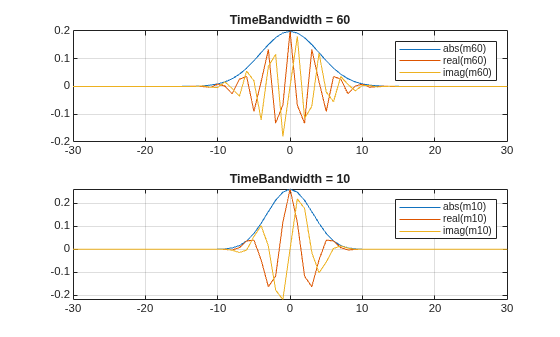
This example shows that increasing the time-bandwidth product of the Morse wavelet creates a wavelet with more oscillations under its envelope. Increasing narrows the wavelet in frequency.
Create two filter banks. One filter bank has the default TimeBandwidth value of 60. The second filter bank has a TimeBandwidth value of 10. The SignalLength for both filter banks is 4096 samples.
sigLen = 4096;
fb60 = cwtfilterbank(SignalLength=sigLen);
fb10 = cwtfilterbank(SignalLength=sigLen,TimeBandwidth=10);
Obtain the time-domain wavelets for the filter banks.
[psi60,t] = wavelets(fb60);
[psi10,~] = wavelets(fb10);
Use the scales function to find the mother wavelet for each filter bank.
sca60 = scales(fb60);
sca10 = scales(fb10);
[~,idx60] = min(abs(sca60-1));
[~,idx10] = min(abs(sca10-1));
m60 = psi60(idx60,:);
m10 = psi10(idx10,:);
Since the time-bandwidth product is larger for the fb60 filter bank, verify the m60 wavelet has more oscillations under its envelope than the m10 wavelet.
tiledlayout(2,1)
nexttile
plot(t,abs(m60))
grid on
hold on
plot(t,real(m60))
plot(t,imag(m60))
hold off
xlim([-30 30])
legend("abs(m60)","real(m60)","imag(m60)")
title("TimeBandwidth = 60")
nexttile
plot(t,abs(m10))
grid on
hold on
plot(t,real(m10))
plot(t,imag(m10))
hold off
xlim([-30 30])
legend("abs(m10)","real(m10)","imag(m10)")
title("TimeBandwidth = 10")
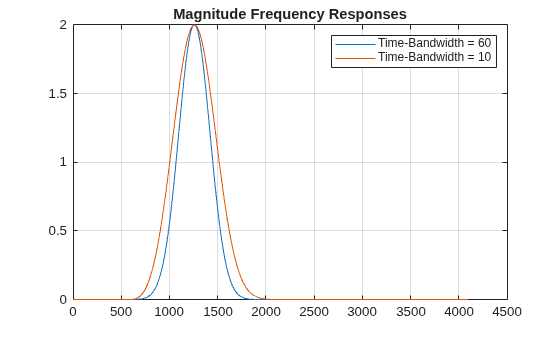
Align the peaks of the m60 and m10 magnitude frequency responses. Verify the frequency response of the m60 wavelet is narrower than the frequency response for the m10 wavelet.
cf60 = centerFrequencies(fb60);
cf10 = centerFrequencies(fb10);

m60cFreq = cf60(idx60);
m10cFreq = cf10(idx10);

freqShift = 2*pi*(m60cFreq-m10cFreq);
x10 = m10.*exp(1j*freqShift*(-sigLen/2:sigLen/2-1));

figure
plot([abs(fft(m60)).' abs(fft(x10)).'])
grid on
legend("Time-Bandwidth = 60","Time-Bandwidth = 10")
title("Magnitude Frequency Responses")
This example shows how to plot the CWT scalogram in a figure subplot.
Load the speech sample. The data is sampled at 7418 Hz. Plot the default CWT scalogram.
load mtlb
cwt(mtlb,Fs)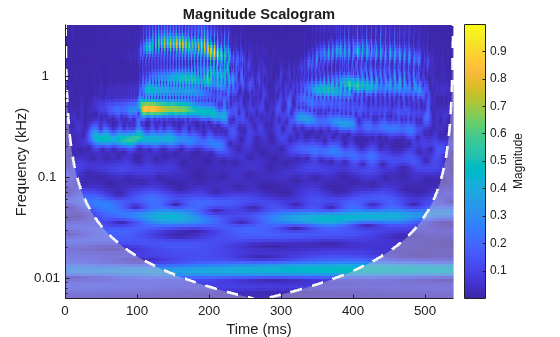
Obtain the CWT of the signal, and the scale-to-frequency conversions of the CWT.
[cfs,frq] = cwt(mtlb,Fs);
The cwt function sets the time and frequency axes in the scalogram. Create a vector representing the sample times.
tms = (0:numel(mtlb)-1)/Fs;
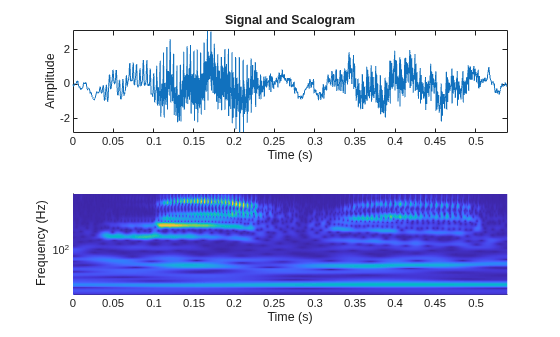
In a new figure, plot the original signal in the upper subplot and the scalogram in the lower subplot. Plot the frequencies on a logarithmic scale.
figure
tiledlayout(2,1)
nexttile
plot(tms,mtlb)
axis tight
title("Signal and Scalogram")
xlabel("Time (s)")
ylabel("Amplitude")
nexttile
surface(tms,frq,abs(cfs))
axis tight
shading flat
xlabel("Time (s)")
ylabel("Frequency (Hz)")
set(gca,"yscale","log")
Since R2026a
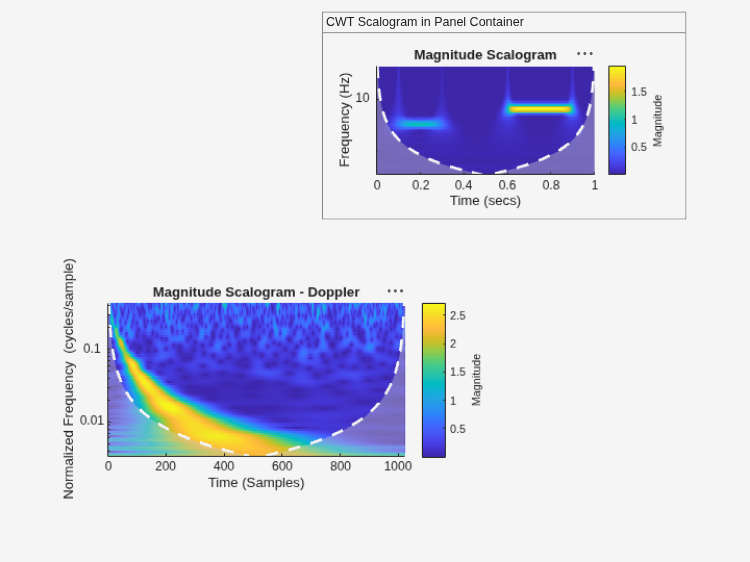
Plot the CWT scalogram for four signals in the specified target axes and panel containers.
Plot CWT Scalogram in Target Axes
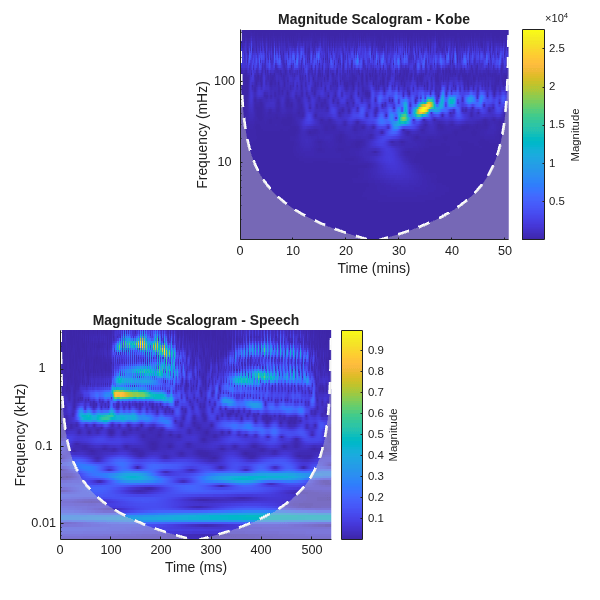
Load the speech sample. The sample rate is 7418 Hz. Load the Kobe earthquake data. The sample rate is 1 Hz.
load mtlb
FsSpeech = 7418;
load kobe
FsKobe = 1;
Create two axes in the southwestern and northeastern corners of a new figure window.
fig = figure(Position=[100 100 600 600]);
ax1 = axes(fig,Position=[0.1 0.1 0.55 0.35]);
ax2 = axes(fig,Position=[0.4 0.6 0.55 0.35]);
Plot the CWT scalogram of the speech and Kobe data in the southwestern and northeastern axes of the figure, respectively.
cwt(mtlb,FsSpeech,Parent=ax1)
title(ax1,"Magnitude Scalogram - Speech")
cwt(kobe,FsKobe,Parent=ax2)
title(ax2,"Magnitude Scalogram - Kobe")
Plot CWT Scalogram in Target UI Axes
Load the noisy Doppler signal.
load noisdoppCreate an axes in the southwestern corner of a new UI figure window.
uif = uifigure(Position=[100 100 720 540]);
ax3 = uiaxes(uif,Position=[60 70 400 200]);
Plot the CWT scalogram of the noisy Doppler signal on the figure axes.
cwt(noisdopp,Parent=ax3)
title(ax3,"Magnitude Scalogram - Doppler")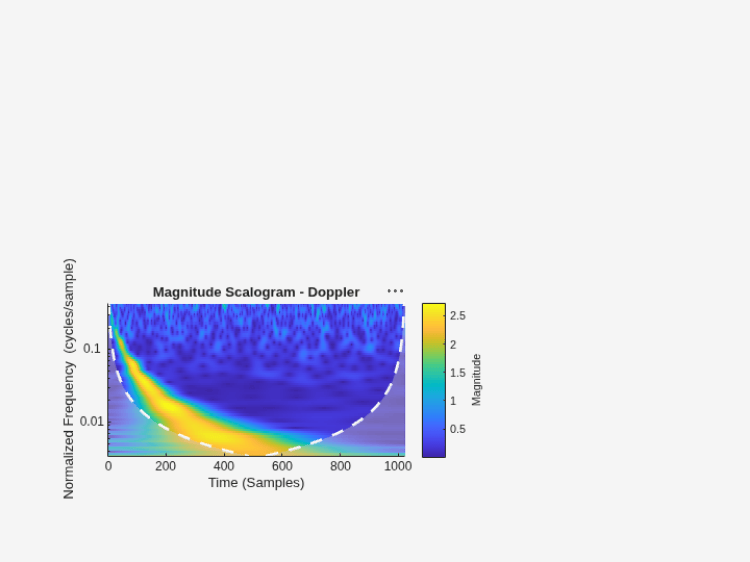
Plot CWT Scalogram in Target Panel Container
Create a signal composed of two sinusoids with disjoint support in time. One sinusoid has a frequency of 32 Hz and amplitude equal to 1. The other sinusoid has a frequency of 64 Hz and amplitude equal to 2. Sample the signal for one second at 1000 Hz.
frq1 = 32;
amp1 = 1;
frq2 = 64;
amp2 = 2;

Fs = 1e3;
t = 0:1/Fs:1;
x = amp1*sin(2*pi*frq1*t).*(t>=0.1 & t<0.3)+...
    amp2*sin(2*pi*frq2*t).*(t>0.6 & t<0.9);
Add a panel container in the northeastern corner of the UI figure window.
p = uipanel(uif,Position=[310 330 350 200], ...
    Title="CWT Scalogram in Panel Container");
Plot the CWT scalogram of the sinusoidal signal on the panel container.
cwt(x,Fs,Parent=p)
Since R2026a
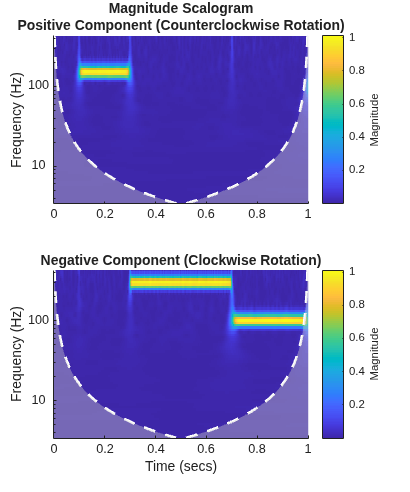
Generate a signal sampled at 1 kHz for one second. The signal consists of three complex-valued sinusoids and white noise. Each sinusoid has a different frequency. Two frequencies are negative. The sinusoids have disjoint time support.
Fs = 1e3;
t = 0:1/Fs:1;
z = exp(1i*2*pi*150*t).*(t>=0.1 & t<0.3) + ...
    exp(-1i*2*pi*300*t).*(t>=0.3 & t<0.7) + ...
    exp(-1i*2*pi*100*t).*(t>0.7);

wgnNoise = 0.05/sqrt(2)*(randn(size(t)) + ...
    1i*randn(size(t)));
sig = z + wgnNoise;
Plot the scalogram of the signal without specifying a target parent container. Because the signal is complex-valued, the function plots the positive and negative components in separate scalograms. The function uses a log scale for the frequency.
cwt(sig,Fs)
Create an axes in a new figure window. Use the Parent name-value argument syntax to plot the scalogram in the axes. Also obtain the CWT coefficients and frequencies. The negative component corresponds to the negative frequencies in the plot. The function uses a linear scale for the frequency.
fig = figure;
ax = axes(fig,Position=[0.1 0.1 0.5 0.6]);
[cfs,f] = cwt(sig,Fs,Parent=ax);
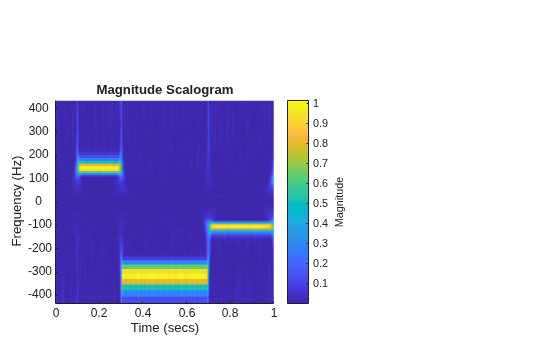
The function returns the CWT coefficients in a 3-D array. The first page corresponds to the positive (counterclockwise) component and the second page corresponds to the negative (clockwise) component.
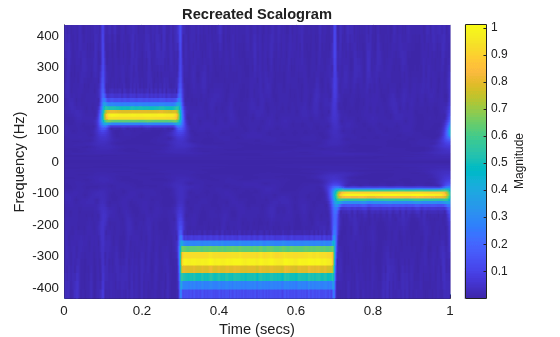
You can use the coefficients and frequencies to recreate the target axes plot in a new figure. Rearrange and concatenate the two pages.
flpdp = flip(cfs(:,:,2));
cfs2 = cat(1,cfs(:,:,1),flpdp);
Rearrange and concatenate the frequency vector such that the frequencies range from positive to negative values.
flpdv = flip(-f);
f2 = cat(1,f,flpdv);
Add an axes ax2 to a new figure. Use the surf function to plot the absolute value of the concatenated coefficients on ax2.
ax2 = axes(figure);
surf(ax2,t,f2,abs(cfs2),EdgeColor="none")
view(ax2,[0,90])
axis(ax2,"tight")
set(ax2,YDir="normal")
xlabel(ax2,"Time (secs)")
ylabel(ax2,"Frequency (Hz)")
c = colorbar(ax2);
c.Label.String = "Magnitude";
title(ax2,"Recreated Scalogram")
Since R2026a
Load the NPG2006 data set. The complex-valued data is the trajectory of a subsurface float trapped in an eddy. The sample period is four hours. Plot the eastward and northward displacement. The triangle marks the initial position.
load npg2006
sig = npg2006.cx;
plot(sig)
hold on
plot(npg2006.cx(1),"^",MarkerSize=11,Color="r", ...
    MarkerFaceColor=[1 0 0 ])
hold off
grid on
xlabel("Eastward Displacement (km)")
ylabel("Northward Displacement (km)")
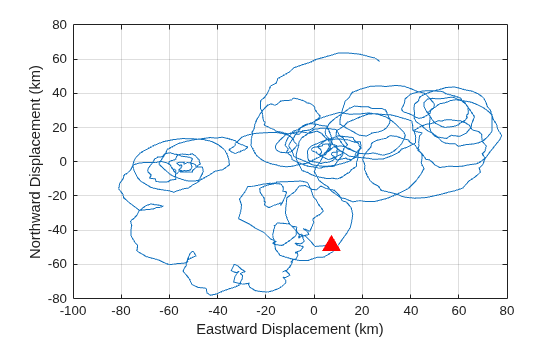
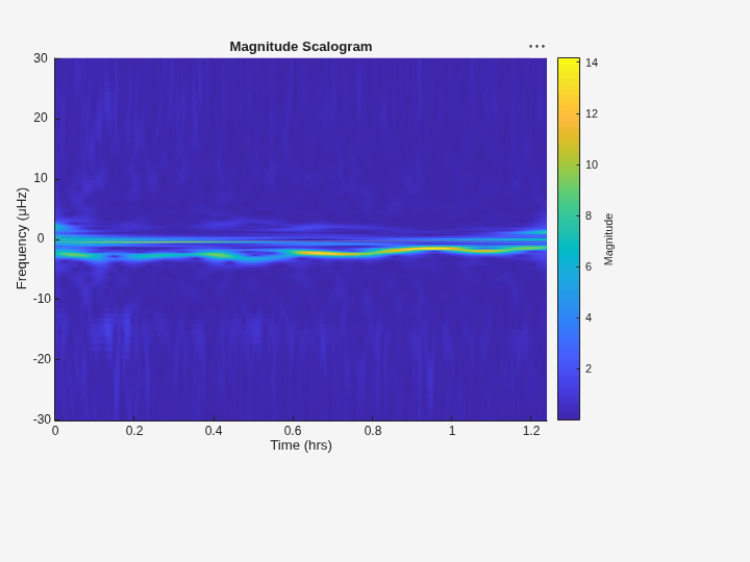
Create an axes in a new UI figure window. Plot the scalogram on the axes using the Parent name-value argument and also obtain the periods p and cone of influence coi. If you specify a sample period in hours, then p and coi are also duration arrays in units of hours. Note that although p and coi are duration arrays, if you call cwt with a target parent container and a complex-valued signal, the function plots the scalogram with respect to frequencies.
uif = uifigure(Position=[100 100 720 540]);
axf = uiaxes(uif,Position=[15 105 575 400]);

[cfs,p,coi] = cwt(sig,hours(4),Parent=axf);
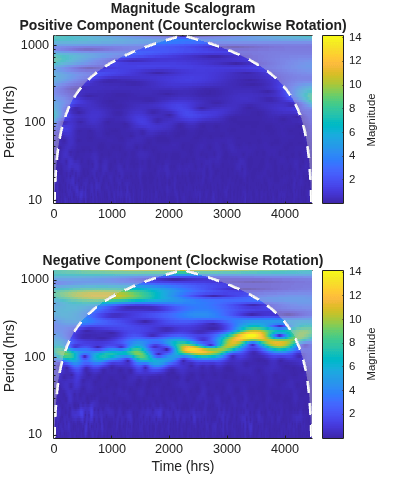
To visualize the clockwise and counterclockwise components of the scalogram in terms of periods, use cwt without specifying a target parent container or output arguments.
figure
cwt(sig,hours(4))
Input Arguments
Name-Value Arguments
Output Arguments
More About
An analytic wavelet is a complex-valued wavelet whose Fourier transform vanishes for negative frequencies. Analytic wavelets are a good choice when doing time-frequency analysis with the CWT. Because the wavelet coefficients are complex-valued, the coefficients provide phase and amplitude information of the signal being analyzed. Analytic wavelets are well suited for studying how the frequency content in real world nonstationary signals evolves as a function of time.
Analytic wavelets are almost exclusively based on rapidly decreasing functions. If is an analytic rapidly decreasing function in time, then its Fourier transform is a rapidly decreasing function in frequency and is small outside of some interval where . Orthogonal and biorthogonal wavelets are typically designed to have compact support in time. Wavelets with compact support in time have relatively poorer energy concentration in frequency than wavelets which rapidly decrease in time. Most orthogonal and biorthogonal wavelets are not symmetric in the Fourier domain.
To obtain a joint time-frequency representation of your signal, use
cwt or cwtfilterbank. Both
functions support the following analytic wavelets:
Morse Wavelet Family (default)
Analytic Morlet (Gabor) Wavelet
Bump Wavelet
For more information regarding Morse wavelets, see Morse Wavelets. In the Fourier domain, in terms of angular frequency:
The analytic Morlet wavelet is defined as

where
 is the indicator function of the
interval [0,∞).
is the indicator function of the
interval [0,∞).The bump wavelet is defined as

where ϵ = 2.2204×10⁻¹⁶.
To do time-frequency analysis using orthogonal or biorthogonal wavelets, use
modwpt.
When using wavelets for time-frequency analysis, you usually convert scales to
frequencies or periods to interpret results. cwt and cwtfilterbank do the conversion. You can obtain the corresponding
scales associated by using scales
on the optional cwt output argument
fb.
For guidance on how to choose the wavelet that is right for your application, see Choose a Wavelet.
Tips
The syntax for the old
cwtfunction continues to work but is no longer recommended. Use the current version ofcwt. Both the old and current versions use the same function name. The function inputs determine automatically which version to use. See cwt function syntax has changed.When performing multiple CWTs, for example inside a for-loop, the recommended workflow is to first create a
cwtfilterbankobject and then use thewtobject function. This workflow minimizes overhead and maximizes performance. See Using CWT Filter Bank on Multiple Time Series.
Algorithms
References
[1] Lilly, J. M., and S. C. Olhede. “Generalized Morse Wavelets as a Superfamily of Analytic Wavelets.” IEEE Transactions on Signal Processing 60, no. 11 (November 2012): 6036–6041. https://doi.org/10.1109/TSP.2012.2210890.
[2] Lilly, J.M., and S.C. Olhede. “Higher-Order Properties of Analytic Wavelets.” IEEE Transactions on Signal Processing 57, no. 1 (January 2009): 146–160. https://doi.org/10.1109/TSP.2008.2007607.
[3] Lilly, J. M. jLab: A data analysis package for MATLAB, version 1.6.2. 2016. http://www.jmlilly.net/jmlsoft.html.
[4] Lilly, Jonathan M. “Element Analysis: A Wavelet-Based Method for Analysing Time-Localized Events in Noisy Time Series.” Proceedings of the Royal Society A: Mathematical, Physical and Engineering Sciences 473, no. 2200 (April 30, 2017): 20160776. https://doi.org/10.1098/rspa.2016.0776.
[5] Lilly, J. M., and J.-C. Gascard. “Wavelet Ridge Diagnosis of Time-Varying Elliptical Signals with Application to an Oceanic Eddy.” Nonlinear Processes in Geophysics 13, no. 5 (September 14, 2006): 467–83. https://doi.org/10.5194/npg-13-467-2006.
Extended Capabilities
Version History
Introduced in R2016bSee Also
Apps
Functions
dlcwt|icwt|cwtfreqbounds
Objects
Topics
- Practical Introduction to Time-Frequency Analysis Using the Continuous Wavelet Transform
- Using Wavelet Time-Frequency Analyzer App
- Continuous and Discrete Wavelet Transforms
- CWT-Based Time-Frequency Analysis
- Boundary Effects and the Cone of Influence
- Morse Wavelets
- Time-Frequency Gallery
- Plot Spectral Representations of Signal in App Designer

