Transfer Learning: Fine-Tune DQN Agent for Pendulum Swing-Up from Earth to Mars
R2026bThis example shows how to use transfer learning to retrain a model trained for one task to perform a similar task. Using transfer learning can save training time and computing resources compared to training a model from scratch.
In this example, you take a deep Q-learning network (DQN) agent that was previously trained to swing up and balance a pendulum in Earth's gravity conditions and adapt it to swing the pendulum in Mars' gravity conditions. To do this, you freeze the beginning layers of the critic network and retrain only the final layer, which allows the agent to quickly recover performance under the new dynamics. The main steps for transfer learning are the following:
Load a pretrained agent.
Extract the critic and actor networks from the agent and freeze the learnable parameters of their initial layers.
Retrain the agent to adapt the unfrozen layers to the new environment.
For a general overview of transfer learning in the context of supervised learning, see Transfer Learning. For more information on DQN agents, see Deep Q-Network (DQN) Agent. For an example that shows how to train a DQN agent from scratch, see Train Default DQN Agent to Swing Up and Balance Discrete Pendulum.
Specify Random Number Stream for Reproducibility
The example code might involve computation of random numbers at several stages. Fixing the random number stream at the beginning of some sections in the example code preserves the random number sequence in the section every time you run it, which is a necessary condition to reproduce the results. For more information, see Results Reproducibility.
Specify the random number stream with seed 0 and random number algorithm Mersenne twister. For more information on controlling the seed used for random number generation, see rng.
previousRngState = rng(0,"twister");The output previousRngState is a structure that contains information about the previous state of the stream. You will restore the state at the end of the example.
Pendulum Swing-Up Environment Model
In this example, the reinforcement learning environment is a simple frictionless pendulum that initially hangs in a downward position. The training goal is to make the pendulum stand upright using minimal control effort.
Open the Simulink model configured for Mars, which uses a gravitational acceleration of 3.71 (instead of 9.81) meters per second squared.
mdl = "rlSimplePendulumModelMars";
open_system(mdl)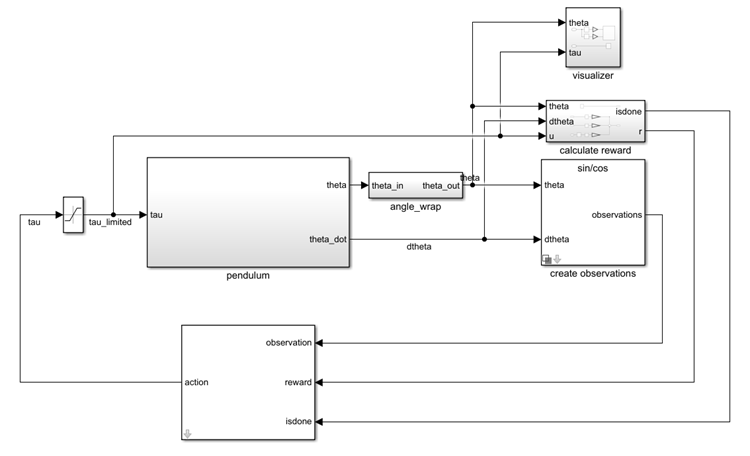
To access the gravitational acceleration g, open the model workspace.
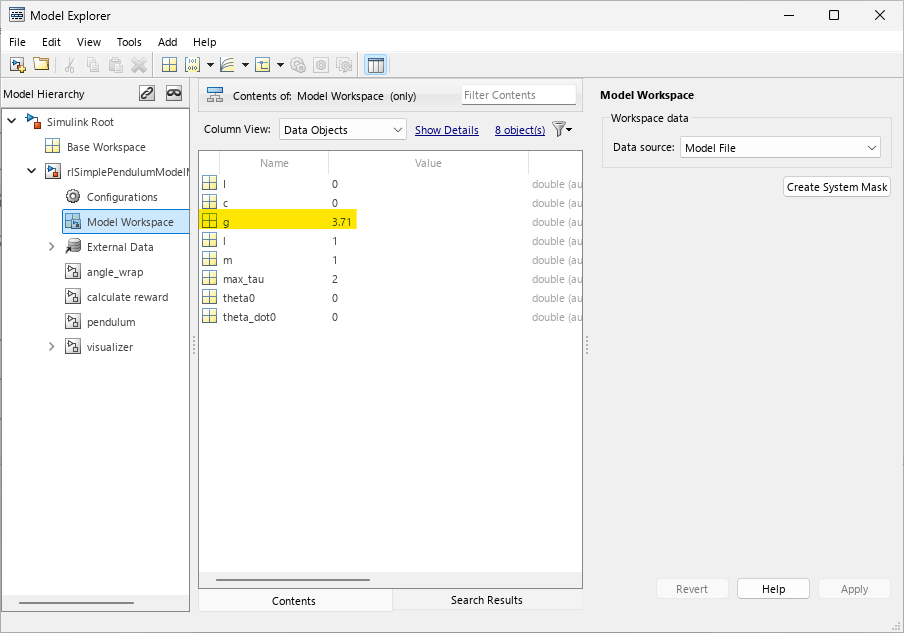
In this model:
The balanced, upright pendulum position is zero radians, and the downward, hanging pendulum position is
piradians.The torque action signal from the agent to the environment can be either –2, 0, or 2 N·m.
The observations from the environment are the sine, cosine, and derivative of the pendulum angle.
The reward , which the environments provides to the agent at every time step, is
where:
is the angle of displacement from the upright position.
is the derivative of the displacement angle.
is the control effort from the previous time step.
For more information on this model, see Use Predefined Control System Environments.
Create Environment Object
Define the observation specification obsInfo and the action specification actInfo.
obsInfo = rlNumericSpec([3 1]);
obsInfo.Name = "Observations";

actInfo = rlFiniteSetSpec([-2 0 2]);
actInfo.Name = "Torque";
Use rlSimulinkEnv to create an environment object from the Simulink model.
env = rlSimulinkEnv(mdl,mdl+"/RL Agent",obsInfo,actInfo);To define the initial condition of the pendulum as hanging downward, specify an environment reset function using an anonymous function handle. This reset function uses setVariable (Simulink) function to set the model workspace variable theta0 to pi. For more information, see Reset Function for Simulink Environments.
env.ResetFcn = @(in)setVariable(in,"theta0",pi,"Workspace",mdl);
Specify the agent sample time Ts and the simulation time Tf in seconds.
Ts = 0.05;
Tf = 20;
Load Pretrained Agent and Freeze Initial Layers
In this example, you reuse the critic network from the agent trained to swing-up and balance the pendulum with Earth gravity conditions. Specifically, you freeze the initial layers of this critic, and retrain only the last fully connected output layer. Freezing the first two fully connected layers preserves the mapping from the observations to the intermediate features produced by these layers. Retraining the output layer allows the mapping from the intermediate features to the value output to adapt to Mars gravity conditions.
First, load the pretrained DQN agent that was trained with Earth's gravity. For more details, see Train Default DQN Agent to Swing Up and Balance Discrete Pendulum.
load("SimulinkPendulumDQNMulti.mat","agent")
Extract learnable parameters for later comparison.
criticEarth    = getCritic(agent);
criticNetEarth = getModel(criticEarth);
learnablesEarth = criticNetEarth.Learnables;
Extract the critic, the critic network, and the layers of the critic network from the agent. For more information, see getModel and getCritic.
critic = getCritic(agent);
criticNet = getModel(critic);
CriticNetLayersMars = criticNet.Layers;
Visualize the pretrained DQN agent critic network. For more information, see analyzeNetwork.
analyzeNetwork(criticNet);
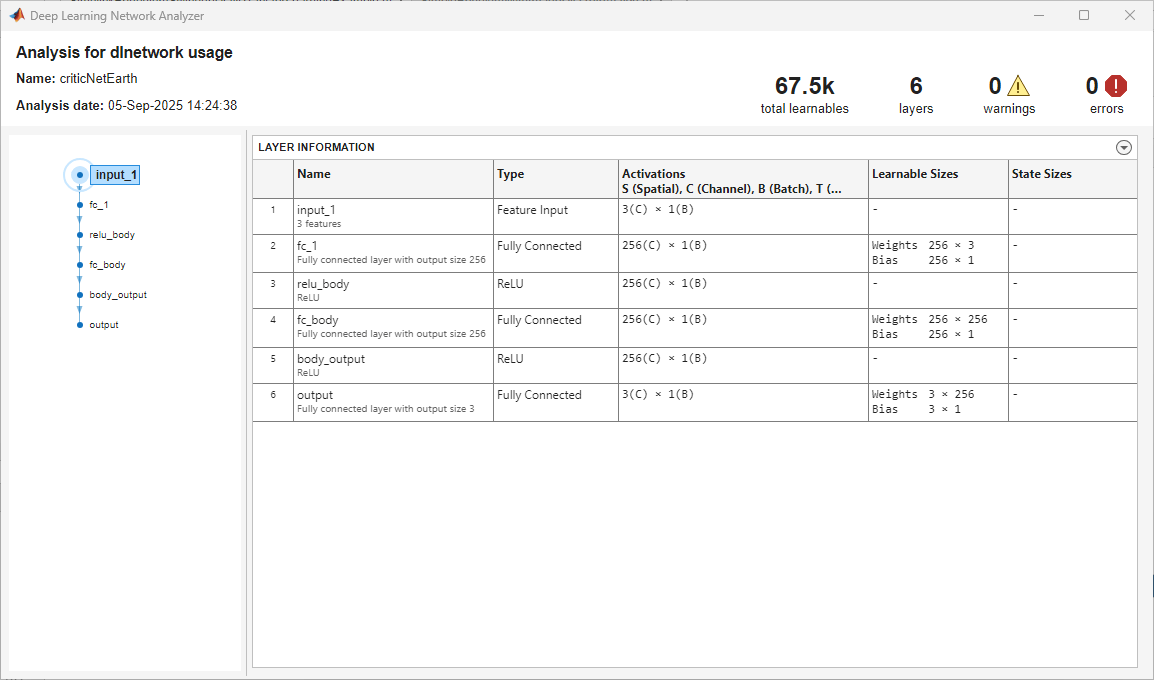
To freeze the initial fully connected layers (indexed by the integers 2 and 4, respectively), set their WeightLearnRateFactor and BiasLearnRateFactor properties to 0. For the output fully connected layer (indexed by the integer 6), leave these properties to their default values.
CriticNetLayersMars(2,1).WeightLearnRateFactor = 0;
CriticNetLayersMars(2,1).BiasLearnRateFactor = 0;
CriticNetLayersMars(4,1).WeightLearnRateFactor = 0;
CriticNetLayersMars(4,1).BiasLearnRateFactor = 0;
criticNetMars = dlnetwork(CriticNetLayersMars);
Set the modified network as the new critic approximation model, and set the agent critic to the updated critic. For more information, see setModel and setCritic.
critic = setModel(critic,criticNetMars);
setCritic(agent,critic);
During training, DQN agents use the epsilon-greedy algorithm to explore the action space. Specifically, in each training episode, the agent either chooses a random action (exploration) or applies a deterministic greedy policy to try to maximize the reward (exploitation). The value of the exploration probability epsilon constantly decays during training, which encourages broad exploration early in training, when the greedy policy is unrefined, and increases exploitation later.
Since pretrained layers reduce the need for exploration, you could often use a faster epsilon decay schedule in transfer learning. However, for this example, use keep the same epsilon decay policy that was used to train agentEarth. For more information on DQN agent options, see rlDQNAgentOptions.
Display the values of the EpsilonDecay and EpsilonMin properties.
agent.AgentOptions.EpsilonGreedyExploration.EpsilonDecay
ans =
5.0000e-05
agent.AgentOptions.EpsilonGreedyExploration.EpsilonMin
ans =
0.1000
Train DQN Agent
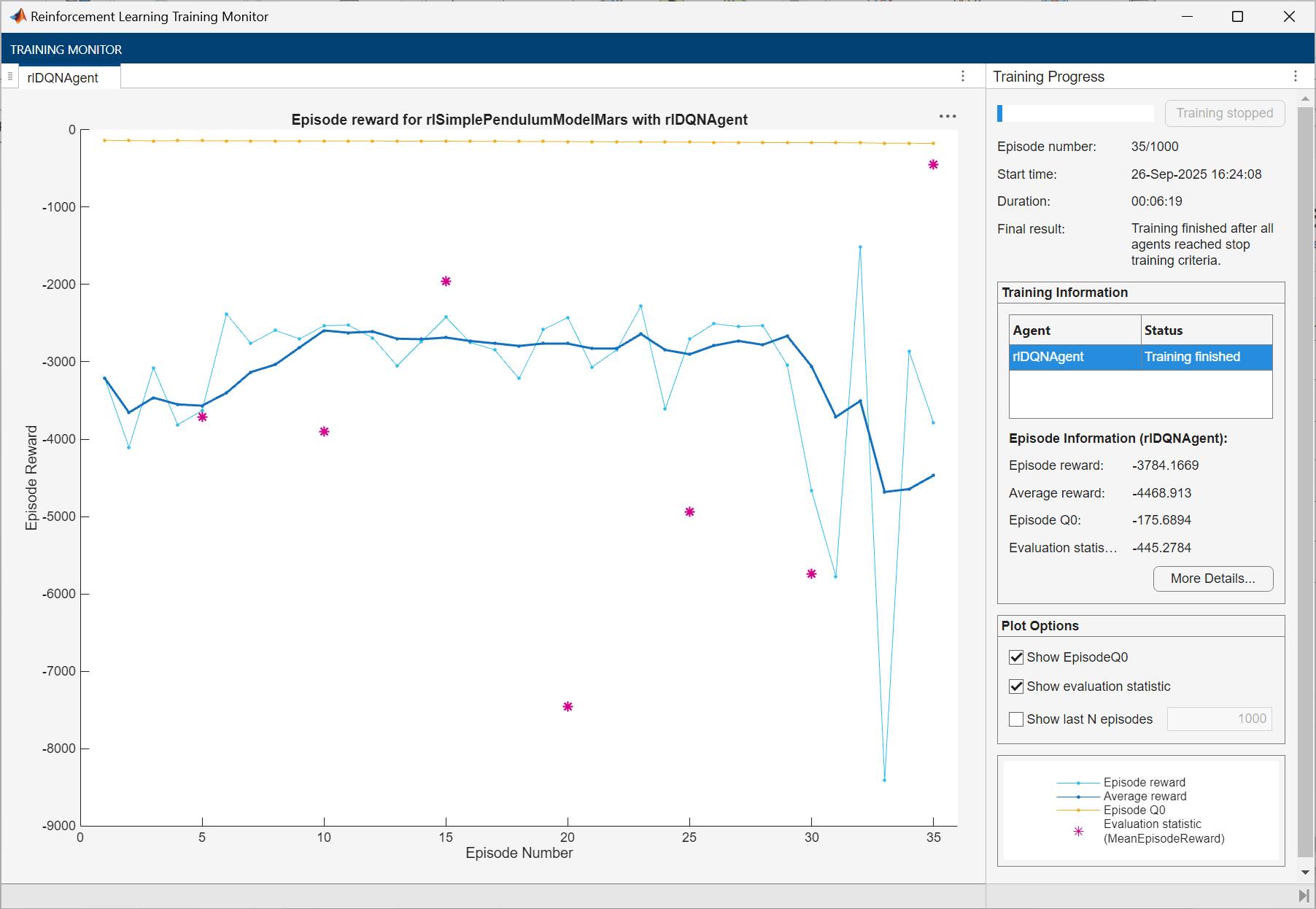
To train the agent, first, specify the training options. For this example:
Run each training for a maximum of 1000 episodes, with each episode lasting a maximum of 500 time steps.
Evaluate the performance of the greedy policy every 5 training episodes.
Disable the command line display.
Display the training progress in the Reinforcement Learning Training Monitor dialog box.
Stop the training when the agent receives an average cumulative reward greater than –1100 when evaluating the greedy policy. At this point, the agent can quickly balance the pendulum in the upright position using minimal control effort.
For more information on training options, see rlTrainingOptions.
trainingOptions = rlTrainingOptions( ...
    MaxEpisodes=1000, ...
    MaxStepsPerEpisode=500, ...
    ScoreAveragingWindowLength=5, ...
    Verbose=false, ...
    Plots="training-progress", ...
    StopTrainingCriteria="EvaluationStatistic", ...
    StopTrainingValue=-1100);
Train the agent using the train function. Training this agent is a computationally intensive process that takes several minutes to complete. To save time, load a pretrained agent by setting doTraining to false. To train the agent yourself, set doTraining to true.
doTraining =false; if doTraining % Agent Evaluator: evaluate the performance of the greedy policy % every 5 training episodes. evl = rlEvaluator(EvaluationFrequency=5, ... NumEpisodes=1, RandomSeeds=0); %#ok<UNRCH> % Train the agent. trainingStats = train(agent,env,trainingOptions, ... Evaluator=evl); else % Load the pretrained agent for the example. load("trainedMarsAgent.mat","agent"); end
Simulate DQN Agent
Specify the random stream for reproducibility.
rng(0,"twister");In simulation, the agent uses the policy behavior specified its UseExplorationPolicy property, which is set to false by default. If you want to use an exploratory policy in simulation, set UseExplorationPolicy to true.
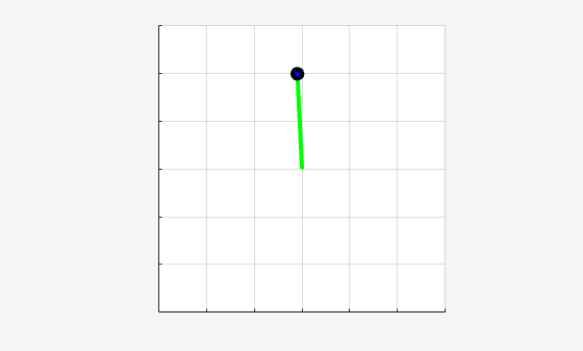
To validate the performance of the trained agent, simulate it within the pendulum environment for 500 steps. For more information on agent simulation, see rlSimulationOptions and sim.
simOptions = rlSimulationOptions(MaxSteps=500);
experience = sim(env,agent,simOptions);
Display the total reward.
totalRwd = sum(experience.Reward)
totalRwd =
-445.2784
Compare Critic Learnable Parameters of Both Agents
To compare the critics' learnable parameters of the Earth and Mars agents' critic networks, compute the Euclidean (L2) norm of their differences.
% Extract critic networks.
criticMars     = getCritic(agent);
criticNetMars  = getModel(criticMars);

% Access learnables.
learnablesMars  = criticNetMars.Learnables;

% Initialize comparison table.
n = height(learnablesEarth);
layerName = strings(n,1);
paramType = strings(n,1); % Weights/Bias/etc.
sizeStr = strings(n,1);
absDiff = zeros(n,1);

% Fill comparison table.
for ii = 1:n
    layerName(ii) = learnablesEarth.Layer(ii);
    paramType(ii) = learnablesEarth.Parameter(ii);

    paramEarth = learnablesEarth.Value{ii};
    paramMars = learnablesMars.Value{ii};

    % Extract data from dlarray.
    paramEarth = extractdata(paramEarth);
    paramMars = extractdata(paramMars);

    % Compute size and Euclidean norm of parameter difference.
    sizeStr(ii) = strjoin(string(size(paramEarth)),'x');
    absDiff(ii) = norm((paramMars(:) - paramEarth(:)), 2);

end

results = table(layerName, paramType, sizeStr, absDiff, ...
    'VariableNames', ...
    {'LayerName','ParameterType','Size','L2NormOfDiff'})
results = 6×4 table
    LayerName    ParameterType      Size       L2NormOfDiff
    _________    _____________    _________    ____________

    "fc_1"         "Weights"      "256x3"              0
    "fc_1"         "Bias"         "256x1"              0
    "fc_body"      "Weights"      "256x256"            0
    "fc_body"      "Bias"         "256x1"              0
    "output"       "Weights"      "3x256"         14.434
    "output"       "Bias"         "3x1"           2.8885
As expected, the norm is zero for frozen layers and nonzero for the weights and bias of the last fully connected layer.
Restore the random number stream using the information stored in previousRngState.
rng(previousRngState);
See Also
Apps
Functions
train|sim|analyzeNetwork
Objects
rlDQNAgent|rlDQNAgentOptions|rlVectorQValueFunction|rlTrainingOptions|rlSimulationOptions|rlOptimizerOptions
Blocks
Topics
- Train Default DQN Agent to Swing Up and Balance Discrete Pendulum
- Train PPO Agent with Curriculum Learning for a Lane Keeping Application
- Enforce State-Dependent Action Constraints Using a Masking Network for a PPO Agent
- Create DQN Agent Using Deep Network Designer and Train Using Image Observations
- Transfer Learning
- Use Predefined Control System Environments
- Deep Q-Network (DQN) Agent
- Train Reinforcement Learning Agents

