メインコンテンツ

estimateNetworkOutputBounds

Compute output bounds of MATLAB, ONNX, and PyTorch networks

Since R2022b

    Description

    Add-On Required: This feature requires the AI Verification Library for Deep Learning Toolbox add-on.

    dlnetwork bounds

    [YLower,YUpper] = estimateNetworkOutputBounds(net,XLower,XUpper) computes lower and upper output bounds, YLower and YUpper, respectively, for the network net for input within the bounds specified by XLower and XUpper.

    The function uses abstract interpretation to compute the range of output values that the network returns when the input is between the specified lower and upper bounds. Use this function to determine the sensitivity of the network predictions to input perturbations. Abstract interpretation can introduce overapproximations so these bounds may not be tight.

    example

    [YLower,YUpper] = estimateNetworkOutputBounds(___,Name=Value) computes lower and upper output bounds with additional options specified by one or more name-value arguments.

    ONNX and PyTorch network bounds

    This feature requires the Deep Learning Toolbox Interface for alpha-beta-CROWN Verifier add-on.

    [YLower,YUpper] = estimateNetworkOutputBounds(modelfile,XLower,XUpper) computes lower and upper output bounds, YLower and YUpper, respectively, for the ONNX™ or PyTorch® network specified in modelfile for input within the bounds specified by XLower and XUpper.

    [YLower,YUpper] = estimateNetworkOutputBounds(___,Name=Value) computes lower and upper output bounds with additional options specified by one or more name-value arguments.

    Examples

    collapse all

    Estimate the output bounds for an image regression network.

    Load a pretrained regression network. This network is a dlnetwork object that has been trained to predict the rotation angle of images of handwritten digits.

    load("digitsRegressionNetwork.mat");

    Load the test data.

    [XTest,~,TTest] = digitTest4DArrayData;

    Select the first ten images.

    X = XTest(:,:,:,1:10);
    T = TTest(1:10);

    Convert the test images to dlarray objects.

    X = dlarray(X,"SSCB");

    Estimate the output bounds for an input perturbation between –0.01 and 0.01 for each pixel. Create lower and upper bounds for the input.

    perturbation = 0.01;
    XLower = X - perturbation;
    XUpper = X + perturbation;

    Estimate the output bounds for each input.

    [YLower,YUpper] = estimateNetworkOutputBounds(net,XLower,XUpper);

    The output bounds are dlarray objects. To plot the output bounds, first extract the data using extractdata.

    YLower = extractdata(YLower);
    YUpper = extractdata(YUpper);

    Visualize the output bounds.

    figure
    hold on
    for i = 1:10
        plot(i,T(i),"ko")
        line([i i],[YLower(i) YUpper(i)],Color="b")
    end
    hold off
    xlim([0 10])
    xlabel("Observation")
    ylabel("Angle of Rotation")
    legend(["True value","Output bounds"])
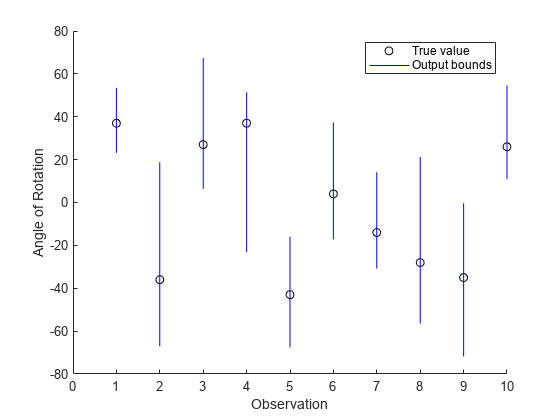
    Figure contains an axes object. The axes object with xlabel Observation, ylabel Angle of Rotation contains 20 objects of type line. One or more of the lines displays its values using only markers These objects represent True value, Output bounds.

    Since R2026a

    Load a pretrained regression network. This network is a dlnetwork object that has been trained to predict the rotation angle of images of handwritten digits.

    load("digitsRegressionNetwork.mat");

    Load the test data.

    [XTest,~,TTest] = digitTest4DArrayData;

    Select the first ten images.

    X = XTest(:,:,:,1:10);
    T = TTest(1:10);

    Convert the test images to dlarray objects.

    X = dlarray(X,"SSCB");

    Estimate the output bounds for an input perturbation between –0.01 and 0.01 for each pixel. Create lower and upper bounds for the input.

    perturbation = 0.01;
    XLower = X - perturbation;
    XUpper = X + perturbation;

    Create an AlphaCROWN options object. Optimize the upper bound and optimize over the average objective.

    opts = alphaCROWNOptions(InitialLearnRate=0.9,MaxEpochs=20, ...
        Objective="upper", ...
        ObjectiveMode="average", ...
        Verbose=true);

    Estimate the output bounds for each input.

    [YLower,YUpper] = estimateNetworkOutputBounds(net,XLower,XUpper);

    The output bounds are dlarray objects. To plot the output bounds, first extract the data using extractdata.

    YLower = extractdata(YLower);
    YUpper = extractdata(YUpper);

    Visualize the output bounds.

    figure
    hold on
    for i = 1:10
        plot(i,T(i),"ko")
        line([i i],[YLower(i) YUpper(i)],Color="b")
    end
    hold off
    xlim([0 10])
    xlabel("Observation")
    ylabel("Angle of Rotation")
    legend(["True value","Output bounds"])
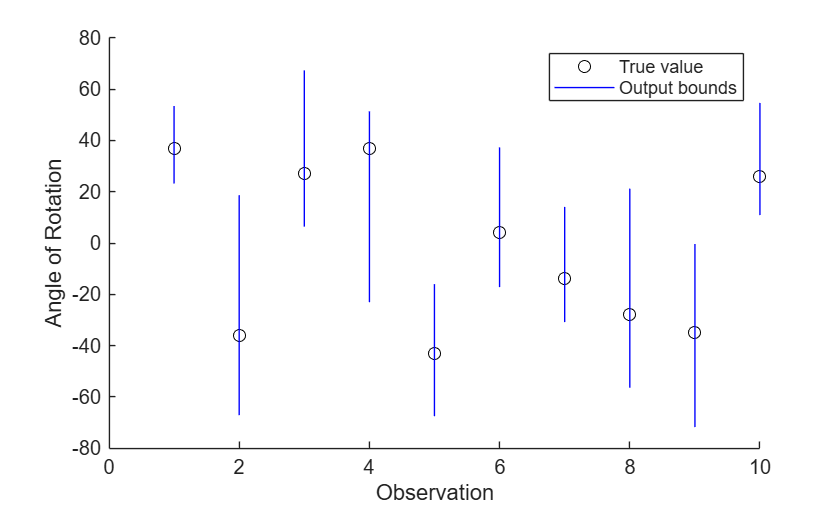
    Since R2026a

    Load a pretrained image regression PyTorch network. This network has been trained to predict the rotation angle of images of handwritten digits.

    modelfile = "digitsRotationConvolutionNet.pt";

    Load the test data.

    [XTest,~,TTest] = digitTest4DArrayData;

    Select the first ten images.

    X = XTest(:,:,:,1:10);
    T = TTest(1:10);

    Estimate the output bounds for an input perturbation between –0.01 and 0.01 for each pixel. Create lower and upper bounds for the input.

    perturbation = 0.01;
    XLower = X - perturbation;
    XUpper = X + perturbation;

    Estimate the output bounds for each input using alpha-CROWN.

    options = outputBoundsOptions(Method="alpha-CROWN",Iteration=10);
    [YLower,YUpper] = estimateNetworkOutputBounds(modelfile,XLower,XUpper,Algorithm=options,InputDataPermutation=[4 3 1 2]);

    Visualize the output bounds.

    figure
    hold on
    for i = 1:10
        line([i i],[YLower(i) YUpper(i)],Color="b")
    end
    hold off
    xlim([0 10])
    xlabel("Observation")
    ylabel("Angle of Rotation")
    legend("Output bounds")
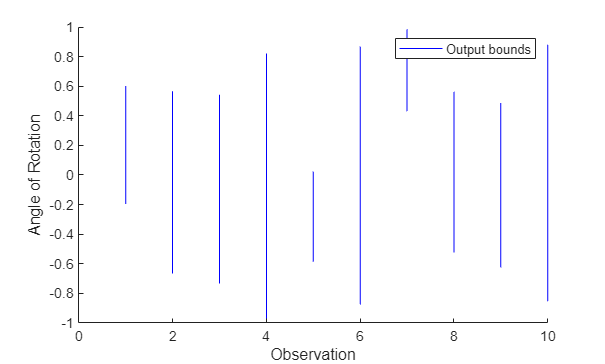
    Input Arguments

    collapse all

    Input lower bound, specified as a dlarray object or a numeric array.

    • If you provide a dlnetwork object as input, XLower must be a formatted dlarray object. For more information about dlarray formats, see the fmt input argument of dlarray.

    • If you provide an ONNX or PyTorch modelfile as input, XLower can be a numeric array or a dlarray object. See Input Dimension Ordering for more information.

    The lower and upper bounds, XLower and XUpper, must have the same size and format. The function computes the results across the batch ("B") dimension of the input lower and upper bounds.

    For ONNX and PyTorch networks, the batch dimension is the first dimension of the data after it is permuted to Python® dimension ordering.

    Input upper bound, specified as a formatted dlarray object or a numeric array.

    • If you provide a dlnetwork object as input, XUpper must be a formatted dlarray object. For more information about dlarray formats, see the fmt input argument of dlarray.

    • If you provide an ONNX or PyTorch modelfile as input, XUpper must be a numeric array.

    The lower and upper bounds, XLower and XUpper, must have the same size and format. The function computes the results across the batch ("B") dimension of the input lower and upper bounds.

    For ONNX and PyTorch networks, the batch dimension is the first dimension of the data after it is permuted to Python dimension ordering.

    dlnetwork only

    Network, specified as an initialized dlnetwork object. To initialize a dlnetwork object, use the initialize function.

    The function supports these layers:

    LayerNotes and Limitations

    additionLayer (since R2024b)


    averagePooling2dLayer (since R2023a)

    Supported when PaddingValue is set to 0.

    batchNormalizationLayer (since R2023a)


    clippedReluLayer (since R2026a)


    convolution2dLayer (since R2023a)

    Supported when Dilation is set to [1 1] or 1 and PaddingValue is set to 0.

    depthConcatenationLayer (since R2026a)


    dropoutLayer (since R2023a)


    featureInputLayer

    Supported when Normalization is set to "none" (since R2022b) or "zerocenter", "zscore", "rescale-symmetric", "rescale-zero-one" (since R2023a). Custom normalization functions are not supported.

    flattenLayer (since R2026a)


    fullyConnectedLayer


    globalAveragePooling2dLayer (since R2023a)


    globalMaxPooling2dLayer (since R2023a)


    identityLayer (since R2026a)


    imageInputLayer

    Supported when Normalization is set to "none" (since R2022b) or "zerocenter", "zscore", "rescale-symmetric", "rescale-zero-one" (since R2023a). Custom normalization functions are not supported.

    leakyReluLayer (since R2026a)

    You can optimize this layer using the α-CROWN algorithm.

    maxPooling2dLayer (since R2023a)


    nnet.onnx.layer.CustomOutputLayer (built-in ONNX layer) (since R2025a)

    Supported when DataFormat is set to "CB" or "SSCB". The data format is commonly set by the InputDataFormats and OutputDataFormats options of the importNetworkFromONNX function.

    nnet.onnx.layer.ElementwiseAffineLayer (built-in ONNX layer) (since R2023a)


    nnet.onnx.layer.FlattenInto2dLayer (built-in ONNX layer) (since R2025a)


    reluLayer

    You can optimize this layer using the α-CROWN algorithm.

    sigmoidLayer (since R2023a)


    tanhLayer


    The function does not support networks with multiple inputs and multiple outputs.

    The function estimates the output bounds using the final layer in the network. For most applications, use the final fully connected layer when computing the output bounds. If your network has a different layer as its final layer, remove the layer before calling the function.

    ONNX or PyTorch only

    Since R2026a

    ONNX or PyTorch model file name specified as a character vector or a string scalar. The modelfile must be a full PyTorch model (saved using torch.save()) or an ONNX model with the .onnx extension.

    Name-Value Arguments

    expand all

    Specify optional pairs of arguments as Name1=Value1,...,NameN=ValueN, where Name is the argument name and Value is the corresponding value. Name-value arguments must appear after other arguments, but the order of the pairs does not matter.

    Example: estimateNetworkOutputBounds(net,XLower,XUpper,MiniBatchSize=32,ExecutionEnvironment="multi-gpu") estimates the network output bounds using a mini-batch size of 32 and using multiple GPUs.

    All Model Types

    expand all

    Since R2026a

    Optimization algorithm, specified as one of these values:

    • "crown" — Use the CROWN algorithm [4]. This option is the same as using an OutputBoundsOptions object with the default values if used with a ONNX or PyTorch network.

    • "alpha-crown" — Use the α-CROWN algorithm [6] with default options. This option is the same as using an AlphaCROWNOptions object with the default values if used with a dlnetwork.

    • "alpha-beta-crown" — Use the α,β-CROWN algorithm with default options. This option is only available with ONNX or PyTorch networks.

    • AlphaCROWNOptions object — Use the α-CROWN algorithm with custom options. Create an AlphaCROWNOptions object using the alphaCROWNOptions function. This option is only available with dlnetwork.

    • OutputBoundsOptions object — Use the α,β-CROWN algorithm with custom options. Create a OutputBoundsOptions object using the outputBoundsOptions function. This option is only available with ONNX or PyTorch networks.

    For more information, see

    The α-CROWN algorithm produces tighter bounds at the cost of longer computation times and requiring more memory.

    Note

    The α-CROWN algorithm tightens bounds for networks with reluLayer or leakyReluLayer layers.

    Since R2024a

    Hardware resource, specified as one of these values:

    • "auto" – Use a local GPU if one is available. Otherwise, use the local CPU.

    • "cpu" – Use the local CPU.

    • "gpu" – Use the local GPU.

    • "multi-gpu" – Use multiple GPUs on one machine, using a local parallel pool based on your default cluster profile. If there is no current parallel pool, the software starts a parallel pool with pool size equal to the number of available GPUs. Only available when input is a dlnetwork object.

    • "parallel-auto" – Use a local or remote parallel pool. If there is no current parallel pool, the software starts one using the default cluster profile. If the pool has access to GPUs, then only workers with a unique GPU perform the computations and excess workers become idle. If the pool does not have GPUs, then the computations take place on all available CPU workers instead. Only available when input is a dlnetwork object.

    • "parallel-cpu" – Use CPU resources in a local or remote parallel pool, ignoring any GPUs. If there is no current parallel pool, the software starts one using the default cluster profile. Only available when input is a dlnetwork object.

    • "parallel-gpu" – Use GPUs in a local or remote parallel pool. Excess workers become idle. If there is no current parallel pool, the software starts one using the default cluster profile. Only available when input is a dlnetwork object.

    The "gpu", "multi-gpu", "parallel-auto", "parallel-cpu", and "parallel-gpu" options require Parallel Computing Toolbox™. To use a GPU for deep learning, you must also have a supported GPU device. For information on supported devices, see GPU Computing Requirements (Parallel Computing Toolbox). If you choose one of these options and Parallel Computing Toolbox or a suitable GPU is not available, then the software returns an error.

    For more information on when to use the different execution environments, see Scale Up Deep Learning in Parallel, on GPUs, and in the Cloud.

    Dependency

    If you specify Algorithm as an AlphaCROWNOptions object, then the execution environment specified in the options object takes precedence.

    dlnetwork only

    expand all

    Since R2023b

    Size of the mini-batch, specified as a positive integer.

    Larger mini-batch sizes require more memory, but can lead to faster computations.

    Dependency

    If you specify Algorithm as an AlphaCROWNOptions object, then the value of the mini-batch size in the options object takes precedence.

    Data Types: single | double | int8 | int16 | int32 | int64 | uint8 | uint16 | uint32 | uint64

    Since R2026a

    Option to enable verbose output, specified as a numeric or logical 1 (true) or 0 (false). When you set this input to 1 (true), the function returns the progress of the algorithm by indicating which mini-batch the function is processing and the total number of mini-batches.

    Dependency

    If you specify Algorithm as an AlphaCROWNOptions object, then the verbose value specified in the options object takes precedence.

    Data Types: single | double | int8 | int16 | int32 | int64 | uint8 | uint16 | uint32 | uint64 | logical

    ONNX or PyTorch only

    Since R2026a

    expand all

    Input dimension ordering specified as a numeric row vector. The ordering is the desired permutation of data in XLower and XUpper from MATLAB to Python dimension ordering. See Input Dimension Ordering for more information.

    Example: [4 3 1 2]

    Number of dimensions in input data specified as a positive integer.

    Example: 4

    Output dimension ordering specified as a numeric row vector. The ordering is the desired permutation of data in YLower and YUpper from Python to MATLAB dimension ordering.

    Example: [4 3 1 2]

    Output Arguments

    collapse all

    Output lower bound, returned as a formatted dlarray object if the input is a dlnetwork or a numeric array if the input is a ONNX or PyTorch modelfile. For more information about dlarray formats, see the fmt input argument of dlarray.

    The function estimates the output bounds for each observation across the batch ("B") dimension. If you supply k upper bounds and lower bounds, then YLower contains k output lower bounds. For more information, see Algorithms.

    Output upper bound, returned as a formatted dlarray object if the input is a dlnetwork or a numeric array if the input is a ONNX or PyTorch modelfile. For more information about dlarray formats, see the fmt input argument of dlarray.

    The function estimates the output bounds for each observation across the batch ("B") dimension. If you supply k upper bounds and lower bounds, then YUpper contains k output upper bounds. For more information, see Algorithms.

    Algorithms

    collapse all

    References

    [1] Goodfellow, Ian J., Jonathon Shlens, and Christian Szegedy. “Explaining and Harnessing Adversarial Examples.” Preprint, submitted March 20, 2015. https://arxiv.org/abs/1412.6572.

    [2] Singh, Gagandeep, Timon Gehr, Markus Püschel, and Martin Vechev. “An Abstract Domain for Certifying Neural Networks”. Proceedings of the ACM on Programming Languages 3, no. POPL (January 2, 2019): 1–30. https://doi.org/10.1145/3290354.

    [3] Singh, Gagandeep, Timon Gehr, Markus Püschel, and Martin Vechev. “An Abstract Domain for Certifying Neural Networks.” Proceedings of the ACM on Programming Languages 3, no. POPL (January 2, 2019): 1–30. https://doi.org/10.1145/3290354.

    [4] Zhang, Huan, Tsui-Wei Weng, Pin-Yu Chen, Cho-Jui Hsieh, and Luca Daniel. “Efficient Neural Network Robustness Certification with General Activation Functions.” arXiv, 2018. https://doi.org/10.48550/ARXIV.1811.00866.

    [5] Xu, Kaidi, Zhouxing Shi, Huan Zhang, Yihan Wang, Kai-Wei Chang, Minlie Huang, Bhavya Kailkhura, Xue Lin, and Cho-Jui Hsieh. “Automatic Perturbation Analysis for Scalable Certified Robustness and Beyond.” arXiv, 2020. https://doi.org/10.48550/ARXIV.2002.12920.

    [6] Xu, Kaidi, Huan Zhang, Shiqi Wang, Yihan Wang, Suman Jana, Xue Lin, and Cho-Jui Hsieh. “Fast and Complete: Enabling Complete Neural Network Verification with Rapid and Massively Parallel Incomplete Verifiers.” arXiv, 2020. https://doi.org/10.48550/ARXIV.2011.13824.

    Extended Capabilities

    expand all

    Version History

    Introduced in R2022b

    expand all