メインコンテンツ

patchMicrostripElliptical

Create standard or AI-based elliptical microstrip patch antenna

Description

Use the default patchMicrostripElliptical object to create a probe-fed elliptical microstrip patch antenna resonating around 5.37 GHz. The default patch is centered at the origin. Elliptical microstrip patch antennas are used in high-performance applications such as spacecraft, aircraft, missiles, and satellites. Elliptical microstrip patch antennas with optimum dimensions act as circularly polarized wave radiators.
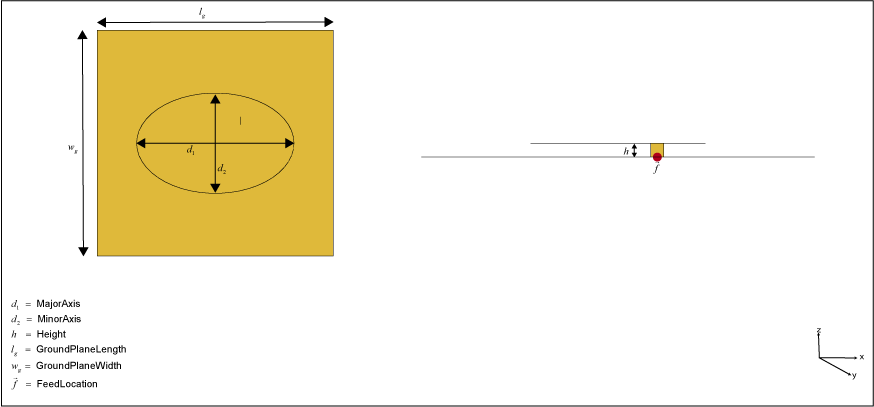
Elliptical microstrip patch antenna

You can perform full-wave EM-solver-based analysis on the standard patchMicrostripElliptical antenna, or you can create an AIAntenna object and use AI‑based analysis to explore the design space and tune the antenna for your application.

Creation

Description

ant = patchMicrostripElliptical creates a standard (full-wave EM) probe-fed elliptical microstrip patch antenna with default property values. The default dimensions are chosen for an operating frequency of around 5.37 GHz.

example

ant = patchMicrostripElliptical(PropertyName=Value) sets properties using one or more name–value arguments. PropertyName is the property name and Value is the corresponding value. You can specify several name-value arguments in any order as PropertyName1=Value1,...,PropertyNameN=ValueN. Properties that you do not specify, retain their default values.

For example, ant = patchMicrostripElliptical(MajorAxis=0.0878) creates an elliptical microstrip patch antenna with a major axis of 0.0878 meters.

  • You can also create a patchMicrostripElliptical antenna resonating at a desired frequency using the design function.

  • You can also create a patchMicrostripElliptical antenna from a microstrip patch type AIAntenna object using the exportAntenna function.

  • A patchMicrostripElliptical type AIAntenna has some common tunable properties with a standard patchMicrostripElliptical antenna for AI-based analysis. Other properties of the standard patchMicrostripElliptical antenna are retained as read-only in its AIAntenna equivalent. To find the upper and lower bounds of the tunable properties, use tunableRanges function.

  • You can create a standard patchMicrostripElliptical antenna resonating at a desired frequency using the design function. For example, to create a standard patchMicrostripElliptical antenna resonating at 5 GHz, use:

    >> design(patchMicrostripElliptical,5e9)
    

  • You can also create an AI-based version of the patchMicrostripElliptical antenna resonating at a desired frequency using the same design function. Set the ForAI argument in the design function to true to create an AIAntenna object. To use this feature, you need a license for the Statistics and Machine Learning Toolbox™ in addition to the Antenna Toolbox™. For example,

    >> design(patchMicrostripElliptical,5e9,ForAI=true)
    
    The AI-based patchMicrostripElliptical antenna retains the MajorAxis, MinorAxis and Height properties of the standard antenna and adds the SubstrateEpsilonR property as tunable properties. All remaining properties of the standard antenna become read‑only in the AI‑based version. To find the upper and lower bounds of the tunable properties, use the tunableRanges function.

    To create a standard patchMicrostripElliptical antenna from the AI‑based antenna, use the exportAntenna function.

Properties

expand all

Major axis length of the ellipse, specified as a scalar in meters. Conventionally, the major axis length is specified along the x-axis. You can set this property for both standard and AI-based patchMicrostripElliptical antenna.

  • For the standard patchMicrostripElliptical antenna, this property does not have any upper or lower bounds.

  • For AI-based patchMicrostripElliptical antenna, this property has upper and lower limits determined by the AI model. Use the tunableRanges function to query the valid range for this parameter.

Example: 0.0989

Data Types: double

Minor axis length of the ellipse along the y-axis, specified as a scalar in meters. Conventionally, the minor axis length is specified along the y-axis. You can set this property for both standard and AI-based patchMicrostripElliptical antenna.

  • For the standard patchMicrostripElliptical antenna, this property does not have any upper or lower bounds.

  • For AI-based patchMicrostripElliptical antenna, this property has upper and lower limits determined by the AI model. Use the tunableRanges function to query the valid range for this parameter.

Example: 0.0898

Data Types: double

Patch height above the ground plane along the z-axis, specified as a scalar in meters. You can set this property for both standard and AI-based patchMicrostripElliptical antenna.

  • For the standard patchMicrostripElliptical antenna, this property does not have any upper or lower bounds.

  • For AI-based patchMicrostripElliptical antenna, this property has upper and lower limits determined by the AI model. Use the tunableRanges function to query the valid range for this parameter.

Example: 0.001

Data Types: double

Type of dielectric material used as a substrate, specified as a dielectric object. You can choose any dielectric material from the DielectricCatalog or specify a dielectric material of your choice. The substrate dimensions must be equal to the ground plane dimensions. You can set this property only for a standard patchMicrostripElliptical antenna. This property is read-only for the AI-based patchMicrostripElliptical antenna. For more information on dielectric substrate meshing, see Meshing.

Example: dielectric("FR4")

Relative permittivity of the dielectric material, specified as a positive scalar. You can specify this property only for the AIAntenna object created from the patchMicrostripElliptical object. To enable this property, specify a substrate in the patchMicrostripElliptical object using the supported dielectric material from the DielectricCatalog before passing it to the design function. The supported dielectric materials are "Air", "FR4", "RO4725JXR", "Teflon", "TMM3", "TMM4", and "TMM6".

Example: 4.8000

Data Types: double

Ground plane length along the x-axis, specified as a scalar in meters. Setting 'GroundPlaneLength' to Inf, uses the infinite ground plane technique for antenna analysis. You can set this property only for the standard patchMicrostripElliptical antenna. This property is read-only for the AI-based patchMicrostripElliptical antenna.

Example: 120e-3

Data Types: double

Ground plane width along the y-axis, specified as a scalar in meters. Setting 'GroundPlaneWidth' to Inf, uses the infinite ground plane technique for antenna analysis. You can set this property only for the standard patchMicrostripElliptical antenna. This property is read-only for the AI-based patchMicrostripElliptical antenna.

Example: 120e-3

Data Types: double

Signed distance of the patch from the origin, specified as a two-element real vector with each element unit in meters. Use this property to adjust the location of the patch relative to the ground plane. Distances are measured along the length and width of the ground plane. You can set this property only for the standard patchMicrostripElliptical antenna. This property is read-only for the AI-based patchMicrostripElliptical antenna.

Example: [0.01 0.01]

Data Types: double

Signed distance of the feed from the origin, specified as a two-element real vector with each element unit in meters. Use this property to adjust the location of the feed relative to the ground plane and patch. You can set this property only for the standard patchMicrostripElliptical antenna. This property is read-only for the AI-based patchMicrostripElliptical antenna.

Example: [0.01 0.01]

Data Types: double

Type of the metal used as a conductor, specified as a metal object. You can choose any metal from the MetalCatalog or specify a metal of your choice. You can set this property only for a standard patchMicrostripElliptical antenna. This property is read-only for the AI-based patchMicrostripElliptical antenna. For more information on metal conductor meshing, see Meshing.

Example: metal("Copper")

Lumped elements added to the antenna feed, specified as a lumpedElement object. You can add a load anywhere on the surface of the antenna. By default, the load is at the feed. You can set this property only for a standard patchMicrostripElliptical antenna. This property is read-only for the AI-based patchMicrostripElliptical antenna.

Example: lumpedElement(Impedance=75)

Tilt angle of the antenna in degrees, specified as a scalar or vector. For more information, see Rotate Antennas and Arrays.

Example: 90

Example: Tilt=[90 90],TiltAxis=[0 1 0;0 1 1] tilts the antenna at 90 degrees about the two axes defined by the vectors.

Data Types: double

Tilt axis of the antenna, specified as one of these values:

  • Three-element vector of Cartesian coordinates in meters. In this case, each coordinate in the vector starts at the origin and lies along the specified points on the x-, y-, and z-axes.

  • Two points in space, specified as a 2-by-3 matrix corresponding to two three-element vectors of Cartesian coordinates. In this case, the antenna rotates around the line joining the two points.

  • "x", "y", or "z" to describe a rotation about the x-, y-, or z-axis, respectively.

For more information, see Rotate Antennas and Arrays.

Example: [0 1 0]

Example: [0 0 0;0 1 0]

Example: "Z"

Data Types: double | string

Object Functions

axialRatioCalculate and plot axial ratio of antenna or array
bandwidthCalculate and plot absolute bandwidth of antenna or array
beamwidthBeamwidth of antenna
chargeCharge distribution on antenna or array surface
currentCurrent distribution on antenna or array surface
designCreate antenna, array, or AI-based antenna resonating at specified frequency
efficiencyCalculate and plot radiation efficiency of antenna or array
EHfieldsElectric and magnetic fields of antennas or embedded electric and magnetic fields of antenna element in arrays
feedCurrentCalculate current at feed for antenna or array
impedanceCalculate and plot input impedance of antenna or scan impedance of array
infoDisplay information about antenna, array, or platform
memoryEstimateEstimate memory required to solve antenna or array mesh
meshGenerate and view mesh for antennas, arrays, and custom shapes
meshconfigChange meshing mode of antenna, array, custom antenna, custom array, or custom geometry
msiwriteWrite antenna or array analysis data to MSI planet file
optimizeOptimize antenna and array catalog elements using SADEA or TR-SADEA algorithm
patternPlot radiation pattern of antenna, array, or embedded element of array
patternAzimuthAzimuth plane radiation pattern of antenna or array
patternElevationElevation plane radiation pattern of antenna or array
peakRadiationCalculate and mark maximum radiation points of antenna or array on radiation pattern
rcsCalculate and plot monostatic and bistatic radar cross section (RCS) of platform, antenna, or array
resonantFrequencyCalculate and plot resonant frequency of antenna
returnLossCalculate and plot return loss of antenna or scan return loss of array
showDisplay antenna, array, AI-based antenna, platform, or shape
sparametersCalculate S-parameters for antenna or array
stlwriteWrite mesh information to STL file
vswrCalculate and plot voltage standing wave ratio (VSWR) of antenna or array element

Examples

collapse all

Create and view a default elliptical microstrip patch antenna.

ant = patchMicrostripElliptical
ant = 
  patchMicrostripElliptical with properties:

            MajorAxis: 0.0300
            MinorAxis: 0.0200
               Height: 0.0016
            Substrate: [1×1 dielectric]
    GroundPlaneLength: 0.0450
     GroundPlaneWidth: 0.0450
    PatchCenterOffset: [0 0]
           FeedOffset: [0.0047 0.0045]
            Conductor: [1×1 metal]
                 Tilt: 0
             TiltAxis: [1 0 0]
                 Load: [1×1 lumpedElement]

show (ant)
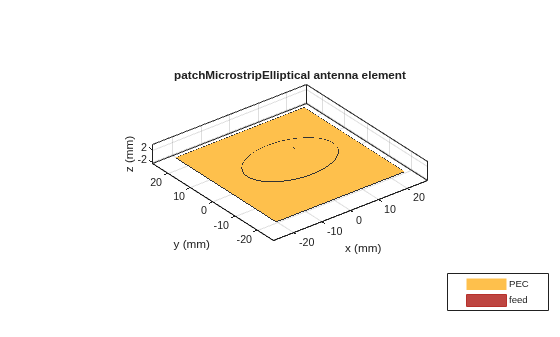
Figure contains an axes object. The axes object with title patchMicrostripElliptical antenna element, xlabel x (mm), ylabel y (mm) contains 5 objects of type patch, surface. These objects represent PEC, feed.

Visualize the radiation pattern of the antenna at 5.45 GHz.

pattern(ant,5.45e9)
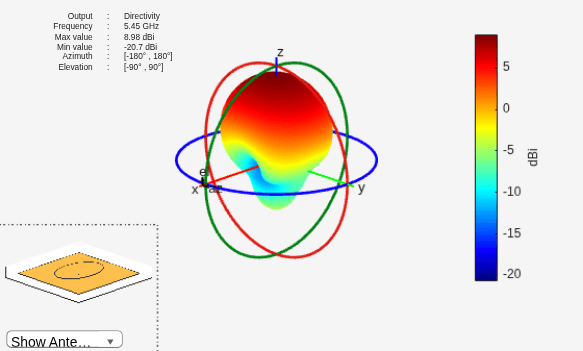
Figure contains 2 axes objects and other objects of type uicontrol. Axes object 1 contains 5 objects of type patch, surface. Hidden axes object 2 contains 17 objects of type surface, line, text, patch.

This example shows how to create an AI model based elliptical microstrip patch antenna at 5.45 GHz and calculate its resonant frequency.

pAI = design(patchMicrostripElliptical(Substrate=dielectric("FR4")),5.45e9,ForAI=true)
pAI = 
  AIAntenna with properties:

   Antenna Info
               AntennaType: 'patchMicrostripElliptical'
    InitialDesignFrequency: 5.4500e+09

   Tunable Parameters
                 MajorAxis: 0.0148
                 MinorAxis: 0.0129
                    Height: 0.0011
         SubstrateEpsilonR: 4.8000

Show read-only properties

Vary its major and minor axis length and calculate its resonant frequency.

pAI.MajorAxis = 0.013;
pAI.MinorAxis = 0.012;
pAI.SubstrateEpsilonR = 5.5;
resonantFrequency(pAI)
ans = 
5.5395e+09

Convert the AIAntenna to a standard elliptical microstrip patch.

pmC = exportAntenna(pAI)
pmC = 
  patchMicrostripElliptical with properties:

            MajorAxis: 0.0130
            MinorAxis: 0.0120
               Height: 0.0011
            Substrate: [1×1 dielectric]
    GroundPlaneLength: 0.0264
     GroundPlaneWidth: 0.0264
    PatchCenterOffset: [0 0]
           FeedOffset: [0.0051 0.0021]
            Conductor: [1×1 metal]
                 Tilt: 0
             TiltAxis: [1 0 0]
                 Load: [1×1 lumpedElement]

Version History

Introduced in R2020a

expand all