このページの内容は最新ではありません。最新版の英語を参照するには、ここをクリックします。
stlwrite
R2026aメッシュ情報を STL ファイルに書き込む
説明
例
矩形を作成します。形状を 2 つの三角形に分割します。形状の頂点を抽出して三角形の頂点を決定します。点の接続リストを定義し、このリストと頂点に対してtriangulation関数を使用します。
w = shape.Rectangle;
v = getShapeVertices(w)
v = 4×3

   -0.5000   -1.0000         0
    0.5000   -1.0000         0
    0.5000    1.0000         0
   -0.5000    1.0000         0
c = [1 2 4; 2 3 4]
c = 2×3

     1     2     4
     2     3     4
tr = triangulation(c,v(:,1),v(:,2))
tr =
  triangulation with properties:

              Points: [4×2 double]
    ConnectivityList: [2×3 double]
triangulation オブジェクトから STL ファイルを作成します。
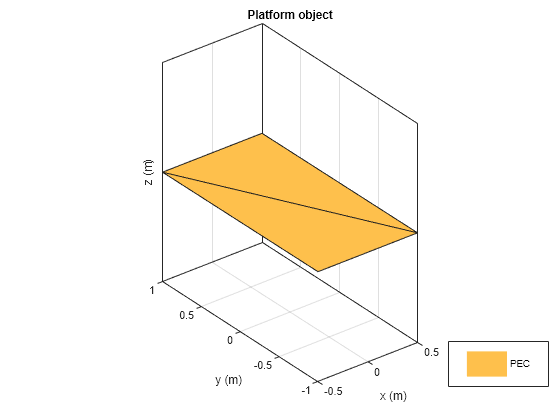
stlwrite(tr,"customPlatForm.stl")現在のフォルダーに STL ファイル customPlatform が作成されます。このファイルを使用して platform オブジェクトを作成し、プラットフォームを可視化します。
plat = platform(FileName="customPlatForm.stl", Units="m")
plat =
  platform with properties:

         FileName: "customPlatForm.stl"
            Units: "m"
    UseFileAsMesh: 0
             Tilt: 0
         TiltAxis: [1 0 0]
figure
show(plat)
入力引数
バージョン履歴
R2019a で導入

