SLAM を使用した LiDAR データからのマップの作成
R2026bこの例では、自己位置推定と環境地図作成の同時実行 (SLAM) の使用により、車両に取り付けられたセンサーからの 3 次元 LiDAR データを処理して、徐々にマップを作成し、車両の軌跡を推定する方法を説明します。3 次元 LiDAR データに加え、慣性航法センサー (INS) も使用して、マップを作成します。このように作成されたマップは、車両ナビゲーションの経路計画に役立ち、位置推定にも使用できます。
概要
LiDAR データからのマップの作成の例では、3 次元 LiDAR データと IMU の読み取り値を使用して、車両がたどった環境のマップを徐々に作成します。このアプローチでは局所的な一貫性のあるマップが作成されますが、これは小さな領域の地図作成にのみ適しています。長いシーケンスではドリフトが蓄積され、重大なエラーになります。この制限に対処するため、この例では以前に訪れた場所を認識し、グラフ SLAM アプローチを使用して、蓄積されたドリフトの修正を試みます。
記録データの読み込みと確認
この例で使用するデータは Velodyne SLAM データセット に含まれています。約 6 分間の記録データです。データを一時ディレクトリにダウンロードします。
メモ: このダウンロードには数分かかることがあります。
baseDownloadURL = 'https://www.mrt.kit.edu/z/publ/download/velodyneslam/data/scenario1.zip';
dataFolder = fullfile(tempdir,'kit_velodyneslam_data_scenario1',filesep);
options = weboptions('Timeout',Inf);

zipFileName  = dataFolder + "scenario1.zip";

% Get the full file path to the PNG files in the scenario1 folder
pointCloudFilePattern = fullfile(dataFolder,'scenario1','scan*.png');
numExpectedFiles = 2513;

folderExists = exist(dataFolder,'dir');
if ~folderExists
    % Create a folder in a temporary directory to save the downloaded zip
    % file
    mkdir(dataFolder);

    disp('Downloading scenario1.zip (153 MB) ...')
    websave(zipFileName,baseDownloadURL,options);

    % Unzip downloaded file
    unzip(zipFileName,dataFolder);

elseif folderExists && numel(dir(pointCloudFilePattern)) < numExpectedFiles
    % Redownload the data if it got reduced in the temporary directory
    disp('Downloading scenario1.zip (153 MB) ...')
    websave(zipFileName,baseDownloadURL,options);

    % Unzip downloaded file
    unzip(zipFileName,dataFolder)
end
Downloading scenario1.zip (153 MB) ...
関数 helperReadDataset を使用して、作成したフォルダーからtimetable形式のデータを読み取ります。LiDAR によって取得された点群は PNG イメージ ファイル形式で格納されます。変数 pointCloudTable にある点群ファイル名のリストを抽出します。イメージ ファイルから点群データを読み取るには、関数 helperReadPointCloudFromFile を使用します。この関数は、イメージ ファイル名を受け取り、pointCloud (Point Cloud Toolbox)オブジェクトを返します。INS の読み取り値は、コンフィギュレーション ファイルから直接読み取られ、変数 insDataTable に格納されます。
datasetTable = helperReadDataset(dataFolder,pointCloudFilePattern);

pointCloudTable = datasetTable(:,1);
insDataTable = datasetTable(:,2:end);
最初の点群を読み取り、それを MATLAB® コマンド プロンプトに表示します。
ptCloud = helperReadPointCloudFromFile(pointCloudTable.PointCloudFileName{1});
disp(ptCloud)
pointCloud with properties:
Location: [64×870×3 single]
Count: 55680
XLimits: [-78.4980 77.7062]
YLimits: [-76.8795 74.7502]
ZLimits: [-2.4839 2.6836]
Color: []
Normal: []
Intensity: []
最初の INS 読み取り値を表示します。timetable は、INS の Heading、Pitch、Roll、X、Y、および Z の情報を保持しています。
disp(insDataTable(1,:))
         Timestamps         Heading     Pitch        Roll          X          Y         Z
    ____________________    _______    ________    _________    _______    _______    ______

    13-Jun-2010 06:27:31    1.9154     0.007438    -0.019888    -2889.1    -2183.9    116.47
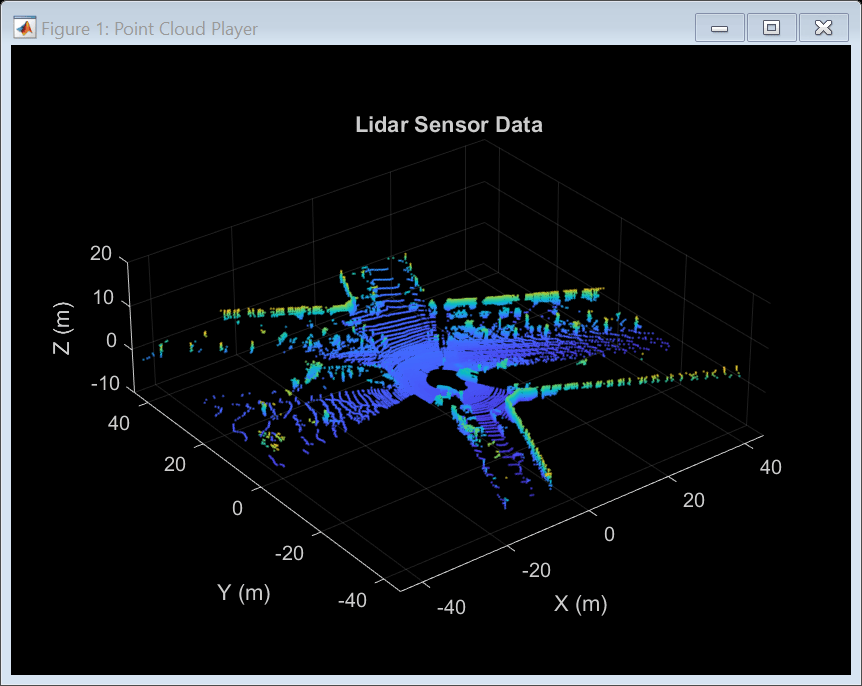
ストリーミング点群表示pcplayer (Point Cloud Toolbox)を使用して、点群を可視化します。車両は、2 つのループで構成される経路をたどります。1 番目のループでは、車両は連続した方向転換を行い、開始点に戻ります。2 番目のループでは、車両は別のルートに沿って連続した方向転換を行い、再び開始点に戻ります。
% Specify limits of the player
xlimits = [-45 45]; % meters
ylimits = [-45 45];
zlimits = [-10 20];

% Create a streaming point cloud display object
lidarPlayer = pcplayer(xlimits,ylimits,zlimits);

% Customize player axes labels
xlabel(lidarPlayer.Axes,'X (m)')
ylabel(lidarPlayer.Axes,'Y (m)')
zlabel(lidarPlayer.Axes,'Z (m)')

title(lidarPlayer.Axes,'Lidar Sensor Data')

% Skip evey other frame since this is a long sequence
skipFrames = 2;
numFrames = height(pointCloudTable);
for n = 1:skipFrames:numFrames

    % Read a point cloud
    fileName = pointCloudTable.PointCloudFileName{n};
    ptCloud = helperReadPointCloudFromFile(fileName);

    % Visualize point cloud
    view(lidarPlayer,ptCloud);

    pause(0.01)
end
オドメトリを使用したマップの作成
まず、LiDAR データからのマップの作成の例で説明したアプローチを使用して、マップを作成します。このアプローチは次のステップで構成されています。
LiDAR スキャンを整列させる: 点群のレジストレーション手法を使用して、連続的な LiDAR スキャンを整列させます。この例では、スキャンのレジストレーションに
pcregisterndt(Point Cloud Toolbox)を使用します。これらの変換を連続して構成することにより、各点群は最初の点群の基準座標系に変換されます。整列したスキャンを組み合わせる: 変換したすべての点群を組み合わせることで、マップを生成します。
インクリメンタルにマップを作成し、車両の軌跡を推定するこのアプローチは、"オドメトリ" と呼ばれます。
pcviewset (Point Cloud Toolbox)オブジェクトを使用して、複数のビューのデータを格納および管理します。ビュー セットには、接続されたビューのセットが含まれています。
各ビューには、1 つのビューに関連付けられた情報が格納されています。この情報には、ビューの絶対姿勢、そのビューで取得された点群センサー データ、およびビューの一意な識別子が含まれています。
addViewを使用して、ビューをビュー セットに追加します。ビュー間の接続を確立するには、
addConnection(Point Cloud Toolbox)を使用します。接続には、接続されたビュー間の相対的な変換、この測定値の計算に伴う不確かさ (情報行列で表されます)、および関連付けられたビューの識別子などの情報が格納されます。plotメソッドを使用して、ビュー セットによって確立された接続を可視化します。これらの接続は、車両がたどった経路を可視化するために使用できます。
hide(lidarPlayer)

% Set random seed to ensure reproducibility
rng(0);

% Create an empty view set
vSet = pcviewset;

% Initialize point cloud processing parameters
downsamplePercent = 0.1;
regGridSize = 3;

% Initialize transformations
absTform = rigidtform3d;  % Absolute transformation to reference frame
relTform = rigidtform3d;  % Relative transformation between successive scans

viewId = 1;
skipFrames = 5;
numFrames = height(pointCloudTable);
displayRate = 100;  % Update display every 100 frames
for n = 1:skipFrames:numFrames

    % Read point cloud
    fileName = pointCloudTable.PointCloudFileName{n};
    ptCloudOrig = helperReadPointCloudFromFile(fileName);

    % Process point cloud
    %   - Segment and remove ground plane
    %   - Segment and remove ego vehicle
    ptCloud = helperProcessPointCloud(ptCloudOrig);

    % Downsample the processed point cloud
    ptCloud = pcdownsample(ptCloud,"random",downsamplePercent);

    firstFrame = (n==1);
    if firstFrame
        % Add first point cloud scan as a view to the view set
        vSet = addView(vSet,viewId,absTform,"PointCloud",ptCloudOrig);

        viewId = viewId + 1;
        ptCloudPrev = ptCloud;
        continue;
    end

    % Use INS to estimate an initial transformation for registration
    initTform = helperComputeInitialEstimateFromINS(relTform, ...
        insDataTable(n-skipFrames:n,:));

    % Compute rigid transformation that registers current point cloud with
    % previous point cloud
    relTform = pcregisterndt(ptCloud,ptCloudPrev,regGridSize, ...
        "InitialTransform",initTform);

    % Update absolute transformation to reference frame (first point cloud)
    absTform = rigidtform3d(absTform.A * relTform.A);

    % Add current point cloud scan as a view to the view set
    vSet = addView(vSet,viewId,absTform,"PointCloud",ptCloudOrig);

    % Add a connection from the previous view to the current view, representing
    % the relative transformation between them
    vSet = addConnection(vSet,viewId-1,viewId,relTform);

    viewId = viewId + 1;

    if mod(viewId,displayRate) == 0
        plot(vSet)
        drawnow
    end

    ptCloudPrev = ptCloud;
    initTform = relTform;
end

title('View Set Display')
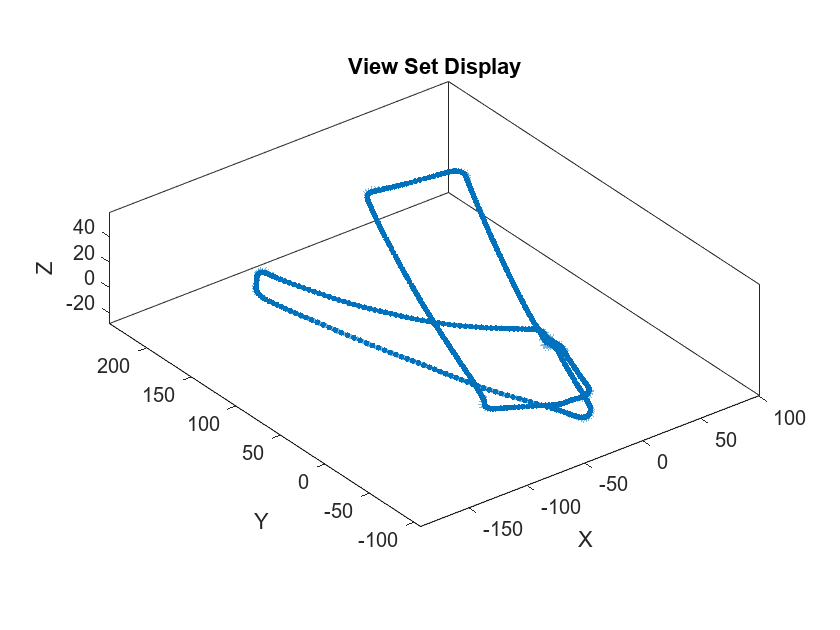
ビュー セット オブジェクト vSet は現在、ビューと接続を保持しています。vSet の Views テーブルでは、最初のビューに対する各ビューの絶対姿勢を変数 AbsolutePose で指定します。vSet の Connections テーブルでは、接続されたビュー間の相対的な制約を変数 RelativePose で指定し、接続に関連付けられた不確かさをエッジごとに変数 InformationMatrix で指定します。
% Display the first few views and connections
head(vSet.Views)
ViewId AbsolutePose PointCloud
______ ________________ ______________
1 1×1 rigidtform3d 1×1 pointCloud
2 1×1 rigidtform3d 1×1 pointCloud
3 1×1 rigidtform3d 1×1 pointCloud
4 1×1 rigidtform3d 1×1 pointCloud
5 1×1 rigidtform3d 1×1 pointCloud
6 1×1 rigidtform3d 1×1 pointCloud
7 1×1 rigidtform3d 1×1 pointCloud
8 1×1 rigidtform3d 1×1 pointCloud
head(vSet.Connections)
    ViewId1    ViewId2      RelativePose      InformationMatrix
    _______    _______    ________________    _________________

       1          2       1×1 rigidtform3d      {6×6 double}
       2          3       1×1 rigidtform3d      {6×6 double}
       3          4       1×1 rigidtform3d      {6×6 double}
       4          5       1×1 rigidtform3d      {6×6 double}
       5          6       1×1 rigidtform3d      {6×6 double}
       6          7       1×1 rigidtform3d      {6×6 double}
       7          8       1×1 rigidtform3d      {6×6 double}
       8          9       1×1 rigidtform3d      {6×6 double}
次に、作成したビュー セットを使用して点群マップを作成します。pcalign (Point Cloud Toolbox)を使用して、ビューの絶対姿勢をビュー セット内の点群の位置に合わせます。グリッド サイズを指定して、マップの分解能を制御します。マップは pointCloud オブジェクトとして返されます。
ptClouds = vSet.Views.PointCloud;
absPoses = vSet.Views.AbsolutePose;
mapGridSize = 0.2;
ptCloudMap = pcalign(ptClouds,absPoses,mapGridSize);
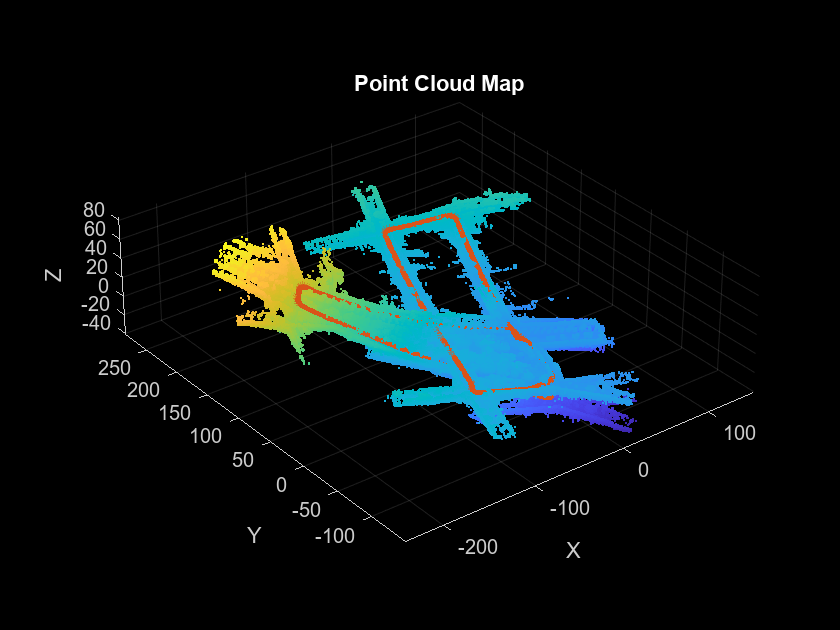
このアプローチを使用してたどった経路は、時間の経過とともにドリフトすることに注目してください。1 番目のループに沿った経路が開始点に戻っているのは妥当と考えられますが、2 番目のループは開始点から大幅にドリフトしています。ドリフトが蓄積したことにより、2 番目のループは開始点から数メーター離れたところで終了しています。
オドメトリのみを使用して作成したマップは不正確です。たどった経路と共に、作成した点群マップを表示します。2 番目のループのマップとたどった経路が 1 番目のループと一致していないことに注目してください。
figure
pcshow(ptCloudMap);
hold on
plot(vSet)
title('Point Cloud Map','Color','w')
姿勢グラフ最適化を使用したドリフトの修正
"グラフ SLAM" は、オドメトリのドリフトを解決するために広く使用されている手法です。グラフ SLAM のアプローチでは、グラフをインクリメンタルに作成します。このグラフでは、ノードは車両の姿勢に対応し、エッジは接続された姿勢を制約するセンサーの測定値を表します。このようなグラフは "姿勢グラフ" と呼ばれます。姿勢グラフにはエッジが含まれており、これが測定値におけるノイズや誤差に起因する矛盾した情報を符号化します。そして、構成されたグラフ内のノードが最適化され、測定値を最適に説明する車両の姿勢のセットが求められます。この手法は "姿勢グラフ最適化" と呼ばれます。
ビュー セットから姿勢グラフを作成するには、関数createPoseGraphを使用できます。この関数は、ビュー セットに含まれる各ビューのノードと各接続のエッジを作成します。姿勢グラフを最適化するには、関数optimizePoseGraph (Navigation Toolbox)を使用できます。
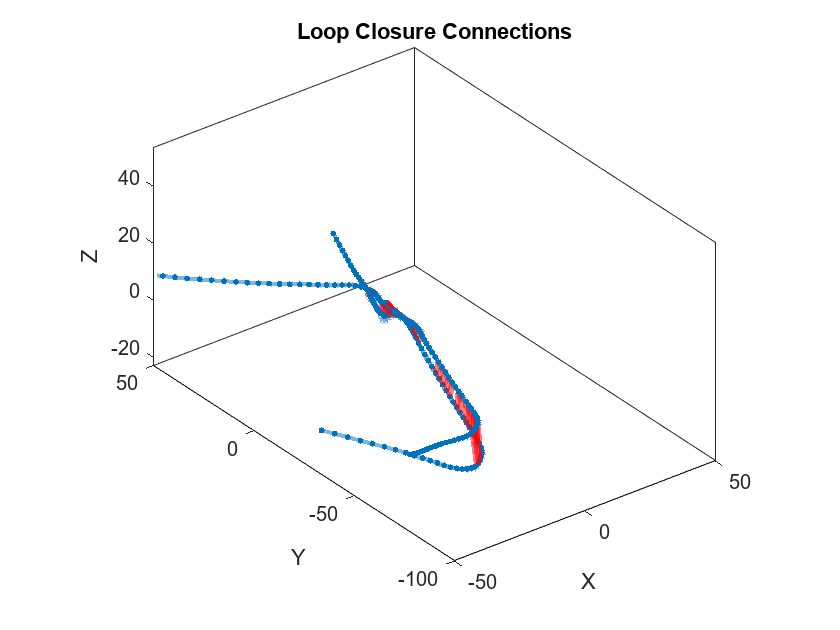
ドリフトの修正においてグラフ SLAM の有効性に寄与する重要な要素の 1 つが、ループ、すなわち以前に訪れた場所を正確に検出することです。これは "ループ閉じ込み検出" または "場所認識" と呼ばれます。ループ閉じ込みに対応する姿勢グラフにエッジを追加すると、接続されたノードの姿勢の計測値に矛盾が生じます。これは姿勢グラフ最適化において解決できます。
ループ閉じ込みは、LiDAR センサーが認識するローカル環境の特徴を示す記述子を使用して検出できます。スキャン コンテキストの記述子 [1] は、scanContextDescriptor (Point Cloud Toolbox)関数を使用して点群から計算できる記述子の 1 つです。この例では、scanContextLoopDetector (Point Cloud Toolbox)オブジェクトを使用して、各ビューに対応するスキャン コンテキスト記述子を管理します。detectLoop (Point Cloud Toolbox)オブジェクト関数を使用して、2 段階記述子検索アルゴリズムでループ閉じ込みを検出します。第 1 段階では、リング キー サブ記述子を計算して、候補になりうるループを求めます。第 2 段階では、スキャン コンテキストの距離をしきい値処理して、ビューをループ閉じ込みとして分類します。
% Set random seed to ensure reproducibility
rng(0);

% Create an empty view set
vSet = pcviewset;

% Create a loop closure detector
loopDetector = scanContextLoopDetector;

% Initialize transformations
absTform = rigidtform3d;  % Absolute transformation to reference frame
relTform = rigidtform3d;  % Relative transformation between successive scans

maxTolerableRMSE = 3;  % Maximum allowed RMSE for a loop closure candidate to be accepted

viewId = 1;
for n = 1:skipFrames:numFrames

    % Read point cloud
    fileName = pointCloudTable.PointCloudFileName{n};
    ptCloudOrig = helperReadPointCloudFromFile(fileName);

    % Process point cloud
    %   - Segment and remove ground plane
    %   - Segment and remove ego vehicle
    ptCloud = helperProcessPointCloud(ptCloudOrig);

    % Downsample the processed point cloud
    ptCloud = pcdownsample(ptCloud,"random",downsamplePercent);

    firstFrame = (n==1);
    if firstFrame
        % Add first point cloud scan as a view to the view set
        vSet = addView(vSet,viewId,absTform,"PointCloud",ptCloudOrig);

        % Extract the scan context descriptor from the first point cloud
        descriptor = scanContextDescriptor(ptCloudOrig);

        % Add the first descriptor to the loop closure detector
        addDescriptor(loopDetector,viewId,descriptor)

        viewId = viewId + 1;
        ptCloudPrev = ptCloud;
        continue;
    end

    % Use INS to estimate an initial transformation for registration
    initTform = helperComputeInitialEstimateFromINS(relTform, ...
        insDataTable(n-skipFrames:n,:));

    % Compute rigid transformation that registers current point cloud with
    % previous point cloud
    relTform = pcregisterndt(ptCloud,ptCloudPrev,regGridSize, ...
        "InitialTransform",initTform);

    % Update absolute transformation to reference frame (first point cloud)
    absTform = rigidtform3d(absTform.A * relTform.A);

    % Add current point cloud scan as a view to the view set
    vSet = addView(vSet,viewId,absTform,"PointCloud",ptCloudOrig);

    % Add a connection from the previous view to the current view representing
    % the relative transformation between them
    vSet = addConnection(vSet,viewId-1,viewId,relTform);

    % Extract the scan context descriptor from the point cloud
    descriptor = scanContextDescriptor(ptCloudOrig);

    % Add the descriptor to the loop closure detector
    addDescriptor(loopDetector,viewId,descriptor)

    % Detect loop closure candidates
    loopViewId = detectLoop(loopDetector);

    % A loop candidate was found
    if ~isempty(loopViewId)
        loopViewId = loopViewId(1);

        % Retrieve point cloud from view set
        loopView = findView(vSet,loopViewId);
        ptCloudOrig = loopView.PointCloud;

        % Process point cloud
        ptCloudOld = helperProcessPointCloud(ptCloudOrig);

        % Downsample point cloud
        ptCloudOld = pcdownsample(ptCloudOld,"random",downsamplePercent);

        % Use registration to estimate the relative pose
        [relTform,~,rmse] = pcregisterndt(ptCloud,ptCloudOld, ...
            regGridSize,"MaxIterations",50);

        acceptLoopClosure = rmse <= maxTolerableRMSE;
        if acceptLoopClosure
            % For simplicity, use a constant, small information matrix for
            % loop closure edges
            infoMat = 0.01 * eye(6);

            % Add a connection corresponding to a loop closure
            vSet = addConnection(vSet,loopViewId,viewId,relTform,infoMat);
        end
    end

    viewId = viewId + 1;

    ptCloudPrev = ptCloud;
    initTform = relTform;
end
createPoseGraphメソッドを使用して、ビュー セットから姿勢グラフを作成します。この姿勢グラフは、次をもつdigraphオブジェクトです。
各ビューの絶対姿勢を含むノード
各接続の相対姿勢の制約を含むエッジ
G = createPoseGraph(vSet);
disp(G)
  digraph with properties:

    Edges: [539×3 table]
    Nodes: [503×2 table]
% Display view set to display loop closure detections
figure
hG = plot(vSet);

% Update axes limits to focus on loop closure detections
xlim([-50 50]);
ylim([-100 50]);

% Find and highlight loop closure connections
loopEdgeIds = find(abs(diff(G.Edges.EndNodes,1,2)) > 1);
highlight(hG,'Edges',loopEdgeIds,'EdgeColor','red','LineWidth',3)
title('Loop Closure Connections')
optimizePoseGraph (Navigation Toolbox)を使用して姿勢グラフを最適化します。
optimG = optimizePoseGraph(G,'g2o-levenberg-marquardt');

vSetOptim = updateView(vSet,optimG.Nodes);
姿勢が最適化されたビュー セットを表示します。検出されたループがマージされており、軌跡の精度が上がっていることがわかります。
figure
plot(vSetOptim)
title('View Set Display (after optimization)')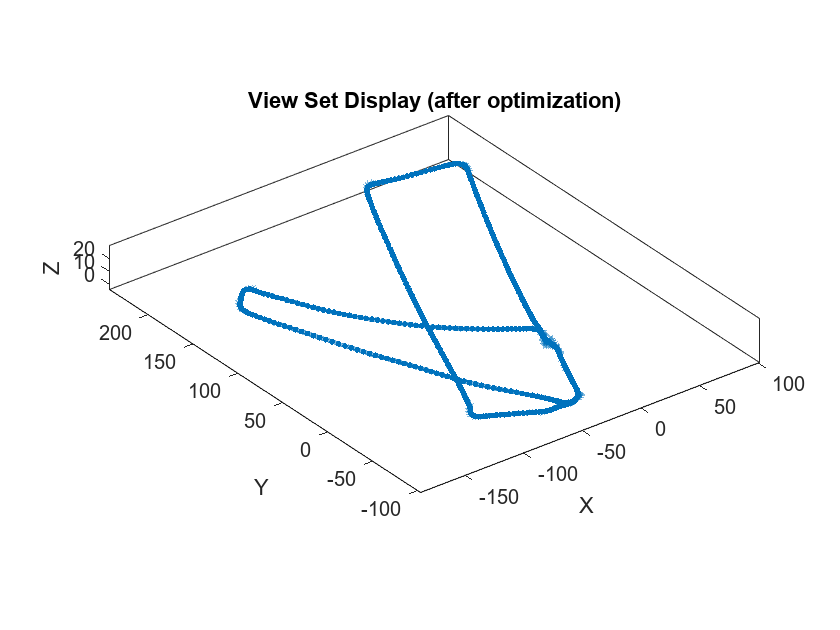
最適化されたビュー セットの絶対姿勢を使用して、より精度の高いマップが作成できるようになりました。pcalign (Point Cloud Toolbox)関数を使用し、ビュー セットの点群と最適化されたビュー セットの絶対姿勢とを合わせて、1 つの点群マップにします。グリッド サイズを指定して、作成された点群マップの分解能を制御します。
mapGridSize = 0.2;
ptClouds = vSetOptim.Views.PointCloud;
absPoses = vSetOptim.Views.AbsolutePose;
ptCloudMap = pcalign(ptClouds,absPoses,mapGridSize);

figure
pcshow(ptCloudMap);

% Overlay view set display
hold on
plot(vSetOptim);
title('Point Cloud Map (after optimization)','Color','w')
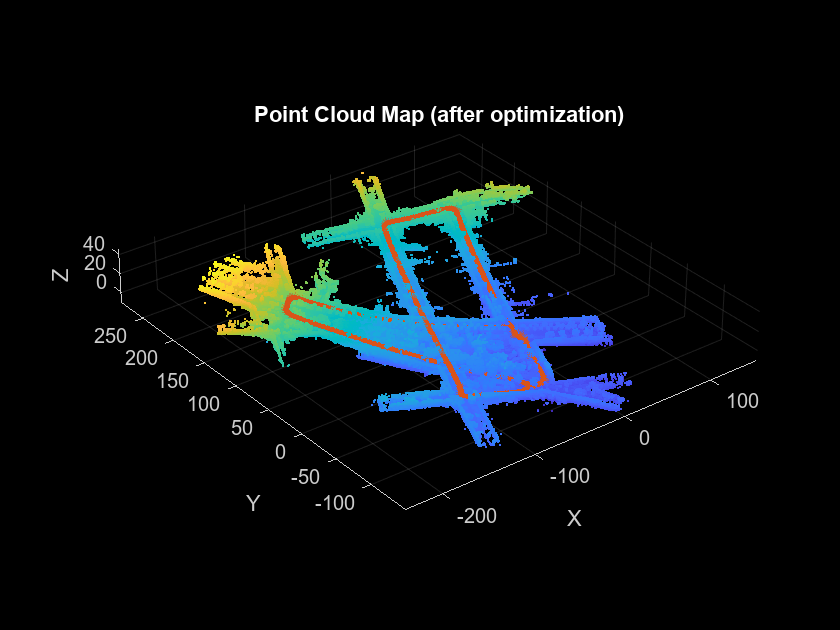
精度はまだ改善できるものの、この点群マップの精度は大幅に向上しています。
GPU コード生成を使用した SLAM ワークフローの高速化
この例のほとんどの機能は GPU コード生成をサポートしています。NVIDIA® GPU で 3 次元 LiDAR SLAM を実行する方法を示す例については、次の例を参照してください。
他のレジストレーション アルゴリズムを使用した 3 次元 LiDAR SLAM
この例では、連続する点群を整列させるためにpcregisterndt (Point Cloud Toolbox)を使用しています。点群をレジストレーションするための他の手法については、次の例を参照できます。
Build a Map with Lidar Odometry and Mapping (LOAM) Using Unreal Engine Simulation (Point Cloud Toolbox):
pcregisterloam(Point Cloud Toolbox)を使用して点群をレジストレーションし、pcmaploam(Point Cloud Toolbox)を使用して配置を調整します。Design Lidar SLAM Algorithm Using Unreal Engine Simulation Environment:
pcregistericp(Point Cloud Toolbox)を使用して点群をレジストレーションし、scanContextLoopDetector(Point Cloud Toolbox)を使用してループ閉じ込みを検出します。Aerial Lidar SLAM Using FPFH Descriptors (Point Cloud Toolbox): 特徴の検出とマッチングの手法を使用して点群間の相対的な姿勢を検出し、
pcregistericp(Point Cloud Toolbox)を使用して配置を調整します。
参考文献
G. Kim and A. Kim, "Scan Context: Egocentric Spatial Descriptor for Place Recognition Within 3D Point Cloud Map," 2018 IEEE/RSJ International Conference on Intelligent Robots and Systems (IROS), Madrid, 2018, pp. 4802-4809.
サポート関数とサポート クラス
helperReadDataset は、指定されたフォルダーから timetable へデータを読み取ります。
function datasetTable = helperReadDataset(dataFolder,pointCloudFilePattern)
%helperReadDataset Read Velodyne SLAM Dataset data into a timetable
%   datasetTable = helperReadDataset(dataFolder) reads data from the
%   folder specified in dataFolder into a timetable. The function
%   expects data from the Velodyne SLAM Dataset.
%
%   See also fileDatastore, helperReadINSConfigFile.

% Create a file datastore to read in files in the right order
fileDS = fileDatastore(pointCloudFilePattern,'ReadFcn', ...
    @helperReadPointCloudFromFile);

% Extract the file list from the datastore
pointCloudFiles = fileDS.Files;

imuConfigFile = fullfile(dataFolder,'scenario1','imu.cfg');
insDataTable = helperReadINSConfigFile(imuConfigFile);

% Delete the bad row from the INS config file
insDataTable(1447,:) = [];

% Remove columns that will not be used
datasetTable = removevars(insDataTable, ...
    {'Num_Satellites','Latitude','Longitude','Altitude','Omega_Heading', ...
     'Omega_Pitch','Omega_Roll','V_X','V_Y','V_ZDown'});

datasetTable = addvars(datasetTable,pointCloudFiles,'Before',1, ...
    'NewVariableNames',"PointCloudFileName");
end
helperProcessPointCloud は、グランド プレーンと自車の点を削除することにより、点群を処理します。
function ptCloud = helperProcessPointCloud(ptCloudIn,method)
%helperProcessPointCloud Process pointCloud to remove ground and ego vehicle
%   ptCloud = helperProcessPointCloud(ptCloudIn,method) processes
%   ptCloudIn by removing the ground plane and the ego vehicle.
%   method can be "planefit" or "rangefloodfill".
%
%   See also pcfitplane, pointCloud/findPointsInCylinder.

arguments
    ptCloudIn (1,1) pointCloud
    method          string      {mustBeMember(method,["planefit","rangefloodfill"])} = "rangefloodfill"
end

isOrganized = ~ismatrix(ptCloudIn.Location);

if (method=="rangefloodfill" && isOrganized)
    % Segment ground using floodfill on range image
    groundFixedIdx = segmentGroundFromLidarData(ptCloudIn, ...
        "ElevationAngleDelta",11);
else
    % Segment ground as the dominant plane with reference normal
    % vector pointing in positive z-direction
    maxDistance = 0.4;
    maxAngularDistance = 5;
    referenceVector= [0 0 1];

    [~,groundFixedIdx] = pcfitplane(ptCloudIn,maxDistance, ...
        referenceVector,maxAngularDistance);
end

if isOrganized
    groundFixed = false(size(ptCloudIn.Location,1),size(ptCloudIn.Location,2));
else
    groundFixed = false(ptCloudIn.Count,1);
end
groundFixed(groundFixedIdx) = true;

% Segment ego vehicle as points within a cylindrical region of the sensor
sensorLocation = [0 0 0];
egoRadius = 3.5;
egoFixed = findPointsInCylinder(ptCloudIn,egoRadius,"Center",sensorLocation);

% Retain subset of point cloud without ground and ego vehicle
if isOrganized
    indices = ~groundFixed & ~egoFixed;
else
    indices = find(~groundFixed & ~egoFixed);
end

ptCloud = select(ptCloudIn,indices);
end
helperComputeInitialEstimateFromINS は、INS の読み取り値から、レジストレーションのための初期変換を推定します。
function initTform = helperComputeInitialEstimateFromINS(initTform,insData)

% If no INS readings are available, return
if isempty(insData)
    return;
end

% The INS readings are provided with X pointing to the front, Y to the left
% and Z up. Translation below accounts for transformation into the lidar
% frame.
insToLidarOffset = [0 -0.79 -1.73]; % See DATAFORMAT.txt
Tnow = [-insData.Y(end) insData.X(end) insData.Z(end)].' + insToLidarOffset';
Tbef = [-insData.Y(1)   insData.X(1)   insData.Z(1)].'   + insToLidarOffset';

% Since the vehicle is expected to move along the ground, changes in roll
% and pitch are minimal. Ignore changes in roll and pitch, use heading only.
Rnow = rotmat(quaternion([insData.Heading(end) 0 0],'euler','ZYX','point'),'point');
Rbef = rotmat(quaternion([insData.Heading(1)   0 0],'euler','ZYX','point'),'point');

T = [Rbef Tbef; 0 0 0 1] \ [Rnow Tnow; 0 0 0 1];

initTform = rigidtform3d(T);
end

