このページの内容は最新ではありません。最新版の英語を参照するには、ここをクリックします。
detectCheckerboardPoints
R2026aイメージ内のチェッカーボード パターンの検出
構文
説明
単一イメージのチェッカーボード検出
[ は、単一のイメージ、イメージのセット、またはステレオ イメージ ペア内のチェッカーボード キャリブレーション パターンのキーポイントを検出します。この関数は、検出点 imagePoints,patternDims] = detectCheckerboardPoints(I)imagePoints とチェッカーボードの次元 patternDims を返します。
[ は、ファイル名の配列として指定された入力イメージ セット内のチェッカーボード パターンを検出します。imagePoints,patternDims,imagesUsed] = detectCheckerboardPoints(imageFileNames)
[ は、グレースケール イメージまたはトゥルーカラー イメージの配列として指定された入力イメージ セット内のチェッカーボード パターンを検出します。imagePoints,patternDims,imagesUsed] = detectCheckerboardPoints(images)
ステレオ ペアのチェッカーボード検出
[ は、ファイル名の cell 配列として指定されたイメージのステレオ ペア内のチェッカーボード パターンを検出します。imagePoints,patternDims,pairsUsed] = detectCheckerboardPoints(imageFileNames1,imageFileNames2)
[ は、グレースケール イメージまたはトゥルーカラー イメージの配列として指定されたイメージのステレオ ペア内のチェッカーボード パターンを検出します。imagePoints,patternDims,pairsUsed] = detectCheckerboardPoints(images1,images2)
オプション引数
[ は、imagePoints,patternDims,pairsUsed] = detectCheckerboardPoints(___,Name,Value)Name,Value ペアの引数を 1 つ以上指定したオプションを追加で使用します。指定していないプロパティは既定値になります。
例
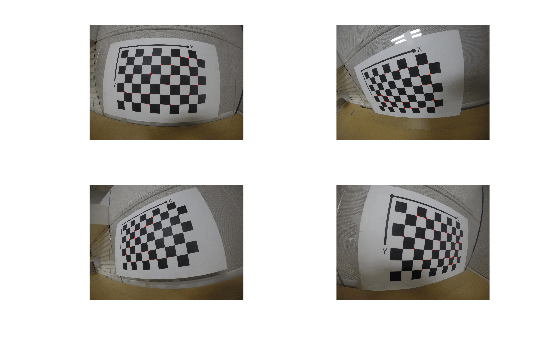
GoPro カメラからのキャリブレーション イメージを格納する imageDatastore を作成します。
imds = imageDatastore(fullfile(toolboxdir("vision"),"visiondata","calibration","gopro"));
魚眼レンズ イメージでの使用に適した HighDistortion オプションを使用して、キャリブレーション パターンを検出します。
[imagePoints,patternDims,imagesUsed] = detectCheckerboardPoints(imds.Files(1:4),HighDistortion=true);
検出した点を表示します。
for i = 1:4
  % Read image
  I = readimage(imds,i);

  % Insert markers at detected point locations
  I = insertMarker(I,imagePoints(:,:,i),"o",MarkerColor="red",Size=10);

  % Display image
  subplot(2,2,i);
  imshow(I);
end
チェッカーボード パターンを含むイメージを読み込みます。
imageFileName = fullfile(toolboxdir("vision"),"visiondata","calibration","dslr","image01.jpg");
I = imread(imageFileName);
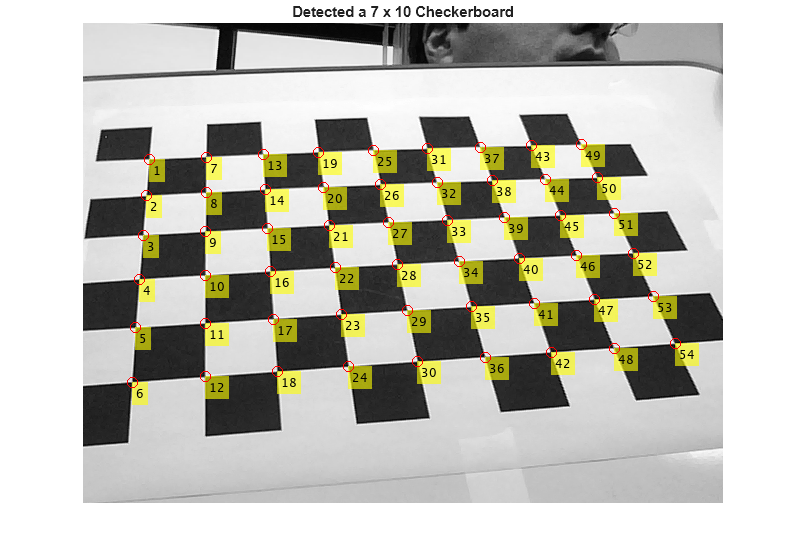
チェッカーボード点を検出します。
[imagePoints,patternDims] = detectCheckerboardPoints(I);
検出した点を表示します。
J = insertText(I,imagePoints,1:size(imagePoints,1));
J = insertMarker(J,imagePoints,"o",MarkerColor="red",Size=5);
imshow(J);
title(sprintf("Detected a %d x %d Checkerboard",patternDims));
キャリブレーション イメージのファイル名の cell 配列を作成します。
images = imageDatastore(fullfile(toolboxdir("vision"),"visiondata",...
    "calibration","dslr"));
imageFileNames = images.Files;
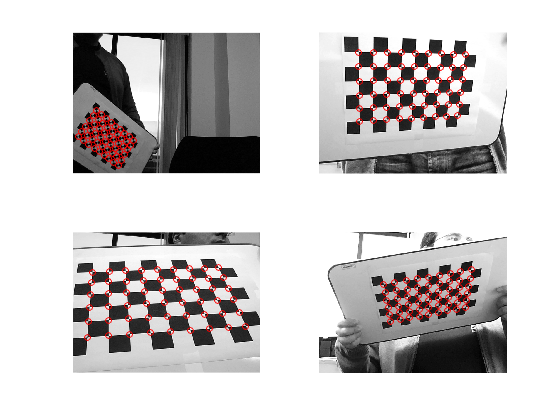
イメージ内のキャリブレーション パターンを検出します。
[imagePoints,patternDims,imagesUsed] = detectCheckerboardPoints(imageFileNames,PartialDetections=false);
検出した点を表示します。
imageFileNames = imageFileNames(imagesUsed);
for i = 1:4
  I = imread(imageFileNames{i});
subplot(2, 2, i);
  imshow(I);
  hold on;
  plot(imagePoints(:,1,i),imagePoints(:,2,i),"ro");
end
ステレオ イメージを読み取ります。
numImages = 4;
images1 = cell(1,numImages);
images2 = cell(1,numImages);
for i = 1:numImages
    images1{i} = fullfile(matlabroot,'toolbox','vision',...
        'visiondata','calibration','stereo','left',sprintf('left%02d.png',i));
    images2{i} = fullfile(matlabroot,'toolbox','vision',...
        'visiondata','calibration','stereo','right',sprintf('right%02d.png',i));
end
イメージ内のチェッカーボードを検出します。
[imagePoints,patternDims,pairsUsed] = ...
    detectCheckerboardPoints(images1,images2);
images1 の点を表示します。
images1 = images1(pairsUsed);
figure;
for i = 1:numel(images1)
      I = imread(images1{i});
      subplot(2,2,i);
      imshow(I);
      hold on;
      plot(imagePoints(:,1,i,1),imagePoints(:,2,i,1),'ro');
end
annotation('textbox',[0 0.9 1 0.1],'String','Camera 1',...
    'EdgeColor','none','HorizontalAlignment','center')

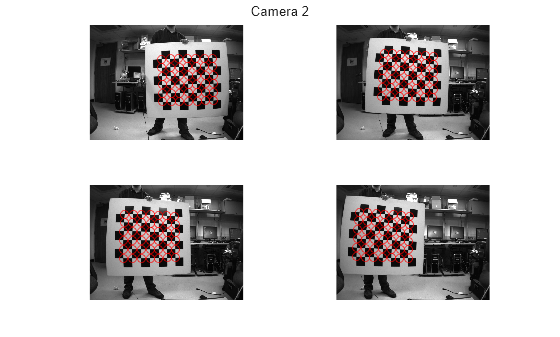
images2 の点を表示します。
images2 = images2(pairsUsed);
figure;
for i = 1:numel(images2)
      I = imread(images2{i});
      subplot(2, 2, i);
      imshow(I);
      hold on;
      plot(imagePoints(:,1,i,2),imagePoints(:,2,i,2),'ro');
end
annotation('textbox',[0 0.9 1 0.1],'String','Camera 2',...
    'EdgeColor','none','HorizontalAlignment','center')
入力引数
名前と値の引数
出力引数
検出されたチェッカーボードのコーナーの座標。1 つのイメージの場合は M 行 2 列の行列として返されます。複数のイメージの場合、点は M x 2 x number of images の配列として返され、イメージのステレオ ペアの場合、点は M x 2 x number of pairs x number of cameras の配列として返されます。
ステレオ ペアの場合、imagePoints(:,:,:,1) は最初のイメージ セットの点で、imagePoints(:,:,:,2) は 2 番目のイメージ セットの点です。出力には M 個の [x y] 座標が含まれます。各座標は、チェッカーボードで正方形のコーナーが検出された点を表します。関数によって返される点の数は、検出された正方形の数を示す patternDims の値によって決まります。関数はサブピクセルの精度で点を検出します。
関数は点の数 M を次のように計算します。
M = prod(patternDims-1)。 |
チェッカーボードを検出できない場合は次のようになります。
imagePoints = [] |
patternDims = [0,0] |
imageFileNames 入力を指定すると、関数は imagePoints を M x 2 x N の配列として返すことができます。この配列では、N はチェッカーボードが検出されたイメージの数を表します。チェッカーボードが検出できない場合、関数は imagePoints を次に設定します。

単一カメラのイメージのみの場合:
完全なチェッカーボードが検出できない場合、関数は、
imagePointsで欠損しているコーナーの x-y 座標として [NaN,NaN] を使用して、部分的に検出されたチェッカーボードを返します。この既定の動作は、名前と値の引数'PartialDetections'を使用して変更できます。可能な場合、関数は、部分的に検出されたチェッカーボードの原点の位置とコーナーの配置が、全体が表示された状態のチェッカーボードと一致するように、その向きを設定します。関数が入力イメージのいずれにおいても完全なチェッカーボードを検出できない場合、検出された最大サイズのチェッカーボードが参照チェッカーボードとして使用され、このボードの次元が
patternDimsに返されます。
パターンの次元。2 要素ベクトル [height, width] として返されます。パターンの次元は正方形の数で表されます。
チェッカーボードが検出できない場合、関数は patternDims を [0,0] に設定します。
パターン検出結果。N 行 1 列の logical ベクトルとして返されます。ここで、N はイメージの数です。関数は、イメージ内でコーナーが正常に検出された場合は 1 (true) を返し、コーナーが検出されなかった場合は 0 (false) を返します。
関数は、キーポイントの正常な検出結果に基づいて、チェッカーボードのコーナーを推定します。検出プロセスのいずれかのステップが失敗した場合、関数はそのイメージのコーナーを返さず、logical ベクトル内の対応する値が false となります。
ステレオ ペアのパターン検出結果。N 行 1 列の logical ベクトルとして返されます。ここで、N はイメージの数です。関数は、ステレオ イメージ ペア内でコーナーが正常に検出された場合は 1 (true) を返し、コーナーが検出されなかった場合は 0 (false) を返します。
ステレオ ペア パターン検出の場合、チェッカーボードを検出するには、両方のイメージでチェッカーボード全体が表示されている必要があります。単一カメラのキャリブレーションとは異なり、ステレオ イメージ ペアでは部分的に検出されたチェッカーボードが除外されます。
参照
[1] Geiger, A., F. Moosmann, O. Car, and B. Schuster. "Automatic Camera and Range Sensor Calibration using a Single Shot," International Conference on Robotics and Automation (ICRA), St. Paul, USA, May 2012.
拡張機能
バージョン履歴
R2014a で導入

