メインコンテンツ

surfaceReflectivityLand

Normalized reflectivity of land surface

Since R2022a

Description

This System object™ creates a normalized reflectivity object for a land surface. Use surfaceReflectivityLand to generate normalized radar cross section (NRCS), and optionally speckle, as a function of frequency and grazing angle for land surfaces. NRCS is the radar cross section (RCS) of a unit area of a surface. Multiplying by the total area of a surface or the illuminated area of a surface gives the total RCS.

NRCS is used to calculate RCS and surface clutter returns. Speckle is a multiplicative factor used to make surface clutter appear noisier and is especially applicable to imaging applications. Attach a surfaceReflectityLand object to a landSurface in radarScenario using SurfaceManager. See Radar Surface Clutter Simulation for more information.

To compute the normalized reflectivity:

  1. Create the surfaceReflectivityLand object and set its properties.

  2. Call the object with arguments, as if it were a function.

To learn more about how System objects work, see What Are System Objects?

Creation

Description

refl = surfaceReflectivityLand creates a normalized reflectivity System object, refl, for a land surface. Use refl to generate normalized radar cross section as a function of frequency and grazing angle. This syntax creates a normalized reflectivity object with a "Barton" land Model and a "Flatland" LandType.

example

refl = surfaceReflectivityLand(PropertyName=Value) creates a normalized reflectivity object for a land surface with each specified PropertyName set to the corresponding Value. For example, the Model and LandType properties specify built-in reflectivity models. Land Reflectivity Models and Land Types summarizes supported land surface models and their domain of application. You can specify additional pairs of arguments in any order as (PropertyName1=Value1, … ,PropertyNameN=ValueN).

example

Properties

expand all

Unless otherwise indicated, properties are nontunable, which means you cannot change their values after calling the object. Objects lock when you call them, and the release function unlocks them.

If a property is tunable, you can change its value at any time.

For more information on changing property values, see System Design in MATLAB Using System Objects.

Land reflectivity model, specified as one of "Barton", "APL", "Billingsley", "GIT", "Morchin", "Nathanson", "UlabyDobson", or "ConstantGamma".

Tip

It is not recommended to use land models outside of their valid frequency and grazing angle ranges. See Land Reflectivity Models and Land Types for more information about the range of validity for supported models and land types.

Data Types: char | string

Land type, specified as one of the options listed in the Land Type column of the table Land Reflectivity Models and Land Types. The land type must correspond to the model selected by the Model property. When Model is set to "ConstantGamma", specify the Gamma property instead of LandType.

Data Types: char | string

Enable polarization, specified as true or false. When EnablePolarization is set to true, the output argument nrcs includes polarimetric normalized radar cross section components. EnablePolarization enables additional polarization-related properties when set to either true or false.

When set to true, EnablePolarization enables the CrossPolarization property. Specifying the CrossPolarization property enables additional polarization-related properties that are relevant for frequencies and grazing angles that you can specify using additional properties:

Enabled PropertyDescription

CrossPolarization, specified as "Full" or "Symmetric" – Enables cross polarization

  • CrossPolarization set to "Full" enables ReflectivityHV and ReflectivityVH, except when Model is set to "ConstantGamma" (the Gamma property defines polarization).

  • CrossPolarization set to "Symmetric" enables ReflectivityHV, except when Model is set to "ConstantGamma" (the Gamma property defines polarization).

Frequency – Frequencies

Frequencies associated with polarimetric reflectivity components. You can specify this property when Model is set to any value other than "ConstantGamma".

GrazingAngle – Grazing angles

Grazing angles associated with polarimetric reflectivity components. You can specify this property when Model is set to any value other than "Billingsley" or "ConstantGamma".

DepressionAngle – Depression angles

Depression angles associated with polarimetric reflectivity components. DepressionAngle is only enabled when the Model property is set to "Billingsley" and this property is used instead of GrazingAngle.

When set to false, EnablePolarization enables:

Enabled PropertyEnabled Property
Polarization – Mean polarization

Mean polarization of the land reflectivity model. Polarization is only enabled when Model is set to "UlabyDobson".

Data Types: char | string

Cross-polarization type, specified as "Full" or "Symmetric".

When set to "Full", the CrossPolarization property enables additional polarization-related properties and impacts speckle:

Enabled PropertyDescriptionSpeckle

ReflectivityHVHV cross-polarized reflectivity component

Note

The HH and VV co-polarized components are determined by the particular model selected in the Model property.

  • HV is the cross-polarized reflectivity component that represents horizontal transmission and vertical reception.

  • You can specify this property when Model is set to any value other than "ConstantGamma".

  • When Model is set to "ConstantGamma", you can specify the HV component in the Gamma property.

When the Speckle property is also set to any value other than "None", unique speckle values are generated for all polarimetric reflectivity components (HV, VH, HH, and VV).

ReflectivityVHVH cross-polarized reflectivity component
  • VH is the cross-polarized reflectivity component that represents vertical transmission and horizontal reception.

  • You can specify this property when Model is set to any value other than "ConstantGamma".

  • When Model is set to "ConstantGamma", you can specify the VH component in the Gamma property.

When set to "Symmetric", the CrossPolarization property enables additional polarization-related properties and impacts speckle:

Enabled PropertyDescriptionSpeckle

ReflectivityHVHV cross-polarized reflectivity component

Note

The HH and VV co-polarized components are determined by the particular model selected in the Model property.

  • HV is the cross-polarized reflectivity component that represents horizontal transmission and vertical reception. Reciprocity is assumed and the cross-polarization terms are set to be equal so that ReflectivityVH = ReflectivityHV.

  • You can specify this property when Model is set to any value other than "ConstantGamma".

  • When Model is set to "ConstantGamma", you can specify the HV component in the Gamma property.

  • When the Speckle property is also set to any value other than "None", speckle values corresponding to the HV and VH polarimetric reflectivity components are equivalent.

  • Unique speckle values are generated for HH and VV polarimetric reflectivity components.

Data Types: char | string

Specify normalized radar cross section (NRCS), or reflectivity values, for the cross-polarized HV reflectivity component. HV represents horizontal transmission and vertical reception. Q corresponds to the number of angles in GrazingAngle or, for supported land surfaces only, DepressionAngle. R corresponds to the number of frequencies in the Frequency property.

The HH and VV co-polarized polarimetric reflectivity components are determined by the particular model selected in the Model property.

The returned nrcs for cross-polarized components is calculated using nearest neighbor interpolation at a given grazing angle and frequency. Therefore, normalized reflectivity values should cover grazing angles from 0–90° and all expected frequencies to avoid interpolation errors. Units are dimensionless but commonly expressed as m²/m².

Dependencies

To enable this property, set the EnablePolarization property to true and set the Model property to any value other than "ConstantGamma".

Data Types: double

Specify normalized radar cross section (NRCS), or reflectivity values, for the cross-polarized VH reflectivity component. VH represents vertical transmission and horizontal reception. Q corresponds to the number of angles in GrazingAngle or, for supported land surfaces only, DepressionAngle. R corresponds to the number of frequencies in the Frequency property.

The returned nrcs for cross-polarized components is calculated using nearest neighbor interpolation at a given grazing angle and frequency. Therefore, normalized reflectivity values should cover grazing angles from 0–90° and all expected frequencies to avoid interpolation errors. Units are dimensionless but commonly expressed as m²/m².

Dependencies

To enable this property, set the EnablePolarization property to true, set the CrossPolarization property to "Full", and set the Model property to any value other than "ConstantGamma".

Data Types: double

Frequencies associated with polarimetric reflectivity components, specified as a length-R row vector, where R is no less than two. When R is a 2-element vector, it defines the minimum and maximum frequencies over which the reflectivity components are valid. By default, the EnablePolarization property is false and the Frequency property is ignored. Frequency units are in Hz.

Example: [1e6,10e6]

Dependencies

To enable this property, set the EnablePolarization property to true and set the Model property to any value except "ConstantGamma".

Data Types: double

Grazing angles associated with polarimetric reflectivity components, specified as a length-R row vector, where R is no less than two. When Q is a 2-element vector, it defines the minimum and maximum Grazing Angle over which the reflectivity components are valid. By default, the EnablePolarization property is false and the GrazingAngle property is ignored. Units are in degrees.

Example: [45:60]

Dependencies

To enable this property, set the EnablePolarization property to true and set the Model property to any value except "ConstantGamma" or "Billingsley".

Data Types: double

Depression angles associated with polarimetric reflectivity components, specified as a length-Q row vector, where Q is no less than two. When Q is a 2-element vector, it defines the minimum and maximum Depression Angle over which the reflectivity components are valid. By default, the EnablePolarization property is false and the DepressionAngle property is ignored. Units are in degrees.

Example: [1e6,10e6]

Dependencies

To enable this property, set the EnablePolarization property to true and set the Model property to "Billingsley".

Data Types: double

Mean polarization of surface reflectivity model, specified as "H" or "V". "H" designates horizontal polarization and "V" designates vertical polarization.

Dependencies

To enable this property, set the EnablePolarization property to false and set the Model property to "UlabyDobson".

Data Types: char | string

Gamma value, γ, used in the Constant Gamma Model, specified as a scalar or 2-by-2 real-valued matrix. When Model is set to "ConstantGamma", you specify the Gamma value that represents the desired surface characteristics at a given frequency instead of the LandType property. The default value of -20 is representative of flat land. Units are in dB.

  • If EnablePolarization is false, specify Gamma as a scalar.

  • If EnablePolarization is true, specify Gamma as a scalar or a 2-by-2 matrix, such that Gamma = [GammaHH GammaHV; GammaVH GammaVV]. When specified as a scalar, it is assumed that all polarimetric components are equal. When CrossPolarization is set to "Symmetric", GammaVH must be set equal to GammaHV.

Tip

You can use the surfacegamma function to return the gamma value for supported terrain types and frequencies.

Dependencies

To enable this property, set the Model property to "ConstantGamma".

Data Types: double

Standard deviation of the surface height, relevant to the "GIT" model, specified as a positive scalar. "GIT" is a semi-empirical model that takes into account terrain roughness. Units are in meters.

Tip

For the "Barton" model, you can use the landroughness function to return the standard deviation of the surface height for each supported land type.

Dependencies

To enable this property, set the Model property to "GIT" and specify the LandType.

Data Types: double

Speckle distribution type, specified as one of "None", "Lognormal", "Rayleigh", or "Weibull". Speckle is a multiplicative factor used to make surface clutter appear noisier and is especially applicable to imaging applications. See Speckle Model for more information.

  • "None" – No speckle is applied.

  • "Lognormal" – Speckle has a lognormal distribution. Define the distribution using the SpeckleMean and SpeckleStandardDeviation properties. Default values of these properties create speckle with a normalized mean lognormal distribution.

  • "Rayleigh" – Speckle has a Rayleigh distribution. Define the distribution using the SpeckleScale property. The default value of this property creates speckle with a unit mean Rayleigh distribution.

  • "Weibull" – Speckle has a Weibull distribution. Define the distribution using the SpeckleScale and SpeckleShape properties. The default values of these properties create speckle with a unit mean Weibull distribution.

Data Types: char | string

Mean value of lognormal-distributed speckle, specified as a scalar. When the Speckle property is set to "Lognormal", speckle has a lognormal distribution and you can define the distribution using the SpeckleMean and SpeckleStandardDeviation properties. Default values of these properties create speckle with a normalized mean lognormal distribution.

A lognormal distribution is parameterized with a mean, μlog, and a standard deviation, σlog. The expected value of the speckle distribution can be expressed as

speckle_dist=e(μlog+σlog22).

A μlog of -0.5*log(2) and a σlog of sqrt(log(2)) results in a speckle_dist equal to one.

Dependencies

To enable this property, set the Speckle property to "Lognormal".

Data Types: double

Standard deviation of lognormal-distributed speckle, specified as a non-negative scalar. When the Speckle property is set to "Lognormal", speckle has a lognormal distribution and you can define the distribution using the SpeckleMean and SpeckleStandardDeviation properties. Default values of these properties create speckle with a normalized mean lognormal distribution.

A lognormal distribution is parameterized with a mean, μlog, and a standard deviation, σlog. The expected value of the speckle distribution can be expressed as

speckle_dist=e(μlog+σlog22).

A μlog of -0.5*log(2) and a σlog of sqrt(log(2)) results in a speckle_dist equal to one.

Dependencies

To enable this property, set the Speckle property to "Lognormal".

Data Types: double

Scale parameter for speckle for the Rayleigh and Weibull distributions, specified as a positive scalar.

  • When the Speckle property is set to "Rayleigh", speckle has a Rayleigh distribution. The default value of SpeckleScale creates speckle with a unit mean Rayleigh distribution. A Rayleigh distribution is parameterized only by the speckle scale, λscale. The expected value of the speckle distribution can be expressed as

    speckle_dist = λscaleπ2.

    A λscale of sqrt(4/π) results in a speckle_dist equal to one.

  • When the Speckle property is set to "Weibull", speckle has a Weibull distribution and you can define the distribution using the SpeckleScale and SpeckleShape properties. The default values of these properties create speckle with a unit mean Weibull distribution. A Weibull distribution is parameterized by the speckle scale, λscale, and speckle shape, kshape.

    speckle_dist = λscaleΓ(1+1kshape),

    where is Γ is the gamma function. A λscale of sqrt(4/π) and a kshape of 2 results in a speckle_dist equal to one.

Dependencies

To enable this property, set the Speckle property to "Rayleigh" or "Weibull".

Data Types: double

Shape value for the Weibull speckle distribution, specified as a positive scalar. When the Speckle property is set to "Weibull", speckle has a Weibull distribution and you can define the distribution using the SpeckleScale and SpeckleShape properties. The default values of these properties create speckle with a unit mean Weibull distribution.

A Weibull distribution is parameterized by the speckle scale, λscale, and speckle shape, kshape.

speckle_dist = λscaleΓ(1+1kshape),

where Γ is the gamma function. A λscale of sqrt(4/π) and a kshape of 2 results in a speckle_dist equal to one.

Dependencies

To enable this property, set the Speckle property to "Weibull".

Data Types: double

Usage

Description

nrcs = refl(graz,freq) returns the normalized radar cross section, nrcs, of a land surface for grazing angle ang and frequency freq. When the Model property is set to "Billingsley", graz is interpreted as a depression angle.

example

[nrcs,speck] = refl(graz,freq) also returns the multiplicative speckle, speck.

example

Input Arguments

expand all

Grazing or depression angle of a surface relative to the radar, specified as a Q-length row vector of real values. It is not recommended to use Land Reflectivity Models and Land Types outside of their defined validity regions. When the land Model property is set to "Billingsley", the angle is interpreted as a Depression Angle between –90° and 90°. For all other models, the angle is interpreted as a Grazing Angle ranging from 0° to 90°. Units are in degrees.

Data Types: double

Transmitted frequencies, specified as a positive scalar or R-length vector of positive values. Units are in Hz.

Example: freq = 70e9

Data Types: double

Output Arguments

expand all

Normalized radar cross section, also referred to as surface σ0. Units are dimensionless, but often expressed as m²/m². nrcs is returned as an array with dimensions that are determined by object properties:

  • For the non-polarimetric reflectivity case, nrcs is returned as a real-valued Q-by-R matrix, where Q is the length of graz and R is the length of freq.

  • For the polarimetric reflectivity case, nrcs is returned as a real-valued 2-b-2-by-Q-by-R array, where Q is the length of graz and R is the length of freq. For each value of Q and R, nrcs forms a polarimetric normalized radar cross section (NRCS) reflectivity matrix, σ0, of the form

    σ0=[σHH0σHV0σVH0σVV0]

    where σ0HV and σ0VH are the cross-polarization components specified by the ReflectivityHV and ReflectivityVH properties. The σ0HH and σ0VV co-polarized components are derived from the specified model as set by the Model property.

The returned normalized reflectivity for cross-polarization components σ0HV and σ0VH is calculated using nearest neighbor interpolation at a given grazing angle and frequency. To avoid interpolation errors, the normalized reflectivity values in the ReflectivityHV and ReflectivityVH properties should cover grazing angles from 0–90 degrees and all expected frequencies.

Dependencies

To enable the polarimetric reflectivity matrix, set the EnablePolarization to true.

Multiplicative speckle, returned as a Q-by-R matrix where Q is the length of ang and R is the length of freq. For the polarimetric reflectivity case, speckle is returned as a 2-by-2-by-Q-by-R array.

Object Functions

To use an object function, specify the System object as the first input argument. For example, to release system resources of a System object named obj, use this syntax:

release(obj)

expand all

stepRun System object algorithm
releaseRelease resources and allow changes to System object property values and input characteristics
resetReset internal states of System object

Examples

collapse all

Plot the normalized radar cross-section for grazing angles from 20 to 60 degrees. Assume the default 'Barton' land Model and 'Flatland' LandType. Set the radar frequency to 1 GHz.

grazAng = 20:60;
freq = 1e9;
reflectivity = surfaceReflectivityLand;
nrcs = reflectivity(grazAng,freq);
plot(grazAng,pow2db(nrcs))
grid on
xlabel('Grazing Angle (deg)')
ylabel('NRCS (dB m^2/m^2)')
title('Barton Land Model with Flat Land Type')
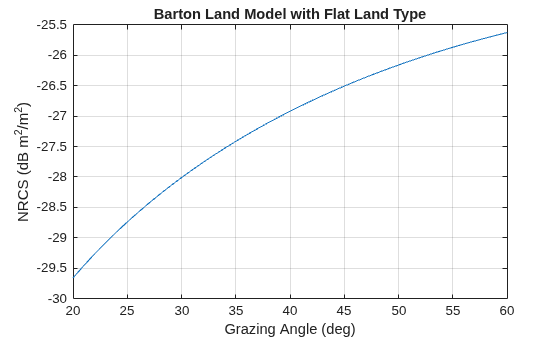
Figure contains an axes object. The axes object with title Barton Land Model with Flat Land Type, xlabel Grazing Angle (deg), ylabel NRCS (dB m Squared baseline /m Squared baseline ) contains an object of type line.

Configure a radarscenario to simulate a reflective land surface. Add a land surface object to define the physical properties of the scenario surface. The surface is a simple 200-by-200 meter rectangle. Use the surfaceReflectivityLand function to create a constant-gamma reflectivity model with a gamma value of -10 dB. Use the scenario landSurface method to add the rectangular land region and the radar reflectivity model to the scenario. Use a surface reference height of 16 meters.

scene = radarScenario(UpdateRate = 0, IsEarthCentered = false);
refl = surfaceReflectivityLand(Model = "ConstantGamma", Gamma = -10);
srf = landSurface(scene,RadarReflectivity = refl, ...
    Boundary=[-100 100; -100 100],ReferenceHeight = 16)
srf = 
  LandSurface with properties:

        RadarReflectivity: [1×1 surfaceReflectivityLand]
    ReflectionCoefficient: [1×1 radar.scenario.SurfaceReflectionCoefficient]
          ReflectivityMap: 1
          ReferenceHeight: 16
                 Boundary: [2×2 double]
                  Terrain: []

Create a normalized reflectivity object using the GIT 'Model' and a 'Soil' land type. Obtain the normalized radar cross-section at a frequency of 3 GHz over grazing angles from 20 to 60 degrees. Assume a surface height standard deviation of two meters. Plot the surface reflectivity.

grazAng = 20:60;
freq = 10e9;
reflectivity = surfaceReflectivityLand(Model="GIT", ...
    LandType="Soil",SurfaceHeightStandardDeviation=2);
nrcs = reflectivity(grazAng,freq);
plot(grazAng,pow2db(nrcs))
grid on
xlabel('Grazing Angle (deg)')
ylabel('NRCS (dB m^2/m^2)')
title('GIT Model')
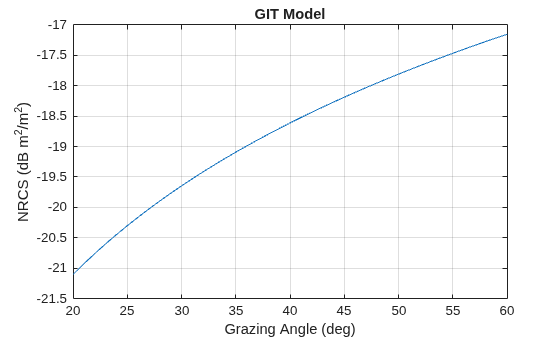
Figure contains an axes object. The axes object with title GIT Model, xlabel Grazing Angle (deg), ylabel NRCS (dB m Squared baseline /m Squared baseline ) contains an object of type line.

Create a normalized reflectivity object using the Billingsley 'Model' and a 'LowReliefRural' land type. Obtain the normalized radar cross-section at a frequency of 3 GHz over depression angles from 0.1 to 3 degrees. Plot the surface reflectivity.

    depAng = 0.1:0.1:2;
    freq = 3e9; 
    reflectivity = surfaceReflectivityLand(Model="Billingsley", ...
         LandType="LowReliefRural");
    nrcs = reflectivity(depAng,freq);
    plot(depAng,pow2db(nrcs))
    grid on
    xlabel('Depression Angle (deg)')
    ylabel('NRCS (dB m^2/m^2)')
    title('Billingsley Model')
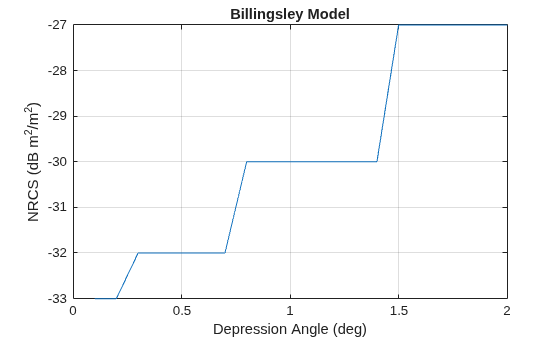
Figure contains an axes object. The axes object with title Billingsley Model, xlabel Depression Angle (deg), ylabel NRCS (dB m Squared baseline /m Squared baseline ) contains an object of type line.

Create a normalized reflectivity object using the Ulaby-Dobson model for a grass land type. Obtain the normalized radar cross-section for both vertical and horizontal polarizations at a frequency of 10 GHz over grazing angles from 1 to 10 degrees. Plot the surface reflectivities.

grazAng = 1:0.1:10;
freq = 10e9;
reflectivity_v = surfaceReflectivityLand(Model="UlabyDobson", ...
    LandType="Grass",Polarization="V");
nrcs_v = reflectivity_v(grazAng,freq);
reflectivity_h = surfaceReflectivityLand(Model="UlabyDobson", ...
    LandType="Grass",Polarization="H");
nrcs_h = reflectivity_h(grazAng,freq);
plot(grazAng,pow2db(nrcs_v))
hold on
plot(grazAng,pow2db(nrcs_h))
grid on
legend('Vertical Polarization','Horizontal Polarization')
xlabel('Grazing Angle (deg)')
ylabel('NRCS (dB m^2/m^2)')
title('Ulaby-Dobson Model')
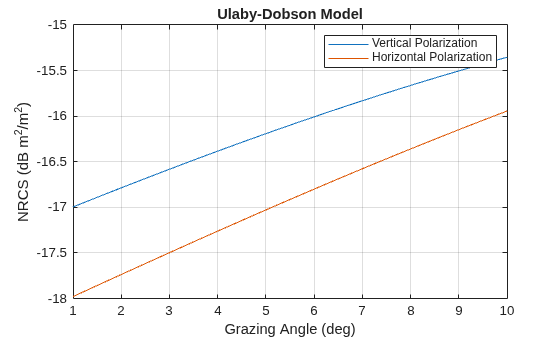
Figure contains an axes object. The axes object with title Ulaby-Dobson Model, xlabel Grazing Angle (deg), ylabel NRCS (dB m Squared baseline /m Squared baseline ) contains 2 objects of type line. These objects represent Vertical Polarization, Horizontal Polarization.

Create a surface with two hills. Plot the surface on a 200-by-200 meter grid with grid points one meter apart. Add the surface to a radar scenario. Assume the surface has a radar reflectivity defined by a constant gamma model.

[x,y] = meshgrid(linspace(-100,100,201));
ht1 = 40*exp(-(x.^2 + y.^2)/30^2);
ht2 = 100*exp(-((x-60).^2 + y.^2)/25^2);
ht = ht1 + ht2;
p = surfc(x(1,:),y(:,1),ht);
axis equal
axis tight
shading interp
simTime = 3;
scene = radarScenario(UpdateRate = 1, ...
    IsEarthCentered = false,StopTime = simTime);
gammaDB = surfacegamma('Flatland');
refl = surfaceReflectivityLand(Model = 'ConstantGamma',Gamma = gammaDB);
srf = landSurface(scene,RadarReflectivity = refl, ...
    Terrain = ht,Boundary = [-100,100;-100,100]);

Use surface manager to identify the surface.

scene.SurfaceManager
ans = 
  SurfaceManager with properties:

    EnableMultipath: 0
       UseOcclusion: 1
           Surfaces: [1×1 radar.scenario.LandSurface]

scene.SurfaceManager.Surfaces
ans = 
  LandSurface with properties:

        RadarReflectivity: [1×1 surfaceReflectivityLand]
    ReflectionCoefficient: [1×1 radar.scenario.SurfaceReflectionCoefficient]
          ReflectivityMap: 1
          ReferenceHeight: 0
                 Boundary: [2×2 double]
                  Terrain: [201×201 double]

Obtain and plot the height of the surface at the point (50,-30).

xt = 50;
yt = -30;
htx = height(srf,[xt,yt])
htx = 
21.1046
hold on
plot3(xt,yt,htx+5,'ow','MarkerFaceColor','r')
xlabel('x')
ylabel('y')
hold off
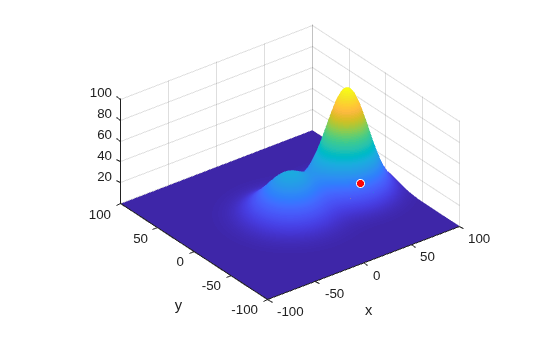
Figure contains an axes object. The axes object with xlabel x, ylabel y contains 3 objects of type surface, contour, line. One or more of the lines displays its values using only markers

Create a land normalized reflectivity object using the Ulaby-Dobson model and a grass land type. Enable polarization and specify the cross-polarization reflectivity. Obtain the NRCS at a frequency of 10 GHz over grazing angles from 1 to 10 degrees. Plot the reflectivities.

grazAng = 0:0.1:20; 
freq = 10e9;
surf = surfaceReflectivityLand(Model='UlabyDobson', ...
    LandType='Grass',EnablePolarization=true, ...
    GrazingAngle=0:.1:90,Frequency=[100,1e6,11e6], ...
    ReflectivityHV=0.05*sind(0:.1:90)'*[1 1 1], ...
    ReflectivityVH=0.04*sind(0:.1:90)'*[1 1 1])
surf = 
  surfaceReflectivityLand with properties:

    EnablePolarization: 1
     CrossPolarization: 'Full'
                 Model: 'UlabyDobson'
              LandType: 'Grass'
        ReflectivityHV: [901×3 double]
        ReflectivityVH: [901×3 double]
             Frequency: [100 1000000 11000000]
          GrazingAngle: [0 0.1000 0.2000 0.3000 0.4000 0.5000 0.6000 0.7000 0.8000 0.9000 1 1.1000 1.2000 1.3000 1.4000 1.5000 1.6000 1.7000 1.8000 1.9000 2 2.1000 2.2000 2.3000 2.4000 2.5000 2.6000 2.7000 2.8000 2.9000 3 3.1000 3.2000 … ] (1×901 double)
               Speckle: 'None'

nrcs = surf(grazAng,freq);
plot(grazAng,pow2db(squeeze(nrcs(1,1,:))), ...
    grazAng,pow2db(squeeze(nrcs(2,2,:))), ...
    grazAng,pow2db(squeeze(nrcs(1,2,:))), ...
    grazAng,pow2db(squeeze(nrcs(2,1,:))))
legend('HH','VV','HV','VH');
grid on
xlabel('Grazing Angle (deg)')
ylabel('NRCS (dB m^2/m^2)')
title('Ulaby-Dobson Model for Land Surface')
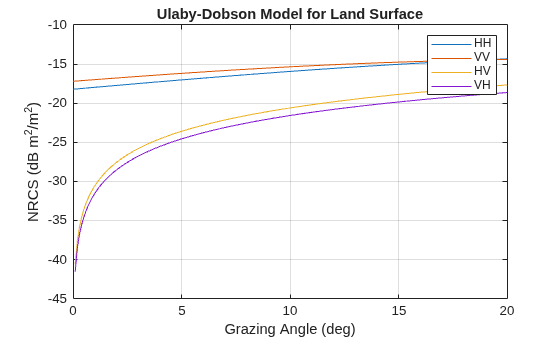
Figure contains an axes object. The axes object with title Ulaby-Dobson Model for Land Surface, xlabel Grazing Angle (deg), ylabel NRCS (dB m Squared baseline /m Squared baseline ) contains 4 objects of type line. These objects represent HH, VV, HV, VH.

More About

expand all

References

[1] Barton, David Knox. Radar Equations for Modern Radar. Artech House, 2013.

[2] Long, Maurice W. Radar Reflectivity of Land and Sea. 3rd ed, Artech House, 2001.

[3] Nathanson, Fred E., et al. Radar Design Principles: Signal Processing and the Environment. 2. ed., Repr, Scitech Publ, 2004.

[4] Reilly, J. P., R. L. McDonald, and G. D. Dockery. "RF-Environment Models for the ADSAM Program." Report No. A1A97U-070, Laurel, MD: Johns Hopkins University Applied Physics Laboratory, August 22, 1997.

[5] Billingsley, J. Barrie. Low-Angle Radar Land Clutter: Measurements and Empirical Models. William Andrew Pub. : SciTech Pub. ; Institution of Electrical Engineers, 2002.

[6] Richards, M. A., et al., editors. Principles of Modern Radar. SciTech Pub, 2010.

[7] Morchin, Fred E., J. Patrick Reilly, and Marvin Cohen. Radar Design Principles: Signal Processing and the Environment. 2nd ed. New York: McGraw-Hill, 1991.

[8] Ulaby, Fawwaz T., and M. Craig Dobson. Handbook of Radar Scattering Statistics for Terrain. Artech House, 1989.

Extended Capabilities

expand all

C/C++ Code Generation
Generate C and C++ code using MATLAB® Coder™.

Version History

Introduced in R2022a