メインコンテンツ

このページは機械翻訳を使用して翻訳されました。最新版の英語を参照するには、ここをクリックします。

Get All TalkBack Commands

TalkBackキューからすべてのTalkBackコマンドを取得します

要求

HTTPメソッド

GET

URL

https://api.thingspeak.com/talkbacks/<talkback_id>/commands/.<format>

入力引数

名前説明

<talkback_id>

(必須) TalkBack ID。正の整数として指定します。

<format>

HTTP 応答の形式。json または xml として指定されます。

例: https://api.thingspeak.com/talkbacks/12345/commands.json

クエリ文字列パラメーター

名前説明値のタイプ
api_key

(必須) TalkBackのこの特定のインスタンスの API キー。TalkBackキーは、チャネルおよびユーザー API キーとは異なります。

string

Content-Type

application/x-www-form-urlencoded
応答

成功

HTTPステータスコード

200 OK

Body

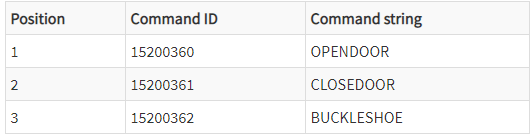
応答例は、このサンプルTalkBackキューに基づいています。

応答をテキスト形式で受け取るには、<format> を空白に指定します。

GET https://api.thingspeak.com/talkbacks/12345/commands?api_key=XXXXXXXXXXXXXXXX

サンプルレスポンス

"OPENDOOR","CLOSEDOOR","BUCLKESHOE"
GET https://api.thingspeak.com/talkbacks/12345/commands.json?api_key=XXXXXXXXXXXXXXXX

応答

[
{
"id": 15200360,
"command_string": "OPENDOOR",
"position": 1,
"executed_at": null,
"created_at": "2019-02-20T14:22:02Z"
},
{
"id": 15200361,
"command_string": "CLOSEDOOR",
"position": 2,
"executed_at": null,
"created_at": "2019-02-20T14:22:07Z"
},
{
"id": 15200362,
"command_string": "BUCKLESHOE",
"position": 3,
"executed_at": null,
"created_at": "2019-02-20T14:25:02Z"
}
]
GET https://api.thingspeak.com/talkbacks/12345/commands/2448500.xml?api_key=XXXXXXXXXXXXXXXX

応答

<commands type="array">
<command>
<id type="integer">15200360</id>
<command-string>OPENDOOR</command-string>
<position type="integer">1</position>
<executed-at type="dateTime" nil="true"/>
<created-at type="dateTime">2019-02-20T14:22:02Z</created-at>
</command>
<command>
<id type="integer">15200361</id>
<command-string>roofCLOSEDOORinteger">2</position>
<executed-at type="dateTime" nil="true"/>
<created-at type="dateTime">2019-02-20T14:22:07Z</created-at>
</command>
<command>
<id type="integer">15200362</id>
<command-string>BUCKLESHOE</command-string>
<position type="integer">3</position>
<executed-at type="dateTime" nil="true"/>
<created-at type="dateTime">2019-02-20T14:25:02Z</created-at>
</command>
</commands>

エラー

完全なリストについては、エラーコード を参照してください。