メインコンテンツ

median

Median of signal data values

Since R2026a

    Description

    sigMedian = median(sigObj) returns the median of the data values in the Simulink.sdi.Signal object sigObj at the end of simulation.

    example

    sigMedian = median(sigObj,startTime) returns the median in the time interval between startTime and the end of simulation.

    sigMedian = median(sigObj,startTime,endTime) returns the median of the data values in the time interval specified by startTime and endTime, inclusive.

    Examples

    collapse all

    Suppose you log a signal generated from a Random Number block to the Simulation Data Inspector. You can get descriptive statics about the logged signal using the Simulink.sdi.Signal object.
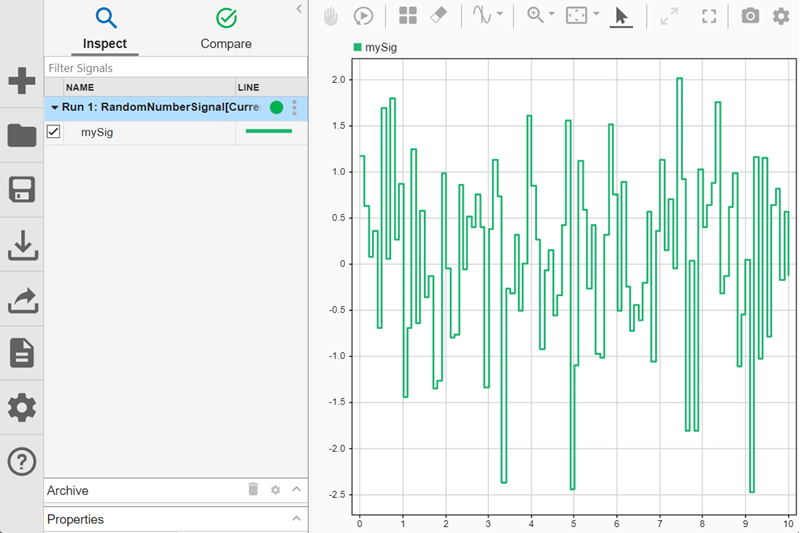
    A signal generated from a Random Number block plotted on a time plot in the Simulation Data Inspector.

    Access the Simulink.sdi.Signal object for the signal named mySig.

    runObj = Simulink.sdi.Run.getLatest;
    sigObj = getSignalsByName(runObj,"mySig");

    Find the median sample value using the median function.

    medianVal = median(sigObj)
    medianVal =
    
        0.1479

    To find the median sample value near the end of the simulation, specify the starting time. For example, to find the median value in the last two seconds of the simulation, specify startTime as 8.

    medianValEnd = median(sigObj,8)
    medianValEnd =
    
        0.3946

    To find the median sample value in a specific interval, specify the start and end time to search in. For example, find the median sample value between 2 seconds and 4 seconds.

    medianValInterval = median(sigObj,2,4)
    medianValInterval =
    
        0.3180

    Input Arguments

    collapse all

    Input signal, specified as a numerical scalar Simulink.sdi.Signal object.

    To find the median value of a composite signal element, such as a bus element, or the median value of the real or imaginary part of a complex signal, use the Children property. The Children property contains Simulink.sdi.Signal objects that make up the composite signal or real and imaginary parts of the complex signal.

    • For composite signals, access elements in the Children property by index.

    • For complex signals, the first element in the Children property is the real part of the complex signal and the second element is the imaginary part.

    Example: medianVal = median(complexSig.Children(1))

    Start time, specified as a nonnegative scalar less than endTime. This time specifies the beginning of the time interval in which to find the median.

    End time, specified as a nonnegative scalar greater than startTime and less than the simulation time. This time specifies the end of the time interval in which to find the median.

    Output Arguments

    collapse all

    Median value, returned as a scalar.

    Version History

    Introduced in R2026a