Reference Path Generator
R2026bReference Path Generator block
To add a block to a model, double-click the canvas and start typing the block name. Then, select the block from the list.
Libraries:
Vehicle Dynamics Blockset /
Vehicle Scenarios /
Drive Cycle and Maneuvers
Description
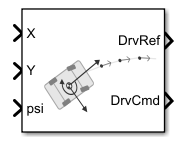
The Reference Path Generator block fits a clothoid curve to user-defined waypoints to generate vehicle reference pose and path curvature. Clothoid curves have curvature that varies linearly with distance traveled, making them ideal for generating smooth, easily navigable trajectories. The block calculates the nearest path using instantaneous vehicle position. It then computes a reference horizon over a specified length and number of samples for use by a driver block. Select either closed or open-ended waypoints, and specify the distance to search ahead for the nearest waypoint to the vehicle to identify the starting reference point. Optionally, you can specify a vehicle reference using reference path waypoints and instantaneous vehicle position.
The figure shows how the Reference Path Generator block generates the reference horizon from the fitted path. Blue circles represent the specified waypoints or a RoadRunner scenario object, Reference path waypoints [m, rad] or RoadRunner Scenario object, connected by a smooth clothoid curve. From the current vehicle position and orientation specified by the block inputs, X, Y, and psi, the block identifies the nearest point on the path. It then computes a specified number of evenly spaced points ahead, shown as red circles. These points form the output reference path, DrvRef, used for trajectory planning. The first point is the closest reference location, while the last point lies at a distance, Path search distance, wayptSrchDist [m], along the path from the vehicle position, providing a continuous horizon.
Examples
Generate Constant Velocity Reference Path with Handling Limits
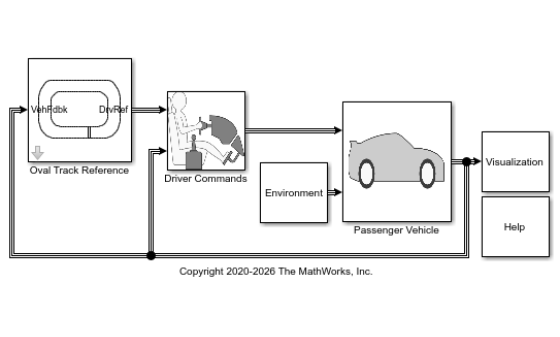
Use the Reference Path Generator block to generate a constant velocity reference for a path-following simulation.
Use RoadRunner Scenario Object as Reference Oval Path
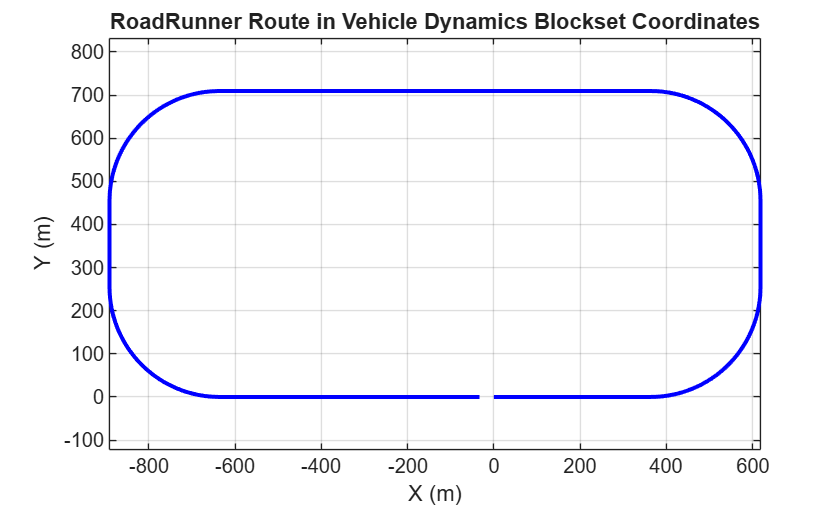
Use Reference Path Generator block to simulate vehicle that follows a RoadRunner scenario object.
Generate Skidpad Test
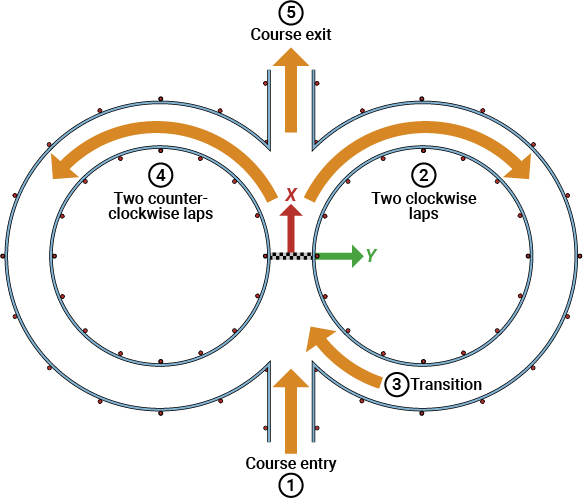
Generate skidpad tests for student competitions. View simulation in 3D environment.
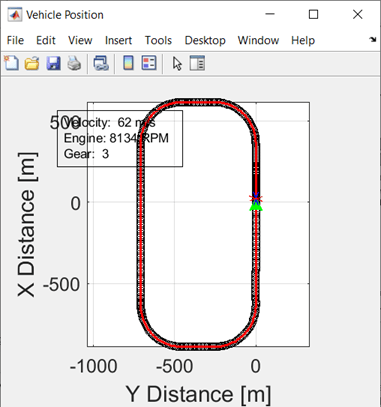
Follow Waypoints Around Oval Track
Simulate vehicle driving around oval track specified by waypoints. Model loads a minimum number of waypoints and uses a MATLAB® function to determine the next heading waypoint.
Ports
Input
Longitudinal position of the vehicle center of mass in the global coordinate
system. The block uses this input to verify that the vehicle has reached the
XGate location to start the test procedure.
Data Types: single | double
Lateral position of the vehicle center of mass in the global coordinate system. The block uses this input to generate an appropriate reference pose.
Data Types: single | double
Vehicle yaw angle with respect to the global coordinate system. The block uses this input to generate an appropriate reference pose.
Data Types: single | double
Output
Driver reference data, returned as a bus containing these block values.
| Signal | Description | Units |
|---|---|---|
| Longitudinal reference velocity | m/s |
| Lateral reference displacement | m |
| Vehicle global longitudinal reference position | m |
| Vehicle global lateral reference position | m |
| Vehicle global yaw reference position | rad |
| Reference path curvature | 1/m |
| Reference path curvature gradient | 1/m^2 |
Data Types: bus
Driver command data, returned as a bus containing these block values.
| Signal | Description | |
|---|---|---|
|
| Boolean signal used to override driver model steering commands |
| Handwheel angle, in radians | |
| Boolean signal used to override driver model steering commands
with zero when value is | |
| Boolean signal used to hold the current driver model steering
output when | |
|
| Boolean signal used to override driver model acceleration commands |
| Normalized accelerator input | |
| Boolean signal used to hold the current driver model acceleration
output when | |
| Boolean signal used to override driver model acceleration
commands with zero when value is | |
|
| Boolean signal used to override driver model deceleration commands |
| Normalized decelerator or brake input | |
| Boolean signal used to hold the current driver model deceleration
output when | |
| Boolean signal used to override driver model deceleration
commands with zero when value is | |
| Normalized handbrake or park brake input | |
|
| Command to specify the transmission mode |
| Command to specify manual gear number or automatic transmission shifter position | |
| Command to upshift | |
| Command to downshift | |
| Normalized clutch open command for manual transmissions | |
Data Types: bus
Parameters
To edit block parameters interactively, use the Property Inspector. From the Simulink® Toolstrip, on the Simulation tab, in the Prepare gallery, select Property Inspector.
Reference Path
Reference path that the block uses to generate vehicle reference pose, curvature, and optional velocity signals. You can specify the reference path as either:
Numeric waypoints defined in workspace variables
A RoadRunner
scenarioobject
| Type | Data Description |
|---|---|
Numeric waypoints | Reference path waypoints, specified as an
n-by- Optionally, you can specify a third column in the array of path tangent angles, in rad, which the block enforces during the fitting process. Specifying this third column can lead to more precise and consistent fitting. |
In R2026b: RoadRunner objects | RoadRunner
|
Note
To get a good path fit, experiment with increasing or decreasing the number of points in areas of the path where greater precision is needed.
Programmatic Use
To set the block parameter value programmatically, use
the set_param function.
To get the block parameter value
programmatically, use the get_param function.
| Parameter: | refPathXY |
| Values: | n-by-3 array |
| Data Types: | single | double |
Option to output an array of the search path horizon.
Tunable: Yes
Programmatic Use
To set the block parameter value programmatically, use
the set_param function.
To get the block parameter value
programmatically, use the get_param function.
| Parameter: | multiPoints |
| Values: | off (default) | on |
| Data Types: | char | string |
Example: multiPoints="on"
Option to close the path using the first and last waypoints.
Programmatic Use
To set the block parameter value programmatically, use
the set_param function.
To get the block parameter value
programmatically, use the get_param function.
| Parameter: | pathClosed |
| Values: | on (default) | off |
| Data Types: | char | string |
Example: pathClosed="off"
Number of sample points to calculate the path horizon.
Programmatic Use
To set the block parameter value programmatically, use
the set_param function.
To get the block parameter value
programmatically, use the get_param function.
| Parameter: | numHrznPts |
| Values: | 20 (default) | scalar in the range [1, inf) |
| Data Types: | single | double |
Example: numHrznPts=30
Path search distance, in m.
Programmatic Use
To set the block parameter value programmatically, use
the set_param function.
To get the block parameter value
programmatically, use the get_param function.
| Parameter: | wayptSrchDist |
| Values: | 100 (default) | scalar in the range (0, inf) |
| Data Types: | single | double |
Example: wayptSrchDist=80
Reference Velocity
Since R2026b
Set a velocity reference for the vehicle as it follows the generated path.
| Parameter | Setting | Description |
|---|---|---|
| Velocity reference | None | No specified reference velocity. If you want the vehicle to have a target velocity as it follows the path, you must modify the model. |
Constant | As it follows the path, the vehicle uses the constant target velocity specified by the Nominal reference velocity parameter. | |
Waypoint | As it follows the path, the vehicle uses the target velocity specified by the Nominal reference velocity parameter. The value is a velocity array of the same dimensions specified in Reference path waypoints, refPathXY. Along the path between the waypoints, the block interpolates the reference velocity. |
Programmatic Use
To set the block parameter value programmatically, use
the set_param function.
To get the block parameter value
programmatically, use the get_param function.
| Parameter: | velRefMode |
| Values: | None (default) | Constant | Waypoint |
Since R2026b
Nominal reference velocity, specified in the units set by the Reference velocity unit, velRefUnit parameter.
If Velocity reference is set to
Constant, then this value is scalar.If Velocity reference is set to
Waypoint, then this value is reference path waypoints specified as an n-by-3array, where n is the number of waypoints.
Dependencies
To enable this parameter, set Velocity reference to either
Constant or Waypoint.
Programmatic Use
To set the block parameter value programmatically, use
the set_param function.
To get the block parameter value
programmatically, use the get_param function.
| Parameter: | velRef |
| Values: | 20 (default) | [0, inf) |
| Data Types: | single | double |
Example: velRef=240
Since R2026b
Nominal reference velocity unit.
Dependencies
To enable this parameter, set Velocity reference to either
Constant or Waypoint.
Programmatic Use
To set the block parameter value programmatically, use
the set_param function.
To get the block parameter value
programmatically, use the get_param function.
| Parameter: | velRefUnit |
| Values: | m/s (default) |
| Data Types: | char | string |
Example: velRefUnit="km/hr"
Since R2026b
Option to constrain the reference velocity.
Dependencies
To enable this parameter, set Velocity reference to either
Constant or Waypoint.
Programmatic Use
To set the block parameter value programmatically, use
the set_param function.
To get the block parameter value
programmatically, use the get_param function.
| Parameter: | accelLimGroup |
| Values: | off (default) | on |
| Data Types: | char | string |
Example: accelLimGroup="on"
Since R2026b
Minimum reference velocity, in the units specified by the Reference velocity unit, velRefUnit parameter.
The block does support reverse driving for vehicles without a trailer. If you do specify a minimum reference velocity less than 0:
A reasonable Reference velocity unit, velRefUnit is -20 mph.
Carefully tune the Stanley Driver reverse gain.
reseasonable lower limit is -20 mph. Carefully duen the
Dependencies
To enable this parameter, set Velocity reference to either
Constant or Waypoint.
Programmatic Use
To set the block parameter value programmatically, use
the set_param function.
To get the block parameter value
programmatically, use the get_param function.
| Parameter: | velRefMin |
| Values: | 0 (default) | scalar in the range [0, velRefMax) |
| Data Types: | single | double |
Example: velRefMin=10
Since R2026b
Maximum reference velocity, in the units specified by the Reference velocity unit, velRefUnit parameter.
Dependencies
Enabled when Enable curvature-based constraints is set to
on and Velocity reference is set to either:
ConstantWaypoint
Programmatic Use
To set the block parameter value programmatically, use
the set_param function.
To get the block parameter value
programmatically, use the get_param function.
| Parameter: | velRefMax |
| Values: | 250 (default) | scalar in the range (0, inf) |
| Data Types: | single | double |
Example: velRefMax=60
Since R2026b
Lateral acceleration limit, in g.
Dependencies
Enabled when Enable curvature-based constraints is set to
on and Velocity reference is set to either:
ConstantWaypoint
Programmatic Use
To set the block parameter value programmatically, use
the set_param function.
To get the block parameter value
programmatically, use the get_param function.
| Parameter: | ayMax |
| Values: | 1.2 (default) | scalar in the range (0, inf) |
| Data Types: | single | double |
Example: ayMax=1.1
Since R2026b
Braking deceleration limit, in g.
Dependencies
Enabled when Enable curvature-based constraints is set to
on and Velocity reference is set to either:
ConstantWaypoint
Programmatic Use
To set the block parameter value programmatically, use
the set_param function.
To get the block parameter value
programmatically, use the get_param function.
| Parameter: | axMin |
| Values: | -0.9 (default) | scalar in the range (-inf,0) |
| Data Types: | single | double |
Example: axMin=-0.8
Since R2026b
Tractive acceleration limit, in g.
Dependencies
Enabled when Enable curvature-based constraints is set to
on and Velocity reference is set to either:
ConstantWaypoint
Programmatic Use
To set the block parameter value programmatically, use
the set_param function.
To get the block parameter value
programmatically, use the get_param function.
| Parameter: | axMax |
| Values: | 0.30 (default) | scalar in the range (0, inf) |
| Data Types: | single | double |
Example: axMax=0.25
Option to plot the path and curvature.
Version History
Introduced in R2026aTo simplify the workflow for using a RoadRunner object as the reference path in Vehicle Dynamics Blockset™ simulations, directly import scenarios into the Reference Path Generator block. Set the Reference path waypoints [m, rad] or RoadRunner Scenario object parameter to a RoadRunner object, including routes, actors, or scenarios.
Prior to R2026b, the Reference path waypoints [m, rad] or RoadRunner Scenario object parameter was named Reference path waypoints, refPathXY [m] . You could only specify reference path waypoints.
Use new parameters to specify an optional velocity reference as the vehicle follows the
reference path. Previously, the block did not allow you to set a reference velocity. For
compatibility with models created before R2026b, set Velocity reference
to None.
| Parameter | Setting | Description |
|---|---|---|
| Velocity reference | None | No specified reference velocity. If you want the vehicle to have a target velocity as it follows the path, you must modify the model. |
Constant | As it follows the reference path, the vehicle uses the constant velocity specified by the Nominal reference velocity parameter. | |
Waypoint | As it follows the reference path, the vehicle uses the velocity specified by the Nominal reference velocity parameter. The value is an array of the same dimensions specified in Reference path waypoints, refPathXY. |
If you set Velocity reference to
Constant or Waypoint, you can use
these parameters to provide constraints on the reference velocity.
| Parameter | Description |
|---|---|
| Minimum velocity reference, velRefMin | Minimum velocity as vehicle follows path |
| Maximum velocity reference, velRefMax | Maximum velocity as vehicle follows path |
| Lateral acceleration limit, ayMax | Lateral acceleration limit as vehicle follows path |
| Braking deceleration limit, axMin | Braking deceleration limit as vehicle follows path |
| Tractive acceleration limit, axMax | Longitudinal acceleration limit as vehicle follows path |
See Also
MATLAB Command
You clicked a link that corresponds to this MATLAB command:
Run the command by entering it in the MATLAB Command Window. Web browsers do not support MATLAB commands.
Web サイトの選択
Web サイトを選択すると、翻訳されたコンテンツにアクセスし、地域のイベントやサービスを確認できます。現在の位置情報に基づき、次のサイトの選択を推奨します:
また、以下のリストから Web サイトを選択することもできます。
最適なサイトパフォーマンスの取得方法
中国のサイト (中国語または英語) を選択することで、最適なサイトパフォーマンスが得られます。その他の国の MathWorks のサイトは、お客様の地域からのアクセスが最適化されていません。
南北アメリカ
- América Latina (Español)
- Canada (English)
- United States (English)
ヨーロッパ
- Belgium (English)
- Denmark (English)
- Deutschland (Deutsch)
- España (Español)
- Finland (English)
- France (Français)
- Ireland (English)
- Italia (Italiano)
- Luxembourg (English)
- Netherlands (English)
- Norway (English)
- Österreich (Deutsch)
- Portugal (English)
- Sweden (English)
- Switzerland
- United Kingdom (English)


