メインコンテンツ

Predictive Driver

Predictive driver controller to track longitudinal speed and lateral path

  • Predictive Driver block

Libraries:
Vehicle Dynamics Blockset / Vehicle Scenarios / Driver

Description

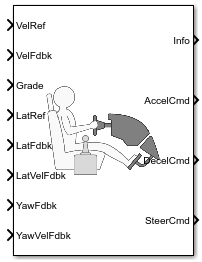
The Predictive Driver block implements a controller that generates normalized steering, acceleration, and braking commands to track longitudinal velocity and a lateral reference displacement. The normalized commands can vary between -1 to 1. The controller uses a single-track (bicycle) model for optimal single-point preview control.

Configurations

External Actions

Use the External Actions parameters to create input ports for signals that you can use to simulate standard test maneuvers. The block uses this priority order for the input commands: disable (highest), hold, override.

This table summarizes the external action parameters.

Goal

External Action Parameter

Input Ports

Data Type

Override the accelerator command with an input acceleration command.

Accelerator override

EnablAccelOvr

Boolean

AccelOvrCmd

double

Hold the acceleration command at the current value.

Accelerator hold

AccelHldBoolean

Disable the acceleration command.

Accelerator disable

AccelZeroBoolean

Override the decelerator command with an input deceleration command.

Decelerator override

EnablDecelOvr

Boolean

DecelOvrCmd

double

Hold the decelerator command at current value.

Decelerator hold

DecelHldBoolean

Disable the decelerator command.

Decelerator disable

DecelZeroBoolean

Override the steering command with an input steering command.

Steering override

EnblSteerOvr

Boolean

SteerOvrCmd

double

Hold the steering command at the current value.

Steering hold

SteerHldBoolean

Disable the steering command.

Steering disable

SteerZeroBoolean

Controllers

Use the Longitudinal control type, cntrlType parameter to specify one of these control options.

Setting

Block Implementation

PI

Proportional-integral (PI) control with tracking windup and feedforward gains.

Scheduled PI

PI control with tracking windup and feedforward gains that are a function of vehicle velocity.

Predictive

Optimal single-point preview (look ahead) control model developed by C. C. MacAdam1, 2, 3. The model represents driver steering control behavior during path-following and obstacle avoidance maneuvers. Drivers preview (look ahead) to follow a predefined path. To implement the MacAdam model, the block:

  • Represents the dynamics as a linear single track (bicycle) vehicle

  • Minimizes the previewed error signal at a single point T* seconds ahead in time

  • Accounts for the driver lag deriving from perceptual and neuromuscular mechanisms

Use the Lateral control type, controlTypeLat parameter to specify the type of lateral control. The table specifies the block implementation.

Setting

Block Implementation

Predictive (default)

Optimal single-point preview (look ahead) control model developed by C. C. MacAdam1, 2, 3. The model represents driver steering control behavior during path-following and obstacle avoidance maneuvers. Drivers preview (look ahead) to follow a predefined path.

Stanley

Controller that uses the Stanley4 method to minimize the position error and the angle error of the current pose with respect to the reference pose.

On the Reference Control pane, use the:

  • Vector input for poses parameter to input the to specify the input.

    SettingImplementation
    off (default)

    Block uses the longitudinal, lateral, and yaw reference (LongRef, LatRef, LatRef) input ports and the feedback (LongFdbk, LatFdbk, LatFdbk) input ports for the reference and feedback pose.

    on

    Block uses input ports, RefPose and CurrPose, for the reference and feedback pose, respectively.

  • Include dynamics parameter to specify the type of model for the controller to use.

    SettingImplementation
    off (default)

    Controller uses a kinematic bicycle model that is suitable for path following in low-speed environments such as parking lots, where inertial effects are minimal.

    on

    Controller uses a dynamic bicycle model that is suitable for path following in high-speed environments such as highways, where inertial effects are more pronounced.

Shift

Use the Shift type, ShftType parameter to specify one of these shift options.

Setting

Block Implementation

None

No transmission. Block outputs a constant gear of 1.

Use this setting to minimize the number of parameters you need to generate acceleration and braking commands to track forward vehicle motion. This setting does not allow reverse vehicle motion.

Reverse, Neutral, Drive

Block uses a Stateflow® chart to model reverse, neutral, and drive gear shift scheduling.

Use this setting to generate acceleration and braking commands to track forward and reverse vehicle motion using simple reverse, neutral, and drive gear shift scheduling. Depending on the vehicle state and vehicle velocity feedback, the block uses the initial gear and time required to shift to shift the vehicle up into drive or down into reverse or neutral.

For neutral gears, the block uses braking commands to control the vehicle speed. For reverse gears, the block uses an acceleration command to generate torque and a brake command to reduce vehicle speed.

Scheduled

Block uses a Stateflow chart to model reverse, neutral, park, and N-speed gear shift scheduling.

Use this setting to generate acceleration and braking commands to track forward and reverse vehicle motion using reverse, neutral, park, and N-speed gear shift scheduling. Depending on the vehicle state and vehicle velocity feedback, the block uses these parameters to determine the:

  • Initial gear

  • Upshift and downshift accelerator pedal positions

  • Upshift and downshift velocity

  • Timing for shifting and engaging forward and reverse from neutral

For neutral gears, the block uses braking commands to control the vehicle speed. For reverse gears, the block uses an acceleration command to generate torque and a brake command to reduce vehicle speed.

External

Block uses the input gear, vehicle state, and velocity feedback to generate acceleration and braking commands to track forward and reverse vehicle motion.

For neutral gears, the block uses braking commands to control the vehicle speed. For reverse gears, the block uses an acceleration command to generate torque and a brake command to reduce vehicle speed.

Units

Use the Longitudinal velocity units, velUnits parameter to specify units for longitudinal velocity input ports.

Use the Angular units, angUnits parameter to specify units for yaw, steering, and pose angle input and output ports.

Gear Signal

Use the Output gear signal parameter to create the GearCmd output port. The GearCmd signal contains the integer value of the commanded vehicle gear.

Gear

Integer

Park

80

Reverse

-1

Neutral

0

Drive

1

Gear

Gear number

Output Handwheel Angle

Use the Output handwheel angle parameter to specify the units for the steering ports.

Setting

Block Implementation

Port

off (default)

Commanded road wheel steer angle, normalized from -1 through 1. The block uses the road wheel angle saturation limit parameter, Road wheel angle limit, theta, to normalize the command.

SteerCmd — Output

Overrides the steering command with a road wheel input steering command normalized from -1 through 1.

SteerOvrCmd — Input

on

Commanded handwheel steer angle, in units specified by Angular units, angUnits.

SteerCmd — Output

Overrides the steering command with a handwheel input steering command, in units specified by Angular units, angUnits.

SteerOvrCmd — Input

Controller: PI Speed-Tracking

If you set the control type to PI or Scheduled PI, the block implements proportional-integral (PI) control with tracking windup and feedforward gains. For the Scheduled PI configuration, the block uses feed forward gains that are a function of vehicle velocity.

To calculate the speed control output, the block uses these equations.

Setting

Equation

PI

y=Kffvnomvref+Kperefvnom+(Kierefvnom+Kaweout)dt+Kgγ

Scheduled PI

y=Kff(v)vnomvref+Kp(v)erefvnom+(Ki(v)erefvnom+Kaweout)dt+Kg(v)γ

where:eref=vrefveout=ysatyysat={1y<1y1y111<y

The velocity error low-pass filter uses this transfer function.

H(s)=1τerrs+1   for   τerr>0

To calculate the acceleration and braking commands, the block uses these equations.

yacc={0ysat<0ysat0ysat111<ysatydec={0ysat>0ysat1ysat01ysat<1

The equations use these variables.

vnom

Nominal vehicle speed

Kp

Proportional gain

Ki

Integral gain

Kaw

Anti-windup gain

Kff

Velocity feedforward gain

Kg

Grade angle feedforward gain

γ

Grade angle

τerr

Error filter time constant

y

Nominal control output magnitude

ysat

Saturated control output magnitude

eref

Velocity error

eout

Difference between saturated and nominal control outputs

yacc

Acceleration signal

ydec

Braking signal

v

Velocity feedback signal

vref

Reference velocity signal

Controller: Predictive Speed-Tracking

If you set the Longitudinal control type, cntrlType or Lateral control type, cntrlType to Predictive, the block implements an optimal single-point preview (look ahead) control model developed by C. C. MacAdam[1], [2], [3]. The model represents driver steering control behavior during path-following and obstacle avoidance maneuvers. Drivers preview (look ahead) to follow a predefined path. To implement the MacAdam model, the block:

  • Represents the dynamics as a linear single track (bicycle) vehicle

  • Minimizes the previewed error signal at a single point T* seconds ahead in time

  • Accounts for the driver lag deriving from perceptual and neuromuscular mechanisms

Vehicle Dynamics

For lateral and yaw motion, the block implements these linear dynamic equations.

x1=Ux˙1=x2=Kptm+ vrgsin(γ)+Frx1y˙=v+Uψv˙=[2(CαF+CαR)mU]v+[2(bCαRaCαF)mUU]r+(2CαFm)δFr˙=[2(bCαRaCαF)IU]v+[2(a2CαF+b2CαR)IU]r+(2aCαFI)δFψ˙=r

In matrix notation:

x˙=Fx+guwhere:x=[x1x2yvrψ]F=[010000Frm000v000010U0002(CαF+CαR)mU2(bCαRaCαF)mUU00002(bCαRaCαF)IU2(a2CαF+b2CαR)IU0000010]g=[00Kptm00002CαFm02aCαFI00]u=[u¯ δF]  u¯=u m2Kptgsin(γ)

The single-point model assumes a minimum previewed error signal at a single point T* seconds ahead in time. a* is the driver ability to predict the future vehicle response based on the current steering control input. b* is the driver ability to predict the future vehicle response based on the current vehicle state. The block uses these equations.

a*=(T*)mT[I+n=1Fn(T*)n(n+1)!]gb*=mT[I+n=1Fn(T*)nn!]mT=[111000]

The equations use these variables.

a, b

Forward and rearward tire location, respectively

m

Vehicle mass

I

Vehicle rotational inertia

CɑF

Front tire cornering coefficient

CɑR

Rear tire cornering coefficient

a*, b*

Driver prediction scalar and vector gain, respectively

x

Predicted vehicle state vector

v

Lateral velocity

r

Yaw rate

Ψ

Front wheel heading angle

y

Lateral displacement

F

System matrix

δ, δF

Steer angle and front axle steer angle, respectively

γ

Grade angle

g

Control coefficient vector

U

Forward (longitudinal) vehicle velocity

T*

Preview time window

ƒ(t+T*)

Previewed path input T* seconds ahead

u

Tractive force

mT

Constant observer vector; provides vehicle lateral position

ar

Static rolling and driveline resistance

br

Linear rolling and driveline resistance

cr

Aerodynamic rolling and driveline resistance

Fr

Rolling resistance

Optimization

The single-point model implemented by the block finds the steering command that minimizes a local performance index, J, over the current preview interval, (t, t+T).

J=1Ttt+T[f(η)y(η)]2dη

To minimize J with respect to the steering command, this condition must be met.

dJdu=0

You can express the optimal control solution in terms of a current non-optimal and corresponding nonzero preview output error T* seconds ahead1, 2, 3.

uo(t)=u(t)+e(t+T*)a*

The block uses the preview distance and vehicle longitudinal velocity to determine the preview time window.

T*=LU

The equations use these variables.

T*

Preview time window

ƒ(t+T*)

Previewed path input T* sec ahead

y(t+T*)

Previewed plant output T* sec ahead

e(t+T*)

Previewed error signal T* sec ahead

u(t), uo(t)

Steer angle and optimal steer angle, respectively

L

Preview distance

J

Performance index

U

Forward (longitudinal) vehicle velocity

Driver Lag

The single-point model implemented by the block introduces a driver lag. The driver lag accounts for the delay when the driver is tracking tasks. Specifically, it is the transport delay deriving from perceptual and neuromuscular mechanisms. To calculate the driver transport delay, the block implements this equation.

H(s)=esτ

The equations use these variables.

τ

Driver transport delay

y(t+T*)

Previewed plant output T* sec ahead

e(t+T*)

Previewed error signal T* sec ahead

u(t), uo(t)

Steer angle and optimal steer angle, respectively

J

Performance index

Controller: Stanley Lateral Path-Tracking

If you set Lateral control type, controlTypeLat to Stanley, the block implements the Stanley method4. To compute the steering angle command, the Stanley controller minimizes the position error and the angle error of the current pose with respect to the reference pose. The driving direction of the vehicle determines these error values.

To compute the steering angle command, the controller minimizes the position error and the angle error of the current pose with respect to the reference pose.

  • The position error is the lateral distance from the vehicle center-of-gravity (CG) to the reference point on the path.

  • The angle error is the angle of the vehicle with respect to reference path.

Examples

Ports

Input

expand all

Reference velocity, vref, in units specified by Longitudinal velocity units, velUnits.

Longitudinal center of mass (CM) displacement reference, in the inertial reference frame, in m.

Dependencies

To enable this port:

  1. Set Lateral control type, controlTypeLat to Stanley.

  2. Clear Vector input for poses.

Lateral center of mass (CM) displacement reference, in the inertial reference frame, in m.

Dependencies

To enable this port, do one of these:

  • Set Lateral control type, controlTypeLat to Stanley and clear Vector input for poses.

  • Set Lateral control type, controlTypeLat to Predictive.

Vehicle yaw angle, Ψo, in the inertial reference frame, in units specified by Angular units, angUnits.

Dependencies

To enable this port:

  • Set Lateral control type, controlTypeLat to Stanley

  • Clear Vector input for poses

Enable steering command override.

Dependencies

To enable this port, select Steering override.

Data Types: Boolean

Steering override command.

Use the Output handwheel angle parameter to specify the units for the steering ports.

Setting

Block Implementation

Port

off (default)

Commanded road wheel steer angle, normalized from -1 through 1. The block uses the road wheel angle saturation limit parameter, Road wheel angle limit, theta, to normalize the command.

SteerCmd — Output

Overrides the steering command with a road wheel input steering command normalized from -1 through 1.

SteerOvrCmd — Input

on

Commanded handwheel steer angle, in units specified by Angular units, angUnits.

SteerCmd — Output

Overrides the steering command with a handwheel input steering command, in units specified by Angular units, angUnits.

SteerOvrCmd — Input

Dependencies

To enable this port, select Steering override.

Data Types: double

Boolean signal that holds the steering command at the current value.

Dependencies

To enable this port, select Steering hold.

Data Types: Boolean

Disable steering command.

Dependencies

To enable this port, select Steering disable.

Data Types: Boolean

Enable acceleration command override.

Dependencies

To enable this port, select Acceleration override.

Data Types: Boolean

Acceleration override command, normalized from 0 through 1.

Dependencies

To enable this port, select Acceleration override.

Data Types: double

Boolean signal that holds the acceleration command at the current value.

Dependencies

To enable this port, select Acceleration hold.

Data Types: Boolean

Disable acceleration command.

Dependencies

To enable this port, select Acceleration disable.

Data Types: Boolean

Enable deceleration command override.

Dependencies

To enable this port, select Deceleration override.

Data Types: Boolean

Deceleration override command, normalized from 0 through 1.

Dependencies

To enable this port, select Deceleration override.

Data Types: double

Boolean signal that holds the deceleration command at the current value.

Dependencies

To enable this port, select Deceleration hold.

Data Types: Boolean

Disable deceleration command.

Dependencies

To enable this port, select Deceleration disable.

Data Types: Boolean

Gear

Integer

Park

80

Reverse

-1

Neutral

0

Drive

1

Gear

Gear number

Dependencies

To enable this port, set Shift type, shftType to External.

Road grade angle, γ, in deg.

Path curvature defined as the rate of change of the tangent angle with respect to the arc length of the path, Κ, in 1/m.

Dependencies

To enable this port:

  1. Set Lateral control type, controlTypeLat to Stanley.

  2. Select Include dynamics.

Reference pose, specified as an [Xref, Yref, φref] vector. Xref and Yref are in meters, and φref are in units specified by Angular units, angUnits.

Xref and Yref specify the reference point to steer the vehicle toward.

φref specifies the orientation angle of the path at this reference point and is positive in the clockwise direction.

The reference point is the point on the path that is closest to the vehicle CG. You can use the either the Z-up or Z-down vehicle coordinate system, as long you use the same coordinate system (Z-up or Z-down) for block inputs and parameters.

Dependencies

To enable this port:

  1. Set Lateral control type, controlTypeLat to Stanley.

  2. Select Vector input for poses.

Data Types: single | double

Longitudinal vehicle velocity, U, in the vehicle-fixed frame, in units specified by Longitudinal velocity units, velUnits.

Current pose of the vehicle, specified as an [Xcurr, Ycurr, φcurr] vector. Xcurr and Ycurr are in meters, and φcurr is in units specified by Angular units, angUnits.

Xcurr and Ycurr specify the location of the vehicle, which is defined as the vehicle CG.

φcurr specifies the orientation angle of the vehicle location at (Xcurr, Ycurr) and is positive in the clockwise direction.

You can use the either the Z-up or Z-down vehicle coordinate system, as long you use the same coordinate system (Z-up or Z-down) for block inputs and parameters.

Dependencies

To enable this port:

  1. Set Lateral control type, controlTypeLat to Stanley.

  2. Select Vector input for poses.

Data Types: single | double

Lateral CM displacement, yo, in the inertial reference frame, in m.

Dependencies

To enable this port, do either of these:

  • Set Lateral control type, controlTypeLat to Stanley and clear Vector input for poses.

  • Set Lateral control type, controlTypeLat to Predictive.

Lateral vehicle velocity, vo , in the vehicle-fixed frame, in m/s.

Dependencies

To enable this port, Set Lateral control type, controlTypeLat to Predictive.

Vehicle yaw angle, Ψo, in the inertial reference frame, in units specified by Angular units, angUnits.

Dependencies

To enable this port, do either of these:

  • Set Lateral control type, controlTypeLat to Stanley and clear Vector input for poses.

  • Set Lateral control type, controlTypeLat to Predictive.

Yaw rate, ro, in the vehicle-fixed frame, in units specified by Angular units, angUnits per sec.

Dependencies

To enable this port, Set Lateral control type, controlTypeLat to Predictive.

Output

expand all

Bus signal containing these block calculations.

SignalVariableDescription
SteerδF

Commanded steer angle, normalized from -1 through 1

Accelyacc

Commanded vehicle acceleration, normalized from 0 through 1

Decel ydec

Commanded vehicle deceleration, normalized from 0 through 1

Gear

Integer value of commanded gear

Clutch

Clutch command

ErrLatErrErreref

Difference in reference vehicle position and vehicle position.

ErrSqrSum0teref2dt

Integrated square of error.

ErrMaxmax(eref(t))

Maximum error during simulation.

ErrMinmin(eref(t))

Minimum error during simulation.

LngErrErreref

Difference in reference vehicle speed and vehicle speed

ErrSqrSum0teref2dt

Integrated square of error

ErrMaxmax(eref(t))

Maximum error during simulation

ErrMinmin(eref(t))

Minimum error during simulation

ExtActionsEnblSteerOvr

Override the steering command with an input deceleration command

SteerOvrCmd

Input steering override command

SteerHld

Hold the steering command at the current value

SteerZero

Disable the steering command

EnblAccelOvr

Override the accelerator command with an input acceleration command

AccelOvrCmd

Input accelerator override command

AccelHld

Hold the acceleration command at the current value

AccelZero

Disable the acceleration command

EnblDecelOvr

Override the decelerator command with an input deceleration command

DecelOvrCmd

Input deceleration override command

DecelHld

Hold the decelerator command at current value

DecelZero

Disable the decelerator command

Commanded steer angle, δF.

Use the Output handwheel angle parameter to specify the units for the steering ports.

Setting

Block Implementation

Port

off (default)

Commanded road wheel steer angle, normalized from -1 through 1. The block uses the road wheel angle saturation limit parameter, Road wheel angle limit, theta, to normalize the command.

SteerCmd — Output

Overrides the steering command with a road wheel input steering command normalized from -1 through 1.

SteerOvrCmd — Input

on

Commanded handwheel steer angle, in units specified by Angular units, angUnits.

SteerCmd — Output

Overrides the steering command with a handwheel input steering command, in units specified by Angular units, angUnits.

SteerOvrCmd — Input

Commanded vehicle acceleration, yacc, normalized from 0 through 1.

Commanded vehicle deceleration, ydec, normalized from 0 through 1.

Integer value of commanded vehicle gear.

Gear

Integer

Park

80

Reverse

-1

Neutral

0

Drive

1

Gear

Gear number

Dependencies

To enable this port, select Output gear signal.

Parameters

expand all

Configuration

External Actions

Select to override the acceleration command with an input acceleration command.

Programmatic Use

To set the block parameter value programmatically, use the set_param function.

To get the block parameter value programmatically, use the get_param function.

Parameter: extAccelOvr
Values: off (default) | on
Data Types: character vector

Dependencies

Selecting this parameter creates the EnblAccelOvr and AccelOvrCmd input ports.

Select to hold the acceleration command.

Programmatic Use

To set the block parameter value programmatically, use the set_param function.

To get the block parameter value programmatically, use the get_param function.

Parameter: extAccelHld
Values: off (default) | on
Data Types: character vector

Dependencies

Selecting this parameter creates the AccelHld input port.

Select to disable the acceleration command.

Programmatic Use

To set the block parameter value programmatically, use the set_param function.

To get the block parameter value programmatically, use the get_param function.

Parameter: extAccelZero
Values: off (default) | on
Data Types: character vector

Dependencies

Selecting this parameter creates the AccelZero input port.

Select to override the deceleration command with an input deceleration command.

Programmatic Use

To set the block parameter value programmatically, use the set_param function.

To get the block parameter value programmatically, use the get_param function.

Parameter: extDecelOvr
Values: off (default) | on
Data Types: character vector

Dependencies

Selecting this parameter creates the EnblDecelOvr and DecelOvrCmd input ports.

Select to hold the deceleration command.

Programmatic Use

To set the block parameter value programmatically, use the set_param function.

To get the block parameter value programmatically, use the get_param function.

Parameter: extDecelHld
Values: off (default) | on
Data Types: character vector

Dependencies

Selecting this parameter creates the DecelHld input port.

Select to disable the deceleration command.

Programmatic Use

To set the block parameter value programmatically, use the set_param function.

To get the block parameter value programmatically, use the get_param function.

Parameter: extDecelZero
Values: off (default) | on
Data Types: character vector

Dependencies

Selecting this parameter creates the DecelZero input port.

Select to override the steering command with an input steering command.

Dependencies

Selecting this parameter creates the EnblSteerOvr and SteerOvrCmd input ports.

Programmatic Use

To set the block parameter value programmatically, use the set_param function.

To get the block parameter value programmatically, use the get_param function.

Parameter: extSteerOvr
Values: off (default) | on
Data Types: character vector

Select to hold the steering command.

Dependencies

Selecting this parameter creates the SteerHld input port.

Programmatic Use

To set the block parameter value programmatically, use the set_param function.

To get the block parameter value programmatically, use the get_param function.

Parameter: extSteerHld
Values: off (default) | on
Data Types: character vector

Select to disable the steering command.

Dependencies

Selecting this parameter creates the SteerZero input port.

Programmatic Use

To set the block parameter value programmatically, use the set_param function.

To get the block parameter value programmatically, use the get_param function.

Parameter: extSteerZero
Values: off (default) | on
Data Types: character vector

Control and Shift

Type of longitudinal control.

Setting

Block Implementation

PI

Proportional-integral (PI) control with tracking windup and feedforward gains.

Scheduled PI

PI control with tracking windup and feedforward gains that are a function of vehicle velocity.

Predictive

Optimal single-point preview (look ahead) control model developed by C. C. MacAdam1, 2, 3. The model represents driver steering control behavior during path-following and obstacle avoidance maneuvers. Drivers preview (look ahead) to follow a predefined path. To implement the MacAdam model, the block:

  • Represents the dynamics as a linear single track (bicycle) vehicle

  • Minimizes the previewed error signal at a single point T* seconds ahead in time

  • Accounts for the driver lag deriving from perceptual and neuromuscular mechanisms

Programmatic Use

To set the block parameter value programmatically, use the set_param function.

To get the block parameter value programmatically, use the get_param function.

Parameter: cntrlType
Values: PI (default) | Scheduled PI | Predictive
Data Types: character vector

Use the Lateral control type, controlTypeLat parameter to specify the type of lateral control. The table specifies the block implementation.

Setting

Block Implementation

Predictive (default)

Optimal single-point preview (look ahead) control model developed by C. C. MacAdam1, 2, 3. The model represents driver steering control behavior during path-following and obstacle avoidance maneuvers. Drivers preview (look ahead) to follow a predefined path.

Stanley

Controller that uses the Stanley4 method to minimize the position error and the angle error of the current pose with respect to the reference pose.

On the Reference Control pane, use the:

  • Vector input for poses parameter to input the to specify the input.

    SettingImplementation
    off (default)

    Block uses the longitudinal, lateral, and yaw reference (LongRef, LatRef, LatRef) input ports and the feedback (LongFdbk, LatFdbk, LatFdbk) input ports for the reference and feedback pose.

    on

    Block uses input ports, RefPose and CurrPose, for the reference and feedback pose, respectively.

  • Include dynamics parameter to specify the type of model for the controller to use.

    SettingImplementation
    off (default)

    Controller uses a kinematic bicycle model that is suitable for path following in low-speed environments such as parking lots, where inertial effects are minimal.

    on

    Controller uses a dynamic bicycle model that is suitable for path following in high-speed environments such as highways, where inertial effects are more pronounced.

Programmatic Use

To set the block parameter value programmatically, use the set_param function.

To get the block parameter value programmatically, use the get_param function.

Parameter: cntrlTypeLat
Values: Predictive (default) | Stanley
Data Types: character vector

Shift type.

Setting

Block Implementation

None

No transmission. Block outputs a constant gear of 1.

Use this setting to minimize the number of parameters you need to generate acceleration and braking commands to track forward vehicle motion. This setting does not allow reverse vehicle motion.

Reverse, Neutral, Drive

Block uses a Stateflow chart to model reverse, neutral, and drive gear shift scheduling.

Use this setting to generate acceleration and braking commands to track forward and reverse vehicle motion using simple reverse, neutral, and drive gear shift scheduling. Depending on the vehicle state and vehicle velocity feedback, the block uses the initial gear and time required to shift to shift the vehicle up into drive or down into reverse or neutral.

For neutral gears, the block uses braking commands to control the vehicle speed. For reverse gears, the block uses an acceleration command to generate torque and a brake command to reduce vehicle speed.

Scheduled

Block uses a Stateflow chart to model reverse, neutral, park, and N-speed gear shift scheduling.

Use this setting to generate acceleration and braking commands to track forward and reverse vehicle motion using reverse, neutral, park, and N-speed gear shift scheduling. Depending on the vehicle state and vehicle velocity feedback, the block uses these parameters to determine the:

  • Initial gear

  • Upshift and downshift accelerator pedal positions

  • Upshift and downshift velocity

  • Timing for shifting and engaging forward and reverse from neutral

For neutral gears, the block uses braking commands to control the vehicle speed. For reverse gears, the block uses an acceleration command to generate torque and a brake command to reduce vehicle speed.

External

Block uses the input gear, vehicle state, and velocity feedback to generate acceleration and braking commands to track forward and reverse vehicle motion.

For neutral gears, the block uses braking commands to control the vehicle speed. For reverse gears, the block uses an acceleration command to generate torque and a brake command to reduce vehicle speed.

Programmatic Use

To set the block parameter value programmatically, use the set_param function.

To get the block parameter value programmatically, use the get_param function.

Parameter: shftType
Values: None (default) | Reverse, Neutral, Drive | Scheduled | External
Data Types: character vector

Vehicle velocity reference and feedback units.

Dependencies

If you set Longitudinal control type, CntrlType control type to Scheduled or Scheduled PI, the block uses the Longitudinal velocity units, velUnits for the Nominal speed, vnom parameter dimension.

If you set Shift Type, shftType to Scheduled, the block uses the Longitudinal velocity units, velUnits for these parameter dimensions:

  • Upshift velocity data table, upShftTbl

  • Downshift velocity data table, dwnShftTbl

Programmatic Use

To set the block parameter value programmatically, use the set_param function.

To get the block parameter value programmatically, use the get_param function.

Parameter: velUnits
Values: m/s (default)
Data Types: character vector

Units for yaw, steering, and pose angle input and output ports.

Programmatic Use

To set the block parameter value programmatically, use the set_param function.

To get the block parameter value programmatically, use the get_param function.

Parameter: angUnits
Values: rad (default) | deg
Data Types: character vector

Specify to create output port GearCmd.

Programmatic Use

To set the block parameter value programmatically, use the set_param function.

To get the block parameter value programmatically, use the get_param function.

Parameter: gearOut
Values: off (default) | on
Data Types: character vector

Use the Output handwheel angle parameter to specify the units for the steering ports.

Setting

Block Implementation

Port

off (default)

Commanded road wheel steer angle, normalized from -1 through 1. The block uses the road wheel angle saturation limit parameter, Road wheel angle limit, theta, to normalize the command.

SteerCmd — Output

Overrides the steering command with a road wheel input steering command normalized from -1 through 1.

SteerOvrCmd — Input

on

Commanded handwheel steer angle, in units specified by Angular units, angUnits.

SteerCmd — Output

Overrides the steering command with a handwheel input steering command, in units specified by Angular units, angUnits.

SteerOvrCmd — Input

Dependencies

To create the SteerOvrCmd input port, select Steering override.

Programmatic Use

To set the block parameter value programmatically, use the set_param function.

To get the block parameter value programmatically, use the get_param function.

Parameter: steerOut
Values: off (default) | on
Data Types: character vector

Reference Control

Longitudinal

Proportional gain, Kp, dimensionless.

Programmatic Use

To set the block parameter value programmatically, use the set_param function.

To get the block parameter value programmatically, use the get_param function.

Parameter: Kp
Values: 10 (default) | scalar
Data Types: double

Dependencies

To create this parameter, set Control type to PI.

Proportional gain, Ki, dimensionless.

Programmatic Use

To set the block parameter value programmatically, use the set_param function.

To get the block parameter value programmatically, use the get_param function.

Parameter: Ki
Values: 5 (default) | scalar
Data Types: double

Dependencies

To create this parameter, set Control type to PI.

Velocity feedforward gain, Kff, dimensionless.

Programmatic Use

To set the block parameter value programmatically, use the set_param function.

To get the block parameter value programmatically, use the get_param function.

Parameter: Kff
Values: .1 (default) | scalar
Data Types: double

Dependencies

To create this parameter, set Control type to PI.

Grade angle feedforward gain, Kg, in 1/deg.

Programmatic Use

To set the block parameter value programmatically, use the set_param function.

To get the block parameter value programmatically, use the get_param function.

Parameter: Kg
Values: 0 (default) | scalar
Data Types: double

Dependencies

To create this parameter, set Control type to PI.

Velocity gain breakpoints, VehVelVec, dimensionless.

Programmatic Use

To set the block parameter value programmatically, use the set_param function.

To get the block parameter value programmatically, use the get_param function.

Parameter: VehVelVec
Values: [0 100] (default) | vector
Data Types: double

Dependencies

To create this parameter, set Control type to Scheduled PI.

Velocity feedforward gain values, KffVec, as a function of vehicle velocity, dimensionless.

Programmatic Use

To set the block parameter value programmatically, use the set_param function.

To get the block parameter value programmatically, use the get_param function.

Parameter: KffVec
Values: [.1 .1] (default) | vector
Data Types: double

Dependencies

To create this parameter, set Control type to Scheduled PI.

Proportional gain values, KpVec, as a function of vehicle velocity, dimensionless.

Programmatic Use

To set the block parameter value programmatically, use the set_param function.

To get the block parameter value programmatically, use the get_param function.

Parameter: KpVec
Values: [10 10] (default) | vector
Data Types: double

Dependencies

To create this parameter, set Control type to Scheduled PI.

Integral gain values, KiVec, as a function of vehicle velocity, dimensionless.

Programmatic Use

To set the block parameter value programmatically, use the set_param function.

To get the block parameter value programmatically, use the get_param function.

Parameter: KiVec
Values: [5 5] (default) | vector
Data Types: double

Dependencies

To create this parameter, set Control type to Scheduled PI.

Grade angle feedforward values, KgVec, as a function of vehicle velocity, in 1/deg.

Programmatic Use

To set the block parameter value programmatically, use the set_param function.

To get the block parameter value programmatically, use the get_param function.

Parameter: KgVec
Values: [0 0] (default) | vector
Data Types: double

Dependencies

To create this parameter, set Control type to Scheduled PI.

Nominal vehicle speed, vnom, in units specified by the Reference and feedback units, velUnits parameter. The block uses the nominal speed to normalize the controller gains.

Programmatic Use

To set the block parameter value programmatically, use the set_param function.

To get the block parameter value programmatically, use the get_param function.

Parameter: vnom
Values: 5 (default) | scalar
Data Types: double

Dependencies

To create this parameter, set Control type to PI or Scheduled PI.

Anti-windup gain, Kaw, dimensionless.

Programmatic Use

To set the block parameter value programmatically, use the set_param function.

To get the block parameter value programmatically, use the get_param function.

Parameter: Kaw
Values: 1 (default) | scalar
Data Types: double

Dependencies

To create this parameter, set Control type to PI or Scheduled PI.

Error filter time constant, τerr, in s. To disable the filter, enter 0.

Programmatic Use

To set the block parameter value programmatically, use the set_param function.

To get the block parameter value programmatically, use the get_param function.

Parameter: tauerr
Values: .01 (default) | scalar
Data Types: double

Dependencies

To create this parameter, set Control type to PI or Scheduled PI.

Predictive

Driver response time, τ, in s.

Dependencies

To enable this parameter, Set Longitudinal control type, cntrlType or Lateral control type, controlTypeLat to Predictive.

Programmatic Use

To set the block parameter value programmatically, use the set_param function.

To get the block parameter value programmatically, use the get_param function.

Parameter: tau
Values: 0.1 (default) | scalar
Data Types: double

Driver preview distance, L, in m. Used to determine the preview time window, T*.

Dependencies

To enable this parameter, Set Longitudinal control type, cntrlType or Lateral control type, controlTypeLat to Predictive.

Programmatic Use

To set the block parameter value programmatically, use the set_param function.

To get the block parameter value programmatically, use the get_param function.

Parameter: L
Values: 3 (default) | scalar
Data Types: double

Effective vehicle total tractive force, Kpt, in N.

Programmatic Use

To set the block parameter value programmatically, use the set_param function.

To get the block parameter value programmatically, use the get_param function.

Parameter: Kpt
Values: 3000 (default) | scalar
Data Types: double

Dependencies

To create this parameter, set Longitudinal control type, cntrlType to Predictive.

Static rolling and driveline resistance coefficient, aR, in N. Block uses the parameter to estimate the constant acceleration or braking effort.

Programmatic Use

To set the block parameter value programmatically, use the set_param function.

To get the block parameter value programmatically, use the get_param function.

Parameter: aR
Values: 200 (default) | scalar
Data Types: double

Dependencies

To create this parameter, set Longitudinal control type, cntrlType to Predictive.

Rolling and driveline resistance coefficient, bR, in N·s/m. Block uses the parameter to estimate the linear velocity-dependent acceleration or braking effort.

Programmatic Use

To set the block parameter value programmatically, use the set_param function.

To get the block parameter value programmatically, use the get_param function.

Parameter: bR
Values: 2.5 (default) | scalar
Data Types: double

Dependencies

To create this parameter, set Longitudinal control type, cntrlType to Predictive.

Aerodynamic drag coefficient, cR, in N·s^2/m^2. Block uses the parameter to estimate the quadratic velocity-dependent acceleration or braking effort.

Programmatic Use

To set the block parameter value programmatically, use the set_param function.

To get the block parameter value programmatically, use the get_param function.

Parameter: cR
Values: 0.5 (default) | scalar
Data Types: double

Dependencies

To create this parameter, set Longitudinal control type, cntrlType to Predictive.

Gravitational constant, g, in m/s^2.

Programmatic Use

To set the block parameter value programmatically, use the set_param function.

To get the block parameter value programmatically, use the get_param function.

Parameter: g
Values: 9.81 (default) | scalar
Data Types: double

Dependencies

To create this parameter, set Longitudinal control type, cntrlType to Predictive.

Stanley

Select this parameter to create the RefPose and CurrPose input ports.

Dependencies

To enable this parameter, Set Lateral control type, controlTypeLat to Stanley.

Programmatic Use

To set the block parameter value programmatically, use the set_param function.

To get the block parameter value programmatically, use the get_param function.

Parameter: vecPose
Values: off (default) | on
Data Types: character vector

The controller computes this command using the Stanley method, whose control law is based on both a kinematic and dynamic bicycle model. To change between models, use this parameter.

SettingImplementation
off

Controller uses a kinematic bicycle model that is suitable for path following in low-speed environments such as parking lots, where inertial effects are minimal.

on

Controller uses a dynamic bicycle model that is suitable for path following in high-speed environments such as highways, where inertial effects are more pronounced.

Dependencies

To enable this parameter, Set Lateral control type, controlTypeLat to Stanley.

Programmatic Use

To set the block parameter value programmatically, use the set_param function.

To get the block parameter value programmatically, use the get_param function.

Parameter: dynamMode
Values: off (default) | on
Data Types: character vector

Position gain of the vehicle when it is in forward motion, specified as a positive scalar. This value determines how much the position error affects the steering angle. Typical values are in the range [1, 5]. Increase this value to increase the magnitude of the steering angle.

Dependencies

To enable this parameter, Set Lateral control type, controlTypeLat to Stanley.

Programmatic Use

To set the block parameter value programmatically, use the set_param function.

To get the block parameter value programmatically, use the get_param function.

Parameter: PositionGainF
Values: 2.5 (default) | scalar
Data Types: double

Position gain of the vehicle when it is in reverse motion, specified as a positive scalar. This value determines how much the position error affects the steering angle. Typical values are in the range [1, 5]. Increase this value to increase the magnitude of the steering angle.

Dependencies

To enable this parameter, Set Lateral control type, controlTypeLat to Stanley.

Programmatic Use

To set the block parameter value programmatically, use the set_param function.

To get the block parameter value programmatically, use the get_param function.

Parameter: PositionGainR
Values: 2.5 (default) | scalar
Data Types: double

Yaw rate feedback gain, specified as a nonnegative real scalar. This value determines how much weight is given to the current yaw rate of the vehicle when the block computes the steering angle command.

Dependencies

To enable this parameter, Set Lateral control type, controlTypeLat to Stanley and select Include dynamics.

Programmatic Use

To set the block parameter value programmatically, use the set_param function.

To get the block parameter value programmatically, use the get_param function.

Parameter: YawRateGain
Values: .2 (default) | scalar
Data Types: double

Steering angle feedback gain, specified as a nonnegative real scalar. This value determines how much the difference between the current steering angle command, SteerCmd, and the current steering angle, CurrSteer, affects the next steering angle command.

Dependencies

To enable this parameter, Set Lateral control type, controlTypeLat to Stanley and select Include dynamics.

Programmatic Use

To set the block parameter value programmatically, use the set_param function.

To get the block parameter value programmatically, use the get_param function.

Parameter: DelayGain
Values: .2 (default) | scalar
Data Types: double

Vehicle Parameters

Forward location of tire, a, in m. Distance from vehicle cg to forward tire location, along vehicle longitudinal axis.

Programmatic Use

To set the block parameter value programmatically, use the set_param function.

To get the block parameter value programmatically, use the get_param function.

Parameter: a
Values: 1.41 (default) | scalar
Data Types: double

Rearward location of tire, b, in m. Absolute value of distance from vehicle cg to rearward tire location, along vehicle longitudinal axis.

Programmatic Use

To set the block parameter value programmatically, use the set_param function.

To get the block parameter value programmatically, use the get_param function.

Parameter: b
Values: 1.41 (default) | scalar
Data Types: double

Vehicle mass, m, in kg.

Dependencies

To enable this port, do either of these:

  • Set Lateral control type, controlTypeLat to Stanley and select Include dynamics.

  • Set Lateral control type, controlTypeLat to Predictive.

Programmatic Use

To set the block parameter value programmatically, use the set_param function.

To get the block parameter value programmatically, use the get_param function.

Parameter: m
Values: 2016 (default) | scalar
Data Types: double

Cornering stiffness coefficient, CαF , in N/rad.

Dependencies

To enable this port, do either of these:

  • Set Lateral control type, controlTypeLat to Stanley and select Include dynamics.

  • Set Lateral control type, controlTypeLat to Predictive.

Programmatic Use

To set the block parameter value programmatically, use the set_param function.

To get the block parameter value programmatically, use the get_param function.

Parameter: Cy_f
Values: 25266 (default) | scalar
Data Types: double

Cornering stiffness coefficient, CαR , in N/rad.

Dependencies

To enable this port, set Lateral control type, controlTypeLat to Predictive.

Programmatic Use

To set the block parameter value programmatically, use the set_param function.

To get the block parameter value programmatically, use the get_param function.

Parameter: Cy_r
Values: 70933 (default) | scalar
Data Types: double

Vehicle rotational inertia, I, about the vehicle yaw axis, in N·m·s^2.

Dependencies

To enable this parameter, Set Lateral control type, controlTypeLat to Predictive.

Programmatic Use

To set the block parameter value programmatically, use the set_param function.

To get the block parameter value programmatically, use the get_param function.

Parameter: I
Values: 4013 (default) | scalar
Data Types: double

Steering ratio, Ksteer. The value has no dimension.

Dependencies

To enable this parameter, select Output handwheel angle.

Programmatic Use

To set the block parameter value programmatically, use the set_param function.

To get the block parameter value programmatically, use the get_param function.

Parameter: Ksteer
Values: 18 (default) | scalar
Data Types: double

Road wheel angle limit, θ, in rad.

Programmatic Use

To set the block parameter value programmatically, use the set_param function.

To get the block parameter value programmatically, use the get_param function.

Parameter: theta
Values: 45*pi/180 (default) | scalar
Data Types: double

Shift

Reverse, Neutral, Drive

Integer value of the initial gear. The block uses the initial gear to generate acceleration and braking commands to track forward and reverse vehicle motion.

Gear

Integer

Park

80

Reverse

-1

Neutral

0

Drive

1

Gear

Gear number

Programmatic Use

To set the block parameter value programmatically, use the set_param function.

To get the block parameter value programmatically, use the get_param function.

Parameter: GearInit
Values: 0 (default) | scalar
Data Types: double

Dependencies

To create this parameter, set Shift type, shftType to Reverse, Neutral, Drive or Scheduled. If you specify Reverse, Neutral, Drive, the Initial Gear, GearInit parameter value can be only -1, 0, or 1.

Time required to shift, tShift, in s. The block uses the time required to shift to generate acceleration and braking commands to track forward and reverse vehicle motion using reverse, neutral, and drive gear shift scheduling.

Programmatic Use

To set the block parameter value programmatically, use the set_param function.

To get the block parameter value programmatically, use the get_param function.

Parameter: tShift
Values: .1 (default) | scalar
Data Types: double

Dependencies

To create this parameter, set Shift type, shftType to Reverse, Neutral, Drive.

Scheduled

Integer value of the initial gear. The block uses the initial gear to generate acceleration and braking commands to track forward and reverse vehicle motion.

Gear

Integer

Park

80

Reverse

-1

Neutral

0

Drive

1

Gear

Gear number

Programmatic Use

To set the block parameter value programmatically, use the set_param function.

To get the block parameter value programmatically, use the get_param function.

Parameter: GearInit
Values: 0 (default) | scalar
Data Types: double

Dependencies

To create this parameter, set Shift type, shftType to Reverse, Neutral, Drive or Scheduled. If you specify Reverse, Neutral, Drive, the Initial Gear, GearInit parameter value can be only -1, 0, or 1.

Pedal position breakpoints for lookup tables when calculating upshift and downshift velocities, dimensionless. Vector dimensions are 1 by the number of pedal position breakpoints, m.

Programmatic Use

To set the block parameter value programmatically, use the set_param function.

To get the block parameter value programmatically, use the get_param function.

Parameter: pdlVec
Values: [0.1 0.4 0.5 0.9] (default) | [1-by-m] vector
Data Types: double

Dependencies

To create this parameter, set Shift type, shftType to Scheduled.

Upshift velocity data as a function of pedal position and gear, in units specified by the Reference and feedback units, velUnits parameter. Upshift velocities indicate the vehicle velocity at which the gear should increase by 1.

The array dimensions are m pedal positions by n gears. The first column of data, when n equals 1, is the upshift velocity for the neutral gear.

Programmatic Use

To set the block parameter value programmatically, use the set_param function.

To get the block parameter value programmatically, use the get_param function.

Parameter: upShftTbl
Values: [m-by-n] array
Data Types: double

Dependencies

To create this parameter, set Shift type, shftType to Scheduled.

Downshift velocity data as a function of pedal position and gear, in units specified by the Reference and feedback units, velUnits parameter. Downshift velocities indicate the vehicle velocity at which the gear should decrease by 1.

The array dimensions are m pedal positions by n gears. The first column of data, when n equals 1, is the downshift velocity for the neutral gear.

Programmatic Use

To set the block parameter value programmatically, use the set_param function.

To get the block parameter value programmatically, use the get_param function.

Parameter: dwnShftTbl
Values: [m-by-n] array
Data Types: double

Dependencies

To create this parameter, set Shift type, shftType to Scheduled.

Time required to shift, tClutch, in s.

Programmatic Use

To set the block parameter value programmatically, use the set_param function.

To get the block parameter value programmatically, use the get_param function.

Parameter: tClutch
Values: .5 (default) | scalar
Data Types: double

Dependencies

To create this parameter, set Shift type, shftType to Scheduled.

Time required to engage reverse from neutral, tRev, in s.

Programmatic Use

To set the block parameter value programmatically, use the set_param function.

To get the block parameter value programmatically, use the get_param function.

Parameter: tRev
Values: .5 (default) | scalar
Data Types: double

Dependencies

To create this parameter, set Shift type, shftType to Scheduled.

Time required to engage park from neutral, tPark, in s.

Programmatic Use

To set the block parameter value programmatically, use the set_param function.

To get the block parameter value programmatically, use the get_param function.

Parameter: tPark
Values: 120 (default) | scalar
Data Types: double

Dependencies

To create this parameter, set Shift type, shftType to Scheduled.

References

[1] MacAdam, C. C. "An Optimal Preview Control for Linear Systems". Journal of Dynamic Systems, Measurement, and Control. Vol. 102, Number 3, Sept. 1980.

[2] MacAdam, C. C. "Application of an Optimal Preview Control for Simulation of Closed-Loop Automobile Driving ". IEEE Transactions on Systems, Man, and Cybernetics. Vol. 11, Issue 6, June 1981.

[3] MacAdam, C. C. Development of Driver/Vehicle Steering Interaction Models for Dynamic Analysis. Final Technical Report UMTRI-88-53. Ann Arbor, Michigan: The University of Michigan Transportation Research Institute, Dec. 1988.

[4] Hoffmann, Gabriel M., Claire J. Tomlin, Michael Montemerlo, and Sebastian Thrun. "Autonomous Automobile Trajectory Tracking for Off-Road Driving: Controller Design, Experimental Validation and Racing." American Control Conference. 2007, pp. 2296–2301. doi:10.1109/ACC.2007.4282788

Extended Capabilities

expand all

C/C++ Code Generation
Generate C and C++ code using Simulink® Coder™.

Version History

Introduced in R2018a