Scaling, Range, and Precision
R2026bThe range of representable values for fixed-point data is less than floating-point data with an equivalent word length. When mapping real-world values to fixed-point values with limited range and precision, scaling is applied avoid overflow and quantization errors. You can scale fixed-point data using Fixed-Point Designer™ and how to analyze the range and precision of fixed-point data based on its scaling.
Scaling
Scaling allows you to fit real-world values into the limited range and precision given by fixed-point numbers. For example, the 8-bit binary word 01110110 is interpreted as 118 if no scaling is applied. With the Fixed-Point Designer software, you can change the value that is interpreted from a binary word by scaling it: either by multiplying it by a slope and adding a bias, or by moving the binary point. This section presents the scaling choices available for fixed-point data types.
Binary-Point Scaling
Binary-point scaling, also known as power-of-two scaling, scales by moving the radix point within a binary word. The radix point is also referred to as the binary point.
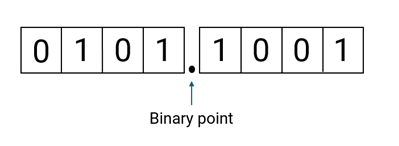
This scaling method minimizes the number of arithmetic operations the processor must perform. The real-world value of a binary-point only scaled number can be represented by:
or
Where the integer value, or stored integer, is the interpreted binary number, in which the binary point is assumed to be at the far right of the word. In binary-point scaling, you move the binary point from the far right of the word by multiplying by a power of two. This table shows an example of how binary point scaling can change the interpretation of a binary word.
| Binary Word | Stored Integer | Scaling | Interpreted Value |
|---|---|---|---|
| 01110110 | 118 | No scaling | 20× 118 = 118 or 01110110. (binary) = 182 |
| Binary-point scaled with fraction length 3 | 2⁻³ ×118 = 14.75 or 10110.110 (binary) = 14.75 |
It is common to use a real-world value as a basis for creating fixed-point data, and choose word length, fraction length and other scaling factors according to hardware requirements.
To create this binary-point scaled fixed-point number in MATLAB®, specify a signed fi (Fixed-Point Designer) object with the value 14.75, word length
8, fraction length 3.
a = fi(14.75,1,8,3)
a =

   14.7500

          DataTypeMode: Fixed-point: binary point scaling
            Signedness: Signed
            WordLength: 8
        FractionLength: 3
>> a.bin
ans =

    '01110110'
Slope-Bias Scaling
A slope and bias can be introduced for additional scaling of a fixed point value. Slope-bias scaling is useful when you need non-power of two scaling, if your hardware uses a custom format, or when your real-world data doesn't start at zero. The real-world value of a slope-bias scaled number can be represented by:
where the slope can be expressed as
Slope-bias scaling is the same as binary-point scaling with the addition of a slope adjustment factor and a bias. The slope adjustment factor is a number greater than or equal to 1 and less than 2. It adjusts the slope so that you can scale your values by non-power of two numbers. The bias can be any number and allows you to center your data around it as a starting value. A binary-point scaled number is equal to a slope-bias scaled number where the bias is 0 and the slope adjustment factor is 1.
This table shows how slope-bias scaling changes the interpretation of the binary word.
| Binary Word | Stored Integer | Scaling | Interpreted Value |
|---|---|---|---|
| 01110110 | 118 | No scaling | 20× 118 = 118 |
| Slope-bias scaling with slope adjustment factor 1.2, fixed exponent –3, and bias –10 | 1.2 × 2–3 ×118 + (–10) = 7.7 |
To create this slope-bias scaled fixed-point number in MATLAB, specify a signed fi object with the value 7.7, word
length 8, slope adjustment factor 1.2, fixed exponent –3, and bias –10.
b = fi(7.7,1,8,1.2,-3,-10)
b =

   7.7000

          DataTypeMode: Fixed-point: slope and bias scaling
            Signedness: Signed
            WordLength: 8
                 Slope: 0.15
                  Bias: -10
b.bin
ans =

    '01110110'
Unspecified Scaling
You can create a fixed-point data type object with no scaling. No scaling means the interpreted value is the stored integer value. Unspecified scaling is useful when you want to store raw binary values or perform bitwise operations.
Note
Simulink® signals, parameters, and states must never have unspecified scaling. When scaling is unspecified, you must use some other mechanism such as automatic best precision scaling to determine the scaling that the Simulink software uses.
Specify Scaling in Simulink
You can specify scaling when you create a fixed-point object using Fixed-Point Designer. To specify scaling in Simulink, use the fixdt function.
Slope-Bias Scaling
When you scale by slope and bias, the slope and bias can take on any value. The slope must be a positive number. Specify slope-bias scaled fixed-point data types as:
fixdt(Signed,WordLength,Slope,Bias)
Binary-Point Scaling
Specify binary-point scaled fixed-point types as:
fixdt(Signed,WordLength,FractionLength)
Integers are a special case of fixed-point data types. Integers have a trivial scaling with slope 1 and bias 0, or equivalently with fraction length 0. Specify integers as:
fixdt(1,WordLength,0)
Unspecified Scaling
Specify fixed-point data types with an unspecified scaling as:
fixdt(Signed,WordLength)
Range
Range is the span of numbers that a fixed-point data type can represent. Range is limited because fixed-point words have limited size.
This illustration shows the range of representable numbers for a two's complement fixed-point number of word length wl, slope S, and bias B, where the values of wl, S, and B allow for both negative and positive numbers.

For both signed and unsigned fixed-point numbers of any data type, the number of different bit patterns is 2wl. For example, in two’s complement, negative numbers must be represented as well as zero, so the maximum value is 2wl-1-1. Because there is only one representation for zero, the number of positive and negative numbers is unequal. There is a representation for —2wl-1, but not for 2wl-1.

Limitations on Range
Because a fixed-point data type represents numbers within a finite range, overflows and underflows can occur if the result of an operation is larger or smaller than the numbers in that range. In binary arithmetic, a processor might need to take an n-bit fixed-point number and store it in m bits, where m and n are not equal.
If m < n, the range of the number has
been reduced, and an operation can produce an overflow condition. Some processors
identify this condition as Inf or NaN. For
other processors, especially digital signal processors (DSPs), the value saturates
or wraps. The Fixed-Point Designer software allows you to either saturate or
wrap overflows. Saturation represents positive overflows as
the largest positive number in the range being used, and negative overflows as the
largest negative number in the range being used. Wrapping uses modulo arithmetic to
cast an overflow back into the representable range of the data type. For more
information, see Modulo Arithmetic (Fixed-Point Designer).
If m > n, the range of the number has been extended. In hardware, extending the range of a word often involves the inclusion of guard bits, which help prevent overflow. For more information, see Guard Bits (Fixed-Point Designer).
Precision
Precision is the smallest difference between two representable values. Higher precision means that the fixed-point number can represent smaller increments between numbers, reducing quantization error.
Precision is equal to the value of the least significant bit of a fixed-point number. The value of the least significant bit, and therefore the precision of the number, is determined by the number of fractional bits. A fixed-point value can be represented to within half of the precision of its data type and scaling.
For example, a fixed-point data type with a fraction length of four has a precision of 2–4 or 0.0625, which is the value of its least significant bit. Any number within the range of this data type and scaling can be represented to within (2–4)/2 or 0.03125, which is half the precision.
Limitations on Precision
The precision of a fixed-point word depends on the word size and binary point location. For example, suppose you must represent the number 35.375 using fixed-point. Using a slope bias encoding scheme, the representation is
where V = 35.375. The two closest approximations to the real-world value are Q = 13 and Q = 14:
In either case, the absolute error is the same:
For fixed-point values within the range of the fixed-point data type, this represents the worst-case error if round-to-nearest is used. If you use other rounding modes, the worst-case error can be twice as large:
You can extend the precision of a word by using additional bits. Rounding and padding with trailing zeros are common methods implemented on processors to deal with the precision of binary words.
Rounding
When you represent numbers with finite precision, not every number in the available range can be represented exactly. If a number cannot be represented exactly by the specified data type and scaling, the software uses a rounding method to cast the value to a representable number. For more information on the rounding methods available with Fixed-Point Designer, see Rounding Modes (Fixed-Point Designer).
Fixed-Point Data Type Parameters
The low limit, high limit, and default binary-point-only scaling for the data types described in this topic are given in this table, where s = slope, b = bias, ws = word length, and fl = fraction length.
Fixed-Point Data Type Range and Default Scaling
Name | Data Type | Representable Minimum | Representable Maximum | Default Scaling |
|---|---|---|---|---|
Unsigned Integer |
|
| 2wl-1 |
|
| Signed Integer |
| –2wl–1–1 | 2wl–1–1 |
|
Unsigned Binary Point |
|
| (2wl)2–fl | 2–fl |
| Signed Binary Point |
| –2wl–1–fl | (2wl–1–1)2–fl | 2–fl |
Unsigned Slope Bias |
|
| s(2wl–1)+b | s |
| Signed Slope Bias |
| –s(2wl–1)+b | s(2wl–1–1)+b | s |
Example Range and Precision of 8-Bit Fixed-Point Data Types
The precision, range of signed values, and range of unsigned values for generalized 8-bit fixed-point data types are listed in the following tables.

