Call Service
R2026bCall service in ROS network
Call Service ROS 1 block

To add a block to a model, double-click the canvas and start typing the block name. Then, select the block from the list.
Libraries:
ROS Toolbox /
ROS
Description
The Call Service block takes a ROS service request message, sends it to the ROS service server, and waits for a response. Connect to a ROS network using rosinit. A ROS server should be set up somewhere on the network before using this block. Check the available services on a ROS network using rosservice. Use rossvcserver to set up a service server in MATLAB®.
Specify the name for your ROS service and the service type in the block mask. If connected to a ROS network, you can select from a list of available services. You can create a blank service request or response message to populate with data using the Blank Message block.
Examples
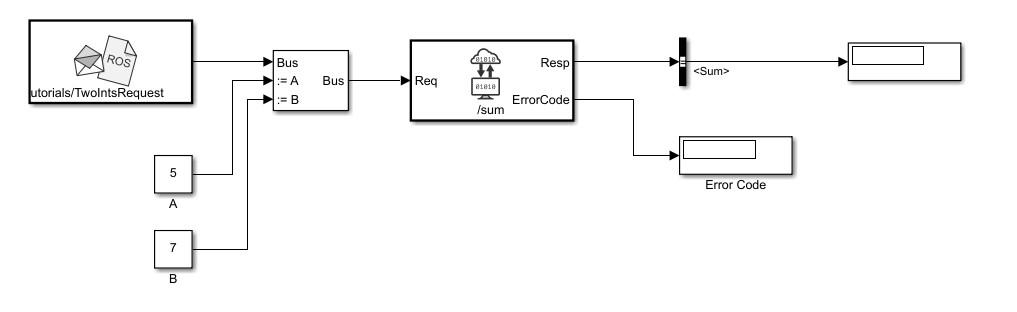
Call ROS Service in Simulink
Use the Call Service block to call a service on the ROS service server.
Ports
Input
Output
Parameters
Programmatic Use: Add Block
To add the block programmatically, use the add_block function with one of these library block paths as the source.
"robotlib/Call Service"
Example: add_block("robotlib/Call Service","myModel/myBlock",MakeNameUnique="on")
Extended Capabilities
Version History
Introduced in R2019b

