graythresh
R2026bGlobal image threshold using Otsu's method
Syntax
Description
thresh = graythresh(I)thresh from grayscale image
I, using Otsu's method [1]. Otsu's method chooses a
threshold that minimizes the intraclass variance of the thresholded black and
white pixels.
graythresh calculates the global threshold by binning the
image data into a 256-bin image histogram. By default, the
graythresh function creates the histogram assuming that
the image data spans the full range of the data type.
You can use the global threshold thresh with the
imbinarize
function to convert a grayscale image to a binary image.
thresh = graythresh(I,HistogramRangeMode=histogramRangeMode)histogramRangeMode. Specify
histogramRangeMode as "data-range"
when the image data has a small dynamic range compared to the data type.
Examples
Read a grayscale image into the workspace.
I = imread('coins.png');Calculate a threshold using graythresh. The threshold is normalized to the range [0, 1].
level = graythresh(I)
level =
0.4941
Convert the image into a binary image using the threshold.
BW = imbinarize(I,level);
Display the original image next to the binary image.
imshowpair(I,BW,'montage')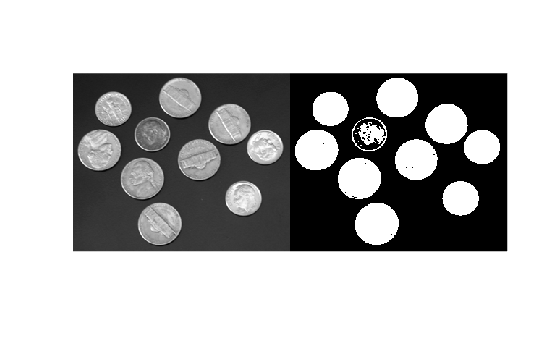
Input Arguments
Output Arguments
Tips
The
imbinarizefunction can also calculate a global threshold for binary images using Otsu’s method, and apply the threshold to binary images in one step. However,imbinarizedoes not calculate an effectiveness metric. If you want to know the effectiveness metric, usegraythreshbefore callingimbinarize.
References
[1] Otsu, N., "A Threshold Selection Method from Gray-Level Histograms." IEEE Transactions on Systems, Man, and Cybernetics. Vol. 9, No. 1, 1979, pp. 62–66.

