Apply Optical Coatings
R2026bOptical coatings are stacks of thin films made from specific optical materials, designed to control reflection and transmission of light within an optical system. You can design, edit, and apply optical coatings to lens and mirror surfaces in an optical system using the Optical Design and Simulation Library for Image Processing Toolbox™. You can perform reflectance, transmittance, and absorbance analysis for optical coating design with specific wavelength, incident light angle, and polarization requirements.
To apply optical coatings, follow these steps:
In addition to working with coatings programmatically, you can interactively apply coatings to surfaces and view coating properties and performance parameters in the Optical System Designer app.
You can install the Optical Design and Simulation Library for Image Processing Toolbox from the Add-On Explorer. For more information about installing add-ons, see Get and Manage Add-Ons.
Use Optical Coating Materials
You can select an existing optical coating material from the coating material library, or create a custom optical coating material, and add it to the library.
Use Material from Coating Library
To use an optical coating material from the default coating material library, use the
coatingMaterialLibrary object. The default materials in the coating
library are Al2O3,
GdF3, HfO2,
MgF2, SiO2, TiO2,
Al, Ag, and Au.
Load the default coating library.
cml = coatingMaterialLibrary
cml =

  CoatingMaterialLibrary with properties:

    CoatingMaterialCatalogTable: [2×3 table]
               CoatingMaterials: [10×1 opticalMaterial]
Inspect the properties of a material in the default coating material library, by
extracting it using the pickCoatingMaterial
function.
ocm = pickCoatingMaterial("TiO2")ocm =
opticalMaterial with properties:
Main Properties
Name: "TiO2"
Catalog: "RefractiveIndex.INFO"
Nd: 2.3247
Vd: 12.5465
WavelengthRange: [0 Inf]
Extended Properties
RefractiveIndexMethod: "LookupTable"
RefractiveIndexParameter: [609×2 double]
ExtinctionCoefficientParameters: [609×2 double]
RawCatalogData: [1×1 struct]Create Custom Coating Material
Create a custom coating material by using an opticalMaterial object. Set the optical properties by specifying the index
of refraction and Abbe number, make the material retrievable using
pickCoatingMaterial function by setting the
Name property, and add the material to a material catalog by
setting the Catalog
property.
newMat = opticalMaterial([1.43 95.23],Name="CaF2",Catalog="New")
newMat =

  opticalMaterial with properties:

   Main Properties
                        Name: "CaF2"
                     Catalog: "New"
                          Nd: 1.4300
                          Vd: 95.2300
             WavelengthRange: [0 Inf]

   Extended Properties
       RefractiveIndexMethod: "AbbeNumber"
    RefractiveIndexParameter: [1.4300 95.2300]
      TransmissionParameters: [587.5618 1 1]
              RawCatalogData: [1×1 struct]
Add Custom Optical Material to Coating Material Library
To use a custom material for optical coating layers, you must first add the material
to the coating material library. Use the addCoatingMaterial function to add the custom optical material to the
coating material library.
addCoatingMaterial(cml,newMat)
To inspect the properties of the custom optical material after you have added it to
the coating material library, you can use the pickCoatingMaterial function. Note that the catalog matches the coating
material catalog specified when creating the material.
ocm_CaF2 = pickCoatingMaterial("CaF2")ocm_CaF2 =
opticalMaterial with properties:
Main Properties
Name: "CaF2"
Catalog: "New"
Nd: 1.4300
Vd: 95.2300
WavelengthRange: [0 Inf]
Extended Properties
RefractiveIndexMethod: "AbbeNumber"
RefractiveIndexParameter: [1.4300 95.2300]
TransmissionParameters: [587.5618 1 1]
RawCatalogData: [1×1 struct]Once you have the coating materials required for your application in the coating library, you can create your optical coating.
Create Custom Optical Coatings
You can use the opticalCoating
object to create a multilayer coating. Create a custom Bragg reflector coating by
specifying the coating layer materials using the CoatingMaterials property, the design wavelength using the PrimaryWavelength property, and the layer thicknesses using the LayerThickness property. Specify the units of the optical coating layer
thicknesses using the ThicknessUnit
property.
The opticalCoating object also has properties that enable you to
specify the incident light angle range, ambient medium type, substrate type, and
operational wavelength range.
ocBragg = opticalCoating(Name="Bragg_500nm", ...
    CoatingMaterials=["CaF2","TiO2"], ...
    PrimaryWavelength=500, ...
    LayerMaterialIndex=repmat([1 2],[1 6]), ...
    ThicknessUnit="quarterWavelength", ...
    LayerThickness=ones(1,12));
This coating has 12 layers, with bilayer stacks of CaF2 and TiO2, materials with low and high indices of refraction, respectively, each repeating 6 times. Each layer is exactly a quarter of the primary wavelength, or /4 at 500 nm, in optical thickness. This figure shows the structure of the layer stacks that comprise the coating.
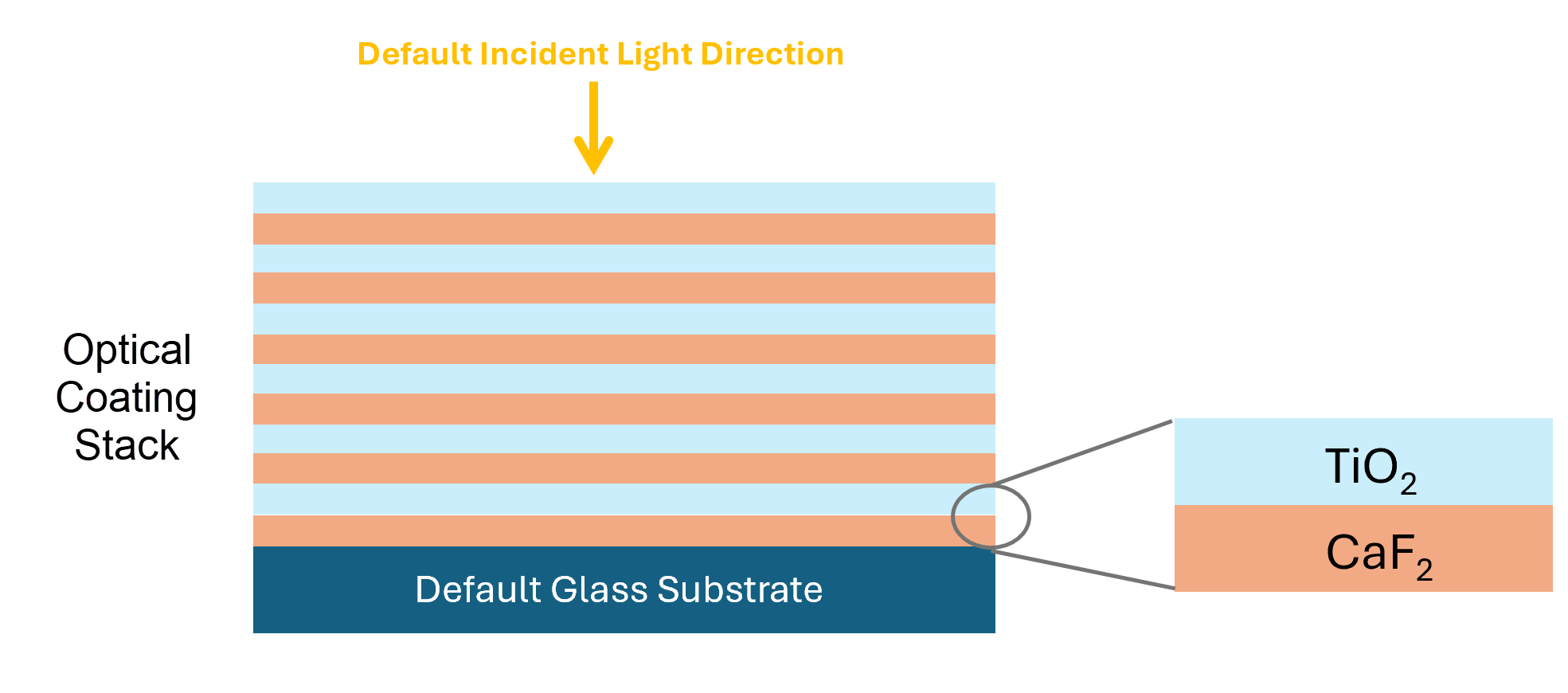
Create another custom coating, a broadband anti-reflective (AR) optical coating that consists of two alternating SiO2 and TiO2 bilayer stacks.
ocBBAR = opticalCoating(Name="BBAR_4l", ...
    CoatingMaterial = ["TiO2","SiO2"], ...
    LayerMaterialIndex = [1 2 1 2], ...
    ThicknessUnit = "nm", ...
    LayerThickness = [14.6 36.5 129.1 95.5]);
Manage Optical Coating Library
Use coatingLibrary
to load and manage the library of available optical coatings. You can add or remove a
custom coating from the coating library using the addCoating or
removeCoating
object function of the coatingLibrary object, respectively. To delete all
custom coatings and restore the coating library to its default state, you can use the
restoreDefaultCoatingLibrary function.
To add a custom coating to the coating library, first load the default coating library
by creating a coatingLibrary object. The default optical coating library
contains two Bragg reflector coatings.
cl = coatingLibrary
cl =
  CoatingLibrary with properties:

    CoatingCatalogTable: [1×3 table]
               Coatings: [2×1 opticalCoating]
Add the custom Bragg reflector and broadband AR coatings to the coating library.
addCoating(cl,[ocBragg ocBBAR])
Inspect the properties of the custom Bragg coating using the pickCoating
function.
pickCoating("Bragg_500nm")ans =
opticalCoating with properties:
Name: "Bragg_500nm"
IncidentAngleRange: [0 15]
WavelengthRange: [300 800]
PrimaryWavelength: 500
Medium: [1×1 opticalMaterial]
Substrate: [1×1 opticalMaterial]
CoatingMaterials: [2×1 opticalMaterial]
LayerMaterialIndex: [1 2 1 2 1 2 1 2 1 2 1 2]
LayerThickness: [1 1 1 1 1 1 1 1 1 1 1 1]
ThicknessUnit: "quarterWavelength"
NumLayers: 12
TotalThickness: 827.0304Visualize Coating Optical Response
To create spectral response plots for your optical coating, you can compute the
reflectance (R), transmittance (T), and absorbance (A), as well as the reflection (r) and
transmission (t) amplitude coefficients, using the fresnelCoefficients object function. Then, use these quantities to create
custom spectral response visualizations.
For example, compute the optical response coefficients for the custom coating
ocBragg at an incident light angle of 21
degrees.
coeffs = fresnelCoefficients(ocBragg,IncidentAngles=21);
Define the operational wavelength range for the coating.
lambda = ocBragg.WavelengthRange(1):ocBragg.WavelengthRange(2);
Plot the spectral response of the coating as a function of wavelength.
figure
hold on
plot(lambda,coeffs.Rs,"r-",LineWidth=2)
plot(lambda,coeffs.Rp,"r--",LineWidth=2)
plot(lambda,coeffs.Ra,"r:",LineWidth=2)
plot(lambda,coeffs.As,"k-",LineWidth=2)
plot(lambda,coeffs.Ap,"k--",LineWidth=2)
plot(lambda,coeffs.Ta,"b:",LineWidth=2)
plot(lambda,coeffs.Ts,"b-",LineWidth=2)
plot(lambda,coeffs.Tp,"b--",LineWidth=2)

xlabel("\lambda")
ylabel("T/R/A")
text(550,0.8,"\theta_{incident}=21\circ",FontSize=14)

legend({"Rs","Rp","Ra","As","Ap","Ta","Ts","Tp"}, ...
    Orientation="horizontal",Location="southoutside")

xlim([min(lambda),max(lambda)])
ylim([0 1])
hold off
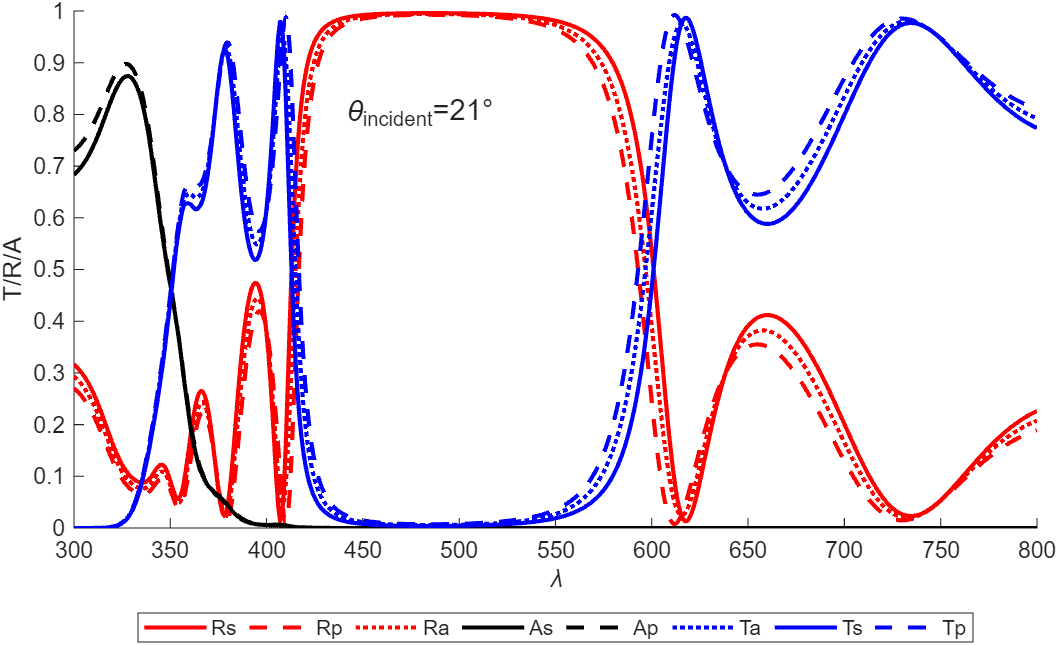
Apply Coating to Surfaces
When you are satisfied with the optical performance of your coating, you can apply it to all lens elements in an optical system simultaneously, or select specific mirror or lens element surfaces to which to apply the optical coating.
First, create an optical system that contains refractive surfaces. Alternatively, you
can load an optical system into the workspace using the zmximport
function.
opsys = opticalSystem;
addRefractiveSurface(opsys,Radius=10,DistanceToNext=4,Material="N-BK7")
addRefractiveSurface(opsys,Radius=-10,DistanceToNext=2,Material="F2")
addRefractiveSurface(opsys,DistanceToNext=10)
addRefractiveSurface(opsys,Radius=10,DistanceToNext=4,Material="N-BK7")
addRefractiveSurface(opsys,Radius=-10)
addGap(opsys,2)
addImagePlane(opsys)
Display a 2-D visualization of the optical system with labeled surfaces by using the
view2d object
function.
view2d(opsys,Labels="surface");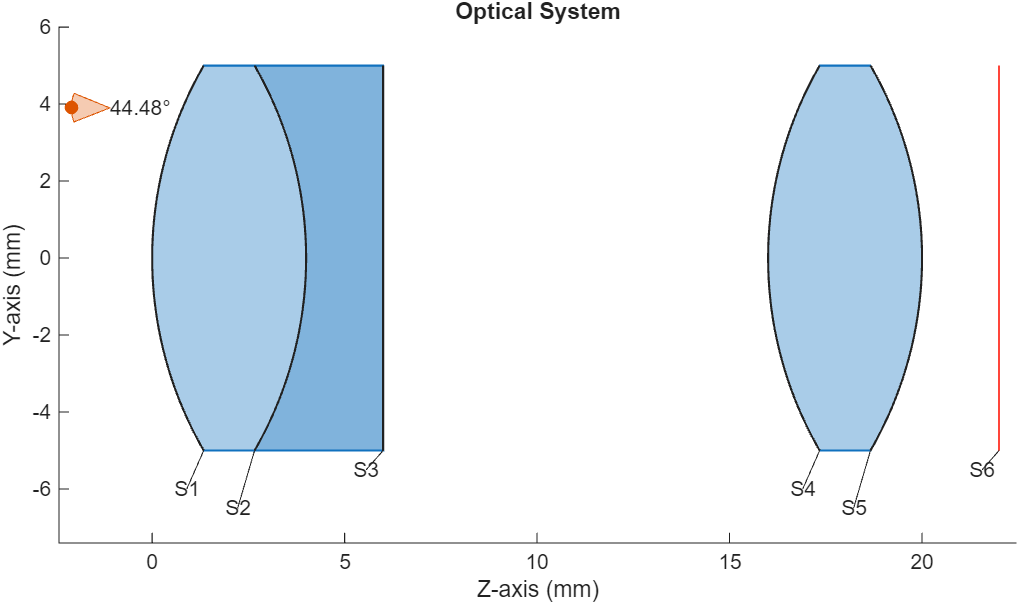
Apply Coating to All Lens Elements
To apply a coating to all lens elements in the optical system, use the addCoating
object function of the opticalSystem object.
Apply the custom Bragg reflector coating to the back surfaces of all the lens elements in the optical system, surfaces S3 and S5.
addCoating(opsys,ocBragg,CoatingSide="back")Apply Coatings to Individual Components or Surfaces
To apply a coating to one or both surfaces of a specific lens element or mirror, you
must set the Coatings property of that LensElement
or Mirror
object.
Apply the custom Bragg reflector coating to the first component in the sample optical
system opsys, a doublet lens. The function applies the coating to the
front surface, S1, of the lens element. The back surface, S3, remains uncoated.
Lens1 = opsys.Components(1);
Lens1.Coatings = ocBragg;
To instead apply different coatings to the front and back surfaces of a lens element
with only two surfaces, set the Coatings property as a 2-element row vector of the form
[frontCoating
backCoating], where frontCoating and
backCoating are the front and back coatings of the lens element,
respectively, specified as opticalCoating objects.
Apply the Bragg reflector coating to the front surface, S4, and the AR coating to the back surface, S5, of the second lens element in the optical system.
Lens2 = opsys.Components(2);
Lens2.Coatings = [ocBragg ocBBAR];
For a lens with N surfaces, the first N – 1
coatings in the Coatings property apply to the front of each
corresponding surface, and the Nth coating applies to the back of
surface N.

