このページの内容は最新ではありません。最新版の英語を参照するには、ここをクリックします。
アンテナのモデル化と解析
R2026aこの例では、Antenna Toolbox でアンテナ素子を構築、可視化、および解析する方法を示します。
Antenna ライブラリを使用したアンテナ素子の定義
Antenna Modeling and Analysis ライブラリのhelixアンテナ素子を使用して、ヘリックス アンテナを定義します。
hx = helix
hx =
  helix with properties:

               Radius: 0.0220
                Width: 1.0000e-03
                Turns: 3
              Spacing: 0.0350
     WindingDirection: 'CCW'
       FeedStubHeight: 1.0000e-03
    GroundPlaneRadius: 0.0750
            Substrate: [1×1 dielectric]
            Conductor: [1×1 metal]
                 Tilt: 0
             TiltAxis: [1 0 0]
                 Load: [1×1 lumpedElement]
アンテナの構造の表示
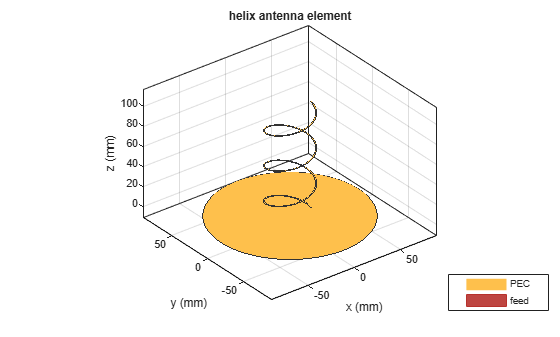
show関数を使用して、ヘリックス アンテナの構造を表示します。ヘリカル アンテナは、グランド プレーン上にあるらせん形状の導体で構成されます。アンテナのグランド プレーンは X-Y 面にあります。
show(hx)
アンテナのプロパティの変更
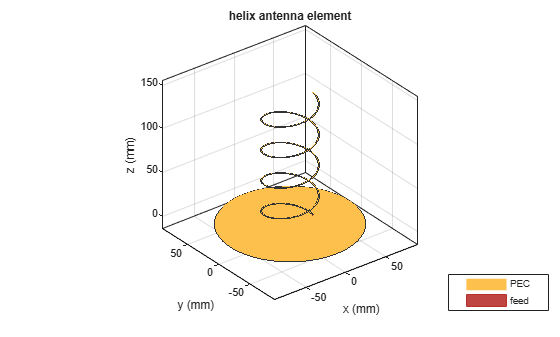
ヘリックス アンテナの次のプロパティを変更します。半径 = 28e-3、幅 = 1.2e-3、巻数 = 4。アンテナのプロパティを表示します。アンテナを表示して、構造の変化を確認します。
hx = helix(Radius=28e-3, Width=1.2e-3, Turns=4)
hx =
  helix with properties:

               Radius: 0.0280
                Width: 0.0012
                Turns: 4
              Spacing: 0.0350
     WindingDirection: 'CCW'
       FeedStubHeight: 1.0000e-03
    GroundPlaneRadius: 0.0750
            Substrate: [1×1 dielectric]
            Conductor: [1×1 metal]
                 Tilt: 0
             TiltAxis: [1 0 0]
                 Load: [1×1 lumpedElement]
show(hx)
アンテナの放射パターンのプロット
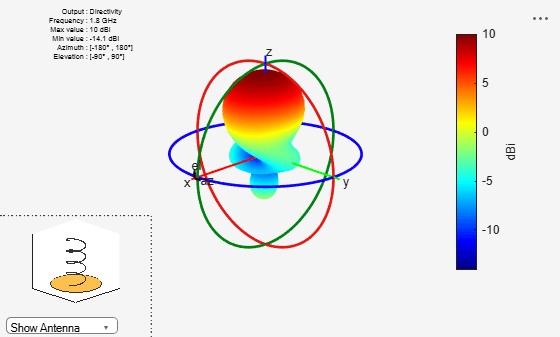
pattern関数を使用して、ヘリックス アンテナの放射パターンをプロットします。アンテナの放射パターンは、アンテナの電力の空間分布です。このパターンは、アンテナの指向性またはゲインを表示します。既定では、pattern 関数はアンテナの指向性をプロットします。
pattern(hx,1.8e9)
アンテナの方位角と仰角のパターンのプロット
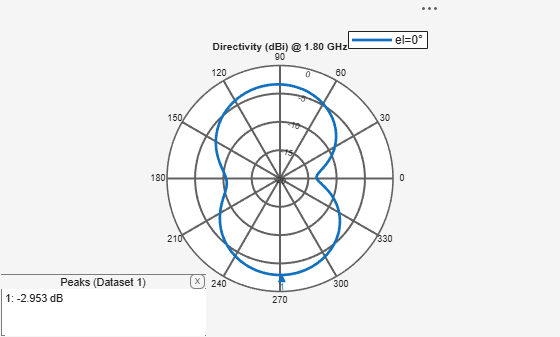
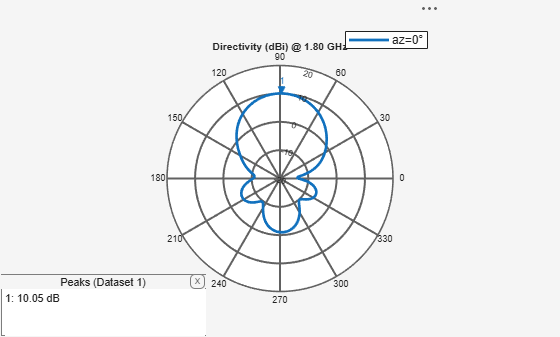
patternAzimuth関数とpatternElevation関数を使用して、ヘリックス アンテナの方位角と仰角のパターンをプロットします。これは、特定の周波数におけるアンテナの 2 次元放射パターンです。
patternAzimuth(hx,1.8e9)
figure
patternElevation(hx,1.8e9)
アンテナの指向性の計算
pattern 関数の出力にある Directivity の名前と値のペアを使用して、ヘリックス アンテナの指向性を計算します。指向性は、アンテナが特定の方向に電力を放射する能力のことです。これは、目的とする方向における最大放射強度と他のすべての方向における平均放射強度との比として定義できます。アンテナのゲインと指向性は、100*lambda の距離で測定されます。
Directivity = pattern(hx,1.8e9,0,90)
Directivity =
10.0440
アンテナの EHfields の計算
EHfields関数を使用して、ヘリックス アンテナの EH 界を計算します。EH 界は、アンテナの電界と磁界の x、y、z 成分のことです。これらの成分は、特定の周波数かつ空間内の指定された地点で測定されます。
[E,H] = EHfields(hx,1.8e9,[0;0;1]);
アンテナのさまざまな偏波のプロット
pattern 関数の Polarization の名前と値のペアを使用して、ヘリックス アンテナのさまざまな偏波パターンをプロットします。偏波は、アンテナの電界 (E 界) の向きのことです。偏波は、楕円、直線、円に分類されます。この例は、ヘリックスの右旋円偏波 (RHCP) 放射パターンを示しています。
pattern(hx,1.8e9, Polarization="RHCP")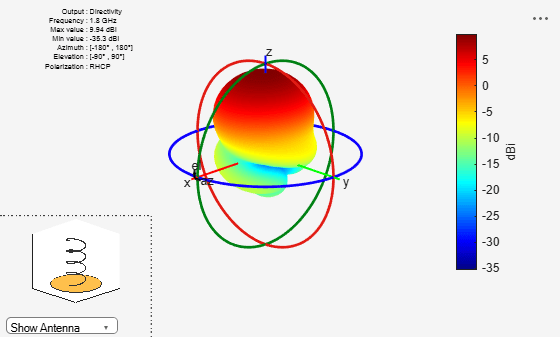
アンテナの軸比の計算
axialRatio関数を使用して、ヘリックス アンテナの軸比を計算します。特定の方向におけるアンテナの軸比 (AR) は、円偏波で放射される 2 つの直交する電界成分の比率を定量化したものです。軸比が無限大ということは、直線偏波であることを示します。測定単位は dB です。
ar = axialRatio(hx,1.8e9,20,30)
ar =
23.8947
アンテナのビーム幅の計算
beamwidth関数を使用してアンテナのビーム幅を計算します。アンテナのビーム幅は、アンテナ パターンのカバレッジを角度で表したものです。ビーム幅角は、アンテナのメイン ローブの方向を含む平面で測定されます。
[bw, angles] = beamwidth(hx,1.8e9,0,1:1:360)
bw =
57.0000
angles = 1×2

    60   117
アンテナのインピーダンスの計算
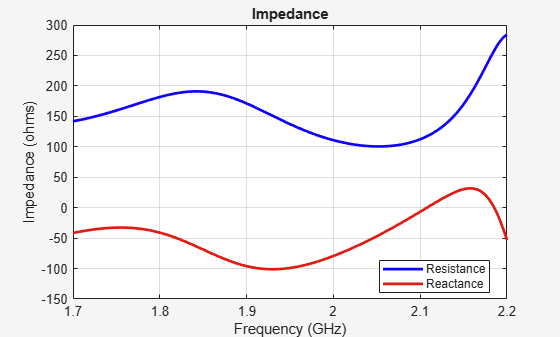
impedance関数を使用して、ヘリックス アンテナの入力インピーダンスを計算し、プロットします。入力インピーダンスは、端子における電圧と電流の比のことです。アンテナのインピーダンスは、端子におけるフェーザ電圧 (前述のように位相角 0 度で 1 V) とフェーザ電流の比として計算されます。
impedance(hx,1.7e9:1e6:2.2e9)
アンテナの反射係数の計算
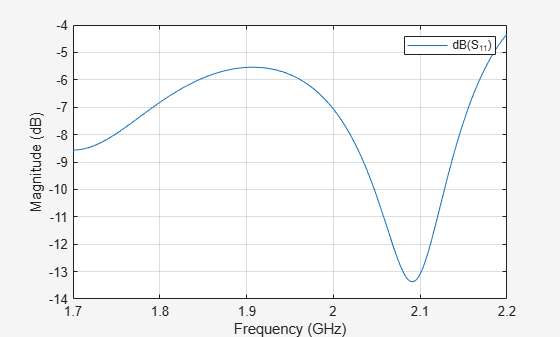
sparameters関数を使用して、ヘリックス アンテナの S11 を計算します。アンテナの反射係数 (S_1_1) は、インピーダンス不整合によって反射される入射 RF 電力の相対的な割合を表します。
S = sparameters(hx,1.7e9:1e6:2.2e9,72)
S =
  sparameters with properties:

      Impedance: 72
       NumPorts: 1
     Parameters: [1×1×501 double]
    Frequencies: [501×1 double]
rfplot(S)
アンテナのリターン ロスの計算
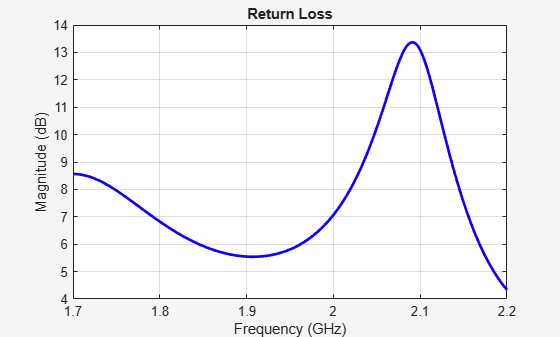
returnLoss関数を使用して、ヘリックス アンテナのリターン ロスを計算し、プロットします。アンテナのリターン ロスは、伝送線路からアンテナなどの負荷への電力供給の効率を示す指標です。計算結果は対数スケールで表示されます。
returnLoss(hx,1.7e9:1e6:2.2e9,72)
アンテナの電圧定在波比 (VSWR) の計算
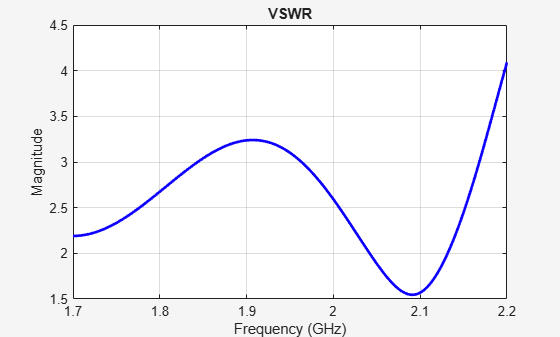
vswr関数を使用して、ヘリックス アンテナの VSWR を計算し、プロットします。アンテナの VSWR は、伝送線路とアンテナの間のインピーダンス整合を示すもう一つの指標です。
vswr(hx,1.7e9:1e6:2.2e9,72)
アンテナの電流分布と電荷分布の計算
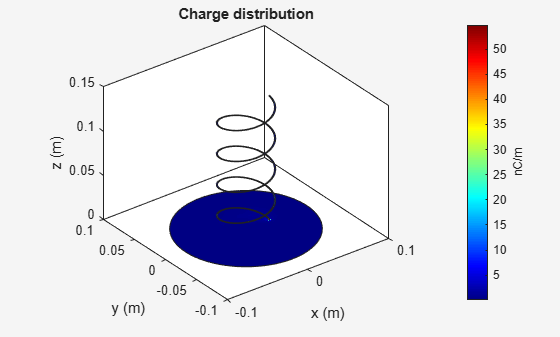
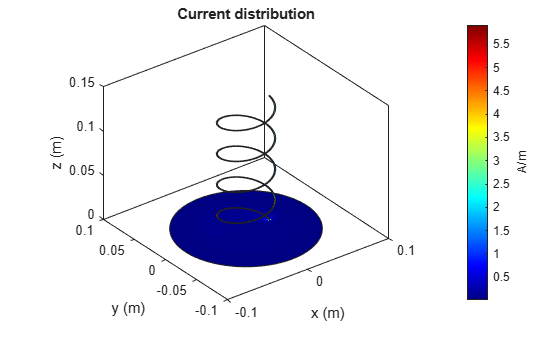
charge関数を使用して、ヘリックス アンテナの電荷分布を計算します。電荷分布とは、特定の周波数におけるアンテナ表面上の電荷の値です。current関数を使用して、ヘリックス アンテナの電流分布を計算します。電流分布とは、特定の周波数におけるアンテナ表面上の電流の値です。
charge(hx,2.01e9)
figure
current(hx,2.01e9)
アンテナのメッシュの表示
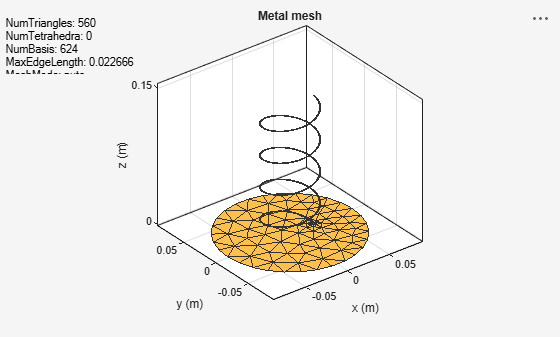
mesh関数を使用して、ヘリックス アンテナのメッシュ構造を作成して表示します。メッシュはアンテナ表面を離散化するために使用されます。このプロセスにおいて、電磁気ソルバーはアンテナの形状と材質を処理できます。アンテナ表面を分割するための基底つまり離散化素子の形状は三角形です。
figure
mesh(hx)
アンテナの手動でのメッシュ化
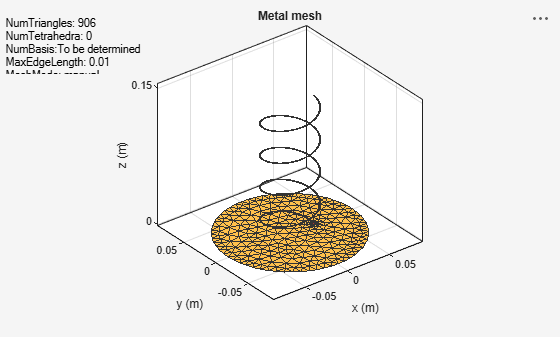
MaxEdgeLength の名前と値の引数を使用して、三角形の最大エッジ長を指定します。これにより、らせん構造が手動でメッシュ化されます。
figure
mesh(hx, MaxEdgeLength=0.01)
メッシュ化の自動への変更
meshconfig(hx,"auto")ans = struct with fields:
NumTriangles: 908
NumTetrahedra: 0
NumBasis: []
MaxEdgeLength: 0.0100
MinEdgeLength: 0.0075
GrowthRate: 0.9500
MeshMode: 'auto'
参考:
Antenna Near-Field Visualization
参考文献
[1] Balanis, C.A. "Antenna Theory. Analysis and Design", p. 514, Wiley, New York, 3rd Edition, 2005.

