wordcloud
R2026bテキスト、bag-of-words モデル、bag-of-n-grams モデル、または LDA モデルからワード クラウド チャートを作成する
構文
説明
Text Analytics Toolbox™ は、wordcloud (MATLAB®) 関数の機能を拡張します。string 配列から直接ワード クラウドを作成し、bag-of-words モデル、bag-of-n-gram モデル、LDA トピックからワード クラウドを作成するためのサポートが追加されています。Text Analytics Toolbox がインストールされていない場合は、wordcloud を参照してください。
wordcloud( は、str)str のテキストをトークン化および前処理し、単語の頻度カウントに対応するサイズで単語を表示することにより、ワード クラウド チャートを作成します。この構文は、英語、日本語、ドイツ語、および韓国語のテキストをサポートしています。
wordcloud( は、頻度カウントを使用して、categorical 配列 C)C の要素からワード クラウド チャートを作成します。
wordcloud(___, は、1 つ以上の名前と値のペアの引数を使用して、追加の Name,Value)WordCloudChart プロパティを指定します。
wordcloud( は、parent,___)parent で指定された Figure、パネル、またはタブにワード クラウドを作成します。
wc = wordcloud(___)WordCloudChart オブジェクトを返します。作成したワード クラウドのプロパティを変更するには、wc を使用します。プロパティの一覧については、WordCloudChart のプロパティ を参照してください。
例
extractFileText を使用して sonnets.txt からテキストを抽出し、最初のソネットのテキストを表示します。
str = extractFileText("sonnets.txt");
extractBefore(str,"II")
ans =
    "THE SONNETS

     by William Shakespeare


       I

       From fairest creatures we desire increase,
       That thereby beauty's rose might never die,
       But as the riper should by time decease,
       His tender heir might bear his memory:
       But thou, contracted to thine own bright eyes,
       Feed'st thy light's flame with self-substantial fuel,
       Making a famine where abundance lies,
       Thy self thy foe, to thy sweet self too cruel:
       Thou that art now the world's fresh ornament,
       And only herald to the gaudy spring,
       Within thine own bud buriest thy content,
       And tender churl mak'st waste in niggarding:
         Pity the world, or else this glutton be,
         To eat the world's due, by the grave and thee.

       "
ソネットの単語をワード クラウドで表示します。
figure
wordcloud(str);
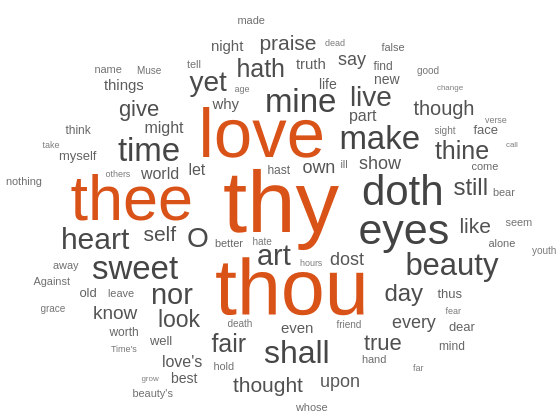
サンプル データを読み込みます。ファイル sonnetsPreprocessed.txt には、シェイクスピアのソネット集の前処理されたバージョンが格納されています。ファイルには、1 行に 1 つのソネットが含まれ、単語がスペースで区切られています。sonnetsPreprocessed.txt からテキストを抽出し、テキストを改行文字で文書に分割した後、文書をトークン化します。
filename = "sonnetsPreprocessed.txt";
str = extractFileText(filename);
textData = split(str,newline);
documents = tokenizedDocument(textData);
ワード クラウドを使用して文書を可視化します。
figure
wordcloud(documents);
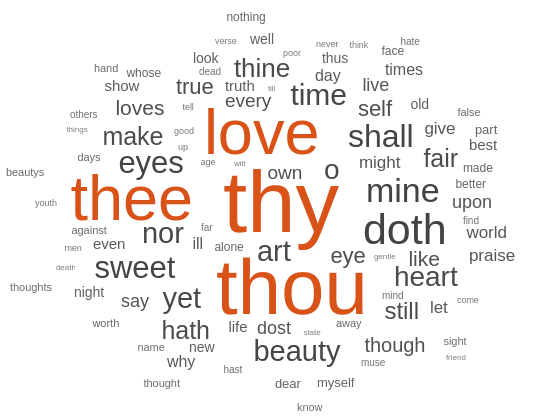
サンプル データを読み込みます。ファイル sonnetsPreprocessed.txt には、シェイクスピアのソネット集の前処理されたバージョンが格納されています。ファイルには、1 行に 1 つのソネットが含まれ、単語がスペースで区切られています。sonnetsPreprocessed.txt からテキストを抽出し、テキストを改行文字で文書に分割した後、文書をトークン化します。
filename = "sonnetsPreprocessed.txt";
str = extractFileText(filename);
textData = split(str,newline);
documents = tokenizedDocument(textData);
bagOfWords を使用して bag-of-words モデルを作成します。
bag = bagOfWords(documents)
bag =
  bagOfWords with properties:

          Counts: [154×3092 double]
      Vocabulary: ["fairest"    "creatures"    "desire"    "increase"    "thereby"    "beautys"    "rose"    "might"    "never"    "die"    "riper"    "time"    "decease"    "tender"    "heir"    "bear"    "memory"    "thou"    "contracted"    …    ]
        NumWords: 3092
    NumDocuments: 154
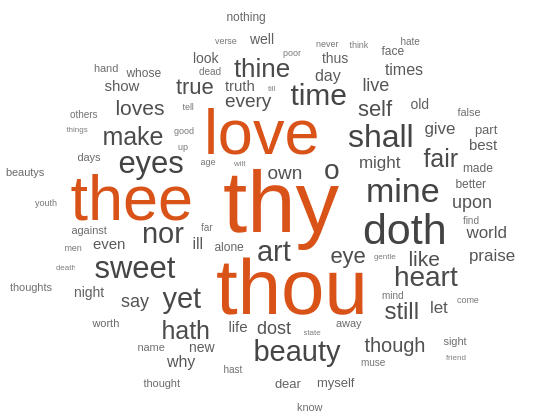
ワード クラウドを使用して bag-of-words モデルを可視化します。
figure
wordcloud(bag);
サンプル データ sonnetsTable を読み込みます。table tbl には、変数 Word に単語のリスト、変数 Count に対応する頻度カウントが格納されています。
load sonnetsTable
head(tbl)
Word Count
___________ _____
{'''tis' } 1
{''Amen'' } 1
{''Fair' } 2
{''Gainst'} 1
{''Since' } 1
{''This' } 2
{''Thou' } 1
{''Thus' } 1
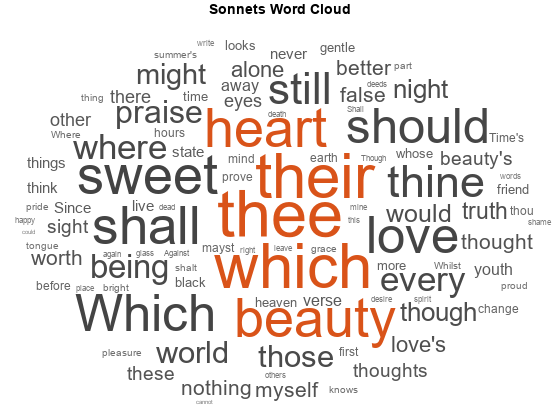
wordcloud を使用して table のデータをプロットします。単語と対応するワード サイズがそれぞれ Word 変数と Count 変数になるように指定します。
figure
wordcloud(tbl,'Word','Count');
title("Sonnets Word Cloud")
この例の結果を再現するために、rng を 'default' に設定します。
rng('default')サンプル データを読み込みます。ファイル sonnetsPreprocessed.txt には、シェイクスピアのソネット集の前処理されたバージョンが格納されています。ファイルには、1 行に 1 つのソネットが含まれ、単語がスペースで区切られています。sonnetsPreprocessed.txt からテキストを抽出し、テキストを改行文字で文書に分割した後、文書をトークン化します。
filename = "sonnetsPreprocessed.txt";
str = extractFileText(filename);
textData = split(str,newline);
documents = tokenizedDocument(textData);
bagOfWords を使用して bag-of-words モデルを作成します。
bag = bagOfWords(documents)
bag =
  bagOfWords with properties:

          Counts: [154×3092 double]
      Vocabulary: ["fairest"    "creatures"    "desire"    "increase"    "thereby"    "beautys"    "rose"    "might"    "never"    "die"    "riper"    "time"    "decease"    "tender"    "heir"    "bear"    "memory"    "thou"    "contracted"    …    ]
        NumWords: 3092
    NumDocuments: 154
トピック数 20 の LDA モデルを当てはめます。詳細出力を抑制するには、'Verbose' を 0 に設定します。
mdl = fitlda(bag,20,'Verbose',0)mdl =
ldaModel with properties:
NumTopics: 20
WordConcentration: 1
TopicConcentration: 5
CorpusTopicProbabilities: [0.0500 0.0500 0.0500 0.0500 0.0500 0.0500 0.0500 0.0500 0.0500 0.0500 0.0500 0.0500 0.0500 0.0500 0.0500 0.0500 0.0500 0.0500 0.0500 0.0500]
DocumentTopicProbabilities: [154×20 double]
TopicWordProbabilities: [3092×20 double]
Vocabulary: ["fairest" "creatures" "desire" "increase" "thereby" "beautys" "rose" "might" "never" "die" "riper" "time" "decease" "tender" "heir" "bear" "memory" "thou" … ]
TopicOrder: 'initial-fit-probability'
FitInfo: [1×1 struct]
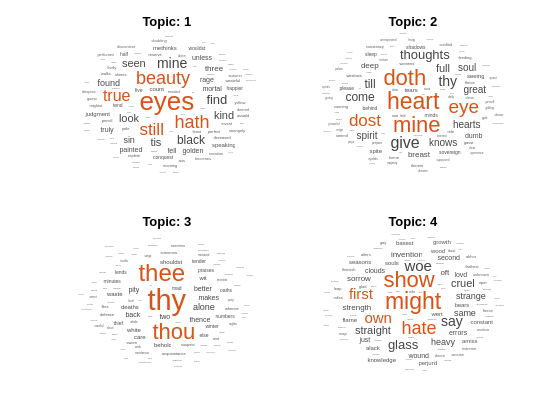
ワード クラウドを使用して、最初の 4 つのトピックを可視化します。
figure
for topicIdx = 1:4
    subplot(2,2,topicIdx)
    wordcloud(mdl,topicIdx);
    title("Topic: " + topicIdx)
end
入力引数
名前と値の引数
オプションの引数のペアを Name1=Value1,...,NameN=ValueN として指定します。ここで、Name は引数名で、Value は対応する値です。名前と値の引数は他の引数の後に指定しなければなりませんが、ペアの順序は重要ではありません。
R2021a より前では、コンマを使用して名前と値をそれぞれ区切り、Name を引用符で囲みます。
例: 'HighlightColor','blue' は、強調色を青に指定します。
ここには一部の WordCloudChart プロパティのみを示します。一覧については、WordCloudChart のプロパティを参照してください。
表示する単語の最大数。非負の整数として指定します。ソフトウェアは、MaxDisplayWords 個の最も大きい単語を表示します。
単語の色。RGB 3 成分、色名を含む文字ベクトル、または N 行 3 列の行列 (N は WordData の長さ) として指定します。Color が行列である場合、各行は WordData 内の対応する単語の RGB 3 成分に対応します。
RGB 3 成分と 16 進数カラー コードは、カスタム色を指定する際に便利です。
RGB 3 成分は、各要素が色の赤、緑、および青の成分の強度を指定する 3 要素の行ベクトルです。強度は
[0,1]の範囲内 (たとえば[0.4 0.6 0.7]) でなければなりません。16 進数カラー コードは、ハッシュ記号 (
#) で始まり、その後に0からFまでの範囲の 3 桁または 6 桁の 16 進数が続く文字ベクトルまたは string スカラーです。値は大文字と小文字を区別しません。したがって、カラー コード"#FF8800"、"#ff8800"、"#F80"、"#f80"は同等です。
または、一般的な色を名前で指定できます。次の表に、名前の付いた色のオプション、それに対応する RGB 3 成分、16 進数カラー コードを示します。
| 色名 | 短い名前 | RGB 3 成分 | 16 進数カラー コード | 外観 |
|---|---|---|---|---|
"red" | "r" | [1 0 0] | "#FF0000" |
|
"green" | "g" | [0 1 0] | "#00FF00" |
|
"blue" | "b" | [0 0 1] | "#0000FF" |
|
"cyan" | "c" | [0 1 1] | "#00FFFF" |
|
"magenta" | "m" | [1 0 1] | "#FF00FF" |
|
"yellow" | "y" | [1 1 0] | "#FFFF00" |
|
"black" | "k" | [0 0 0] | "#000000" |
|
"white" | "w" | [1 1 1] | "#FFFFFF" |
|


次の表に、ライト テーマとダーク テーマにおけるプロットの既定のカラー パレットを示します。
| パレット | パレットの色 |
|---|---|
R2025a より前: ほとんどのプロットは、既定でこれらの色を使用します。 |
|
|
|


orderedcolors 関数と rgb2hex 関数を使用して、これらのパレットの RGB 3 成分と 16 進数カラー コードを取得できます。たとえば、"gem" パレットの RGB 3 成分を取得し、それらを 16 進数カラー コードに変換します。
RGB = orderedcolors("gem");
H = rgb2hex(RGB);
R2024a より前: H = compose("#%02X%02X%02X",round(RGB*255)) を使用して、16 進数カラー コードを取得します。
R2023b より前: RGB = get(groot,"FactoryAxesColorOrder") を使用して、RGB 3 成分を取得します。
例: 'blue'
例: [0 0 1]
単語の強調色。RGB 3 成分、または色名を含む文字ベクトルとして指定します。ソフトウェアは、最も大きい単語をこの色で強調表示します。
RGB 3 成分と 16 進数カラー コードは、カスタム色を指定する際に便利です。
RGB 3 成分は、各要素が色の赤、緑、および青の成分の強度を指定する 3 要素の行ベクトルです。強度は
[0,1]の範囲内 (たとえば[0.4 0.6 0.7]) でなければなりません。16 進数カラー コードは、ハッシュ記号 (
#) で始まり、その後に0からFまでの範囲の 3 桁または 6 桁の 16 進数が続く文字ベクトルまたは string スカラーです。値は大文字と小文字を区別しません。したがって、カラー コード"#FF8800"、"#ff8800"、"#F80"、"#f80"は同等です。
または、一般的な色を名前で指定できます。次の表に、名前の付いた色のオプション、それに対応する RGB 3 成分、16 進数カラー コードを示します。
| 色名 | 短い名前 | RGB 3 成分 | 16 進数カラー コード | 外観 |
|---|---|---|---|---|
"red" | "r" | [1 0 0] | "#FF0000" |
|
"green" | "g" | [0 1 0] | "#00FF00" |
|
"blue" | "b" | [0 0 1] | "#0000FF" |
|
"cyan" | "c" | [0 1 1] | "#00FFFF" |
|
"magenta" | "m" | [1 0 1] | "#FF00FF" |
|
"yellow" | "y" | [1 1 0] | "#FFFF00" |
|
"black" | "k" | [0 0 0] | "#000000" |
|
"white" | "w" | [1 1 1] | "#FFFFFF" |
|
次の表に、ライト テーマとダーク テーマにおけるプロットの既定のカラー パレットを示します。
| パレット | パレットの色 |
|---|---|
R2025a より前: ほとんどのプロットは、既定でこれらの色を使用します。 |
|
|
|
orderedcolors 関数と rgb2hex 関数を使用して、これらのパレットの RGB 3 成分と 16 進数カラー コードを取得できます。たとえば、"gem" パレットの RGB 3 成分を取得し、それらを 16 進数カラー コードに変換します。
RGB = orderedcolors("gem");
H = rgb2hex(RGB);
R2024a より前: H = compose("#%02X%02X%02X",round(RGB*255)) を使用して、16 進数カラー コードを取得します。
R2023b より前: RGB = get(groot,"FactoryAxesColorOrder") を使用して、RGB 3 成分を取得します。
例: 'blue'
例: [0 0 1]
ワード クラウド チャートの形状。'oval' または 'rectangle' として指定します。
例: 'rectangle'
出力引数
詳細
バージョン履歴
R2017b で導入

