タイヤ プレッシャー モニタリング システムでのアーキテクチャの割り当て
割り当てを使用してタイヤ プレッシャー モニタリング システムを解析します。
概要
システムズ エンジニアリングでは、システムをさまざまな抽象化レベルで記述するのが一般的です。たとえば、システムを高水準機能として記述できます。これらの機能は、いずれの動作も関連付けられていない場合もありますが、システムが満たさなければならない何らかの動作要件までさかのぼってトレースすることがほとんどです。この層 (アーキテクチャ) のことを "機能アーキテクチャ" と呼びます。この例では、自動車のタイヤ プレッシャー モニタリング システムが 3 つの異なるアーキテクチャで記述されています。
機能アーキテクチャ — システムを高水準機能として記述します。接続は機能間の依存関係を示します [1]。
論理アーキテクチャ — システムをその論理コンポーネントとコンポーネント間でのデータ交換として記述します。さらに、このアーキテクチャはモデルのシミュレーション用の動作を指定します [2]。
プラットフォーム アーキテクチャ — システムに必要な物理ハードウェアを高い水準で記述します [3]。
メモ: この例では、特定の方法論を使用した System Composer™ での割り当てを示しています。ただし、ニーズに合う他の方法論も使用できます。
この割り当て処理は、システムを完全に記述するこれらの 3 つのアーキテクチャをリンクすることとして定義されます。リンクすることで各アーキテクチャ層に関する情報を取得し、他の層からアクセスできるようにします。
次のコマンドを使用してプロジェクトを開きます。
openProject("scExampleTirePressureMonitorSystem");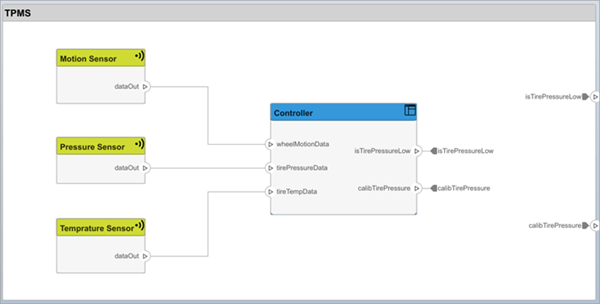
FunctionalAllocation.mldatx ファイルを開きます。TPMS_FunctionalArchitecture から TPMS_LogicalArchitecture への割り当てが割り当てエディターに表示されます。最初の列に TPMS_FunctionalArchitecture の要素が表示されます。最初の行に TPMS_LogicalArchitecture の要素が表示されます。矢印はモデル要素間の割り当てを示します。
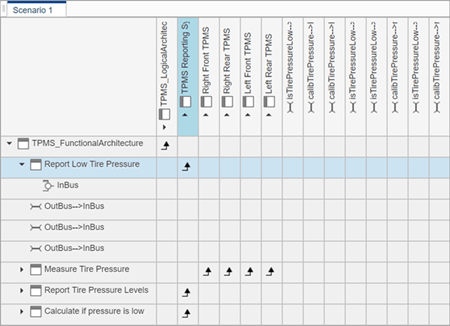
モデル内の割り当てられたコンポーネントが矢印で表示されます。モデルの階層構造における各要素の割り当てを確認できます。
この例の残りの部分では、この割り当て情報を使用してモデルをさらに解析する方法を示します。
機能から論理への割り当てとカバレッジ解析
このセクションでは、カバレッジ解析を実行して、すべての機能が割り当てられていることを検証する方法を示します。この処理では、機能アーキテクチャと論理アーキテクチャの間で指定される割り当て情報を使用する必要があります。
解析を開始するには、割り当てセットを読み込みます。
allocSet = systemcomposer.allocation.load('FunctionalAllocation');
scenario = allocSet.Scenarios;
システムの各機能が割り当てられていることを検証します。
import systemcomposer.query.*;
[~,allFunctions] = allocSet.SourceModel.find(HasStereotype(IsStereotypeDerivedFrom("TPMSProfile.Function")));
unAllocatedFunctions = [];
ImplementedAllocations = [];
for i = 1:numel(allFunctions)
    alloc = scenario.getAllocatedTo(allFunctions(i));
    if isempty(alloc)
        unAllocatedFunctions(end+1) = allFunctions(i);
    end
end

allCompsSource = allocSet.SourceModel.find(AnyComponent);
allCompsTarget = allocSet.TargetModel.find(AnyComponent);
for i = 1:numel(allCompsSource)
    for j = 1:numel(allCompsTarget)
        sourceComp = allocSet.SourceModel.lookup(Path=allCompsSource{i});
        targetComp = allocSet.TargetModel.lookup(Path=allCompsTarget{j});
        allocated = scenario.getAllocation(sourceComp,targetComp);
        if ~isempty(allocated)
            if allocated.getPropertyValue("TPMSProfile.FunctionalAllocation.IsImplemented")
                ImplementedAllocations(end+1) = strcat(sourceComp.Name," to ",targetComp.Name);
            end
        end
    end
end

if isempty(unAllocatedFunctions)
  fprintf('All functions are allocated');
else
  fprintf('%d Functions have not been allocated',numel(unAllocatedFunctions));
end

if isempty(ImplementedAllocations)
  fprintf('No allocations are implemented');
else
  fprintf('%d Allocations have been implemented',numel(ImplementedAllocations));
end
結果に All functions are allocated と表示され、システムのすべての機能が割り当てられていることが検証されます。また、実装されていない割り当てがリストされます。
機能を提供するサプライヤーの解析
このセクションでは、指定された割り当てを使用して、どの機能がどのサプライヤーから提供されるかを特定する方法を示します。サプライヤーはそれらのコンポーネントをシステム インテグレーターに供給するため、サプライヤー情報は論理モデルに格納されます。
suppliers = {'Supplier A','Supplier B','Supplier C','Supplier D'};
functionNames = arrayfun(@(x) x.Name, allFunctions,'UniformOutput',false);
numFunNames = length(allFunctions);
numSuppliers = length(suppliers);
allocTable = table('Size',[numFunNames,numSuppliers],'VariableTypes',...
  repmat("double",1,numSuppliers));
allocTable.Properties.VariableNames = suppliers;
allocTable.Properties.RowNames = functionNames;
for i = 1:numFunNames
  elem = scenario.getAllocatedTo(allFunctions(i));
  for j = 1:numel(elem)
      elemSupplier = getEvaluatedPropertyValue(elem(j),'TPMSProfile.LogicalComponent.Supplier');
      allocTable{i,strcmp(elemSupplier,suppliers)} = 1;
  end

end
対応する機能がどのサプライヤーのものであるかが table で示されます。
allocTable
ソフトウェア展開手法の解析
すべてのソフトウェア コンポーネントを格納するための十分な容量がエンジン制御ユニット (ECU) にあるかどうかを判定できます。ソフトウェア コンポーネント自体はコアに割り当てられますが、ECU は割り当てプロパティをもつコンポーネントです。
プラットフォーム アーキテクチャを取得します。
platformArch = systemcomposer.loadModel('PlatformArchitecture');割り当てを読み込みます。
softwareDeployment = systemcomposer.allocation.load('SoftwareDeployment');

frontECU = platformArch.lookup('Path','PlatformArchitecture/Front ECU');
rearECU = platformArch.lookup('Path','PlatformArchitecture/Rear ECU');

scenario1 = softwareDeployment.getScenario('Scenario 1');
scenario2 = softwareDeployment.getScenario('Scenario 2');
frontECU_availMemory = getEvaluatedPropertyValue(frontECU,"TPMSProfile.ECU.MemoryCapacity");
rearECU_availMemory = getEvaluatedPropertyValue(rearECU,"TPMSProfile.ECU.MemoryCapacity");

frontECU_memoryUsed1 = getUtilizedMemoryOnECU(frontECU,scenario1);
frontECU_isOverBudget1 = frontECU_memoryUsed1 > frontECU_availMemory;
rearECU_memoryUsed1 = getUtilizedMemoryOnECU(rearECU,scenario1);
rearECU_isOverBudget1 = rearECU_memoryUsed1 > rearECU_availMemory;

frontECU_memoryUsed2 = getUtilizedMemoryOnECU(frontECU,scenario2);
frontECU_isOverBudget2 = frontECU_memoryUsed2 > frontECU_availMemory;
rearECU_memoryUsed2 = getUtilizedMemoryOnECU(rearECU,scenario2);
rearECU_isOverBudget2 = rearECU_memoryUsed2 > rearECU_availMemory;
結果を示す table を作成します。
softwareDeploymentTable = table([frontECU_memoryUsed1;frontECU_availMemory;...
  frontECU_isOverBudget1;rearECU_memoryUsed1;rearECU_availMemory;rearECU_isOverBudget1],...
  [frontECU_memoryUsed2; frontECU_availMemory; frontECU_isOverBudget2;rearECU_memoryUsed2;...
  rearECU_availMemory; rearECU_isOverBudget2],...
  'VariableNames',{'Scenario 1','Scenario 2'},...
  'RowNames',{'Front ECUMemory Used (MB)','Front ECU Memory (MB)','Front ECU Overloaded',...
  'Rear ECU Memory Used (MB)','Rear ECU Memory (MB)','Rear ECU Overloaded'})
function memoryUsed = getUtilizedMemoryOnECU(ecu, scenario)ECU の各コンポーネントについて、割り当てられる各ソフトウェア コンポーネントに必要なバイナリ サイズを累計します。
coreNames = {'Core1','Core2','Core3','Core4'};
memoryUsed = 0;
for i = 1:numel(coreNames)
  core = ecu.Model.lookup('Path',[ecu.getQualifiedName '/' coreNames{i}]);
  allocatedSWComps = scenario.getAllocatedFrom(core);
  for j = 1:numel(allocatedSWComps)
      binarySize = getEvaluatedPropertyValue(allocatedSWComps(j),"TPMSProfile.SWComponent.BinarySize");
      memoryUsed = memoryUsed + binarySize;
  end
end
end
参照
[1] Carter, Jeffrey. “Functional Architecture.” Guide to the Systems Engineering Body of Knowledge (SEBoK) v. 2.7, released October 31, 2022. https://sebokwiki.org/wiki/Functional_Architecture.
[2] Faisandier, Alan, Garry Roedler, and Rick Adcock. “Logical Architecture.” Guide to the Systems Engineering Body of Knowledge (SEBoK) v. 2.7, released October 31, 2022. https://sebokwiki.org/wiki/Logical_Architecture.
[3] Faisandier, Alan, and Rick Adcock. “Physical Architecture.” Guide to the Systems Engineering Body of Knowledge (SEBoK) v. 2.7, released October 31, 2022. https://sebokwiki.org/wiki/Physical_Architecture.
参考
オブジェクト
systemcomposer.allocation.AllocationScenario|systemcomposer.allocation.AllocationSet|systemcomposer.allocation.Allocation