MATLAB ヘルプ センター
Navigate to link source or destination
slreq.show(tgt)
slreq.show(tgt) navigates to tgt, a link source or destination. The source or destination object opens in the corresponding interface, such as a block in a model, or test in the Test Manager.
tgt
example
collapse all
This example uses:
This example shows how to navigate to a link source.
Load Requirement Set and Links
rq = slreq.load('original_thrust_reverser_requirements.slreqx'); lk = slreq.load('reqs_validation_property_proving_original_model.slmx');
Navigate to a Link Source
sl = getLinks(lk); sl2 = sl(2); slreq.show(source(sl2))
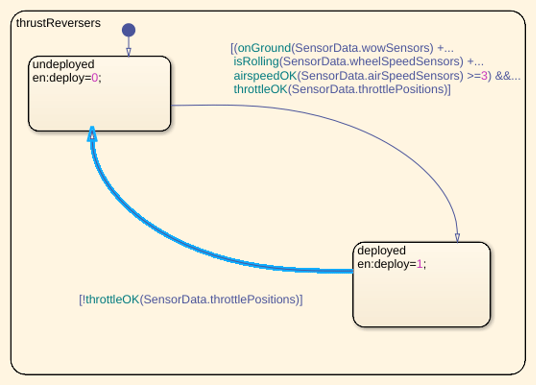
struct
Link source or destination, as may be returned by source or destination for a Link.
source
destination
Link
Example: struct with fields
struct with fields
Data Types: struct
Introduced in R2020a
slreq.Link | slreq.inLinks | slreq.outLinks
slreq.Link
slreq.inLinks
slreq.outLinks
You clicked a link that corresponds to this MATLAB command:
Run the command by entering it in the MATLAB Command Window. Web browsers do not support MATLAB commands.
Web サイトの選択
Web サイトを選択すると、翻訳されたコンテンツにアクセスし、地域のイベントやサービスを確認できます。現在の位置情報に基づき、次のサイトの選択を推奨します:
また、以下のリストから Web サイトを選択することもできます。
最適なサイトパフォーマンスの取得方法
中国のサイト (中国語または英語) を選択することで、最適なサイトパフォーマンスが得られます。その他の国の MathWorks のサイトは、お客様の地域からのアクセスが最適化されていません。
南北アメリカ
ヨーロッパ
アジア太平洋地域
最寄りの営業オフィスへのお問い合わせ