imresize3
Resize 3-D volumetric image
Syntax
Description
resizes the numeric or categorical volume B = imresize3(V,scale)V by the scale factor
scale.
If scale is between 0 and 1, then B is
smaller than V. If scale is greater than
1, then B is larger than V. If V is a color or multichannel volume,
then imresize3 resizes only the three spatial
dimensions (since R2026a).
uses name-value arguments to control aspects of the operation. For example, control
antialiasing by using the B = imresize3(___,Name=Value)Antialiasing name-value
argument.
Examples
Read an MRI volume into the workspace.
s = load("mri.mat");
volOriginal = squeeze(s.D);
volOriginal = double(volOriginal);
sizeO = size(volOriginal)sizeO = 1×3
128 128 27
Visualize the volume.
slice(volOriginal,sizeO(2)/2,sizeO(1)/2,sizeO(3)/2) shading interp colormap gray axis equal title("Original")

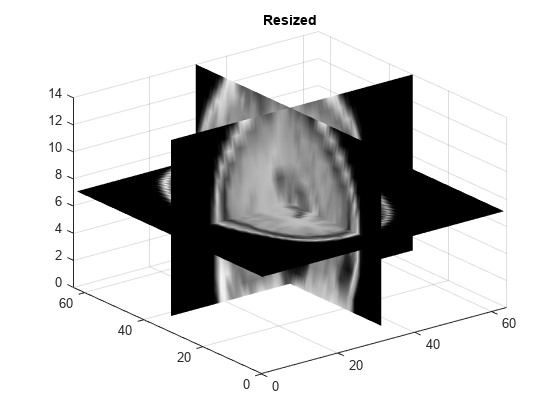
Resize the volume by applying a scale factor of 0.5 to all dimensions. This example uses the default interpolation method and antialiasing.
volScaled = imresize3(volOriginal,0.5); sizeS = size(volScaled)
sizeS = 1×3
64 64 14
Visualize the resized volume.
slice(volScaled,sizeS(2)/2,sizeS(1)/2,sizeS(3)/2) shading interp colormap gray axis equal title("Rescaled")
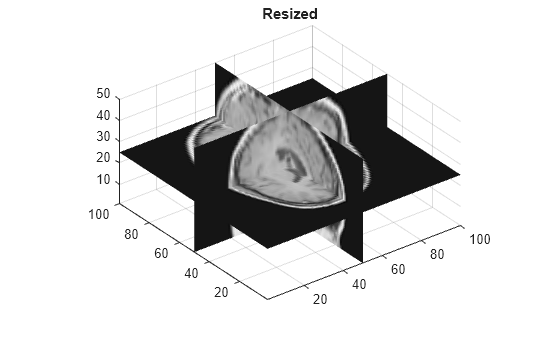
Resize the original volume to a target size of 100-by-100-by-50 pixels.
volResized = imresize3(volOriginal,[100 100 50]); sizeR = size(volResized)
sizeR = 1×3
100 100 50
Visualize the resized volume.
slice(volResized,sizeR(2)/2,sizeR(1)/2,sizeR(3)/2) shading interp colormap gray axis equal title("Resized")
Since R2026a
Read an RGB volume into the workspace.
load("colorVol.mat");
size(colorVol)
ans = 500 500 200 3
Display the original volume with a scale bar.
vC = volshow(colorVol);
vC.Parent.ScaleBar = "on";

Resize the volume by a scale factor of 0.25 in all spatial dimensions. Then, display the rescaled volume with a scale bar.
volScaled = imresize3(colorVol,0.25);
size(volScaled)
vS = volshow(volScaled);
vS.Parent.ScaleBar = "on";
ans = 125 125 50 3

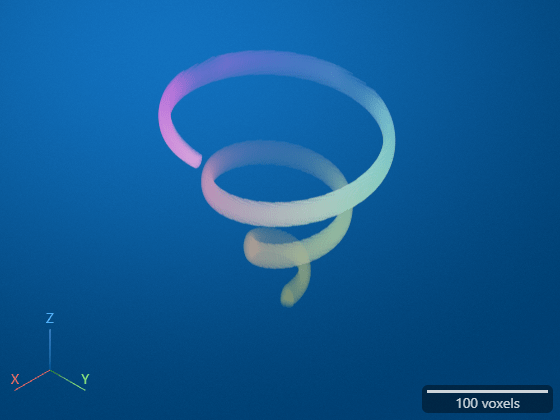
Resize the original volume to a target size of 200-by-200-by-200 pixels. Then, display the rescaled volume with a scale bar.
volResized = imresize3(colorVol,[200 200 200]);
size(volResized)
vR = volshow(volResized);
vR.Parent.ScaleBar = "on";
ans = 200 200 200 3
Input Arguments
Volume to be resized, specified as a numeric array or categorical array. For color and multichannel volumes, the dimensions must be in the order [rows columns planes channels].
Data Types: single | double | int8 | int16 | int32 | uint8 | uint16 | uint32 | categorical
Scale factor, specified as a positive number.
If
scaleis less than 1, then the output image is smaller than the input volume.If
scaleis greater than 1, then the output image is larger than the input volume.
imresize3 applies the scale factor to each spatial
dimension in the volume. To apply a different scale factor to each spatial
dimension, use the Scale name-value argument.
If you specify a scale factor that does not result in integer-length image
dimensions, then imresize3 follows the resizing
operation with a call to the ceil function. In other
words, the output image has size ceil(scale*size(V)).
If you specify the scale argument and an output size,
then imresize3 resizes the image according to the
output size and ignores the value of scale. If you
specify the scale argument and the
Scale name-value argument, then
imresize3 resizes the image according to
Scale and ignores the value of
scale.
Size of the output volume, specified as a 3-element vector of positive
integers in the order [numrows
numcols
numplanes]. If you specify one numeric value and the
other two values as NaN, then
imresize3 calculates the other two elements
automatically to preserve the aspect ratio.
If you specify the sz argument and a scale factor,
then imresize3 resizes the image according to
sz and ignores the value of the scale factor. If
you specify the sz argument and the
OutputSize name-value argument, then
imresize3 resizes the image according to
OutputSize and ignores the value of
sz.
Data Types: single | double
Interpolation method, specified as one of the values in the table. The default value for
numeric and logical images is "cubic". The default value
for categorical images is "nearest". Categorical images
only support the values "nearest" and
"box".
| Method | Description |
|---|---|
| Nearest-neighbor interpolation, performed using a box-shaped interpolation kernel. |
| Linear interpolation, performed using a triangular interpolation kernel. |
| Cubic interpolation, performed using a piecewise cubic interpolation kernel. Note Cubic interpolation can produce pixel values outside the original range. |
"lanczos2" | Interpolation using a Lanczos-2 kernel. |
"lanczos3" | Interpolation using a Lanczos-3 kernel. |
Data Types: char | string
Name-Value Arguments
Specify optional pairs of arguments as
Name1=Value1,...,NameN=ValueN, where Name is
the argument name and Value is the corresponding value.
Name-value arguments must appear after other arguments, but the order of the
pairs does not matter.
Example: B = imresize3(V,0.25,Antialiasing=false) specifies not
to perform antialiasing when shrinking the volume.
Before R2021a, use commas to separate each name and value, and enclose
Name in quotes.
Example: B = imresize3(V,0.25,"Antialiasing",false)
Perform antialiasing when shrinking the volume, specified as
a numeric or
logical 1 (true) or 0
(false).
If
methodis"nearest", then the default value ofAntialiasingisfalse.If the interpolation
methodis the"box"interpolation kernel and the input volume is categorical, then the default value ofAntialiasingisfalse.For all other interpolation methods, the default value of
Antialiasingistrue.
Data Types: logical
Interpolation method, specified as a string scalar or character vector. For details, see
method.
Data Types: char | string
Size of the output volume, specified as a 3-element vector of positive integers in the order
numrows
numcols
numplanes. If you specify one numeric value and the
other two values as NaN, then
imresize3 calculates the other two elements
automatically to preserve the aspect ratio.
If you specify the OutputSize name-value argument
and the sz argument or a scale factor, then
imresize3 resizes the image according to
OutputSize and ignores the value of
sz or the scale factor.
Resize scale factor, specified as a positive number or 3-element
vector of positive numbers. If you specify a scalar, then
imresize3 applies the same scale factor to each
spatial dimension in the volume. If you specify a 3-element vector, then
imresize3 applies each scale factor to the
corresponding spatial dimension.
If you specify a resize scale factor that does not result in
integer-length image dimensions, then imresize3
follows the resizing operation with a call to the ceil function. In other
words, the output image has size ceil(Scale.*size(V)).
If you specify the Scale name-value argument and
an output size, then imresize3 resizes the image
according to the output size and ignores the value of
Scale. If you specify the
Scale name-value argument and the
scale argument, then
imresize3 resizes the image according to
Scale and ignores the value of
scale.
Output Arguments
Resized volume, returned as an array of the same data type as the input volume,
V.
Extended Capabilities
Usage notes and limitations:
imresize3supports the generation of C and C++ code (requires MATLAB® Coder™). For more information, see Code Generation for Image Processing.The
methodargument and any name-value arguments must be compile-time constants.Input images of data type
categoricalare not supported.
Refer to the usage notes and limitations in the C/C++ Code Generation section. The same usage notes and limitations apply to GPU code generation.
The imresize3 function fully supports
thread-based environments. For more information, see Run MATLAB Functions in Thread-Based Environment.
Version History
Introduced in R2017aThe imresize3 function can now resize
color and multichannel volumes. The resizing operation does not change the size of
the channel dimension. To resize a color or multichannel image, the image dimensions
must be in the order [rows
columns
planes
channels].
imresize3 now supports the generation of
C code (requires MATLAB
Coder).
imresize3 now supports thread-based
environments.
See Also
MATLAB Command
You clicked a link that corresponds to this MATLAB command:
Run the command by entering it in the MATLAB Command Window. Web browsers do not support MATLAB commands.
Select a Web Site
Choose a web site to get translated content where available and see local events and offers. Based on your location, we recommend that you select: .
You can also select a web site from the following list
How to Get Best Site Performance
Select the China site (in Chinese or English) for best site performance. Other MathWorks country sites are not optimized for visits from your location.
Americas
- América Latina (Español)
- Canada (English)
- United States (English)
Europe
- Belgium (English)
- Denmark (English)
- Deutschland (Deutsch)
- España (Español)
- Finland (English)
- France (Français)
- Ireland (English)
- Italia (Italiano)
- Luxembourg (English)
- Netherlands (English)
- Norway (English)
- Österreich (Deutsch)
- Portugal (English)
- Sweden (English)
- Switzerland
- United Kingdom (English)