nlssinit
R2026bInitialize nonlinear state-space model using measured time-domain system data
Since R2026a
Syntax
Description
nssInitialized = nlssinit(U,Y,nss)U and Y,
and default training options, to train the state and output networks of the idNeuralStateSpace
object nss. It estimates the weights and biases of the networks by
numerically approximating the state derivatives and performing an open-loop training. The
open-loop training minimizes the state-derivative prediction error for continuous-time
models and the state-update prediction error for discrete-time models. This syntax returns
the idNeuralStateSpace object nssInitialized with the
trained state and output networks. You can use nssInitialized as the
initial model when estimating neural state-space models using nlssest.
nssInitialized = nlssinit(Data,nss)Data, and the default
training options, to train the state and output networks of nss.
nssInitialized = nlssinit(___,Options)
nssInitialized = nlssinit(___,Name=Value)
[
returns model parameters corresponding to the final loss and minimal training loss. If
nssInitialized,params] = nlssinit(___)UseLastExperimentForValidation is true, it also returns the
model parameters corresponding to minimal validation loss.
Examples
This example demonstrates how to estimate a neural state-space model using both approximate open-loop and closed-loop training approaches. The example also compares the performance of the trained models on a validation data set.
Load and Preprocess Data
Load the two tank system data. The data consists of one input, u, and one output, y, signal.
data = load("twotankdata.mat");
u = data.u;
y = data.y;
Normalize the input and output data for better training performance.
u = normalize(u);
y = normalize(y);
Split the data into training and validation sets and create iddata objects.
zt = iddata(y(1:2000),u(1:2000),Ts=0.2);
zv = iddata(y(2001:end),u(2001:end),Ts=0.2);
To reproduce the results of this example, use a random generator seed.
rng("default");Create Neural State-Space Model
Create a discrete-time neural state-space model with one state and one input using idNeuralStateSpace.
nx = 1;
nu = 1;
nss = idNeuralStateSpace(nx,NumInputs=nu,Ts=0.2);
Define the structure of the state network to be a multi-layer perceptron (MLP) network with two hidden layers of 20 neurons each using createMLPNetwork.
nss.StateNetwork = createMLPNetwork(nss,"state",LayerSizes=[20 20]);Specify Training Options
Specify training options for the state network using nssTrainingOptions. Use the Adam algorithm, specify the maximum number of epochs as 350, and specify the window size as 128. For closed-loop training, the window size value decides the simulation horizon. For open-loop training, the prediction horizon is fixed to one.
opt = nssTrainingOptions('adam');
opt.MaxEpochs = 350;
opt.WindowSize = 128;
Estimate Neural State-Space Model
Perform approximate open-loop training of the neural state-space model using nlssinit. Record the estimation time.
tic
sys1 = nlssinit(zt,nss,opt)
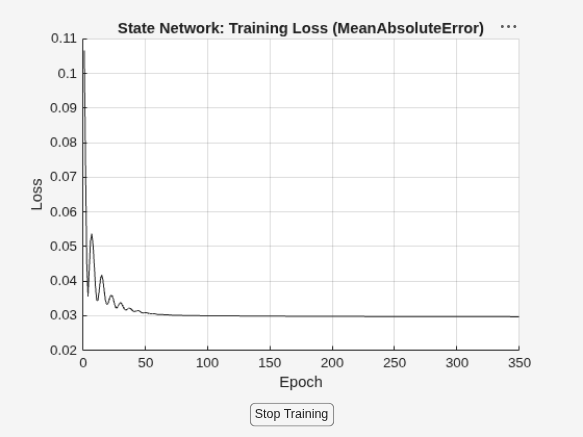
Generating estimation report...done.
sys1 =
Discrete-time Neural ODE in 1 variables
     x(t+1) = f(x(t),u(t))
       y(t) = x(t) + e(t)

f(.) network:
  Deep network with 2 fully connected, hidden layers
  Activation function: tanh

Variables: x1
Sample time: 0.2 seconds

Status:
Estimated using NLSSINIT on time domain data "zt".
Fit to estimation data: 87.18%
FPE: 0.02567, MSE: 0.01539

Model Properties
t1 = toc
t1 =
12.3501
Estimate the model using closed-loop training approach using nlssest. Record the estimation time.
tic
sys2 = nlssest(zt,nss,opt)
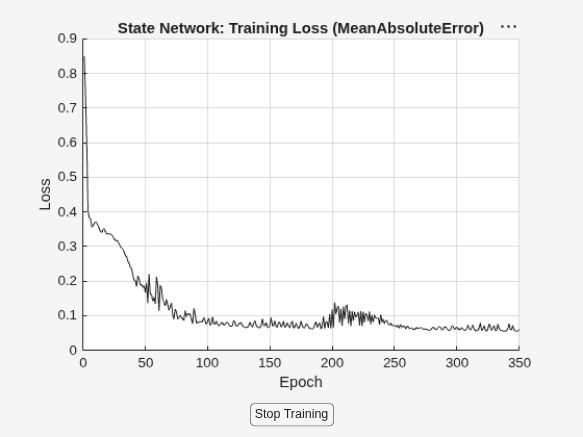
Generating estimation report...done.
sys2 =
Discrete-time Neural ODE in 1 variables
     x(t+1) = f(x(t),u(t))
       y(t) = x(t) + e(t)

f(.) network:
  Deep network with 2 fully connected, hidden layers
  Activation function: tanh

Variables: x1
Sample time: 0.2 seconds

Status:
Estimated using NLSSEST on time domain data "zt".
Fit to estimation data: 87.59%
FPE: 0.02405, MSE: 0.01442

Model Properties
t2 = toc
t2 =
36.5036
From the estimation times, you can see that open-loop training takes less time than the closed-loop training. The difference in estimation times between the training approaches becomes more obvious if you train the model with a large data set and turn off the plot, that is, specify the PlotLossFcn property of the training options object as false. For more details on the difference, see Training Neural State-Space Models.
Compare Model Performance
Compare the performance of both the trained models using the validation data set.
compare(sys1,zv)
compare(sys2,zv)
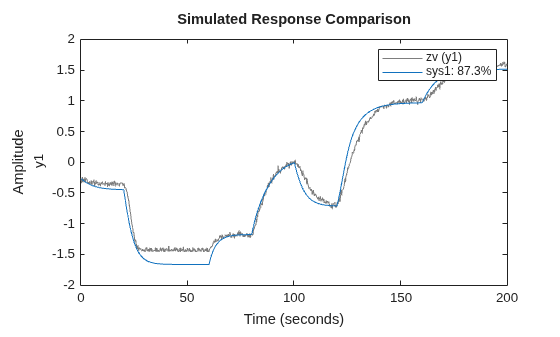
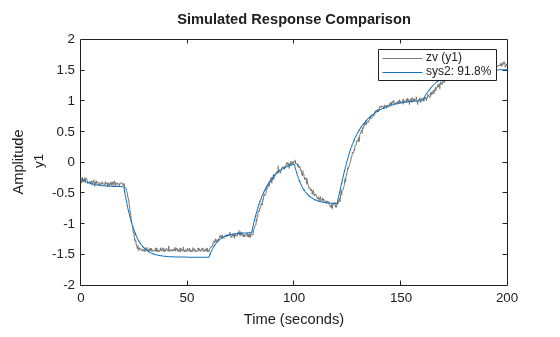
As shown in this example, if the noise in the data is small or if the model exhibits a relatively low degree of nonlinearity, the model trained using approximate open-loop training approach can perform as good as the model trained using closed-loop training approach. So when given a data set, first use nlssinit to train the model as it is faster than closed-loop training. If the model performance is not good, you can use nlssest to perform closed-loop training by using this trained model as a starting point.
Input Arguments
Name-Value Arguments
Output Arguments
Version History
Introduced in R2026a

