sschdl.tuneOptimizedModel
R2026bTune parameter values for dynamic switches optimized for FPGA deployment
Since R2026a
Syntax
Description
tunedParams = sschdl.tuneOptimizedModel(originalModel)
tunedParams = sschdl.tuneOptimizedModel(originalModel,Name=Value)FineTune as true.
Examples
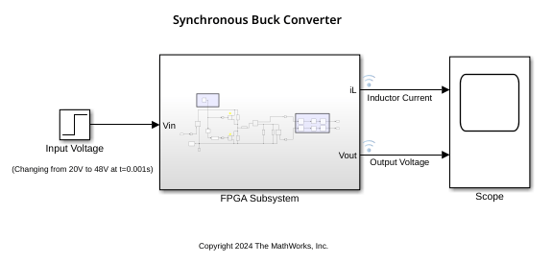
Open the synchronous buck converter model.
modelName = "sschdlexSynchronousBuckConverterExample";
open_system(modelName)
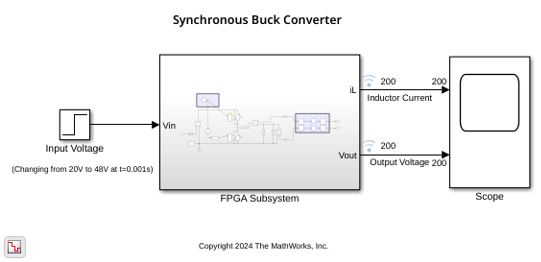
Generate optimized model by running the sschdl.generateOptimizedModel function.
generatedModel = sschdl.generateOptimizedModel("sschdlexSynchronousBuckConverterExample");
The following blocks have been replaced:
'sschdlexSynchronousBuckConverterExample/FPGA Subsystem/Diode'
'sschdlexSynchronousBuckConverterExample/FPGA Subsystem/Diode1'
'sschdlexSynchronousBuckConverterExample/FPGA Subsystem/IGBT (Ideal, Switching)1'
'sschdlexSynchronousBuckConverterExample/FPGA Subsystem/IGBT (Ideal, Switching)2'

Saving sschdlexSynchronousBuckConverterExample as sschdlexSynchronousBuckConverterExample_generated and replacing switch and converter blocks with equivalent FPGA HIL supported blocks.
To tune the parameter values for the dynamic switches in the generated model, use the sschdl.tuneOptimizedModel function.
optMdl = "sschdlexSynchronousBuckConverterExample_generated";
tunedParams = sschdl.tuneOptimizedModel("sschdlexSynchronousBuckConverterExample",...
    optimizedModel=optMdl,FineTune=true);
 Optimization started 2026-Aug-07, 01:24:55

                                          First-order
 Iter F-count        f(x)      Step-size  optimality
    0      9      24945.5            1
    1     18      5122.03       0.3777     3.91e+04
    2     27       968.52       0.6544     7.09e+03
    3     36      258.803        2.454     8.27e+03
    4     45      258.803        4.946     8.27e+03
    5     54      221.764        1.236     2.35e+03
    6     63      221.764        2.473     2.35e+03
    7     72      221.764       0.6182     2.35e+03
    8     81      221.764       0.1546     2.35e+03
    9     90      221.764      0.03864     2.35e+03
   10     99      214.374      0.00966     4.35e+03
   11    108       213.83      0.00966     1.78e+03
   12    117      213.009     0.002415     1.82e+03
   13    126      212.655    0.0006038     1.83e+03
Local minimum possible.
lsqnonlin stopped because the size of the current step is less than
the value of the step size tolerance.

<stopping criteria details>
The tunedParams variable stores the tuned parameter values after the optimization.
Simulate the baseline (Simscape) model and the generated optimized model to observe the performance after tuning.
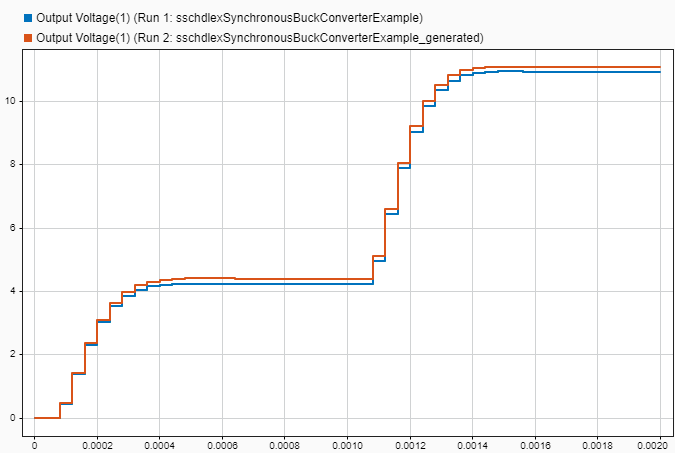
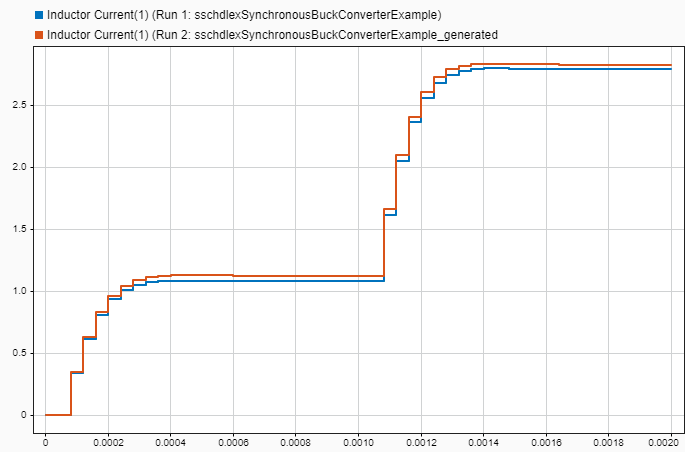
You can see the output waveform and compare the Simscape model and the generated optimized model. To see the waveform, double-click the Data Logger on top of the output signals and open the Simulation Data Inspector.
Input Arguments
Name-Value Arguments
Output Arguments
Version History
Introduced in R2026a

