Generate HDL Code from Stateflow Charts
R2026bIn this example, you generate HDL code from a Stateflow® chart. You create a Stateflow chart that models the control logic for a four-bit up-counter, set chart properties that are required for HDL code generation, and generate HDL code.
After you generate HDL code, you can integrate the code into a larger hardware design, perform synthesis and timing analysis, or deploy the HDL code to a target device. For more information, see Basic HDL Code Generation Workflow.
Model Counter in Stateflow
The model hdlcoder_sf_counter contains the framework for a four-bit up-counter. To complete the model, you must design the Stateflow chart. The model includes a subsystem that represents the design under test (DUT), which contains the empty Stateflow chart.
Open the DUT subsystem:
load_system("hdlcoder_sf_counter.slx");
open_system("hdlcoder_sf_counter/DUT");
Open the chart. Use junctions and transitions to model the logic shown in this image:
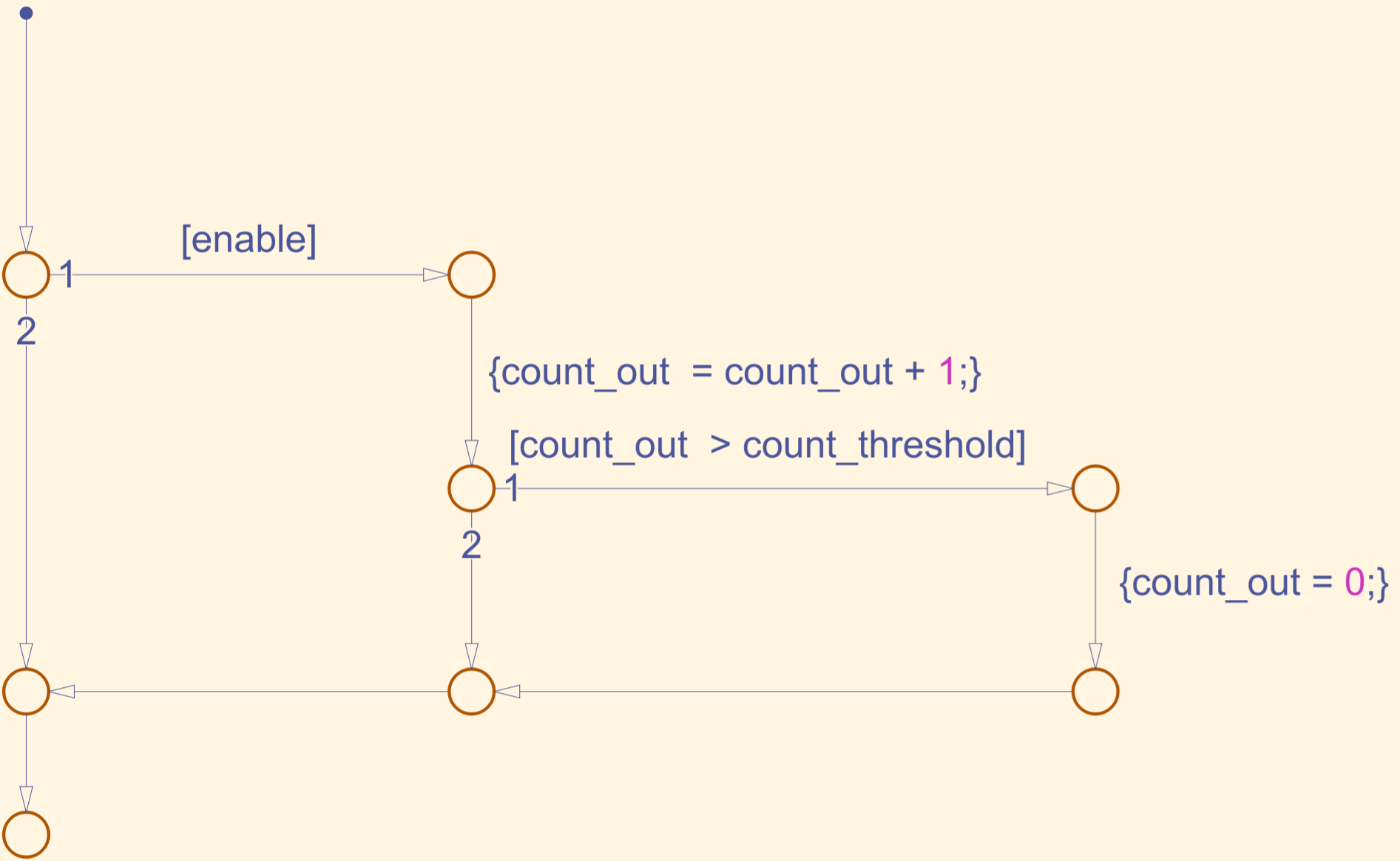
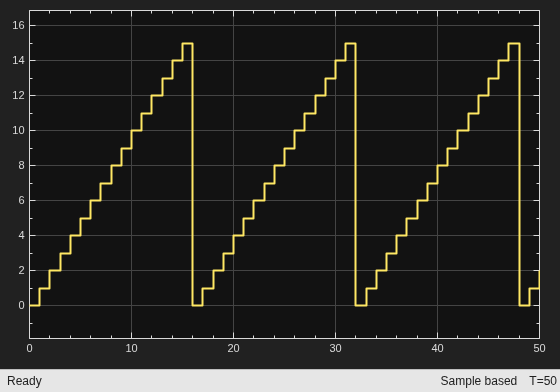
For each Simulink® time step, the Stateflow chart wakes up and evaluates transitions. If the input data enable is true, the chart increments the output data count_out by one. If enable is false, the chart maintains the current value of count_out. If count_out exceeds the input data count_threshold, the chart resets count_out to zero. The counter counts from zero up to count_threshold, resets, and repeats.
Next, use the supported chart properties for HDL code generation. In the Modeling tab, in the Design Data section, select Model Explorer. In the Model Hierarchy pane, select the Stateflow chart.
In the Contents pane, complete the Chart Properties according to these settings:
You can generate HDL code from Stateflow charts with the action language set to C or MATLAB®. Set the Action language to
MATLAB.You can reduce hardware resource use by eliminating the generated HDL code that tracks chart initialization for one cycle after reset. Enable the Execute (enter) chart at initialization chart property.
To model count persistence, store the chart output between chart executions. HDL Coder™ generates a register that maintains the chart output. Disable the Initialize outputs every time chart wakes up chart property.
Variable-size arrays are not synthesizable by third-party FPGA synthesis tools. Disable the Support variable-size arrays chart property.
For more information on recommended Stateflow chart settings, guidelines, and best practices to follow for HDL code generation from Stateflow charts, see Guidelines for HDL Code Generation Using Stateflow Charts.
Open the hdlcoder_sf_counter_complete model to see the completed model. Simulate the model.
load_system("hdlcoder_sf_counter_complete.slx");
open_system("hdlcoder_sf_counter_complete/Scope");
sim("hdlcoder_sf_counter_complete.slx");Generate HDL Code
Set the model configuration parameters for hdlcoder_sf_counter_complete to the recommended settings for HDL code generation by using the hdlsetup function. To see a list of parameters the function sets, see Parameter Configurations.
hdlsetup("hdlcoder_sf_counter_complete");### The configuration parameter values use the recommended settings for HDL code generation and does not need any modification as a part of hdlsetup. Please refer to hdlsetup document for best practices on model settings.
Next, generate HDL code for the DUT subsystem:
close_system("hdlcoder_sf_counter_complete/Scope");
makehdl("hdlcoder_sf_counter_complete/DUT");
### Working on the model hdlcoder_sf_counter_complete
### Generating HDL for hdlcoder_sf_counter_complete/DUT
### Using the config set for model hdlcoder_sf_counter_complete for HDL code generation parameters.
### Running HDL checks on the model 'hdlcoder_sf_counter_complete'.
### Begin compilation of the model 'hdlcoder_sf_counter_complete'...
### Working on the model 'hdlcoder_sf_counter_complete'...
### Working on... GenerateModel
### Begin model generation 'gm_hdlcoder_sf_counter_complete'...
### Copying DUT to the generated model....
### Model generation complete.
### Generated model saved at hdlsrc/hdlcoder_sf_counter_complete/gm_hdlcoder_sf_counter_complete.slx
### Begin VHDL Code Generation for 'hdlcoder_sf_counter_complete'.
### Working on... Traceability
### Working on hdlcoder_sf_counter_complete/DUT/Chart as hdlsrc/hdlcoder_sf_counter_complete/Chart.vhd.
### Working on hdlcoder_sf_counter_complete/DUT as hdlsrc/hdlcoder_sf_counter_complete/DUT.vhd.
### Code Generation for 'hdlcoder_sf_counter_complete' completed.
### Generating HTML files for code generation report at index.html
### Creating HDL Code Generation Check Report DUT_report.html
### HDL check for 'hdlcoder_sf_counter_complete' complete with 0 errors, 0 warnings, and 0 messages.
### HDL code generation complete.

