Avoid Fault Modeling and Simulation Issues
R2026bSome fault modeling practices may yield unanticipated simulation results. Additionally, some fault modeling practices can cause errors when you compile or simulate the model. Resolve these issues by following these best practices.
Save Faults and Conditionals
When you create the first fault, fault model, or conditional associated with a model, Simulink® Fault Analyzer™ automatically saves the information to the fault information file. If you update fault properties or create additional faults, fault behaviors, or conditionals, you must save the model to save the fault information. Otherwise, your simulation can yield erroneous results, or produce a compilation or simulation error. To save the model that contains faults, fault information file, and fault models, In the Fault Analyzer tab, in the File section, click Save All. To save the fault information file and fault models without saving the model that contains the faults, expand Save All and click Save Only Fault Artifacts.
If you close the model without saving after making changes to these artifacts, Simulink displays a dialog box that allows you to save the fault model and fault information file before closing.
Log Signals from Faults
If you log a signal from a block output that has a fault, the log returns the data from the signal before the data from the fault. The icon order indicates the order of evaluation. For example, the signal log in this model retrieves the output of the Sine Wave block without the fault behavior.
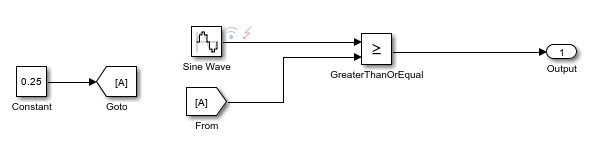
To log the value of a signal after a fault, log the signal value going in to the Fault Outport block in the fault behavior, or log the data from the output port of another block that is downstream from the fault.
Simulate Faults on Nonvirtual Buses
You can add faults to buses. See Add Fault Behaviors to Buses. However, you cannot simulate faults on virtual buses or bus elements. For example, this model uses a Bus Creator block that outputs a virtual bus.
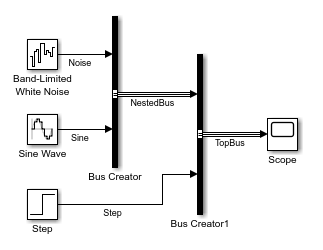
Adding faults to either of the virtual buses and simulating causes an error during model compilation.
By contrast, this model has a fault on a nonvirtual bus. You can simulate this model.
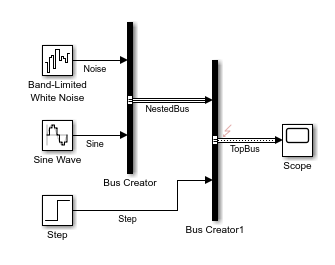
You can convert virtual buses to nonvirtual buses. For more information, see Convert Virtual Bus to Nonvirtual Bus.
Avoid changing nonvirtual signals to virtual signals when modeling with faults. If you add faults to a nonvirtual bus and change the faulted signal to virtual, the model generates an error during compilation.
If you use an incompatible signal data type or an alias of an incompatible data type, a simulation error occurs.
Match Data Types of Fault Behaviors to Data Source
The data type of the signal source returned by Fault Inport and Fault Data Inport blocks must match the data types used by the blocks in the fault behaviors. Otherwise, a compilation error occurs. The action you take depends on whether you add built-in or custom fault behaviors:
Built-in behaviors — Before adding fault behaviors, update the model. When you add faults and their behaviors, Simulink Fault Analyzer attempts to match the data types used by the blocks in the fault behavior to the data source.
Custom behaviors — You must manually set the data type of the blocks to match the data source. For more information on displaying data types, see Port Data Types.
Limitations on Fault Injection
These limitations apply when modeling faults:
You can only use fast restart for models that have faults on Simscape™ blocks.
You can only use accelerator or rapid accelerator mode in models that have faults on Simscape blocks.
Virtual blocks support faults only on their input and output ports.
Atomic subsystems support faults only on the ports that correspond to Inport and Outport blocks.
You cannot add faults to duplicate Inport blocks.
If you add a fault to a continuous signal, the signal must enter a block with a discrete sample time. For more information on sample time, see What Is Sample Time?.
You cannot simulate faults on signals with constant sample times.
You cannot simulate faults on signals at the top level of export-function models or models that execute concurrently. However, you can simulate faults on signals in referenced models or atomic subsystems in these models.
The blocks that you use in Fault Subsystem blocks must have inherited or constant sample times.
Faults evaluate the state of their assigned conditional trigger before the conditional evaluates. Consequently, faults trigger in the time step following the time step where the conditional status changes.

