Build Signalized Junction Using RoadRunner HD Map
R2026bThis example shows how to programmatically build a T-shaped junction with traffic signal control using MATLAB® objects and functions for RoadRunner HD Map, then import the resulting HD map into a RoadRunner scene. Use this workflow when you need to create HD map content from external data sources, generate road networks algorithmically, or automate scene construction that would be repetitive in the RoadRunner interactive editor. In this example, you:
Build an HD map with junction geometry in MATLAB.
Create road segments approaching the junction.
Define maneuver lanes within the junction.
Define traffic signals bulbs and states.
Configure junction traffic control phases.
Write the map to a RoadRunner HD Map (
.rrhd) fileImport the file into RoadRunner and build the scene (requires RoadRunner Scene Builder).
Create HD Map and Define Lane Markings
Create an empty RoadRunner HD Map.
rrMap = roadrunnerHDMap;
Create a dashed white lane marking asset reference and add it to the HD map. The RoadRunner HD Map applies this marking to lane boundaries as you add them to the road network.
pathDashed = roadrunner.hdmap.RelativeAssetPath(AssetPath="Assets/Markings/DashedSingleWhite.rrlms");
rrMap.LaneMarkings(1) = roadrunner.hdmap.LaneMarking(ID="DashedWhite",AssetPath=pathDashed);
Create a marking reference and parametric attribution that you can use to apply the marking along the full length of a lane boundary.
dashRef = roadrunner.hdmap.MarkingReference(MarkingID=roadrunner.hdmap.Reference(ID="DashedWhite"));
markingSpan = [0 1];
markingAttrib = roadrunner.hdmap.ParametricAttribution(MarkingReference=dashRef,Span=markingSpan);
Define Junction Area
Define the junction area by creating a simple rectangular shape that represents the region where the roads meet. First, list the corner points of the rectangle and use them to create a Polygon object. Then, add the polygon to a MultiPolygon object.
junctionCorners = [-9.85 -9.85; 9.85 -9.85; 9.85 9.85; -9.85 9.85; -9.85 -9.85];
junctionPolygon = roadrunner.hdmap.Polygon(ExteriorRing=junctionCorners);
multiPolygon = roadrunner.hdmap.MultiPolygon(Polygons=junctionPolygon);
Create the junction using the MultiPolygon geometry.
rrMap.Junctions(1) = roadrunner.hdmap.Junction(ID="TJunction",Geometry=multiPolygon);Create Road Segments Approaching Junction
Create West Road Segment
Create a road segment on the west side of the junction. This road contains two lanes: an eastbound lane, wApproach, that carries vehicles toward the junction and a westbound lane, wExit, that carries vehicles away from the junction.
wApproach = roadrunner.hdmap.Lane(ID="wApproach",Geometry=[-50 -1.75; -9.85 -1.75],TravelDirection="Forward",LaneType="Driving");
wExit = roadrunner.hdmap.Lane(ID="wExit",Geometry=[-50 1.75; -9.85 1.75],TravelDirection="Backward",LaneType="Driving");
Create the lane boundaries that define the edges and centerline of the road.
wCenter = roadrunner.hdmap.LaneBoundary(ID="wCenter",Geometry=[-50 0; -9.85 0]);
wSouth = roadrunner.hdmap.LaneBoundary(ID="wSouth",Geometry=[-50 -3.5; -9.85 -3.5]);
wNorth = roadrunner.hdmap.LaneBoundary(ID="wNorth",Geometry=[-50 3.5; -9.85 3.5]);
Assign the lane boundaries to the lanes.
leftBoundary(wApproach,"wCenter",Alignment="Forward");
rightBoundary(wApproach,"wSouth",Alignment="Forward");
leftBoundary(wExit,"wNorth",Alignment="Forward");
rightBoundary(wExit,"wCenter",Alignment="Forward");
Add the dashed white centerline marking, the defined lane boundaries, and the lanes to the HD map.
wCenter.ParametricAttributes = markingAttrib;
rrMap.LaneBoundaries(end+1) = wCenter;
rrMap.LaneBoundaries(end+1) = wSouth;
rrMap.LaneBoundaries(end+1) = wNorth;
rrMap.Lanes(end+1) = wApproach;
rrMap.Lanes(end+1) = wExit;
Create East Road Segment
Create a road segment on the east side of the junction. This road also contains two lanes: an eastbound lane, eExit, that carries vehicles away from the junction and a westbound lane, eApproach, that carries vehicles toward the junction.
eExit = roadrunner.hdmap.Lane(ID="eExit",Geometry=[9.85 -1.75; 50 -1.75],TravelDirection="Forward",LaneType="Driving");
eApproach = roadrunner.hdmap.Lane(ID="eApproach",Geometry=[9.85 1.75; 50 1.75],TravelDirection="Backward",LaneType="Driving");
Create the lane boundaries, and assign them to the lanes.
eCenter = roadrunner.hdmap.LaneBoundary(ID="eCenter",Geometry=[9.85 0; 50 0]);
eSouth = roadrunner.hdmap.LaneBoundary(ID="eSouth",Geometry=[9.85 -3.5; 50 -3.5]);
eNorth = roadrunner.hdmap.LaneBoundary(ID="eNorth",Geometry=[9.85 3.5; 50 3.5]);
leftBoundary(eExit,"eCenter",Alignment="Forward");
rightBoundary(eExit,"eSouth",Alignment="Forward");
leftBoundary(eApproach,"eNorth",Alignment="Forward");
rightBoundary(eApproach,"eCenter",Alignment="Forward");
Add the dashed white centerline marking, the defined lane boundaries, and the lanes to the HD map.
eCenter.ParametricAttributes = markingAttrib;
rrMap.LaneBoundaries(end+1) = eCenter;
rrMap.LaneBoundaries(end+1) = eSouth;
rrMap.LaneBoundaries(end+1) = eNorth;
rrMap.Lanes(end+1) = eExit;
rrMap.Lanes(end+1) = eApproach;
Create South Road Segment
Create a road segment that approaches the junction from the south. This road contains two lanes: a northbound, sApproach, that carries vehicles toward the junction and a southbound lane, sExit, that carries vehicles away from the junction.
sApproach = roadrunner.hdmap.Lane(ID="sApproach",Geometry=[1.75 -50; 1.75 -9.85],TravelDirection="Forward",LaneType="Driving");
sExit = roadrunner.hdmap.Lane(ID="sExit",Geometry=[-1.75 -50; -1.75 -9.85],TravelDirection="Backward",LaneType="Driving");
Create the lane boundaries, and assign them to the lanes.
sCenter = roadrunner.hdmap.LaneBoundary(ID="sCenter",Geometry=[0 -50; 0 -9.85]);
sEast = roadrunner.hdmap.LaneBoundary(ID="sEast",Geometry=[3.5 -50; 3.5 -9.85]);
sWest = roadrunner.hdmap.LaneBoundary(ID="sWest",Geometry=[-3.5 -50; -3.5 -9.85]);
leftBoundary(sApproach,"sCenter",Alignment="Forward");
rightBoundary(sApproach,"sEast",Alignment="Forward");
leftBoundary(sExit,"sWest",Alignment="Forward");
rightBoundary(sExit,"sCenter",Alignment="Forward");
Add the dashed white centerline marking, the defined lane boundaries, and the lanes to the HD map.
sCenter.ParametricAttributes = markingAttrib;
rrMap.LaneBoundaries(end+1) = sCenter;
rrMap.LaneBoundaries(end+1) = sEast;
rrMap.LaneBoundaries(end+1) = sWest;
rrMap.Lanes(end+1) = sApproach;
rrMap.Lanes(end+1) = sExit;
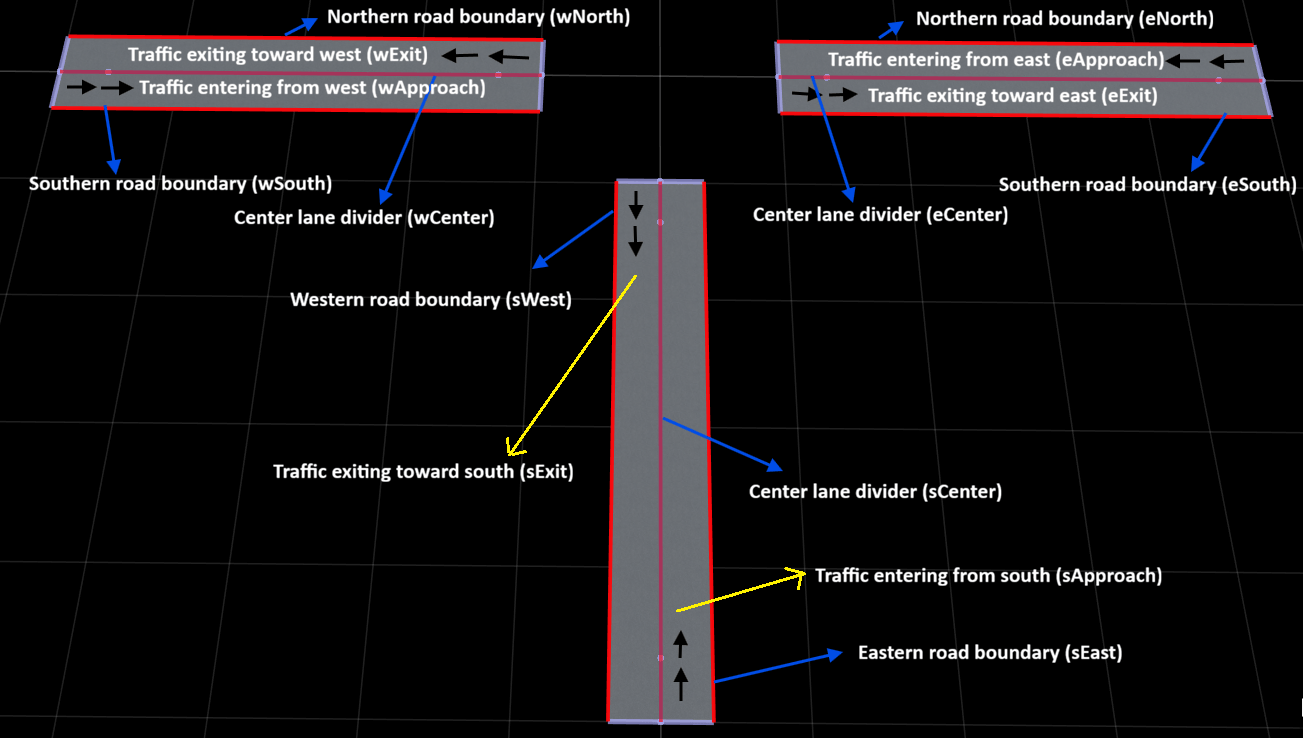
This figure shows the road layout with the approach lanes, exit lanes, and lane boundaries for the west, east, and south road segments labeled.
Create Maneuver Lanes Inside Junction
Create the six maneuver lanes inside the junction. Each maneuver lane represents a possible vehicle path through the junction area. This T-junction requires six maneuver lanes: west to east, east to west, south to east, south to west, west to south, and east to south.
Define the number of points to use for generating smooth circular arcs in the turning maneuvers. A higher value creates smoother curves with more geometry points.
numPts = 80;
Create West-to-East Maneuver (Straight Through)
Create a straight maneuver lane for vehicles traveling from west to east through the junction.
maneuver_W2E_geom = [-9.85 -1.75; 9.85 -1.75];
maneuver_W2E = roadrunner.hdmap.Lane(ID="maneuver_W2E",Geometry=maneuver_W2E_geom,TravelDirection="Forward",LaneType="Driving");
Create the left and right lane boundaries by offsetting the lane center geometry by 1.75 meters using the createOffsetCurve helper function.
maneuver_W2E_left_geom = createOffsetCurve(maneuver_W2E_geom,1.75);
maneuver_W2E_right_geom = createOffsetCurve(maneuver_W2E_geom,-1.75);
Create lane boundary objects, and assign them to the maneuver lane.
maneuver_W2E_left = roadrunner.hdmap.LaneBoundary(ID="maneuver_W2E_Left",Geometry=maneuver_W2E_left_geom);
maneuver_W2E_right = roadrunner.hdmap.LaneBoundary(ID="maneuver_W2E_Right",Geometry=maneuver_W2E_right_geom);
leftBoundary(maneuver_W2E,"maneuver_W2E_Left",Alignment="Forward");
rightBoundary(maneuver_W2E,"maneuver_W2E_Right",Alignment="Forward");
Create East-to-West Maneuver (Straight Through)
Create a straight maneuver lane for vehicles traveling from east to west through the junction.
maneuver_E2W_geom = [-9.85 1.75; 9.85 1.75];
maneuver_E2W = roadrunner.hdmap.Lane(ID="maneuver_E2W",Geometry=maneuver_E2W_geom,TravelDirection="Backward",LaneType="Driving");
Create the lane boundaries, and assign them to the maneuver lane.
maneuver_E2W_left_geom = createOffsetCurve(maneuver_E2W_geom,1.75);
maneuver_E2W_right_geom = createOffsetCurve(maneuver_E2W_geom,-1.75);
maneuver_E2W_left = roadrunner.hdmap.LaneBoundary(ID="maneuver_E2W_Left",Geometry=maneuver_E2W_left_geom);
maneuver_E2W_right = roadrunner.hdmap.LaneBoundary(ID="maneuver_E2W_Right",Geometry=maneuver_E2W_right_geom);
leftBoundary(maneuver_E2W,"maneuver_E2W_Left",Alignment="Forward");
rightBoundary(maneuver_E2W,"maneuver_E2W_Right",Alignment="Forward");
Create South-to-East Maneuver (Right Turn)
Create a curved maneuver lane for vehicles making a right turn from south to east. Define the start and end points of the turn, then create a smooth circular arc using the createCircularArc helper function. Specify the initial heading angle (90 degrees for northbound) and the turn angle (−90 degrees for a right turn).
startPt = [1.75 -9.85];
endPt = [9.85 -1.75];
maneuver_S2E_geom = createCircularArc(startPt,endPt,90,-90,numPts);
Create a maneuver lane that uses the circular arc geometry.
maneuver_S2E = roadrunner.hdmap.Lane(ID="maneuver_S2E",Geometry=maneuver_S2E_geom,TravelDirection="Forward",LaneType="Driving");
Create parallel lane boundaries by offsetting the lane center curve, then assign them to the maneuver lane.
maneuver_S2E_left_geom = createOffsetCurve(maneuver_S2E_geom,1.75);
maneuver_S2E_right_geom = createOffsetCurve(maneuver_S2E_geom,-1.75);
maneuver_S2E_left = roadrunner.hdmap.LaneBoundary(ID="maneuver_S2E_Left",Geometry=maneuver_S2E_left_geom);
maneuver_S2E_right = roadrunner.hdmap.LaneBoundary(ID="maneuver_S2E_Right",Geometry=maneuver_S2E_right_geom);
leftBoundary(maneuver_S2E,"maneuver_S2E_Left",Alignment="Forward");
rightBoundary(maneuver_S2E,"maneuver_S2E_Right",Alignment="Forward");
Create South-to-West Maneuver (Left Turn)
Create a curved maneuver lane for vehicles making a left turn from south to west. Generate a circular arc with a positive turn angle (90 degrees) to represent a left turn.
startPt = [1.75 -9.85];
endPt = [-9.85 1.75];
maneuver_S2W_geom = createCircularArc(startPt,endPt,90,90,numPts);
maneuver_S2W = roadrunner.hdmap.Lane(ID="maneuver_S2W",Geometry=maneuver_S2W_geom,TravelDirection="Forward",LaneType="Driving");
Create the lane boundaries, and assign them to the maneuver lane.
maneuver_S2W_left_geom = createOffsetCurve(maneuver_S2W_geom,1.75);
maneuver_S2W_right_geom = createOffsetCurve(maneuver_S2W_geom,-1.75);
maneuver_S2W_left = roadrunner.hdmap.LaneBoundary(ID="maneuver_S2W_Left",Geometry=maneuver_S2W_left_geom);
maneuver_S2W_right = roadrunner.hdmap.LaneBoundary(ID="maneuver_S2W_Right",Geometry=maneuver_S2W_right_geom);
leftBoundary(maneuver_S2W,"maneuver_S2W_Left",Alignment="Forward");
rightBoundary(maneuver_S2W,"maneuver_S2W_Right",Alignment="Forward");
Create West-to-South Maneuver (Right Turn)
Create a curved maneuver lane for vehicles making a right turn from west to south. Specify the initial heading angle (0 degrees for eastbound) and a negative turn angle (−90 degrees) to create the right turn arc.
startPt = [-9.85 -1.75];
endPt = [-1.75 -9.85];
maneuver_W2S_geom = createCircularArc(startPt,endPt,0,-90,numPts);
maneuver_W2S = roadrunner.hdmap.Lane(ID="maneuver_W2S",Geometry=maneuver_W2S_geom,TravelDirection="Forward",LaneType="Driving");
Create the lane boundaries, and assign them to the maneuver lane.
maneuver_W2S_left_geom = createOffsetCurve(maneuver_W2S_geom,1.75);
maneuver_W2S_right_geom = createOffsetCurve(maneuver_W2S_geom,-1.75);
maneuver_W2S_left = roadrunner.hdmap.LaneBoundary(ID="maneuver_W2S_Left",Geometry=maneuver_W2S_left_geom);
maneuver_W2S_right = roadrunner.hdmap.LaneBoundary(ID="maneuver_W2S_Right",Geometry=maneuver_W2S_right_geom);
leftBoundary(maneuver_W2S,"maneuver_W2S_Left",Alignment="Forward");
rightBoundary(maneuver_W2S,"maneuver_W2S_Right",Alignment="Forward");
Create East-to-South Maneuver (Left Turn)
Create a curved maneuver lane for vehicles making a left turn from east to south. Specify the initial heading angle (180 degrees for westbound) and a positive turn angle (90 degrees) to create the left turn arc.
startPt = [9.85 1.75];
endPt = [-1.75 -9.85];
maneuver_E2S_geom = createCircularArc(startPt,endPt,180,90,numPts);
maneuver_E2S = roadrunner.hdmap.Lane(ID="maneuver_E2S",Geometry=maneuver_E2S_geom,TravelDirection="Forward",LaneType="Driving");
Create the lane boundaries, and assign them to the maneuver lane.
maneuver_E2S_left_geom = createOffsetCurve(maneuver_E2S_geom,1.75);
maneuver_E2S_right_geom = createOffsetCurve(maneuver_E2S_geom,-1.75);
maneuver_E2S_left = roadrunner.hdmap.LaneBoundary(ID="maneuver_E2S_Left",Geometry=maneuver_E2S_left_geom);
maneuver_E2S_right = roadrunner.hdmap.LaneBoundary(ID="maneuver_E2S_Right",Geometry=maneuver_E2S_right_geom);
leftBoundary(maneuver_E2S,"maneuver_E2S_Left",Alignment="Forward");
rightBoundary(maneuver_E2S,"maneuver_E2S_Right",Alignment="Forward");
Add all of the maneuver lane boundaries to the HD map.
% Collect all maneuver lane boundaries in an array
maneuverBoundaries = [maneuver_W2E_left maneuver_W2E_right maneuver_E2W_left maneuver_E2W_right maneuver_S2E_left maneuver_S2E_right,...
    maneuver_S2W_left maneuver_S2W_right maneuver_W2S_left maneuver_W2S_right maneuver_E2S_left maneuver_E2S_right];

% Add all of the maneuver lane boundaries to the HD map.
for i = 1:length(maneuverBoundaries)
    rrMap.LaneBoundaries(end+1) = maneuverBoundaries(i);
end
Define Lane Connectivity and Associate Maneuver Lanes with Junction
Define connectivity between the approach lanes, maneuver lanes, and exit lanes by using the addPredecessor and addSuccessor object functions of roadrunner.hdmap.Lane objects. These connections describe how vehicles move from one lane to another.
% West->East: wApproach -> maneuver_W2E -> eExit
addSuccessor(wApproach,"maneuver_W2E");
addPredecessor(maneuver_W2E,"wApproach");
addSuccessor(maneuver_W2E,"eExit");
addPredecessor(eExit,"maneuver_W2E");

% East->West: eApproach -> maneuver_E2W -> wExit
addSuccessor(eApproach,"maneuver_E2W",Alignment="Backward");
addPredecessor(maneuver_E2W,"eApproach",Alignment="Backward");
addSuccessor(maneuver_E2W,"wExit",Alignment="Backward");
addPredecessor(wExit,"maneuver_E2W",Alignment="Backward");

% South->East: sApproach -> maneuver_S2E -> eExit
addSuccessor(sApproach,"maneuver_S2E");
addPredecessor(maneuver_S2E,"sApproach");
addSuccessor(maneuver_S2E,"eExit");
addPredecessor(eExit,"maneuver_S2E");

% South->West: sApproach -> maneuver_S2W -> wExit
addSuccessor(sApproach,"maneuver_S2W");
addPredecessor(maneuver_S2W,"sApproach");
addSuccessor(maneuver_S2W,"wExit",Alignment="Backward");
addPredecessor(wExit,"maneuver_S2W",Alignment="Backward");

% West->South: wApproach -> maneuver_W2S -> sExit
addSuccessor(wApproach,"maneuver_W2S");
addPredecessor(maneuver_W2S,"wApproach");
addSuccessor(maneuver_W2S,"sExit",Alignment="Backward");
addPredecessor(sExit,"maneuver_W2S",Alignment="Backward");

% East->South: eApproach -> maneuver_E2S -> sExit
addSuccessor(eApproach,"maneuver_E2S",Alignment="Backward");
addPredecessor(maneuver_E2S,"eApproach",Alignment="Backward");
addSuccessor(maneuver_E2S,"sExit",Alignment="Backward");
addPredecessor(sExit,"maneuver_E2S",Alignment="Backward");

% Collect all of the maneuver lane in an array.
maneuverLanes = [maneuver_W2E maneuver_E2W maneuver_S2E maneuver_S2W maneuver_W2S maneuver_E2S];

% Add all maneuver lanes to the HD map.
for i = 1:length(maneuverLanes)
    rrMap.Lanes(end+1) = maneuverLanes(i);
end
Associate the maneuver lanes with the junction by using a roadrunner.hdmap.Reference object.
% Collect all of the maneuver lane IDs in an array.
maneuverIDs = ["maneuver_W2E" "maneuver_E2W" "maneuver_S2E" "maneuver_S2W" "maneuver_W2S" "maneuver_E2S"];

% Associate all of the maneuver lanes with the junction
for i = 1:length(maneuverIDs)
    rrMap.Junctions(1).Lanes(i) = roadrunner.hdmap.Reference(ID=maneuverIDs(i));
end
Note: Junctions must reference only lanes within the junction boundary polygon. Do not include approach or exit lanes that lie outside the junction area.
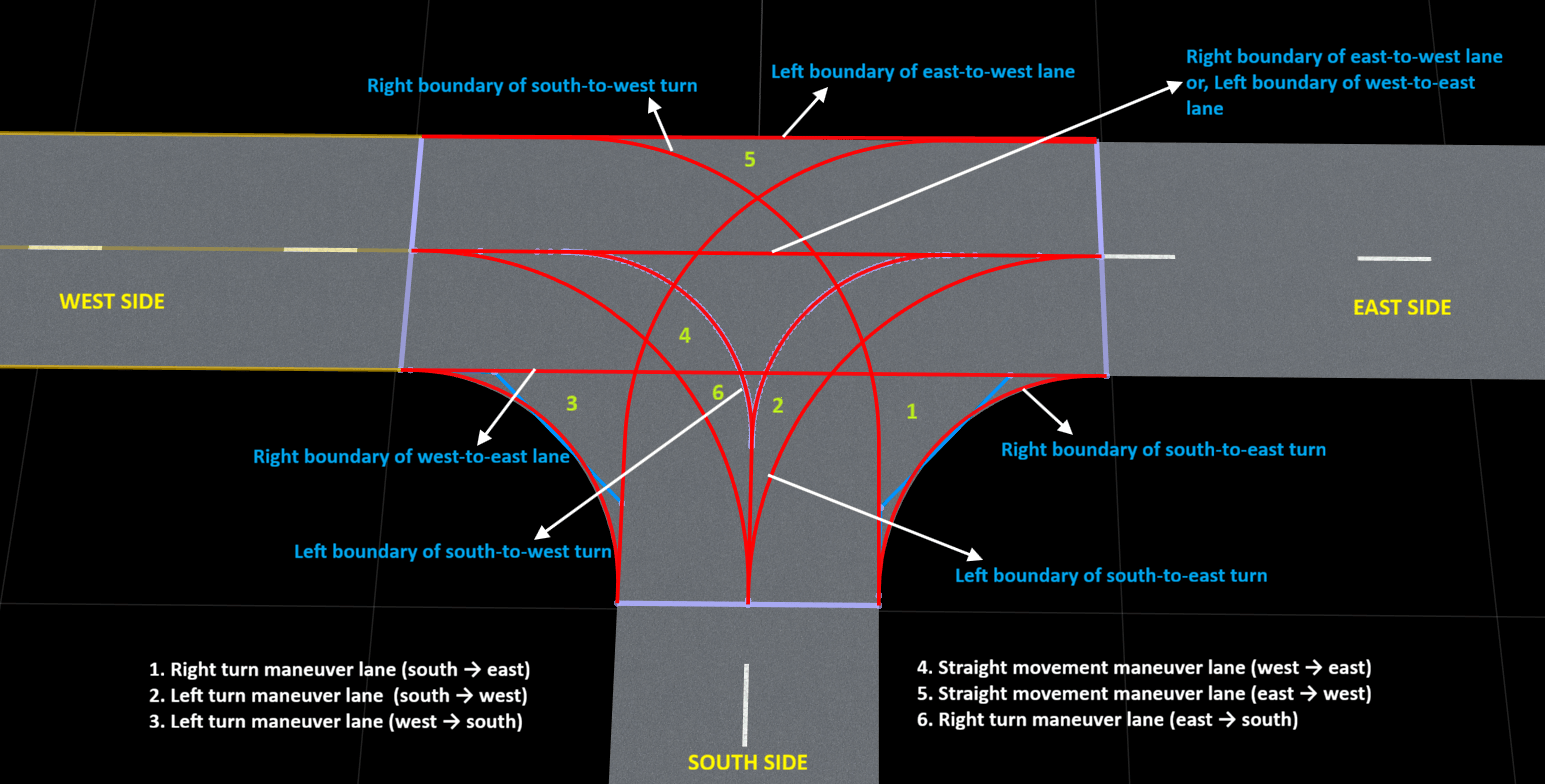
This figure shows the maneuver lanes inside the junction, illustrating all possible vehicle paths and their corresponding lane boundaries.
.
Define Traffic Signal Bulbs and States
Create bulb objects for a standard three-bulb traffic light with red, yellow, and green lights.
bulbRed = roadrunner.hdmap.Bulb(ID="BulbRed",Name="Red Bulb");
bulbYellow = roadrunner.hdmap.Bulb(ID="BulbYellow",Name="Yellow Bulb");
bulbGreen = roadrunner.hdmap.Bulb(ID="BulbGreen",Name="Green Bulb");
Create bulb state objects and signal states for each color. For the Red signal state, turn on the red bulb and turn off the yellow and green bulbs.
bulbStateRed_R = roadrunner.hdmap.BulbState(BulbRef=roadrunner.hdmap.Reference(ID="BulbRed"),State="On");
bulbStateYellow_R = roadrunner.hdmap.BulbState(BulbRef=roadrunner.hdmap.Reference(ID="BulbYellow"),State="Off");
bulbStateGreen_R = roadrunner.hdmap.BulbState(BulbRef=roadrunner.hdmap.Reference(ID="BulbGreen"),State="Off");
signalStateRed = roadrunner.hdmap.SignalState(ID="Red",StateName="Red",BulbStates=[bulbStateRed_R; bulbStateYellow_R; bulbStateGreen_R]);
Create the Yellow signal state. For the Yellow signal state, turn on the yellow bulb and turn off the red and green bulbs.
bulbStateRed_Y = roadrunner.hdmap.BulbState(BulbRef=roadrunner.hdmap.Reference(ID="BulbRed"),State="Off");
bulbStateYellow_Y = roadrunner.hdmap.BulbState(BulbRef=roadrunner.hdmap.Reference(ID="BulbYellow"),State="On");
bulbStateGreen_Y = roadrunner.hdmap.BulbState(BulbRef=roadrunner.hdmap.Reference(ID="BulbGreen"),State="Off");
signalStateYellow = roadrunner.hdmap.SignalState(ID="Yellow",StateName="Yellow",BulbStates=[bulbStateRed_Y; bulbStateYellow_Y; bulbStateGreen_Y]);
Create the Green signal state. For the Green signal state, turn on the green bulb and turn off the red and yellow bulbs.
bulbStateRed_G = roadrunner.hdmap.BulbState(BulbRef=roadrunner.hdmap.Reference(ID="BulbRed"),State="Off");
bulbStateYellow_G = roadrunner.hdmap.BulbState(BulbRef=roadrunner.hdmap.Reference(ID="BulbYellow"),State="Off");
bulbStateGreen_G = roadrunner.hdmap.BulbState(BulbRef=roadrunner.hdmap.Reference(ID="BulbGreen"),State="On");
signalStateGreen = roadrunner.hdmap.SignalState(ID="Green",StateName="Green",BulbStates=[bulbStateRed_G; bulbStateYellow_G; bulbStateGreen_G]);
Create a signal type with bulbs and signal states, referencing it to a traffic light asset.
trafficLightType = roadrunner.hdmap.SignalType(ID="TrafficLight3Bulb", ...
    AssetPath=roadrunner.hdmap.RelativeAssetPath(AssetPath="Assets/Props/Signals/Signal_3Light_Post01.fbx"), ...
    Bulbs=[bulbRed; bulbYellow; bulbGreen],SignalStates=[signalStateRed; signalStateYellow; signalStateGreen]);

rrMap.SignalTypes(end+1) = trafficLightType;
Create signal objects for each approach direction, and add them to the HD map.
signalWest = roadrunner.hdmap.Signal(ID="SignalWest",SignalTypeRef=roadrunner.hdmap.Reference(ID="TrafficLight3Bulb"));
signalEast = roadrunner.hdmap.Signal(ID="SignalEast",SignalTypeRef=roadrunner.hdmap.Reference(ID="TrafficLight3Bulb"));
signalSouth = roadrunner.hdmap.Signal(ID="SignalSouth",SignalTypeRef=roadrunner.hdmap.Reference(ID="TrafficLight3Bulb"));

% Add Signal objects to the HD map
rrMap.Signals(end+1) = signalWest;
rrMap.Signals(end+1) = signalEast;
rrMap.Signals(end+1) = signalSouth;
Configure Junction Traffic Control Phases
Define traffic control for the junction by using a roadrunner.hdmap.JunctionConfiguration object. A junction configuration uses multiple signal phases to control traffic flow at the junction.
tjConfig = roadrunner.hdmap.JunctionConfiguration(ID="TJSignal",Name="TJunctionTrafficLight");
Create references to all of the maneuver lanes as roadrunner.hdmap.Reference objects. you can use these references to assign traffic control states to each lane in each phase.
refW2E = roadrunner.hdmap.Reference(ID="maneuver_W2E");
refE2W = roadrunner.hdmap.Reference(ID="maneuver_E2W");
refS2E = roadrunner.hdmap.Reference(ID="maneuver_S2E");
refS2W = roadrunner.hdmap.Reference(ID="maneuver_S2W");
refW2S = roadrunner.hdmap.Reference(ID="maneuver_W2S");
refE2S = roadrunner.hdmap.Reference(ID="maneuver_E2S");
Create a phase in which east−west traffic can move through the junction by assigning the "GoAlways" state to the west-to-east and east-to-west maneuver lanes. Assign the "Yield" state to the east-to-south and west-to-south maneuver lanes to enable vehicles to turn toward the south road when they have an opening to do so. Finally, assign the "Stop" state to the south-to-east and south-to-west maneuver lanes, preventing vehicles from entering the junction from the south road. Add signal state references to display green on the west and east signal heads and red on the south signal head during this phase.
% Phase 1
ewGreen = roadrunner.hdmap.Phase(ID="ewGreen",Name="East-West Green",Time=20);
ewGreen.JunctionLaneStates(end+1) = roadrunner.hdmap.JunctionLaneState(LaneID=refW2E,State="GoAlways");
ewGreen.JunctionLaneStates(end+1) = roadrunner.hdmap.JunctionLaneState(LaneID=refE2W,State="GoAlways");
ewGreen.JunctionLaneStates(end+1) = roadrunner.hdmap.JunctionLaneState(LaneID=refW2S,State="Yield");
ewGreen.JunctionLaneStates(end+1) = roadrunner.hdmap.JunctionLaneState(LaneID=refE2S,State="Yield");
ewGreen.JunctionLaneStates(end+1) = roadrunner.hdmap.JunctionLaneState(LaneID=refS2E,State="Stop");
ewGreen.JunctionLaneStates(end+1) = roadrunner.hdmap.JunctionLaneState(LaneID=refS2W,State="Stop");

% Add signal state references for Phase 1
ewGreen.SignalStateReferences(end+1) = roadrunner.hdmap.SignalStateReference(SignalTypeRef=roadrunner.hdmap.Reference(ID="TrafficLight3Bulb"), ...
    SignalStateRef=roadrunner.hdmap.Reference(ID="Green"));
ewGreen.SignalStateReferences(end+1) = roadrunner.hdmap.SignalStateReference(SignalTypeRef=roadrunner.hdmap.Reference(ID="TrafficLight3Bulb"), ...
    SignalStateRef=roadrunner.hdmap.Reference(ID="Green"));
ewGreen.SignalStateReferences(end+1) = roadrunner.hdmap.SignalStateReference(SignalTypeRef=roadrunner.hdmap.Reference(ID="TrafficLight3Bulb"), ...
    SignalStateRef=roadrunner.hdmap.Reference(ID="Red"));
Create a transition phase for east−west traffic. Assign the "Yield" state to the west-to-east, east-to-west, west-to-south, and east-to-south maneuver lanes to indicate caution as the signal transitions. Assign the "Stop" state to the south-to-east and south-to-west maneuver lanes, keeping vehicles from entering the junction from the south road. Add signal state references to display yellow on the west and east signal heads and red on the south signal head during this transition phase.
% Phase 2
ewYellow = roadrunner.hdmap.Phase(ID="ewYellow",Name="East-West Yellow",Time=5);
ewYellow.JunctionLaneStates(end+1) = roadrunner.hdmap.JunctionLaneState(LaneID=refW2E,State="Yield");
ewYellow.JunctionLaneStates(end+1) = roadrunner.hdmap.JunctionLaneState(LaneID=refE2W,State="Yield");
ewYellow.JunctionLaneStates(end+1) = roadrunner.hdmap.JunctionLaneState(LaneID=refW2S,State="Yield");
ewYellow.JunctionLaneStates(end+1) = roadrunner.hdmap.JunctionLaneState(LaneID=refE2S,State="Yield");
ewYellow.JunctionLaneStates(end+1) = roadrunner.hdmap.JunctionLaneState(LaneID=refS2E,State="Stop");
ewYellow.JunctionLaneStates(end+1) = roadrunner.hdmap.JunctionLaneState(LaneID=refS2W,State="Stop");

% Add signal state references for Phase 2
ewYellow.SignalStateReferences(end+1) = roadrunner.hdmap.SignalStateReference(SignalTypeRef=roadrunner.hdmap.Reference(ID="TrafficLight3Bulb"), ...
    SignalStateRef=roadrunner.hdmap.Reference(ID="Yellow"));
ewYellow.SignalStateReferences(end+1) = roadrunner.hdmap.SignalStateReference(SignalTypeRef=roadrunner.hdmap.Reference(ID="TrafficLight3Bulb"), ...
    SignalStateRef=roadrunner.hdmap.Reference(ID="Yellow"));
ewYellow.SignalStateReferences(end+1) = roadrunner.hdmap.SignalStateReference(SignalTypeRef=roadrunner.hdmap.Reference(ID="TrafficLight3Bulb"), ...
    SignalStateRef=roadrunner.hdmap.Reference(ID="Red"));
Create a clearance phase after the east−west transition phase. Assign the "Stop" state to the west-to-east, east-to-west, west-to-south, east-to-south, south-to-east, and south-to-west maneuver lanes to provide a clearance interval between signal transitions. Add signal state references to display red on all signal heads (west, east, and south) during this clearance phase.
% Phase 3
allRed1 = roadrunner.hdmap.Phase(ID="allRed1",Name="All Red Transition 1",Time=2);
allRed1.JunctionLaneStates(end+1) = roadrunner.hdmap.JunctionLaneState(LaneID=refW2E,State="Stop");
allRed1.JunctionLaneStates(end+1) = roadrunner.hdmap.JunctionLaneState(LaneID=refE2W,State="Stop");
allRed1.JunctionLaneStates(end+1) = roadrunner.hdmap.JunctionLaneState(LaneID=refW2S,State="Stop");
allRed1.JunctionLaneStates(end+1) = roadrunner.hdmap.JunctionLaneState(LaneID=refE2S,State="Stop");
allRed1.JunctionLaneStates(end+1) = roadrunner.hdmap.JunctionLaneState(LaneID=refS2E,State="Stop");
allRed1.JunctionLaneStates(end+1) = roadrunner.hdmap.JunctionLaneState(LaneID=refS2W,State="Stop");

% Add signal state references for Phase 3
allRed1.SignalStateReferences(end+1) = roadrunner.hdmap.SignalStateReference(SignalTypeRef=roadrunner.hdmap.Reference(ID="TrafficLight3Bulb"), ...
    SignalStateRef=roadrunner.hdmap.Reference(ID="Red"));
allRed1.SignalStateReferences(end+1) = roadrunner.hdmap.SignalStateReference(SignalTypeRef=roadrunner.hdmap.Reference(ID="TrafficLight3Bulb"), ...
    SignalStateRef=roadrunner.hdmap.Reference(ID="Red"));
allRed1.SignalStateReferences(end+1) = roadrunner.hdmap.SignalStateReference(SignalTypeRef=roadrunner.hdmap.Reference(ID="TrafficLight3Bulb"), ...
    SignalStateRef=roadrunner.hdmap.Reference(ID="Red"));
Create a phase in which traffic from the south road can move through the junction by assigning the "GoAlways" state to the south-to-east and south-to-west maneuver lanes. Assign the "Yield" state to the west-to-south and east-to-south maneuver lanes to enable vehicles to turn toward the south road when they have an opening to do so. Assign the "Stop" state to the west-to-east and east-to-west maneuver lanes, preventing vehicles from moving straight through the junction on the east−west road. Add signal state references to display red on the west and east signal heads and green on the south signal head during this transition phase.
% Phase 4
sGreen = roadrunner.hdmap.Phase(ID="sGreen",Name="South Green",Time=20);
sGreen.JunctionLaneStates(end+1) = roadrunner.hdmap.JunctionLaneState(LaneID=refS2E,State="GoAlways");
sGreen.JunctionLaneStates(end+1) = roadrunner.hdmap.JunctionLaneState(LaneID=refS2W,State="GoAlways");
sGreen.JunctionLaneStates(end+1) = roadrunner.hdmap.JunctionLaneState(LaneID=refW2S,State="Yield");
sGreen.JunctionLaneStates(end+1) = roadrunner.hdmap.JunctionLaneState(LaneID=refE2S,State="Yield");
sGreen.JunctionLaneStates(end+1) = roadrunner.hdmap.JunctionLaneState(LaneID=refW2E,State="Stop");
sGreen.JunctionLaneStates(end+1) = roadrunner.hdmap.JunctionLaneState(LaneID=refE2W,State="Stop");

% Add signal state references for Phase 4
sGreen.SignalStateReferences(end+1) = roadrunner.hdmap.SignalStateReference(SignalTypeRef=roadrunner.hdmap.Reference(ID="TrafficLight3Bulb"), ...
    SignalStateRef=roadrunner.hdmap.Reference(ID="Red"));
sGreen.SignalStateReferences(end+1) = roadrunner.hdmap.SignalStateReference(SignalTypeRef=roadrunner.hdmap.Reference(ID="TrafficLight3Bulb"), ...
    SignalStateRef=roadrunner.hdmap.Reference(ID="Red"));
sGreen.SignalStateReferences(end+1) = roadrunner.hdmap.SignalStateReference(SignalTypeRef=roadrunner.hdmap.Reference(ID="TrafficLight3Bulb"), ...
    SignalStateRef=roadrunner.hdmap.Reference(ID="Green"));
Create a transition phase for traffic from the south road. Assign the "Yield" state to the south-to-east and south-to-west maneuver lanes to indicate caution as the signal transitions. Assign the "Stop" state to the west-to-east, east-to-west, west-to-south, and east-to-south maneuver lanes. Add signal state references to display red on the west and east signal heads and yellow on the south signal head during this transition phase.
% Phase 5
sYellow = roadrunner.hdmap.Phase(ID="sYellow",Name="South Yellow",Time=5);
sYellow.JunctionLaneStates(end+1) = roadrunner.hdmap.JunctionLaneState(LaneID=refS2E,State="Yield");
sYellow.JunctionLaneStates(end+1) = roadrunner.hdmap.JunctionLaneState(LaneID=refS2W,State="Yield");
sYellow.JunctionLaneStates(end+1) = roadrunner.hdmap.JunctionLaneState(LaneID=refW2E,State="Stop");
sYellow.JunctionLaneStates(end+1) = roadrunner.hdmap.JunctionLaneState(LaneID=refE2W,State="Stop");
sYellow.JunctionLaneStates(end+1) = roadrunner.hdmap.JunctionLaneState(LaneID=refW2S,State="Stop");
sYellow.JunctionLaneStates(end+1) = roadrunner.hdmap.JunctionLaneState(LaneID=refE2S,State="Stop");

% Add signal state references for Phase 5
sYellow.SignalStateReferences(end+1) = roadrunner.hdmap.SignalStateReference(SignalTypeRef=roadrunner.hdmap.Reference(ID="TrafficLight3Bulb"), ...
    SignalStateRef=roadrunner.hdmap.Reference(ID="Red"));
sYellow.SignalStateReferences(end+1) = roadrunner.hdmap.SignalStateReference(SignalTypeRef=roadrunner.hdmap.Reference(ID="TrafficLight3Bulb"), ...
    SignalStateRef=roadrunner.hdmap.Reference(ID="Red"));
sYellow.SignalStateReferences(end+1) = roadrunner.hdmap.SignalStateReference(SignalTypeRef=roadrunner.hdmap.Reference(ID="TrafficLight3Bulb"), ...
    SignalStateRef=roadrunner.hdmap.Reference(ID="Yellow"));
Create a clearance phase after the transition phase for traffic from the south road. Assign the "Stop" state to the west-to-east, east-to-west, west-to-south, east-to-south, south-to-east, and south-to-west maneuver lanes to provide a clearance interval between signal transitions. Add signal state references to display red on all signal heads (west, east, and south) during this clearance phase.
% Phase 6
allRed2 = roadrunner.hdmap.Phase(ID="allRed2",Name="All Red Transition 2",Time=2);
allRed2.JunctionLaneStates(end+1) = roadrunner.hdmap.JunctionLaneState(LaneID=refW2E,State="Stop");
allRed2.JunctionLaneStates(end+1) = roadrunner.hdmap.JunctionLaneState(LaneID=refE2W,State="Stop");
allRed2.JunctionLaneStates(end+1) = roadrunner.hdmap.JunctionLaneState(LaneID=refW2S,State="Stop");
allRed2.JunctionLaneStates(end+1) = roadrunner.hdmap.JunctionLaneState(LaneID=refE2S,State="Stop");
allRed2.JunctionLaneStates(end+1) = roadrunner.hdmap.JunctionLaneState(LaneID=refS2E,State="Stop");
allRed2.JunctionLaneStates(end+1) = roadrunner.hdmap.JunctionLaneState(LaneID=refS2W,State="Stop");

% Add signal state references for Phase 6
allRed2.SignalStateReferences(end+1) = roadrunner.hdmap.SignalStateReference(SignalTypeRef=roadrunner.hdmap.Reference(ID="TrafficLight3Bulb"), ...
    SignalStateRef=roadrunner.hdmap.Reference(ID="Red"));
allRed2.SignalStateReferences(end+1) = roadrunner.hdmap.SignalStateReference(SignalTypeRef=roadrunner.hdmap.Reference(ID="TrafficLight3Bulb"), ...
    SignalStateRef=roadrunner.hdmap.Reference(ID="Red"));
allRed2.SignalStateReferences(end+1) = roadrunner.hdmap.SignalStateReference(SignalTypeRef=roadrunner.hdmap.Reference(ID="TrafficLight3Bulb"), ...
    SignalStateRef=roadrunner.hdmap.Reference(ID="Red"));
This table summarizes the complete traffic control logic for all maneuver lanes across all signal phases.
Direction | Phase 1:
| Phase 2:
| Phase 3:
| Phase 4:
| Phase 5:
| Phase 6:
|
|---|---|---|---|---|---|---|
West to east |
|
|
|
|
|
|
East to west |
|
|
|
|
|
|
West to south |
|
|
|
|
|
|
East to south |
|
|
|
|
|
|
South to east |
|
|
|
|
|
|
South to west |
|
|
|
|
|
|
Add the phases to the junction configuration, in sequence, to represent the full traffic signal cycle.
% Collect all of the phases in an array
phases = [ewGreen ewYellow allRed1 sGreen sYellow allRed2];

% Add all of the phases to the junction configuration
for i = 1:length(phases)
    tjConfig.Phases(end+1) = phases(i);
end
Attach the junction configuration to the junction so that the defined traffic control logic applies to all maneuver lanes within the junction.
rrMap.Junctions(1).Configurations(end+1) = tjConfig;
Write the RoadRunner HD Map to a binary file.
filename = "NonOverlappingTJunction.rrhd";
write(rrMap,filename)
Import HD Map File into RoadRunner and Build Scene
To build a scene from a roadRunner HD Map, you must have a RoadRunner Scene Builder license. RoadRunner Scene Builder is an add-on product that requires an addition to your RoadRunner license. For more details, see RoadRunner Scene Builder.
Create a roadrunner object, specifying the path to an existing project. For example, this code shows the path to a project, on a Windows® machine, located at "C:\RR\MyProject". This code assumes that RoadRunner is installed in the default location, and returns an object, rrApp, that provides functions for performing basic tasks such as opening, closing, and saving scenes and projects.
rrApp = roadrunner("C:\RR\MyProject",InstallationFolder="C:\Program Files\RoadRunner\R2026b\roadrunner\bin\win64");
Import the RoadRunner HD Map file NonOverlappingTJunction.rrhd into your RoadRunner instance, and build a scene from the RoadRunner HD Map data.
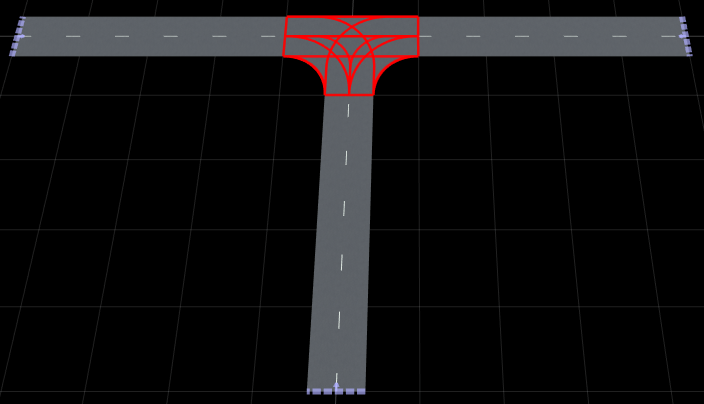
importScene(rrApp,fullfile(pwd,filename),"RoadRunner HD Map")This figure shows the built scene in the RoadRunner canvas, with the red highlights indicating the maneuver lanes inside the junction.
Helper Functions
The example uses these helper functions to create smooth, geometrically accurate maneuver lanes.
createCircularArc Function
The createCircularArc function creates a circular arc between two points. Specify the start point, end point, initial heading angle, turn angle, and number of points to create a smooth curved path. The function calculates the arc radius based on the chord length and turn angle, then determines the center position of the circle that defines the arc.
function geom = createCircularArc(startPt,endPt,startAngle,turnAngle,numPoints)
% startPt: [x,y] starting point
% endPt: [x,y] ending point
% startAngle: initial heading in degrees (0=East, 90=North, 180=West, 270=South)
% turnAngle: angle to turn in degrees (positive=left, negative=right)
% numPoints: number of points in the arc

% Calculate the arc radius based on the chord distance and turn angle.
dx = endPt(1) - startPt(1);
dy = endPt(2) - startPt(2);
turnRad = deg2rad(abs(turnAngle));
chord = sqrt(dx^2 + dy^2);
radius = chord/(2*sin(turnRad/2));

% Determine the center position of the circle based on the initial heading and turn direction.
% For a left turn (positive turnAngle), the center lies to the left of the initial heading.
% For a right turn (negative turnAngle), the center lies to the right.
initHeadingRad = deg2rad(startAngle);
if turnAngle > 0
    centerDir = initHeadingRad + pi/2;
else
    centerDir = initHeadingRad - pi/2;
end
center = startPt + radius*[cos(centerDir) sin(centerDir)];

% Calculate the angular positions of the start and end points relative to the circle center.
angleStart = atan2(startPt(2)-center(2),startPt(1)-center(1));
angleEnd = atan2(endPt(2)-center(2),endPt(1)-center(1));

% Generate evenly spaced angles along the arc.
% For left turns, sweep counterclockwise. For right turns, sweep clockwise.
if turnAngle > 0
    if angleEnd < angleStart
        angleEnd = angleEnd + 2*pi;
    end
    angles = linspace(angleStart,angleEnd,numPoints);
else
    if angleEnd > angleStart
        angleEnd = angleEnd - 2*pi;
    end
    angles = linspace(angleStart,angleEnd,numPoints);
end

% Generate the arc points by evaluating the circle equation at each angle.
geom = center + radius*[cos(angles)' sin(angles)'];
end
createOffsetCurve Function
The createOffsetCurve function creates a parallel curve offset from a centerline by a specified distance. This function creates lane boundaries that maintain a constant perpendicular distance from the lane center, ensuring geometrically accurate parallel curves.
function offsetGeom = createOffsetCurve(centerGeom, offset)
% Initialize the output array to store offset points.
n = size(centerGeom,1);
offsetGeom = zeros(n,2);

% For each point along the centerline, calculate the tangent vector based on neighboring points.
% Use forward differences for the first point, backward differences for the last point,
% and central differences for interior points to ensure smooth normal vectors.
for i = 1:n
    if i == 1
        tangent = centerGeom(2,:) - centerGeom(1,:);
    elseif i == n
        tangent = centerGeom(n,:) - centerGeom(n-1,:);
    else
        tangent = centerGeom(i+1,:) - centerGeom(i-1,:);
    end

    % Normalize the tangent vector to unit length.
    len = sqrt(tangent(1)^2 + tangent(2)^2);
    if len < 1e-10
        len = 1;
    end
    tangent = tangent/len;

    % Calculate the normal vector by rotating the tangent 90 degrees counter-clockwise.
    % This creates a perpendicular vector pointing to the left of the direction of travel.
    normal = [-tangent(2) tangent(1)];

    % Apply the offset distance along the normal direction to generate the offset point.
    offsetGeom(i,:) = centerGeom(i,:) + offset*normal;
end
end
See Also
roadrunnerHDMap | roadrunner.hdmap.Lane | roadrunner.hdmap.Junction | roadrunner.hdmap.Signal | roadrunner.hdmap.Phase

