Variable Spherical Solid
Solid sphere with variable dimensions and mass properties
Libraries:
Simscape /
Multibody /
Body Elements /
Variable Mass
Description
The Variable Spherical Solid block models a solid sphere whose dimensions and mass properties can change during simulation. The block uses the scalar equation
where:
m is the mass of the solid sphere.
⍴ is the density of the solid sphere.
r is the radius of the solid sphere.
You can compute any variable by providing the other two variables. If the equation is rearranged and any variable appears in the denominator, ensure that this variable is nonzero to maintain the validity of the equation. Also, when calculating the radius of the solid sphere, mass and density must share the same sign.
To model a variable solid sphere, select one parameter to compute automatically, then define the remaining parameters by using either constant values or time-varying physical signals. The reference frame is located at the center of the solid sphere.

Examples
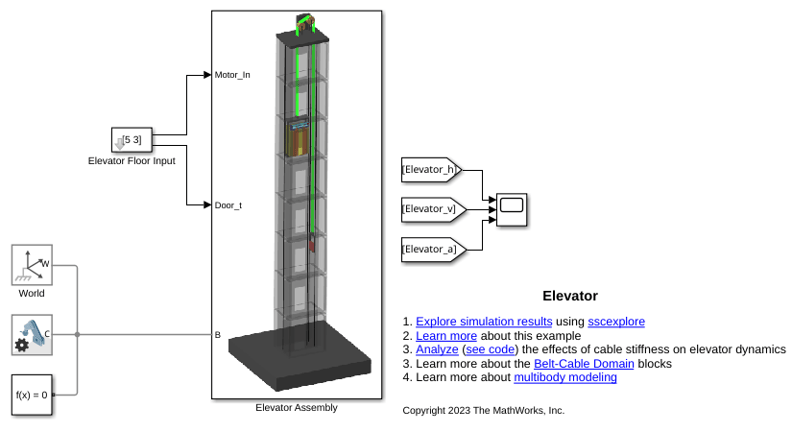
Elevator
Models an elevator system in Simscape™ Multibody™. The system is comprised of belt-cable pulley circuits which control the movement of the elevator and the door mechanism. The cable is approximated to be extensible by using high stiffness springs between the belt cable ends and the elevator. The motor pulley is motion actuated based on the necessary elevator kinematics computed from the Floor Number inputs. Effects of people entering and leaving the elevator are modeled using general variable mass blocks.
Ports
Frame
Reference frame of the variable solid sphere, fixed at the center of the sphere.
Input
Radius of the variable solid sphere. The value must be nonnegative.
Parameter Dependencies
To enable this port:
Do not set Automatically Compute to
Radius.Under Geometry and Inertia, set the Radius parameter to
Provided by Input.
Density of the variable solid sphere.
Parameter Dependencies
To enable this port:
Do not set Automatically Compute to
Density.Under Geometry and Inertia, set the Density parameter to
Provided by Input.
Mass of the variable solid sphere.
Parameter Dependencies
To enable this port:
Do not set Automatically Compute to
Mass.Under Geometry and Inertia, set the Mass parameter to
Provided by Input.
Output
Radius of the variable solid sphere.
Parameter Dependencies
To enable this port, under Sensing, select Radius.
Density of the variable solid sphere.
Parameter Dependencies
To enable this port, under Sensing, select Density.
Mass of the variable solid sphere.
Parameter Dependencies
To enable this port, under Sensing, select Mass.
Center of mass of the variable solid sphere. The signal is a 3-by-1 vector that contains the Cartesian coordinates of the center of mass, expressed in the reference frame of the variable solid sphere.
Parameter Dependencies
To enable this port, under Sensing, select Center of Mass.
Inertia matrix of the variable solid sphere. The signal is a 3-by-3 matrix, expressed in the reference frame of the variable solid sphere.
Parameter Dependencies
To enable this port, under Sensing, select Inertia Matrix.
Parameters
Geometry and Inertia
Specify which variable of the solid sphere that the block calculates based on the values of the other variable.
Radius of the variable solid sphere. To use a fixed value, select
Constant. To specify a time-varying value via
a physical signal, select Provided by
Input.
Parameter Dependencies
To enable this parameter, do not set Automatically
Compute to Radius.
Radius of the variable solid sphere. The radius remains constant throughout the simulation.
Parameter Dependencies
To enable this parameter:
Do not set Automatically Compute to
Radius.Under Geometry and Inertia, set Radius to
Constant.
Mass per unit volume of the material. To use a fixed value, select
Constant. To specify a time-varying value via
a physical signal, select Provided by
Input.
Parameter Dependencies
To enable this parameter, do not set Automatically
Compute to Density.
Density of the variable solid sphere. The value remains constant throughout the simulation. To model the effect of a void or cavity in a compound body, use a negative value. The overall mass of the compound body must remain positive.
Parameter Dependencies
To enable this parameter:
Do not set Automatically Compute to
Density.Under Geometry and Inertia, set Density to
Constant.
Mass of the variable solid sphere. To use a fixed value, select
Constant. To specify a time-varying value via
a physical signal, select Provided by
Input.
Parameter Dependencies
To enable this parameter, do not set Automatically
Compute to Mass.
Mass of the variable solid sphere. The value remains constant throughout the simulation. To model the effect of a void or cavity in a compound body, use a negative value. The overall mass of the compound body must remain positive.
Parameter Dependencies
To enable this parameter:
Do not set Automatically Compute to
Mass.Under Geometry and Inertia, set Mass to
Constant.
Graphic
Type of the visual representation of the solid, specified as From Geometry, Marker, or None. Set the parameter to From Geometry to show the visual representation of the solid. Set the parameter to Marker to represent the solid as a marker. Set the parameter to None to hide the solid in the model visualization.
Parameterizations for specifying visual properties. Select
Simple to specify Diffuse
Color and Opacity. Select
Advanced to specify more visual
properties, such as Specular Color, Ambient
Color, Emissive Color, and
Shininess.
Dependencies
To enable this parameter, set Type to From
Geometry or
Marker.
Shape of the marker by means of which to visualize the solid. The motion of the marker reflects the motion of the solid itself.
Dependencies
To enable this parameter, set Type to Marker.
Width of the marker in pixels. This width does not scale with zoom level. Note that the apparent size of the marker depends partly on screen resolution, with higher resolutions packing more pixels per unit length, and therefore producing smaller icons.
Dependencies
To enable this parameter, set Type to Marker.
Color of the light due to diffuse reflection, specified as an [R,G,B] or [R,G,B,A] vector with values in the range of 0 to 1. The vector can be a row or column vector. The optional fourth element specifies the color opacity. Omitting the opacity element is equivalent to specifying a value of 1.
The diffuse color reflects the main color of the rendered solid and provides shading that gives the rendered object a three-dimensional appearance.
Dependencies
To enable this parameter, set:
Type to
From GeometryorMarker.Visual Properties to
Advanced.
Graphic opacity, specified as a scalar in the range of 0 to 1. A scalar of 0 corresponds to completely transparent, and a scalar of 1 corresponds to completely opaque.
Dependencies
To enable this parameter, set:
Type to
From GeometryorMarker.Visual Properties to
Simple.
Color of the light due to specular reflection, specified as an [R,G,B] or [R,G,B,A] vector with values in the range of 0 to 1. The vector can be a row or column vector. The optional fourth element specifies the color opacity. Omitting the opacity element is equivalent to specifying a value of 1. This parameter changes the color of the specular highlight, which is the bright spot on the rendered solid due to the reflection of the light from the light source.
Dependencies
To enable this parameter, set:
Type to
From GeometryorMarker.Visual Properties to
Advanced.
Color of the ambient light, specified as an [R,G,B] or [R,G,B,A] vector with values in the range of 0 to 1. The vector can be a row or column vector. The optional fourth element specifies the color opacity. Omitting the opacity element is equivalent to specifying a value of 1.
Ambient light refers to a general level of illumination that does not come directly from a light source. The Ambient light consists of light that has been reflected and re-reflected so many times that it is no longer coming from any particular direction. You can adjust this parameter to change the shadow color of the rendered solid.
Dependencies
To enable this parameter, set:
Type to
From GeometryorMarker.Visual Properties to
Advanced.
Color due to self illumination, specified as an [R,G,B] or [R,G,B,A] vector in the range of 0 to 1. The vector can be a row or column vector. The optional fourth element specifies the color opacity. Omitting the opacity element is equivalent to specifying a value of 1.
The emission color is color that does not come from any external source, and therefore seems to be emitted by the solid itself. When a solid has an emissive color, the solid can be seen even if there is no external light source.
Dependencies
To enable this parameter, set:
Type to
From GeometryorMarker.Visual Properties to
Advanced.
Sharpness of specular light reflections, specified as a scalar number on a 0–128 scale. Increase the shininess value for smaller but sharper highlights. Decrease the value for larger but smoother highlights.
Dependencies
To enable this parameter, set:
Type to
From GeometryorMarker.Visual Properties to
Advanced.
Extended Capabilities
C/C++ Code Generation
Generate C and C++ code using Simulink® Coder™.
Version History
Introduced in R2017b
MATLAB Command
You clicked a link that corresponds to this MATLAB command:
Run the command by entering it in the MATLAB Command Window. Web browsers do not support MATLAB commands.
Web サイトの選択
Web サイトを選択すると、翻訳されたコンテンツにアクセスし、地域のイベントやサービスを確認できます。現在の位置情報に基づき、次のサイトの選択を推奨します:
また、以下のリストから Web サイトを選択することもできます。
最適なサイトパフォーマンスの取得方法
中国のサイト (中国語または英語) を選択することで、最適なサイトパフォーマンスが得られます。その他の国の MathWorks のサイトは、お客様の地域からのアクセスが最適化されていません。
南北アメリカ
- América Latina (Español)
- Canada (English)
- United States (English)
ヨーロッパ
- Belgium (English)
- Denmark (English)
- Deutschland (Deutsch)
- España (Español)
- Finland (English)
- France (Français)
- Ireland (English)
- Italia (Italiano)
- Luxembourg (English)
- Netherlands (English)
- Norway (English)
- Österreich (Deutsch)
- Portugal (English)
- Sweden (English)
- Switzerland
- United Kingdom (English)

