Use Variant Blocks and Self-Modifiable Masks to Modify Linked Library Blocks
R2026bThis example shows how to modify a linked library block based on mask parameter values by using variant blocks. The example also shows how to use self-modifiable masks when you need to modify the structure of a linked block dynamically and cannot define all required subsystem configurations in advance.
Variant blocks — Variant blocks enable you to represent multiple structural implementations in a single subsystem and switch between them based on specific conditions. When you add a masked subsystem containing variant blocks from a library to a model, you can use mask dialog box parameters to select the active variant in the linked block. Variant blocks support code generation and different variant activation times. Use variant blocks when you can define all required subsystem configurations in advance.
Self-modifiable masks — Use self-modifiable masks to make programmatic structural changes, such as to add, remove, reconnect blocks, set parameters for parent and child blocks, or change the number of ports in a multiport S-Function linked block.
Consider these points when deciding whether to use variant blocks or self-modifiable masks:
Use variant blocks when you can define all required subsystem configurations in advance. Variant blocks support code generation, analysis workflows and avoid the performance overhead of structural changes during mask initialization.
Use self-modifiable masks only when you must modify block structure dynamically and variant blocks cannot represent the required behavior. If a mask parameter references an unavailable workspace variable when you open the model, mask initialization can fail. In that case, assign a default value before making structural changes.
Use Variant Blocks to Change Structure of Masked Subsystem
Explore Model
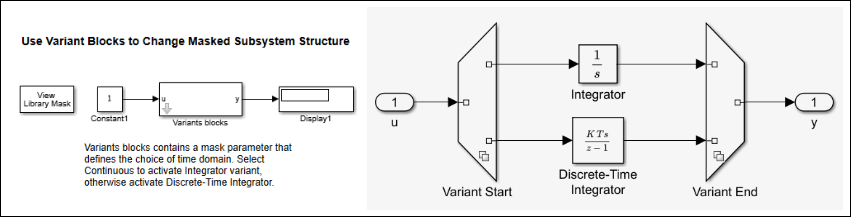
The model slexMaskSelfModifiableExample uses variant blocks from the library slexMaskSelfModifiableLib. These variant blocks use a popup parameter with an enumeration to specify the time domain. When you set this parameter to Continuous, the Integrator variant is active. Otherwise, the Discrete-Time Integrator variant is active.
Create and Verify Variant Blocks
To create a masked subsystem with variant blocks:
1. Insert a Subsystem block in slexMaskSelfModifiableLib. Name the Subsystem block Variants blocks.
2. On the Parameters & Dialog tab of the Mask Editor, create a popup parameter named TimeDomain.
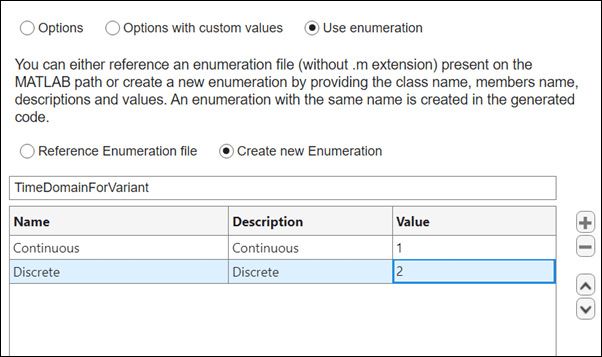
3. In the Property Editor pane of the Mask Editor, double-click Type options. In the dialog box, select the options Use enumeration and Create new Enumeration. Create the enumeration class TimeDomainForVariant with the values Continuous and Discrete. These enumeration values define the variant control expressions for the variant blocks.
4. Click Save Mask and close the Mask Editor.
5. Right-click the Variants blocks subsystem and click Look Inside Mask. The Variants blocks subsystem is pre-configured with two implementations of the integrator by using Variant Start and Variant End blocks. Use the mask popup parameter TimeDomain and its enumeration class to configure these blocks:
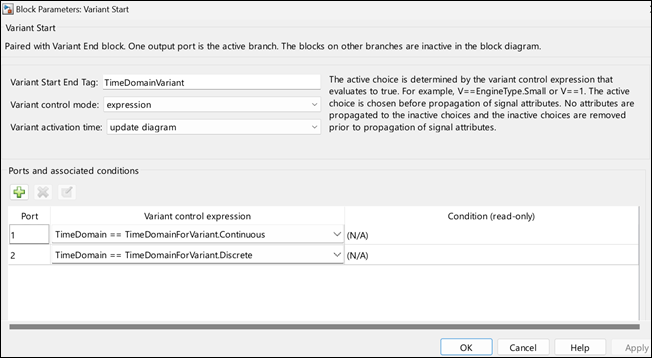
a. In the Block Parameters dialog box for the Variant Start block, set Variant Start End Tag to TimeDomainVariant and Variant control mode to expression. Under Variant control expression, enter TimeDomain == TimeDomainForVariant.Continuous and TimeDomain == TimeDomainForVariant.Discrete.
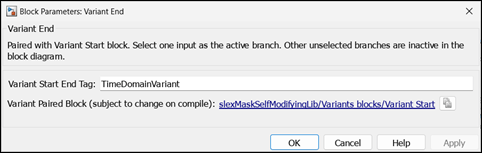
b. In the Block Parameters dialog box for the Variant End block, set Variant Start End Tag to TimeDomainVariant.
Verify Variant Behavior
In the previous section, you created the Variants blocks subsystem in the library slexMaskSelfModifiableLib. To verify that the TimeDomain mask parameter selects the expected variant in the linked library block:
1. In the model slexMaskSelfModifiableExample, create the linked library block Variants blocks from the library.
2. In the mask dialog box, select Continuous.
3. Click Look Inside Mask and observe which variant is active.
4. Simulate the model. The continuous integrator variant is active.

Dynamically Create Blocks and Ports with Self-Modifiable Masks
Explore Model
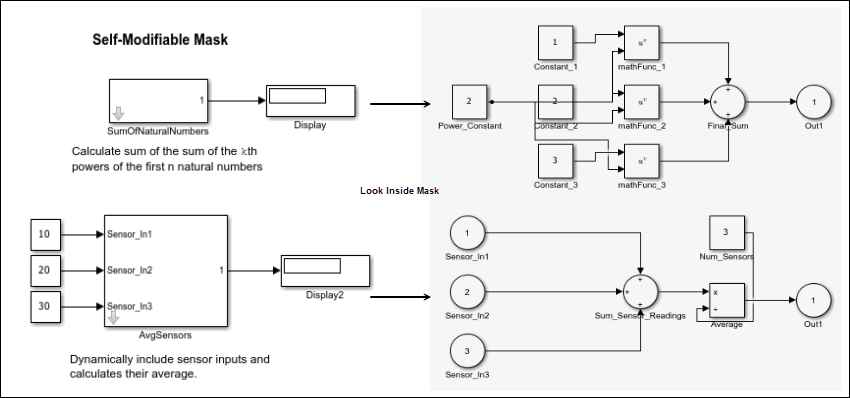
The example slexMaskSelfModifiableExample uses linked library blocks from the library slexMaskSelfModifiableLib. The linked library block SumOfNaturalNumbers calculates the sum of the k th powers of the first n natural numbers. This block has two mask parameters: n and k. The mask initialization code in the callback file sumOfNumbersCallback creates n Constant blocks dynamically and assigns the value of k to the Power_Constant block.
The linked library block AvgSensors calculates the average of multiple sensor inputs. The mask parameter numSensors determines the number of input ports on the AvgSensors block. The callback file numberOfSensors contains the mask initialization code that manages this configuration.
Note: Use self-modifiable masks only when the subsystem structure must be computed at run time and cannot be represented by predefined variant choices. When you can define all possible structures in advance, use variant blocks instead.
Add Blocks Dynamically
To create a library slexMaskSelfModifiableLib with a masked block SumOfNaturalNumbers that calculates the sum of the k th powers of the first n natural numbers:
1. On the Parameters & Dialog tab of the Mask Editor, create two mask parameters, k and n.
2. To mark the Subsystem block as self-modifiable, on the Code tab, select Allow mask initialization code to modify the subsystem's content.
3. In the Callback Organization section of the Code tab, specify the callback filename sumOfNumbersCallback to store the mask initialization code.
4. Save the mask.
Add Ports Dynamically
You can also add ports dynamically to a masked Subsystem block. To create a block AvgSensors that calculates the average of multiple sensor inputs:
1. In the same library, slexMaskSelfModifiableLib, create a masked Subsystem block named AvgSensors.
2. In the Parameters & Dialog tab of the Mask Editor, create a mask parameter numSensors that specifies the number of input ports in the AvgSensors Subsystem block.
3. To mark the Subsystem block as self-modifiable, on the Code tab of the Mask Editor, select Allow mask initialization code to modify the subsystem's content.
4. In the Callback Organization section of the Code tab, specify the callback file name numberOfSensors to store the mask initialization code.
5. Save the mask.
Verify Self-Modifiable Structural Changes
In the previous sections, you created the library slexMaskSelfModifiableLib with the blocks SumOfNaturalNumbers and AvgSensors. Verify the structural changes in these linked library blocks before simulation to confirm that the mask parameters produce the expected result. This check is important because self-modifiable masks change subsystem contents during mask initialization, which can lead to incorrect ports or broken connections if parameter values are not valid.
1. Create a model named slexMaskSelfModifiableExample.
2. Create linked blocks from the library blocks SumOfNaturalNumbers and AvgSensors in slexMaskSelfModifiableExample.
3. Add Inport and Display blocks as needed.
4. In the mask dialog box for SumOfNaturalNumbers, specify values for k and n.
5. To verify that the block structure changes as expected, click Look Inside Mask.

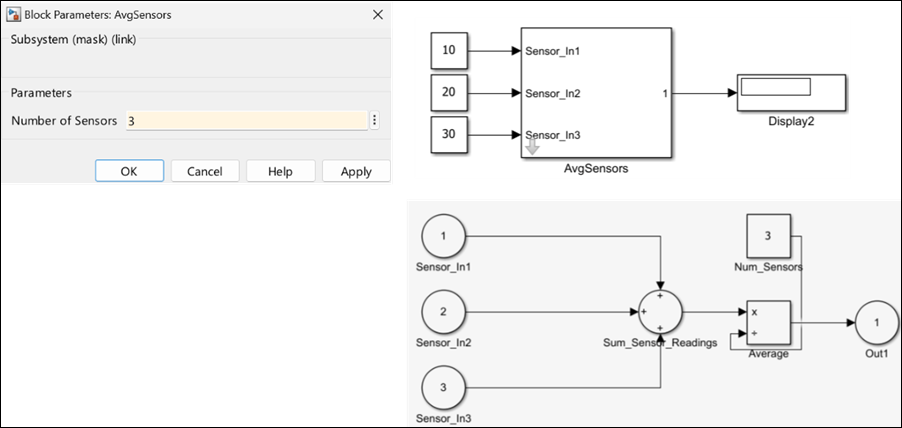
6. In the mask dialog box for AvgSensors, specify numSensors.
7. Verify that the number of input ports matches the value of the mask parameter numSensors.
8. Create the required Constant blocks and connect the port lines.
9. Simulate the model and observe the results.
Limitations of Self-Modifiable Masks:
Although self-modifiable masks help to dynamically modify the structure of a masked Subsystem block, these limitations apply:
Structural changes during mask initialization can affect performance. Use variant systems when you know the possible design variations in advance.
Do not use a self-modifiable mask only to set child block parameter values from parent mask initialization code. Doing so can make child block parameters nontunable in generated code. You can either promote the child block parameter to the parent block to set its value or reference the parent mask parameter in the child block.
For example, in this code, the child block parameter childParam becomes nontunable in the generated code.
value = get_param(<parentBlock>, "parentMaskparam")
set_param(<childBlock>, "childParam", value)
Block logic is hard to understand if it is written using MATLAB code.
Some analysis workflows, including those for Simulink Design Verifier and Dependency Analyzer, do not support models that use self-modifiable masks. This limitation happens when mask initialization code changes workspace parameter attributes or creates or deletes blocks.
Note: When you open a model, Simulink evaluates all mask parameters and then runs mask initialization for self-modifiable blocks. If a mask parameter references a workspace variable that is not available when the model opens, Simulink sets the parameter value to []. If mask initialization uses that value to add or modify ports, blocks, or connections, mask initialization can fail or create an incorrect block structure. Before you make structural changes in mask initialization, check whether the parameter value is []. If it is, assign an appropriate default value first.

