Integrate External C++ Code Using Class with Custom Constructor in Simulink
R2026bThis example shows how to integrate external C++ code that uses a class with a custom constructor into Simulink®. The classes and custom constructor define an algorithm for use in various engineering and science applications. You can integrate such external C++ code into Simulink by using a C Function block.
In this example, the CFcnUniquePtrExample model performs signal processing operation on a digital signal. To perform signal processing, the Signal Processing unit of the model uses two blocks:
A Rate Transition block performs upsampling. Upsampling increases the sampling rate of the input signal.
A C Function block performs signal smoothing using a linear filter defined in the external C++ code. This code uses
std::inner_productfunction to implement a digital signal processing algorithm.
Open the model.
mdl = "CFcnUniquePtrExample.slx";
open(mdl);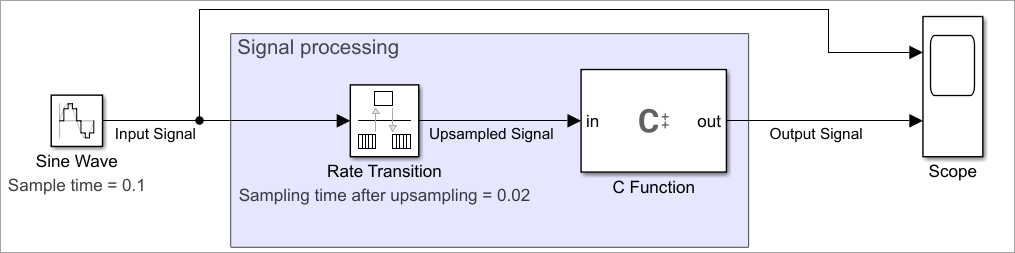
Signal Processing Unit
The Signal Processing unit receives a discrete sine wave. The Rate Transition block and C Function blocks together process the input signal and output a less noisy, smoother signal.
Rate Transition Block
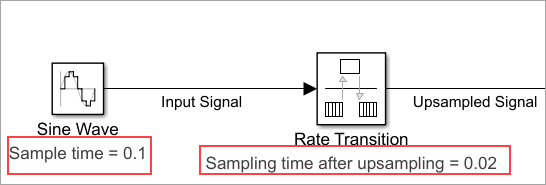
To upsample the input signal, set the Output port sample time parameter value of the Rate Transition block to 0.02 which increases the sampling rate of the input signal by five times. This upsampling operation helps the C Function block perform the signal smoothing.
C Function Block
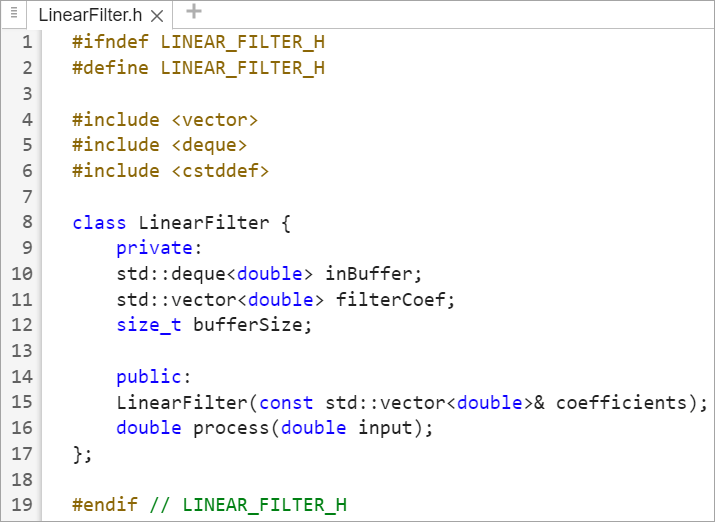
The C++ code in the C Function block uses a header file named LinearFilter.h and a source file named LinearFilter.cpp. The header and source file together implement the linear filter, which performs signal smoothing.
The header file defines a class named LinearFilter that uses:
Standard template library container (STL)
std::dequeto create a data buffer and stores that in a variable namedinBuffer.Standard template library container (STL)
std::vectorto create a variable that represents filter coefficients.A constructor (
LinearFilter(const std::vector<double>& coefficients)) of theLinearFilterclass.A function named
processto perform signal smoothing operation.
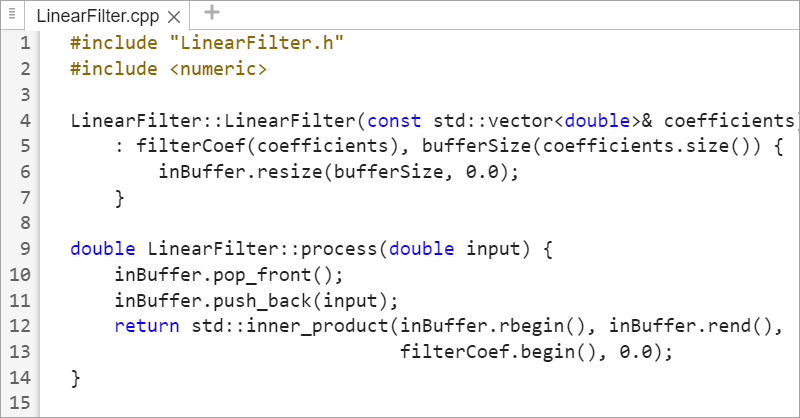
In the source file, the process function uses the template function std::inner_product for convolution between the input sine wave data and the filter coefficients to smooth the signal. This function uses a First-In-First-Out strategy where the pop_front() method removes the signal data from the initial position and the push_back() method adds data at the end of the data buffer named inBuffer.
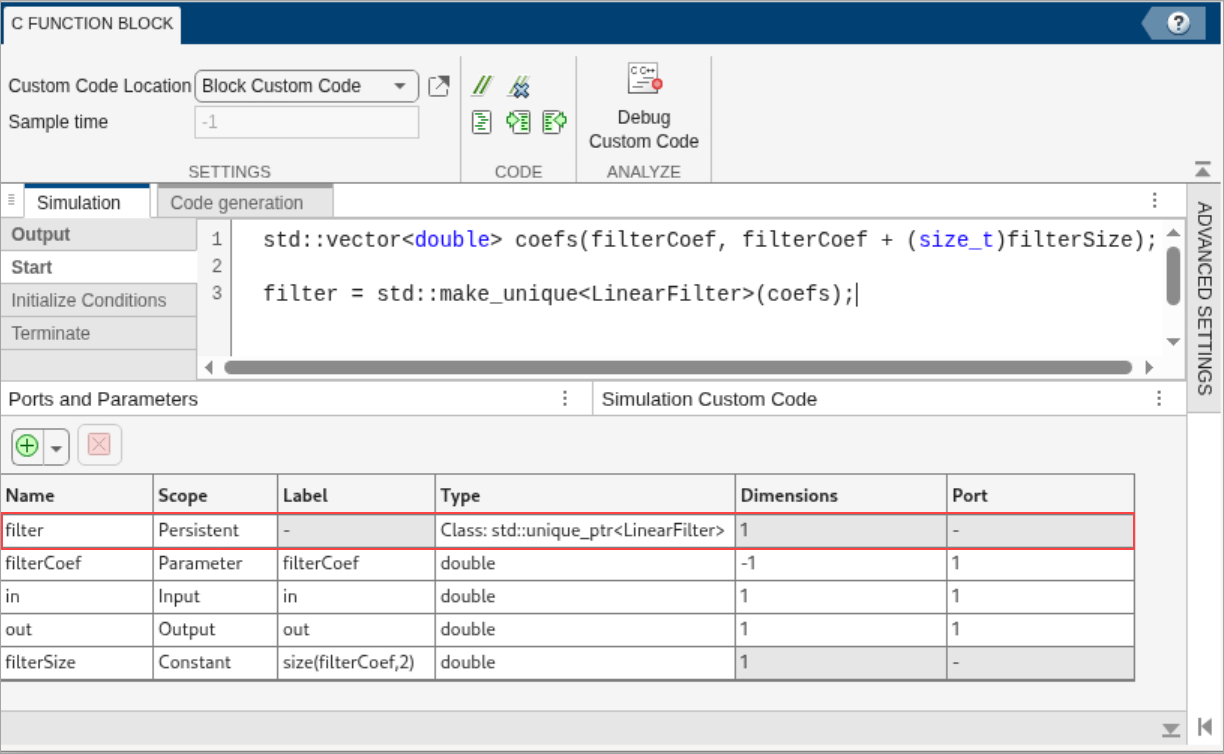
To understand how the C++ code is integrated into the C Function block, check these settings in the Simulation tab of the C Function block:
The header file
LinearFilter.hand a source fileLinearFilter.cppare specified locally in the C Function block in the Headers and Sources fields, respectively.The Start code calls the class constructor for
LinearFilterand creates a smart pointer namedstd::unique_ptr. This pointer is stored in a variable namedfilter.To instantiate
filter, in the Ports and Parameters table, specify its Type asClass:std::unique_ptr<LinearFilter>and Scope asPersistentbecause it retains its value from one time step to another during simulation.
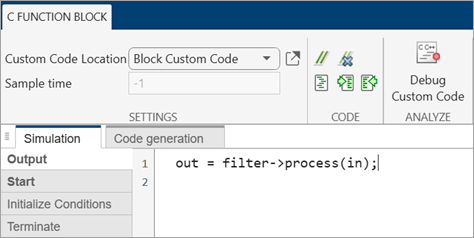
The Output code uses the pointer variable
filterto call theprocessfunction, which is a member of theLinearFilterclass. The input signal is passed to the function using the variablein. The function output variableoutstores the processed signal data.
Model Simulation
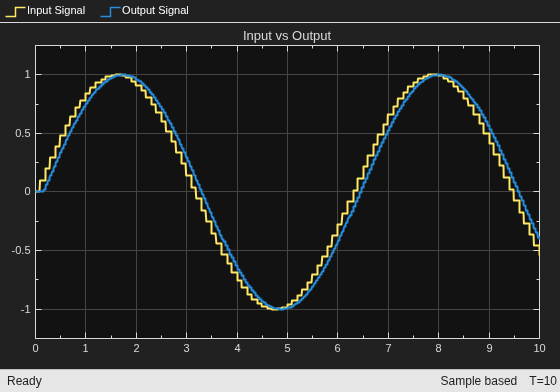
Simulate the model for t = 10s and visualize the results using a Scope block. The yellow signal indicates the input signal, and the blue signal indicates the output signal. The output signal is smoother and less noisy as compared to the input signal.
out = sim(mdl);