fprintf
Displays variable text centered on masked subsystem icon
Description
fprintf(
formats formatspec,var)var as specified in
formatspec.
Examples
Display the text Hello on the icon.
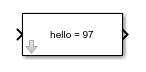
fprintf('Hello');Convert the character a to an integer
97 and display it on the block icon.
myvar = 'a' fprintf('hello = %d',myvar);
Input Arguments
Text that appears on the block is specified as a string or a character vector.
Data Types: char | string
Conversion character for the variable is specified.
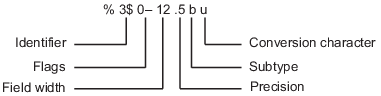
Formatting Operator
A formatting operator starts with a percent sign, %,
and ends with a conversion character. It is mandatory to specify the
conversion character. Optionally, you can specify identifier, flags, field
width, precision, and subtype operators between % and the
conversion character. Spaces are invalid between operators and are shown
here only for readability.

Conversion Character
This table shows conversion characters to format numeric and character data as text.
| Value Type | Conversion | Details |
|---|---|---|
Integer, signed |
| Base 10 |
Integer, unsigned |
| Base 10 |
| Base 8 (octal) | |
| Base 16 (hexadecimal), lowercase letters
| |
| Same as | |
Floating-point number |
| Fixed-point notation (Use a precision operator to specify the number of digits after the decimal point.) |
| Exponential notation, such as
| |
| Same as | |
| The more compact of | |
| The more compact of | |
Characters or strings |
| Single character |
| Character vector or string array. The type of the
output text is the same as the type of
|
Data Types: char | string
The variable is formatted as per the formatting character specified in
formatspec.
Note
While this fprintf function is identical in name to its
corresponding MATLAB® function, it provides only the functionality described on this
page.
Version History
Introduced before R2006a
See Also
disp | port_label | text | Mask Display and Initialization Commands
MATLAB Command
You clicked a link that corresponds to this MATLAB command:
Run the command by entering it in the MATLAB Command Window. Web browsers do not support MATLAB commands.
Web サイトの選択
Web サイトを選択すると、翻訳されたコンテンツにアクセスし、地域のイベントやサービスを確認できます。現在の位置情報に基づき、次のサイトの選択を推奨します:
また、以下のリストから Web サイトを選択することもできます。
最適なサイトパフォーマンスの取得方法
中国のサイト (中国語または英語) を選択することで、最適なサイトパフォーマンスが得られます。その他の国の MathWorks のサイトは、お客様の地域からのアクセスが最適化されていません。
南北アメリカ
- América Latina (Español)
- Canada (English)
- United States (English)
ヨーロッパ
- Belgium (English)
- Denmark (English)
- Deutschland (Deutsch)
- España (Español)
- Finland (English)
- France (Français)
- Ireland (English)
- Italia (Italiano)
- Luxembourg (English)
- Netherlands (English)
- Norway (English)
- Österreich (Deutsch)
- Portugal (English)
- Sweden (English)
- Switzerland
- United Kingdom (English)