Future
R2026bObject that supports deferred outputs for reinforcement learning environment simulations running on workers
Since R2022a
Description
When runEpisode runs in
the background it returns a Future object as a result. Use this object to
monitor the status of ongoing simulations, fetch outputs of completed simulations, or cancel
ongoing simulations.
Creation
A Future object is returned by runEpisode when the
environment is configured for parallel simulations (such as in
setup(env,UseParallel="on")).
Note that creating a Future object requires Parallel Computing Toolbox™ software.
Properties
Object Functions
Examples
This example shows how to use Future objects and their methods fetchNext, fetchOutput, cancel, and wait to defer output retrieval for environment simulations running on workers, monitor the status of ongoing simulations, fetch outputs of completed simulations, cancel ongoing simulations, or wait for ongoing simulations to complete.
Load a predefined environment and a suitable agent. For this example use both the environment and agent described in Train PG Agent with Custom Actor Network to Balance Discrete Cart-Pole.
env = rlPredefinedEnv("CartPole-Discrete");
load("MATLABCartpolePG.mat","agent")
Start a parallel pool and set up the environment so that it simulates on workers.
pp = parpool(2);
Starting parallel pool (parpool) using the 'Processes' profile ...
05-Nov-2025 12:41:50: Job Queued. Waiting for parallel pool job with ID 1 to start ...
05-Nov-2025 12:42:51: Job Queued. Waiting for parallel pool job with ID 1 to start ...
05-Nov-2025 12:43:51: Job Queued. Waiting for parallel pool job with ID 1 to start ...
05-Nov-2025 12:44:52: Job Queued. Waiting for parallel pool job with ID 1 to start ...
05-Nov-2025 12:45:53: Job Queued. Waiting for parallel pool job with ID 1 to start ...
05-Nov-2025 12:46:54: Job Queued. Waiting for parallel pool job with ID 1 to start ...
05-Nov-2025 12:47:55: Job Queued. Waiting for parallel pool job with ID 1 to start ...
05-Nov-2025 12:48:57: Job Running. Waiting for parallel pool workers to connect ...
Connected to parallel pool with 2 workers.
setup(env,UseParallel="on");To display the simulation completion times, start a timer.
tic
Schedule six simulations to run on the available workers. At the beginning of the simulation, the reset function of the cart-pole environment sets the initial angle of the pole to a random position in the neighborhood of zero (the upward position). This randomization ensures that each simulation is different.
for i=1:6
    ftr(i) = runEpisode(env,agent,CleanupPostSim=false);
end
Each element of the Future array ftr represents a scheduled simulation.
ftr
ftr = 1×6 Future array with properties:
    1×1 Future    1×1 Future    1×1 Future    1×1 Future    1×1 Future    1×1 Future
Display the state of each simulation.
ftr.State
ans =
'running'
ans =
'running'
ans =
'queued'
ans =
'queued'
ans =
'queued'
ans =
'queued'
Two simulations are ongoing while the others are queued.
Use fetchNext with a timeout of 0.1 seconds to retrieve results for simulations that complete within that time (if any).
[idx,out] = fetchNext(ftr,0.1)
idx =

     []


out =

     []
Both the outputs are empty, which means that none of the four simulations has completed yet.
Display how many output results have been already retrieved.
ftr.Read
ans = logical
   0
ans = logical
   0
ans = logical
   0
ans = logical
   0
ans = logical
   0
ans = logical
   0
Use fetchNext without any timeout to wait until an unretrieved simulation output becomes available and then return the results.
[idx,out] = fetchNext(ftr)
idx =
1
out = struct with fields:
    SimulationInfo: [1×1 struct]
         AgentData: [1×1 struct]
Display the state of the simulations.
ftr.State
ans =
'finished'
ans =
'finished'
ans =
'running'
ans =
'running'
ans =
'queued'
ans =
'queued'
As expected, the first two simulations, which were running in parallel on the two workers, are finished, while the next two, which were previously queued, are now running, and the final two are still queued.
Display the time taken for the first two simulations to complete.
toc
Elapsed time is 11.709910 seconds.
Note that once the results from a simulation have been already retrieved, any attempt to use fetchNext to retrieve it again, such as in fetchNext(ftr(2)), will result in an error. To retrieve the results from a Future object that has already been read, you can use fetchOuptuts, such as in fetchOutputs(ftr(2)).
Retrieve the next available result, and display the time elapsed since the simulations started.
[idx,out] = fetchNext(ftr)
idx =
2
out = struct with fields:
    SimulationInfo: [1×1 struct]
         AgentData: [1×1 struct]
toc
Elapsed time is 11.801602 seconds.
As expected, fetchNext promptly returns the results from the second simulation, since it was already available.
Display how many output results have been already retrieved.
ftr.Read
ans = logical
   1
ans = logical
   1
ans = logical
   0
ans = logical
   0
ans = logical
   0
ans = logical
   0
Cancel the last simulation.
cancel(ftr(6))
Wait for the fourth simulation to complete. The wait function blocks the command prompt until the fourth simulation is completed.
wait(ftr(4))
Display the elapsed time since the simulations started.
toc
Elapsed time is 14.108526 seconds.
Display the state of the simulations.
ftr.State
ans =
'finished'
ans =
'finished'
ans =
'running'
ans =
'finished'
ans =
'running'
ans =
'finished'
The status of the last element of the array, for which the simulation has been canceled, is classified as 'finished'.
Because any attempt to retrieve results from a simulation that has been canceled will result in an error, remove the canceled object from the array.
ftr(6)=[]
ftr = 1×5 Future array with properties:
    1×1 Future    1×1 Future    1×1 Future    1×1 Future    1×1 Future
Use fetchOutputs to wait until all remaining simulations are completed and then retrieve all outputs.
outs = fetchOutputs(ftr)
outs = 5×1 struct array with fields:
    1×1 struct    1×1 struct
    1×1 struct    1×1 struct
    1×1 struct    1×1 struct
    1×1 struct    1×1 struct
    1×1 struct    1×1 struct
Display the elapsed time.
toc
Elapsed time is 18.463711 seconds.
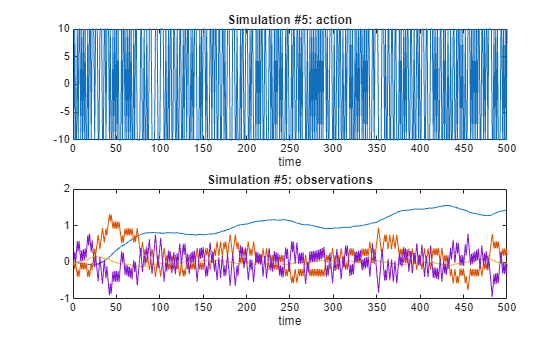
Plot the action and observations from the fifth simulation.
figure

subplot(2,1,1);
plot(outs(5).AgentData.Time(2:end), ...
     cell2mat([outs(5).AgentData.Experiences.Action]))
title('Simulation #5: action');
xlabel('time');

subplot(2,1,2)
plot(outs(5).AgentData.Time(2:end), ...
     cell2mat([outs(5).AgentData.Experiences.Observation]))
title('Simulation #5: observations')
xlabel('time');
Clear the array of Future objects, the environment, and delete the parallel pool (this is the reverse order in which they were created).
clear ftr
clear env
delete(pp)
Parallel pool using the 'Processes' profile is shutting down.
Version History
Introduced in R2022a
See Also
Objects
Future|Simulink.Simulation.Future(Simulink)
Functions
fetchNext|fetchOutputs|cancel|wait|runEpisode|setup|cleanup|reset

