OptimizationValues
R2026b説明
作成
関数 solve は、多目的問題の解として OptimizationValues オブジェクトのベクトルを返します。
関数 optimvalues を使用して、開始点 x0 の OptimizationValues オブジェクトを作成します。
プロパティ
オブジェクト関数
paretoplot | 多目的値のパレート プロット |
例
最適化変数を使用して多目的問題を作成し、解きます。
x = optimvar("x",LowerBound=-3,UpperBound=3);
prob = optimproblem;
prob.Objective = [x^2;(x-1)^2]; % Tradeoff region between x = 0 and x = 1
prob.Constraints.con1 = x^2 <= 1/2; % Demonstrate constraints
prob.Constraints.con2 = x^2 >= 1/10; % Second constraint
rng default % For reproducibility
[sol,fval,exitflag,output] = solve(prob,Solver="paretosearch")
Solving problem using paretosearch.

Pareto set found that satisfies the constraints.

Optimization completed because the relative change in the volume of the Pareto set
is less than 'options.ParetoSetChangeTolerance' and constraints are satisfied to within
'options.ConstraintTolerance'.
sol =
  1×60 OptimizationValues vector with properties:

   Variables properties:
            x: [0.7027 0.7014 0.3635 0.3491 0.5723 0.3177 0.4634 0.4400 0.6379 0.6402 0.3750 0.6057 0.6565 0.5483 0.6455 0.5518 0.3760 0.3232 0.6768 0.6357 0.5625 0.3952 0.3382 0.3857 0.5677 0.5170 0.5107 0.6241 0.6615 0.3295 0.6875 … ] (1×60 double)

   Objective properties:
    Objective: [2×60 double]

   Constraints properties:
         con1: [-0.0063 -0.0081 -0.3679 -0.3781 -0.1725 -0.3991 -0.2853 -0.3064 -0.0931 -0.0902 -0.3594 -0.1332 -0.0690 -0.1994 -0.0833 -0.1955 -0.3586 -0.3955 -0.0420 -0.0959 -0.1836 -0.3438 -0.3856 -0.3512 -0.1777 -0.2327 -0.2392 … ] (1×60 double)
         con2: [-0.3937 -0.3919 -0.0321 -0.0219 -0.2275 -9.3572e-04 -0.1147 -0.0936 -0.3069 -0.3098 -0.0406 -0.2668 -0.3310 -0.2006 -0.3167 -0.2045 -0.0414 -0.0045 -0.3580 -0.3041 -0.2164 -0.0562 -0.0144 -0.0488 -0.2223 -0.1673 -0.1608 … ] (1×60 double)
fval = 2×60

    0.4937    0.4919    0.1321    0.1219    0.3275    0.1009    0.2147    0.1936    0.4069    0.4098    0.1406    0.3668    0.4310    0.3006    0.4167    0.3045    0.1414    0.1045    0.4580    0.4041    0.3164    0.1562    0.1144    0.1488    0.3223    0.2673    0.2608    0.3895    0.4375    0.1086    0.4727    0.2001    0.4395    0.2261    0.1658    0.4862    0.4270    0.3525    0.1057    0.2628    0.2197    0.4902    0.1760    0.3665    0.2411    0.1092    0.4911    0.1914    0.1182    0.3742
    0.0884    0.0892    0.4051    0.4237    0.1829    0.4655    0.2880    0.3136    0.1311    0.1295    0.3906    0.1555    0.1180    0.2040    0.1257    0.2009    0.3893    0.4580    0.1045    0.1327    0.1914    0.3658    0.4380    0.3773    0.1869    0.2333    0.2394    0.1413    0.1146    0.4496    0.0977    0.3055    0.1136    0.2751    0.3514    0.0916    0.1201    0.1650    0.4555    0.2375    0.2822    0.0899    0.3369    0.1557    0.2591    0.4483    0.0895    0.3164    0.4307    0.1508
exitflag =
    SolverConvergedSuccessfully
output = struct with fields:
         iterations: 20
          funccount: 380
             volume: 1.8611
    averagedistance: 0.0101
             spread: 0.3067
      maxconstraint: 0
            message: 'Pareto set found that satisfies the constraints. ↵↵Optimization completed because the relative change in the volume of the Pareto set ↵is less than 'options.ParetoSetChangeTolerance' and constraints are satisfied to within ↵'options.ConstraintTolerance'.'
           rngstate: [1×1 struct]
             solver: 'paretosearch'
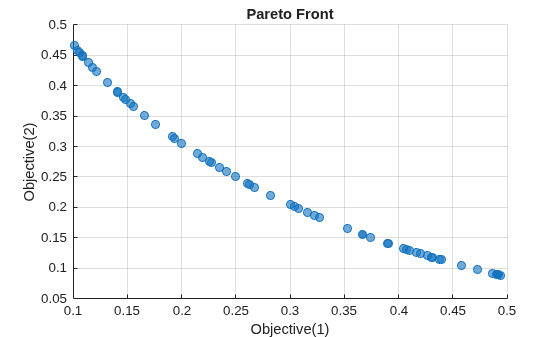
paretosearch ソルバーが 16 回の反復で実行可能解に収束します。解をプロットします。
paretoplot(sol)
任意の点を選択し、データ ヒントを使用してプロット内を確認します。
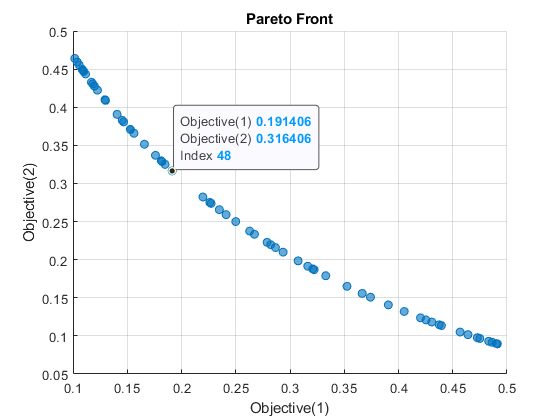
表示された点のインデックスは 48 です。解 48 を検証します。
arbitrarysol = sol(48)
arbitrarysol =
  OptimizationValues with properties:

   Variables properties:
            x: 0.4375

   Objective properties:
    Objective: [2×1 double]

   Constraints properties:
         con1: -0.3086
         con2: -0.0914
制約値は負ですが、これは表示された点が実行可能であるということです。
arbitrarysol.Objective
ans = 2×1

    0.1914
    0.3164
目的値は、データ ヒントの値に一致します。
制限
OptimizationValuesオブジェクトは、水平連結のみをサポートします。言い換えると、OptimizationValuesオブジェクトの行ベクトルのみをもつことができます。
バージョン履歴
R2022a で導入
参考
トピック
- 問題ベースのMultiStartの開始点を指定する (Global Optimization Toolbox)
- 多目的最適化のためのパレート フロント、問題ベース (Global Optimization Toolbox)

