このページの内容は最新ではありません。最新版の英語を参照するには、ここをクリックします。
ディクショナリの作成と管理
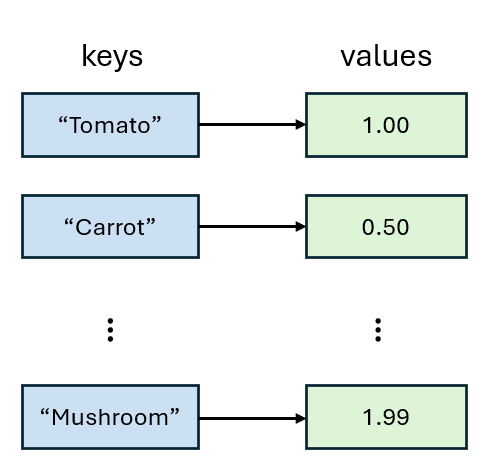
R2026acontainers.Map よりも推奨されます。ディクショナリはデータをキーと値のペアとして保存します。各キーは一意であり、対応する値にマッピングされます。キーと値は異なるデータ型にすることができ、キーと値の各ペアがエントリになります。ディクショナリに保存されているエントリの数に関係なく、キーを使用して一定の時間で値を検索したり更新したりできます。効率的なルックアップと更新により、ディクショナリは、意味のあるキーと値を関連付けることができる大規模なデータ セットを整理するのに役立ちます。
ディクショナリの作成
dictionary 関数を使用してディクショナリを作成できます。たとえば、製品名をキー、価格を関連付けられた値としてもつディクショナリを作成します。キーと値をベクトルとして指定します。ディクショナリの出力では、キーと値のデータ型が示されます。
products = ["Tomato" "Carrot" "Mango" "Mushroom"];
prices = [1 0.5 2.50 1.99];
d = dictionary(products,prices)
d =

  dictionary (string ⟼ double) with 4 entries:

    "Tomato"   ⟼ 1
    "Carrot"   ⟼ 0.5000
    "Mango"    ⟼ 2.5000
    "Mushroom" ⟼ 1.9900
あるいは、キーと値の各ペアを明示的に指定してディクショナリを作成することもできます。
d = dictionary("Tomato",1, ...
               "Carrot",0.5, ...
               "Mango",2.5, ...
               "Mushroom",1.99)
d =

  dictionary (string ⟼ double) with 4 entries:

    "Tomato"   ⟼ 1
    "Carrot"   ⟼ 0.5000
    "Mango"    ⟼ 2.5000
    "Mushroom" ⟼ 1.9900
空のディクショナリの作成
空のディクショナリから始めることもできます。次のコマンドは、キーと値にデータ型を割り当てず、空の未構成のディクショナリを作成します。
d = dictionary
d =

  dictionary with unset key and value types.
その後、ディクショナリにエントリを追加できます。未構成のディクショナリにエントリを追加すると、キーのデータ型と値のデータ型が設定されます。
d("Tomato") = 1;
d("Carrot") = 0.5;
d("Mango") = 2.5;
d("Mushroom") = 1.99
d =

  dictionary (string ⟼ double) with 4 entries:

    "Tomato"   ⟼ 1
    "Carrot"   ⟼ 0.5000
    "Mango"    ⟼ 2.5000
    "Mushroom" ⟼ 1.9900
キーと値の型を最初に定義する場合は、configureDictionary 関数を使用して空の構成済みディクショナリを作成します。たとえば、製品を string 型にし、価格を double 型にします。
d = configureDictionary("string","double")
d =

  dictionary (string ⟼ double) with no entries.
R2023b より前: 目的のデータ型の empty 入力を作成すれば、エントリを追加せずにディクショナリを構成できます。たとえば、dictionary(string.empty,double.empty)** のようになります。
構成済みディクショナリでは、MATLAB® は互換性のあるエントリを、構成されたキーと値の型に変換します。
d("Tomato") = int8(1);
d("Carrot") = "0.5";
d("Mango") = single(2.5);
d("Mushroom") = 1.99
d =

  dictionary (string ⟼ double) with 4 entries:

    "Tomato"   ⟼ 1
    "Carrot"   ⟼ 0.5000
    "Mango"    ⟼ 2.5000
    "Mushroom" ⟼ 1.9900
ディクショナリの値の検索
ディクショナリを作成した後、関連付けられたキーを使用して値を検索できます。たとえば、"Carrot" の価格を検索します。
d("Carrot")ans = 0.5000
"Carrot" と "Mushroom" の価格を同時に検索することもできます。
d(["Carrot" "Mushroom"])
ans = 1×2

    0.5000    1.9900
ディクショナリのエントリの変更
ディクショナリ内のエントリは、追加された順序を保持します。既存のエントリの値を更新しても、その位置は変わりません。新しい各エントリは、これまでのエントリの末尾に追加されます。
新しい値を既存のキーにマッピングすることで、エントリ変更できます。たとえば、"Carrot" の価格を 0.7 に変更します。
d("Carrot") = 0.7d =
dictionary (string ⟼ double) with 4 entries:
"Tomato" ⟼ 1
"Carrot" ⟼ 0.7000
"Mango" ⟼ 2.5000
"Mushroom" ⟼ 1.9900
ディクショナリに新しいエントリを追加するには、新しい値を新しいキーにマッピングします。
たとえば、値 0.75 をもつキー "Potato" を追加します。
d("Potato") = 0.75d =
dictionary (string ⟼ double) with 5 entries:
"Tomato" ⟼ 1
"Carrot" ⟼ 0.7000
"Mango" ⟼ 2.5000
"Mushroom" ⟼ 1.9900
"Potato" ⟼ 0.7500
エントリを削除するには、キーを [] に割り当てます。たとえば、"Mango" のエントリを削除します。
d("Mango") = []d =
dictionary (string ⟼ double) with 4 entries:
"Tomato" ⟼ 1
"Carrot" ⟼ 0.7000
"Mushroom" ⟼ 1.9900
"Potato" ⟼ 0.7500
複数のディクショナリ エントリの変更
ベクトル演算を使用して、複数のディクショナリ エントリを同時に変更できます。たとえば、"Carrot" と "Mushroom" の価格を同時に更新します。
d(["Carrot" "Mushroom"]) = [0.60 1.89]
d =

  dictionary (string ⟼ double) with 4 entries:

    "Tomato"   ⟼ 1
    "Carrot"   ⟼ 0.6000
    "Mushroom" ⟼ 1.8900
    "Potato"   ⟼ 0.7500
関連付けられた価格をもつ "Celery" と "Grapes" の 2 つの新しいエントリを追加します。
d(["Celery" "Grapes"]) = [0.50 1.95]
d =

  dictionary (string ⟼ double) with 6 entries:

    "Tomato"   ⟼ 1
    "Carrot"   ⟼ 0.6000
    "Mushroom" ⟼ 1.8900
    "Potato"   ⟼ 0.7500
    "Celery"   ⟼ 0.5000
    "Grapes"   ⟼ 1.9500
スカラー拡張を使用して、同じ価格をもつ "Apple" と "Pear" の 2 つの新しいエントリを追加します。
d(["Apple" "Pear"]) = 1.14
d =

  dictionary (string ⟼ double) with 8 entries:

    "Tomato"   ⟼ 1
    "Carrot"   ⟼ 0.6000
    "Mushroom" ⟼ 1.8900
    "Potato"   ⟼ 0.7500
    "Celery"   ⟼ 0.5000
    "Grapes"   ⟼ 1.9500
    "Apple"    ⟼ 1.1400
    "Pear"     ⟼ 1.1400
"Apple"、"Pear"、および "Grapes" のエントリを削除します。
d(["Apple" "Pear" "Grapes"]) = []
d =

  dictionary (string ⟼ double) with 5 entries:

    "Tomato"   ⟼ 1
    "Carrot"   ⟼ 0.6000
    "Mushroom" ⟼ 1.8900
    "Potato"   ⟼ 0.7500
    "Celery"   ⟼ 0.5000
ディクショナリのマージ
キーの型と値の型がそれぞれ同一または変換可能であり、かつ値の型で連結がサポートされている場合、2 つのディクショナリをマージできます。たとえば、乳製品を含む新しいディクショナリを作成します。
d2 = dictionary("Milk",3.49,"Yogurt",0.99,"Cheese",4.25)
d2 =

  dictionary (string ⟼ double) with 3 entries:

    "Milk"   ⟼ 3.4900
    "Yogurt" ⟼ 0.9900
    "Cheese" ⟼ 4.2500
新しいディクショナリ d2 を以前のディクショナリ d にマージします。
d(keys(d2)) = values(d2)
d =

  dictionary (string ⟼ double) with 8 entries:

    "Tomato"   ⟼ 1
    "Carrot"   ⟼ 0.6000
    "Mushroom" ⟼ 1.8900
    "Potato"   ⟼ 0.7500
    "Celery"   ⟼ 0.5000
    "Milk"     ⟼ 3.4900
    "Yogurt"   ⟼ 0.9900
    "Cheese"   ⟼ 4.2500
ファイルでのディクショナリの読み取りと書き込み
ディクショナリを MAT ファイルまたは JSON ファイルに保存し、そのファイルから MATLAB にディクショナリを読み込むことができます。
ファイルへのディクショナリの書き込み
ディクショナリを MAT ファイルに書き込むことができます。たとえば、ディクショナリ d を "mydict.mat" という名前のファイルに保存します。
save("mydict","d")
ディクショナリを JSON ファイルに書き込むこともできます。
writedictionary(d,"mydict.json")ファイルからのディクショナリの読み取り
MAT ファイルからディクショナリを MATLAB に読み込みます。
clear d
load("mydict.mat","d")
d
d =

  dictionary (string ⟼ double) with 8 entries:

    "Tomato"   ⟼ 1
    "Carrot"   ⟼ 0.6000
    "Mushroom" ⟼ 1.8900
    "Potato"   ⟼ 0.7500
    "Celery"   ⟼ 0.5000
    "Milk"     ⟼ 3.4900
    "Yogurt"   ⟼ 0.9900
    "Cheese"   ⟼ 4.2500
あるいは、JSON ファイルからデータを読み取ってディクショナリを読み込むこともできます。
d4 = readdictionary("mydict.json")d4 =
dictionary (string ⟼ double) with 8 entries:
"Tomato" ⟼ 1
"Carrot" ⟼ 0.6000
"Mushroom" ⟼ 1.8900
"Potato" ⟼ 0.7500
"Celery" ⟼ 0.5000
"Milk" ⟼ 3.4900
"Yogurt" ⟼ 0.9900
"Cheese" ⟼ 4.2500
参考
dictionary | configureDictionary | writedictionary | readdictionary

