Assess Code Quality
R2026bThis step of the example shows how to assess the current code quality of a project. You analyze the current project metrics by using the Code Quality Dashboard, then fix the code issues by using the Code Analyzer Report.
Open the ECGClassification
project.
openProject("ECGClassification");Assess Project Metrics
To assess the overall quality of the project, open the Code Quality Dashboard. In the Project tab, in the Tools section, click Code Quality Dashboard. In the Code Quality Dashboard, click the Run button  .
.
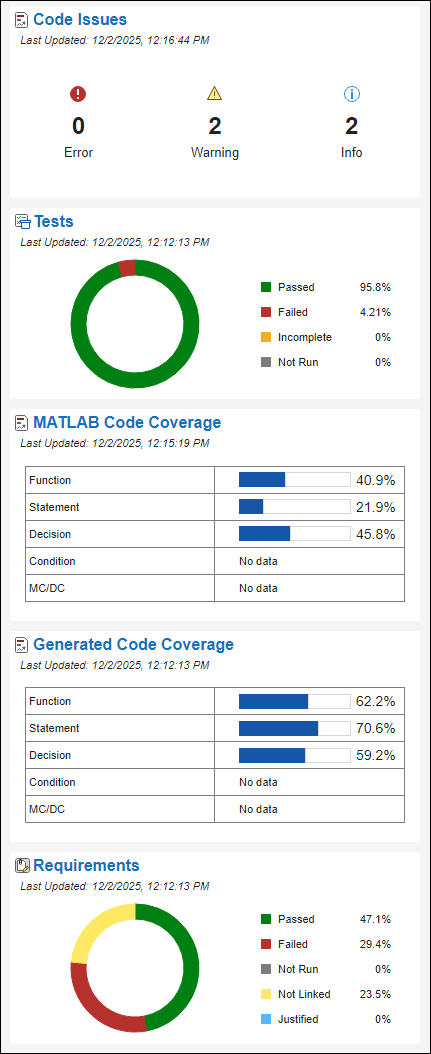
The Code Quality Dashboard displays metrics for code analysis, test results, code coverage and generated code coverage results, and requirements verification.
This example focuses on these metrics:
The Code Issues section indicates that there are two informational messages.
The MATLAB Code Coverage section indicates that function coverage is 40.9%, statement coverage is 21.9%, and decision coverage is 45.8%.
The Requirements section indicates that 47.1% of requirements link to a test that passed.
Fix Code Issues
To view details about the code issues in the project, open the Code Analyzer Report by clicking Code Issues.
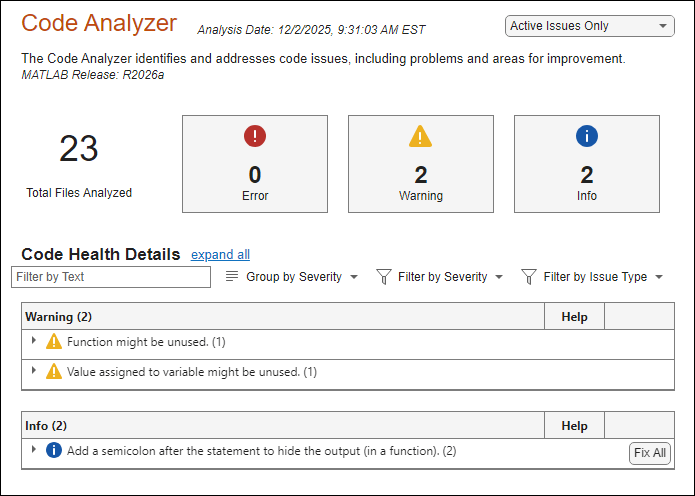
The Code Analyzer report indicates that the isAlpha.m file is missing a
semicolon in two places. To fix the issue, add a semicolon by clicking Fix All. In the Code Quality Dashboard, update the metrics
by clicking Refresh Metrics in the banner.
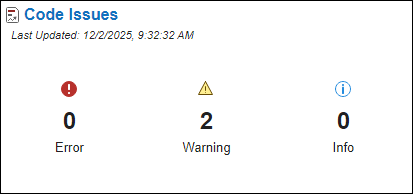
The Code Issues section indicates that there are zero informational messages.

