traceMarginalRays
R2026bDescription
Add-On Required: This feature requires the Optical Design and Simulation Library for Image Processing Toolbox add-on.
traces marginal rays through the optical system marginalRays = traceMarginalRays(opsys)opsys. Marginal rays
are rays that pass through the edge of the entrance pupil of an optical system.
specifies options for tracing marginal rays using one or more name-value arguments in
addition to the argument from the previous syntax. For example,
marginalRays = traceMarginalRays(opsys,Name=Value)FieldPoints=fieldPoint(Position=[1 0 1]) traces marginal rays from a
light source at the position (1,0,1) in the global reference
frame.
Examples
Load a double Gauss lens from a ZMX file into the workspace.
opsys = zmximport("DoubleGaussLens.zmx");Define a field point representation of two light sources using the fieldPoint function. The light sources are located at an infinite distance away from the first surface of the optical system, at 10 and 15 degrees below the optical axis in the *yz-*plane.
fp = fieldPoint(Angles=[10 0; 15 0]);
Trace rays through the optical system using the traceRays object function. Specify the ray wavelength as the Fraunhofer d line using the Wavelength name-value argument, and the sampling surface as the entrance pupil using the SamplingSurface name-value argument.
rb = traceRays(opsys,FieldPoints=fp,Wavelength=587.5618,SamplingSurface="entrance-pupil");Trace marginal rays through the optical system using the traceMarginalRays object function.
mr = traceMarginalRays(opsys,FieldPoints=fp,Wavelength=587.5618);
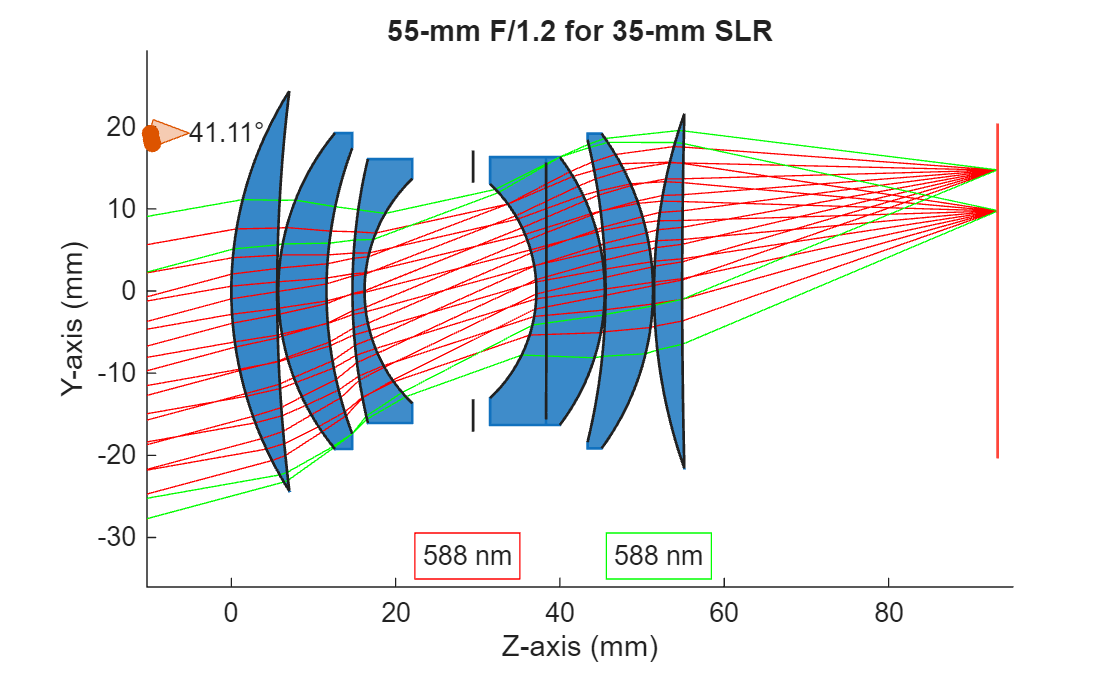
Display the optical system using the view2d object function, and visualize the traced rays through the system using the addRays object function. The marginal and sample rays are visualized in green and red, respectively.
hv = view2d(opsys); addRays(hv,rb,Color="r") addRays(hv,mr,Color="g")
Input Arguments
Optical system for which to trace marginal rays, specified as an opticalSystem object.
By default, the traceMarginalRays function traces the marginal rays
from the field points specified by the FieldPoints property of the opticalSystem
object, at the operational wavelengths specified by the Wavelengths property of the opticalSystem
object.
Name-Value Arguments
Specify optional pairs of arguments as
Name1=Value1,...,NameN=ValueN, where Name is
the argument name and Value is the corresponding value.
Name-value arguments must appear after other arguments, but the order of the
pairs does not matter.
Example: traceMarginalRays(FieldPoints=fieldPoint(Position=[1 0 1]))
traces marginal rays from a light source at the position (1,0,1) in the
global reference frame.
Field point representation of a light source or light sources, specified as one of these options:
FieldPoints value | Light Source Type |
|---|---|
Array of | Field points represent light sources that are at an infinite distance from the first surface of the optical system. |
Array of | Field points represent light sources that are at a finite distance from the first surface of the optical system. |
Array of FieldPosition and FieldAngle
objects | Field points represent two types of light sources, either at an infinite distance and at a finite distance from the first surface of the optical system. |
By default, the value of FieldPoints is set by the
FieldPoints property of the optical system
opsys.
Additional ray properties to compute, specified as one or more of these values.
The traceMarginalRays function returns the specified ray properties
as additional fields in the RayData property of each RayBundle
object in marginalRays. Each value of
RayProperties, except "All", creates a field
of the same name in RayData.
RayProperties Value | Field Value in RayData |
|---|---|
| Fresnel reflection and transmission coefficients at each interface, bulk transmission and phase shift, and the total transmittance through the optical system, represented as a structure with these fields.
|
| Polarization transformation matrices for each ray and surface intersection, represented as a structure with these fields.
|
| Adds all additional ray properties to
|
For more information about the global and local coordinate systems, see Coordinate Systems in Optics.
Wavelengths for which to trace rays, specified as an M-element numeric vector. M is the number of wavelengths. Each element of the vector is a wavelength, in nanometers, specified as a positive scalar.
Output Arguments
Marginal rays traced through the optical system, returned as an
N-by-M matrix of RayBundle
objects. N is the number of field points, and M is
the number of wavelengths for which the chief ray is traced. Each element of the matrix
is a RayBundle object.
Marginal rays are the outermost rays that can pass through the system to the image plane, and define the boundary of the light cone entering the system as they pass through the edges of the major and minor axes of the entrance pupil ellipse.
Note
The traceMarginalRays function attempts to trace rays for
each specified field point at the entrance pupil. If rays cannot be traced for a
particular field point, the function skips tracing for that field point and continues
tracing rays for the remaining field points.
Limitations
The traceMarginalRays function determines the marginal rays by locating the
entrance pupil. For optical systems with surface discontinuities or non‑convex apertures, the
entrance pupil and corresponding marginal rays can be ill‑defined. In these cases,
traceMarginalRaysmight be unable to identify unique marginal rays for a
specific field point and wavelength combination.
To visualize the actual ray paths through such systems, use traceRays and
specify an explicit sampling surface using the SamplingSurface argument,
such as "first-surface".
Version History
Introduced in R2026aUsing the traceMarginalRays function, you can now compute Fresnel terms and
polarization matrices by specifying the RayProperties name-value
argument.
MATLAB Command
You clicked a link that corresponds to this MATLAB command:
Run the command by entering it in the MATLAB Command Window. Web browsers do not support MATLAB commands.
Web サイトの選択
Web サイトを選択すると、翻訳されたコンテンツにアクセスし、地域のイベントやサービスを確認できます。現在の位置情報に基づき、次のサイトの選択を推奨します:
また、以下のリストから Web サイトを選択することもできます。
最適なサイトパフォーマンスの取得方法
中国のサイト (中国語または英語) を選択することで、最適なサイトパフォーマンスが得られます。その他の国の MathWorks のサイトは、お客様の地域からのアクセスが最適化されていません。
南北アメリカ
- América Latina (Español)
- Canada (English)
- United States (English)
ヨーロッパ
- Belgium (English)
- Denmark (English)
- Deutschland (Deutsch)
- España (Español)
- Finland (English)
- France (Français)
- Ireland (English)
- Italia (Italiano)
- Luxembourg (English)
- Netherlands (English)
- Norway (English)
- Österreich (Deutsch)
- Portugal (English)
- Sweden (English)
- Switzerland
- United Kingdom (English)