Data Type Agent for Reciprocal HDL Optimized Blocks
R2026bThe Data Type Agent for the Reciprocal HDL Optimized blocks is an interactive graphical tool that visually depicts the pipelining allocation and block latency as a function of block parameter selections for algorithm implementation and input data type for these blocks:
Open the Data Type Agent
To open the Data Type Agent, click a supported block in the model. On the Block tab, under Data Type, click the Data Type Agent icon.
Examples
Use Data Type Agent to Select Parameters for Normalized Reciprocal HDL Optimized Block
Follow the How to Use HDL Optimized Normalized Reciprocal example to set up a model containing the Normalized Reciprocal HDL Optimized block.
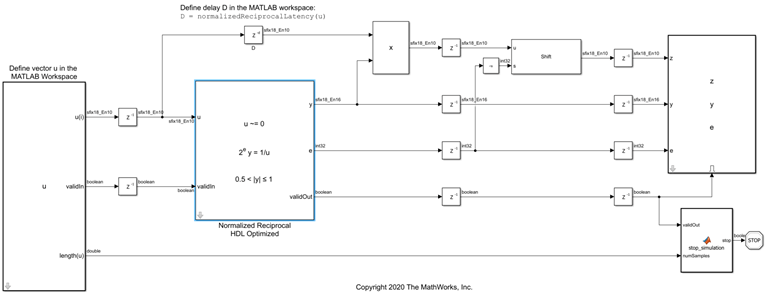
To open the Data Type Agent, first select the Normalized Reciprocal HDL Optimized block in the model. Then, on the Block tab, under Data Type, click the Data Type Agent icon.
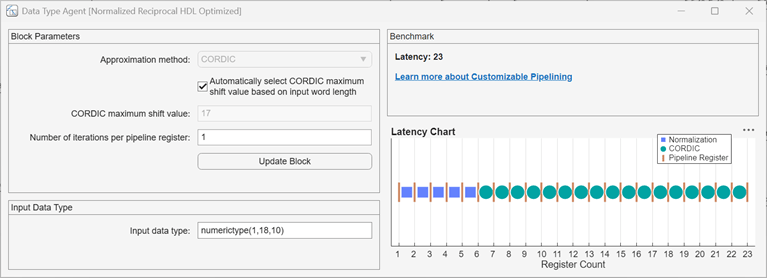
By default, the Data Type Agent displays the block parameters and input
data type set on the block. For this example, the block uses the CORDIC approximation
method, automatically selects the CORDIC maximum shift value of 17, and
uses one iteration per pipeline register. The input data type is
numerictype(1,18,10), which corresponds to the
sfix18_En10 data type displayed on the input signal line in the
NormalizedReciprocalModel model.
The Benchmark section reports the latency of the block for this parameter configuration. The Latency Chart section provides a visual depiction of the corresponding process stages for this configuration. Blue squares represent normalization stages, green circles represent CORDIC iterations, and vertical orange bars represent pipeline registers. From left to right, the x-axis shows the register count.
To update the latency value and chart, change the block parameter values and input data type in the Data Type Agent. To apply the parameters to the selected block, click Update Block. Note that while the tool displays the impact of a changed input data type, you must manually update the input data type in the model.
Parameters
Algorithms
Using the Data Type Agent for the Reciprocal HDL Optimized blocks is equivalent to manually setting block parameters for these blocks.
For a full description of the block parameters and algorithms, see:

