Mesh Networking
R2026bThe mesh networking capabilities of Bluetooth® Toolbox enable you to create a Bluetooth mesh network and realize mesh packet communication.
Use the features and reference examples to:
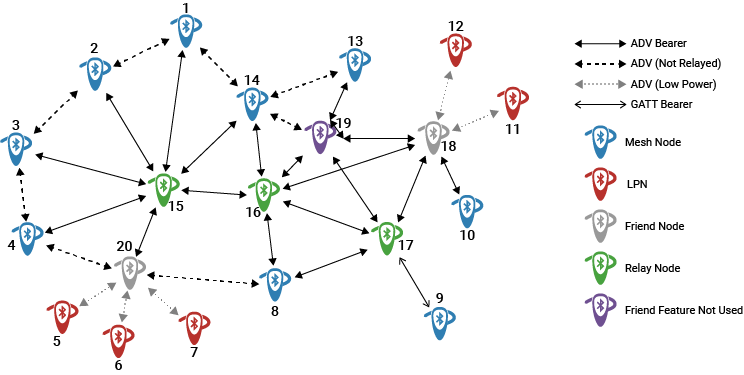
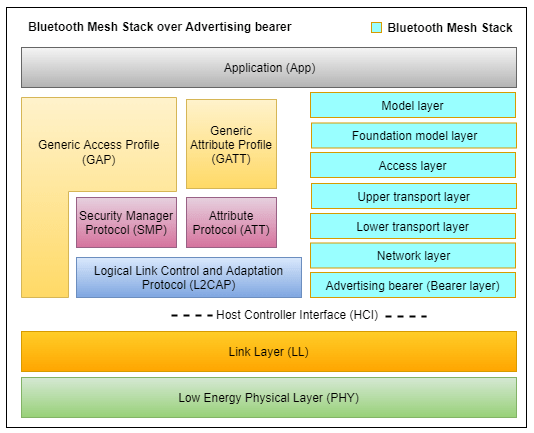
Simulate and visualize a Bluetooth mesh network over an advertising bearer, consisting of relay, low power, and friend nodes with varying multiple source and destination nodes.
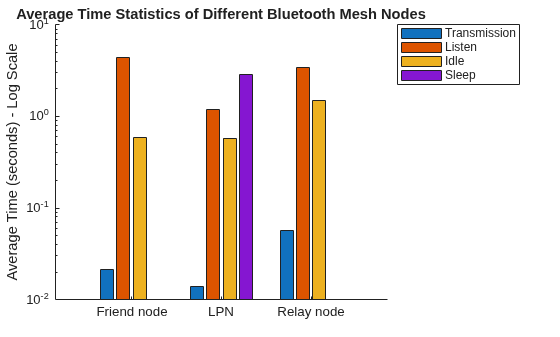
Analyze mesh packet communication and compute energy consumption of nodes in the transmission, listen, sleep, and idle states.
Simulate managed flooding and visualize the flow of packets.
Functions
Objects
Topics
What is Bluetooth Mesh Networking?
- Bluetooth Mesh Networking
Learn the concepts of Bluetooth mesh networking.
Node and Statistics
- Composition of Bluetooth LE Node
Learn about the composition of a Bluetooth LE Node. - Bluetooth LE Node Statistics
Explore the statistics of a Bluetooth LE node. - Create and Add Custom Mobility Model to Bluetooth LE Nodes
Learn how to create and add custom mobility model to Bluetooth LE nodes and visualize their movement. (Since R2026a) - Simulate Mobility of Peripheral Node in Bluetooth Network
Learn how to simulate mobility of Peripheral nodes in Bluetooth network. (Since R2026a) - Create and Add Custom Traffic in Bluetooth Network Simulation
Learn how to create and integrate a custom traffic model into Bluetooth nodes. (Since R2026a)
Network Configuration and Simulation
- Wireless Network Simulator (Wireless Network Toolbox)
Learn how the wireless network simulator object works. - Create, Configure and Simulate Bluetooth Mesh Network
Use Bluetooth LE node creation, mesh profile configuration, and wireless network simulation capabilities to create, configure, and simulate a Bluetooth mesh network. - Establish Friendship Between Friend Node and LPN in Bluetooth Mesh Network
Use Bluetooth LE node creation, mesh profile configuration, and wireless network simulation capabilities to configure and simulate friendship between a Friend node and LPN in a Bluetooth mesh network. - Create, Configure, and Visualize Bluetooth Mesh Network
Use Bluetooth LE node and mesh profile configuration objects to create, configure, and visualize a Bluetooth mesh network.
Featured Examples
Energy Profiling of Bluetooth Mesh Nodes in Wireless Sensor Networks
Perform energy profiling of Bluetooth LE mesh End nodes, Low Power nodes, Friend nodes, and Relay nodes in transmission, listen, sleep, and idle states.
Bluetooth Mesh Flooding in Wireless Sensor Networks
Create, configure, and visualize network layer flooding in a Bluetooth mesh network.

