Vehicle Dynamics Blockset Interface for Unreal Engine Projects
Customize automotive scenes in Unreal® Editor for co-simulation in Simulink®

現在この提出コンテンツをフォロー中です。
- フォローしているコンテンツ フィードに更新が表示されます。
- コミュニケーション基本設定に応じて電子メールを受け取ることができます
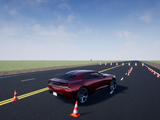
Vehicle Dynamics Blockset™ comes installed with prebuilt 3D scenes in which to simulate and visualize the vehicles modeled in Simulink®. These 3D scenes are visualized using the Unreal Engine® from Epic Games®. By using the Unreal® Editor, you can customize these scenes or simulate within the scenes from your own custom project.
By using the Unreal Editor and the Vehicle Dynamics Blockset Interface for Unreal Engine Projects support package, you can customize these scenes. You can also use the Unreal Editor and the support package to simulate within scenes from your own custom project.
With custom scenes, you can co-simulate in both Simulink and the Unreal Editor so that you can modify your scenes between simulation runs. To customize scenes, you should be familiar with creating and modifying scenes in the Unreal Editor.
For information about installing and using the support package, see Customize 3D Scenes for Vehicle Dynamics Simulations (https://www.mathworks.com/help/vdynblks/ug/customize-3d-scenes-for-vehicle-dynamics-simulations.html).
MATLAB リリースの互換性
- R2018a 以降 R2026b 以前と互換性あり
プラットフォームの互換性
- Windows
- macOS (Apple Silicon)
- macOS (Intel)
- Linux

