Interactive Regular Expression Tool

バージョン 4.1.1 (217 KB) 作成者: Stephen23
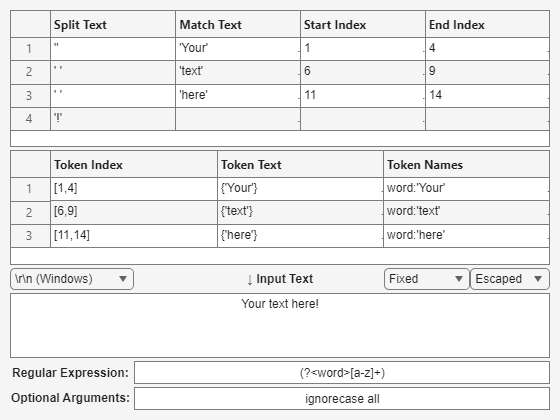
Develop and refine regular expressions in an interactive figure that shows all of REGEXP's outputs.
ダウンロード: 1.9K
更新 2026/3/7

ライセンスの表示

Finally, new features of UIFIGURE allowed me to write the GUI that I wanted to write 10 years ago...
Features
IREGEXP is a simple interactive tool to help develop regular expressions: IREGEXP lets you write a regular expression and see REGEXP's outputs update in real-time.
IREGEXP consists of just one Mfile which creates a UIFIGURE with three input text-boxes (for the input text, the regular expression, and any optional arguments) and two UITABLES which display all of REGEXP's outputs. Drop-down menus control the EOL character(s) and how space & control characters are displayed.
IREGEXP can be used in two ways (and in any combination of these two ways):
  1. interactively by typing directly into the figure's text-boxes, or
  2. by calling the function with exactly the same inputs and options as REGEXP itself.
Keep It Simple
IREGEXP is intended to be the simplest interactive regular expression tool on FEX: no highlighting, no links, no colors, no buttons, no java code, no file parsing, no apps to install, no third-party dependencies... just this one Mfile is all you need. IREGEXP aids fast development of a regular expression, especially by allowing editing using only the keyboard (use the TAB key to switch between the text-boxes), to parse short pieces of text.
Examples
>> str = 'bat cat can car coat court CUT ct CAT-scan';
>> rgx = 'c[aeiou]+t';
>> idx = iregexp(str,rgx)
idx = [5,17]
>> str = 'EXTRA! The iregexp function helps you relax.';
>> rgx = '\w*x\w*';
>> mat = iregexp(str,rgx,'match')
mat = {'iregexp','relax'}
MATLAB <R2023b
Click on the "Version History" tab and download version 3.1.1. It does not have all the nice features of UIFIGURE, but works as documented :)

引用

Stephen23 (2026). Interactive Regular Expression Tool (https://jp.mathworks.com/matlabcentral/fileexchange/48930-interactive-regular-expression-tool), MATLAB Central File Exchange. 取得日: .

MATLAB リリースの互換性
作成: R2010b
R2023b 以降のリリースと互換性あり
プラットフォームの互換性
Windows macOS Linux
カテゴリ
Help Center および MATLAB AnswersString Parsing についてさらに検索
バージョン 公開済み リリース ノート
4.1.1

* Update screenshot

4.1.0

* Add "Optional Arguments" text box.
* Capture and display error messages.

4.0.3

* Add newline dropdown menu

4.0.2

* Add Placeholder text (for empty text fields).
* Code tweaks.

4.0.1

* Change default space character representation
* Added examples to HTML documentation

4.0.0

* Total rewrite using UIFIGURE and UIGRIDLAYOUT
* Text fields using UITEXTAREA and UIEDITFIELD
* Text callbacks using VALUECHANGEDFCN (i.e. no more dodgy keypress hack!)

3.1.1

* Fix bug in token display with 'once' option.
* Improve documentation.

3.1.0

* Display string outputs with "".
* Return string outputs as string.
* Add HTML examples.

3.0.0

* Allow string class input arguments.
* Improve pretty-print local functions.

2.1.1

* Added fix suggested by Zhuohe Liu.

2.1.0

* Simplify code with UITABLE (replacing multiple UICONTROL text boxes).

2.0.0.0

* rename function.
* try to make HG2 compatible (needs testing).
* simplify internal handling of output arguments.

1.1.0.0

* Display outputs in edit boxes (as these have scrollbars).
* Input string can change ParseString edit box to multi-line.

1.0.0.0
