
KeyInject

Send key strokes to any window from within Matlab

現在この提出コンテンツをフォロー中です。

Send key strokes to a named Window. Alt, Ctrl, Shift, Enter and Tab are
all supported, allowing you to fully navigate the menu of other programs
from within Matlab. If you simply wish to type into another program (as
opposed to navigating a menu), see my other submission "textInject".

Example:
Send some text to Notepad, save it with a specified file name using
Notepad's menu, then return focus to Matlab:
keyInject('Untitled - Notepad','Here is some text I would like to save','Untitled - Notepad')
keyInject('Untitled - Notepad','ALT__FA','Untitled - Notepad')
keyInject('Save As','this is the file name i want.txt\r','Matlab R2012b')

Supported keystrokes:
alphanumeric (a-z,0-9), L Alt ('ALT__'), L Ctrl ('CTRL__'), L Shift
('SHIFT__'), Tab ('\t'), Enter ('\r'), Dash ('-') and Period ('.'). For
capital letters you can hold shift (see below).

Holding down Alt, Ctrl or Shift keys:
Replace the second underscore character with a '+' to hold the key down,
or a '-' to release it. For example to select all text in a window and
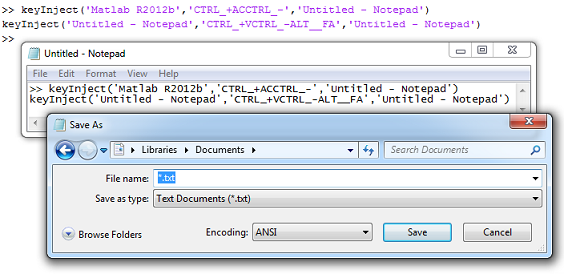
copy it to the clipboard: 'CTRL_+AC' (followed by 'CTRL_-' to release).
See the screenshot on the file exchange for an example of how to this in
action (selects text in Matlab and copy-pastes it into Notepad).

Adding new keys: This must be done manually, but it's easy if you copy
the approach I've laid out below. You will need a 'Virtual Key Code':
http://www.kbdedit.com/manual/low_level_vk_list.html
The hex values there need to be converted to decimal:
http://www.kbdedit.com/manual/low_level_vk_list.html
You don't need to recompile the mex files to add new keys.

Mex files: You must compile the included source code to use this utility. The Windows keyboard API uses C++, and so you will need a C++ compiler (the Matlab LCC compiler will not work). Once you have a supported compiler, type mex -setup to select it. Then put the C files on the Matlab path and just type:
mex 'keyInject_setFocus.cc'
mex 'keyInject_sendKey.cc'

引用

Phillip (2026). KeyInject (https://jp.mathworks.com/matlabcentral/fileexchange/40001-keyinject), MATLAB Central File Exchange. に取得済み.

謝辞

ヒントを得たファイル: TextInject

ヒントを与えたファイル: Interactive link between MATLAB and ANSYS

カテゴリ

Help Center および MATLAB AnswersWrite C Functions Callable from MATLAB (MEX Files) についてさらに検索

一般的な情報

MATLAB リリースの互換性

  • すべてのリリースと互換性あり

プラットフォームの互換性

  • Windows
  • macOS
  • Linux
バージョン 公開済み リリース ノート Action
1.1.0.0

I updated the description of how to compile the source code, as I realised that the Matlab LCC compiler will not work because this submission uses C++.

1.0.0.0