
TextInject

A mex file to send text to any other application.

現在この提出コンテンツをフォロー中です。

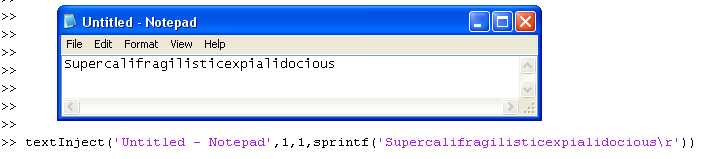
This is source code for a mex file that I made, which sends text to any Windows application from within Matlab. I needed to make this because I have a device that I can only communicate with by typing into HyperTerminal, but I wanted to be able to do it automagically.

To mex this file, cd to the directory and in Matlab type:
mex 'textInject.cc'

Then use the file by typing

textInject(WindowName,X,Y,TextToSend)

Example of WindowName is 'Untitled - Notepad'
X and Y are co-ordinates, relative to the window, where the edit field is that you're trying to "type" into. Example for Notepad is X=1 and Y=1. If you are having trouble finding the correct co-ordinates, try taking a screenshot and using Paint.
For TextToSend, you can put in any string but if you want e.g. newline or carriage return you should wrap the string in sprintf() to apply the desired formatting.

Hope this is useful to somebody else as it took me a couple of days to figure out how to do this :S

引用

Phillip (2026). TextInject (https://jp.mathworks.com/matlabcentral/fileexchange/29594-textinject), MATLAB Central File Exchange. に取得済み.

謝辞

ヒントを与えたファイル: KeyInject, Interactive link between MATLAB and ANSYS

カテゴリ

Help Center および MATLAB AnswersFile Operations についてさらに検索

一般的な情報

MATLAB リリースの互換性

  • すべてのリリースと互換性あり

プラットフォームの互換性

  • Windows
  • macOS
  • Linux
バージョン 公開済み リリース ノート Action
1.0.0.0