hline and vline

Draws 'low-impact' horizontal or vertical lines on the current axes

現在この提出コンテンツをフォロー中です。

編集メモ: Popular File 2019

This file was a File Exchange Pick of the Week

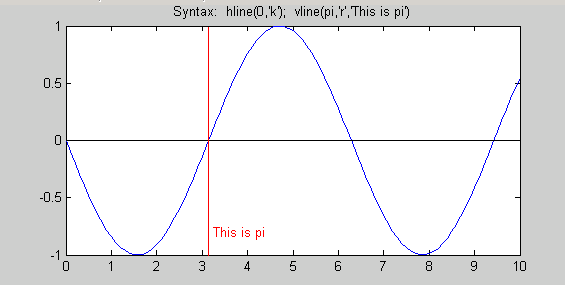
These functions draw horizontal or vertical lines at specified places on the current axes. The axes are automatically held for the drawing of the lines, and restored to their previous 'hold' states afterwards. THe HandleVisibility of the new lines is "off" so that they don't appear on legends. (Incidentally, this also makes them invisible to moveplot.m and addplot.m) Objects with HandleVisibility set to off can be "found" by setting the root object's "ShowHiddenHandles" property to "on". Also, if an output argument is specified, the function will return the handle to the otherwise 'hidden' object.

Further arguments allow the user to set the linetype and color of the line (default is 'r:'), and to add labels. For example:

h = vline(42,'g','The Answer')

will return a handle to a vertical line at x=42 on the current axes, colored green, and with a text label "The Answer" on the axes close to the line, and in the same color of the line.

hline and vline both accept vector inputs.

引用

Brandon Kuczenski (2026). hline and vline (https://jp.mathworks.com/matlabcentral/fileexchange/1039-hline-and-vline), MATLAB Central File Exchange. に取得済み.

カテゴリ

Help Center および MATLAB AnswersLanguage Fundamentals についてさらに検索

一般的な情報

MATLAB リリースの互換性

  • すべてのリリースと互換性あり

プラットフォームの互換性

  • Windows
  • macOS
  • Linux
バージョン 公開済み リリース ノート Action
1.0.0.0