Generate Synthetic Training Images Using Copy-Paste Augmentation
R2026bTraining deep learning models for object detection requires large, diverse, annotated data sets. In many industrial applications, such as defect inspection, collecting and labeling thousands of images is expensive and time-consuming. Synthetic data generation, such as copy-paste augmentation, can mitigate this expense by programmatically creating new training images from a small set of real annotated examples.
This example shows you how to generate synthetic training images using copy-paste augmentation on the BSData pitting defect data set. Copy-paste augmentation extracts annotated object instances from source images and composites them onto clean background images. This produces realistic training data with automatically generated ground truth labels. You can configure the generated images for both object detection and instance segmentation tasks.
Download Data Set
This example uses the BSData data set [1], a collection of surface images of bearing steel captured under controlled inspection conditions. The data set contains images with and without pitting corrosion defects, along with polygon annotations in JSON format for defect regions.
Download the data set from the BSData GitHub repository. Create folders in which to store the BSData training data set on your local machine.
dataDir = fullfile(tempdir,"BSDataDataset");
sourceImagePath = fullfile(dataDir,"BSData","data");
sourceLabelPath = fullfile(dataDir,"BSData","label");
annotationPath = fullfile(dataDir,"annotations");
Create a directory for the output annotations.
if ~exist(annotationPath,"dir")
    mkdir(annotationPath);
end
Identify and Count Source Data
Read all available images and their corresponding JSON annotations from the BSData data set. The example uses annotated images as object sources and unannotated images as clean backgrounds for synthetic image generation.
imageFiles = dir(fullfile(sourceImagePath,"*.jpg"));
numSourceImages = length(imageFiles);
disp("Found " + numSourceImages + " source images")
Found 1104 source images
labelFiles = dir(fullfile(sourceLabelPath,"*.json"));
numLabelFiles = length(labelFiles);
disp("Found " + numLabelFiles + " label files")
Found 394 label files
Parse JSON Annotations and Save as MAT Files
Parse each JSON annotation file using the parseAndSaveAnnotations helper function, which is attached to this example as a supporting file. The helper function converts each polygon annotation into a MAT file with the variables boundingBoxes, labels, and masks, and saves it in the annotations folder. This conversion avoids repeated JSON parsing during training and provides a standardized format to the objectInsertionDatastore object. The helper function derives bounding boxes from polygon extents using the regionprops function and generates binary masks from polygon vertices using the poly2mask function.
className = "Pitting";
[annotatedImagePaths,annotatedMatPaths] = parseAndSaveAnnotations( ...
    labelFiles,sourceImagePath,sourceLabelPath,annotationPath,className);
disp("Saved " + numel(annotatedMatPaths) + " annotation MAT files to: " + annotationPath)
Identify Unannotated Background Images
Find all source images that do not have a corresponding JSON annotation file. These defect-free images serve as clean backgrounds for synthetic data generation. Use real, defect-free images as backgrounds to ensure the synthetic composites have realistic textures and lighting conditions that match the inspection environment.
[~,annotatedBaseNames] = fileparts(string(annotatedImagePaths));
[~,allBaseNames] = fileparts(string({imageFiles.name}));
unannotatedIdx = ~ismember(allBaseNames,annotatedBaseNames);
unannotatedImagePaths = fullfile(sourceImagePath,{imageFiles(unannotatedIdx).name});
disp("Found " + numel(unannotatedImagePaths) + " unannotated (background) images")
Found 710 unannotated (background) images
Create Object and Destination Datastores
The objectInsertionDatastore object requires these input datastores:
Object datastore — A
fileDatastorethat reads from the annotated image paths.Destination datastore — An
imageDatastorecontaining the unannotated, defect-free background images onto which to add objects.
Create the object datastore. For the read function of the FileDatastore, specify the readObjectFromMATFile helper function, attached to this example as a supporting file. This function reads the annotated image files and their corresponding annotation MAT files into a cell array in which each row is of the form {Image BoundingBoxes Labels Masks}. Preview the object datastore to verify its output format.
dsObject = fileDatastore(annotatedImagePaths, ...
    ReadFcn=@(imgPath) readObjectFromMATFile(imgPath,annotationPath));
preview(dsObject)
ans = 1×4 cell array
{460×1130×3 uint8} {[767.5000 218.5000 15 10]} {[Pitting]} {460×1130 logical}
Create the destination datastore from the unannotated background images.
dsDestination = imageDatastore(unannotatedImagePaths);
Generate Synthetic Image Data for Object Detection
First, specify the number of synthetic images to generate.
numSyntheticImages = 1000;
Generate synthetic image data for object detection by using the objectInsertionDatastore object. Set the OutputFormat property to "ObjectDetection" so that each row of the cell array returned by the datastore is of the form {Image BoundingBoxes Labels}, representing a single image. The objectInsertionDatastore object randomly samples object instances and background scenes independently to produce a wide variety of generated images, but you can adjust its properties to tune the parameters of object insertion, controlling the realism and diversity of the generated synthetic training data:
For this example, specify these property values:
NumObjectsToInsert=[1 3]— Each synthetic image must contain between 1 and 3 defect instances, matching the real-world defect density distribution.ObjectsInSceneMaxOverlap=0.3— The maximum overlap between inserted objects is 30%, preventing unrealistic defect clustering.BlendMethod="guidedfilter"— Guided filtering enables seamless blending at object boundaries, reducing visible paste artifacts.GeometricAugmentation=@() randomAffine2d(Scale=[0.8 1.2],XReflection=true,YReflection=true,Rotation=[-180 180])— Apply random affine transforms, which include scaling, reflection, and rotation, to each inserted object, increasing pose diversity.
dsSyntheticOD = objectInsertionDatastore(dsDestination,dsObject,numSyntheticImages, ...
    NumObjectsToInsert=[1 3], ...
    ObjectsInSceneMaxOverlap=0.3, ...
    BlendMethod="guidedfilter", ...
    GeometricAugmentation=@() randomAffine2d(Scale=[0.8 1.2], ...
    XReflection=true,YReflection=true,Rotation=[-180 180]), ...
    OutputFormat="ObjectDetection");

disp("Created objectInsertionDatastore (ObjectDetection) with " + numSyntheticImages + " synthetic images")
Created objectInsertionDatastore (ObjectDetection) with 1000 synthetic images
Visualize Synthetic Image Data
Preview a sample from the object detection synthetic datastore, and display it with overlaid bounding boxes. Visually inspect the result to verify these qualities:
Inserted defects appear at realistic scales.
Blending produces natural boundaries.
Bounding box annotations tightly enclose each defect instance.
sampleData = preview(dsSyntheticOD);
sampleImg = sampleData{1};
sampleBoxes = sampleData{2};
sampleLabels = sampleData{3};

figure
imshow(sampleImg)
hold on
showShape("rectangle",sampleBoxes,Label=string(sampleLabels),Color="green")
hold off
title("Synthetic Image — Object Detection Format")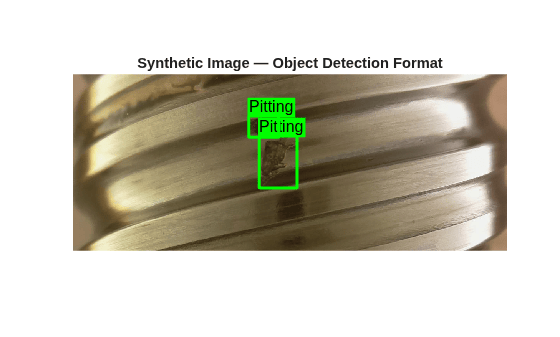
Generate Synthetic Image Data for Instance Segmentation
To instead generate synthetic training image data for instance segmentation, create an objectInsertionDatastore object with the OutputFormat property set to "InstanceSegmentation". Each row of the cell array returned by the datastore is of the form {Image BoundingBoxes Labels Masks}, representing a single image. The Masks output provides pixel-level delineation of each defect instance. This configuration uses the same augmentation and blending parameters as the object detection datastore, ensuring consistency between the two output formats.
dsSyntheticISeg = objectInsertionDatastore(dsDestination,dsObject,numSyntheticImages, ...
    NumObjectsToInsert=[1 3], ...
    ObjectsInSceneMaxOverlap=0.3, ...
    BlendMethod="guidedfilter", ...
    GeometricAugmentation=@() randomAffine2d(Scale=[0.8 1.2], ...
    XReflection=true,YReflection=true,Rotation=[-180 180]), ...
    OutputFormat="InstanceSegmentation");

disp("Created objectInsertionDatastore (InstanceSegmentation) with " + numSyntheticImages + " synthetic images")
Created objectInsertionDatastore (InstanceSegmentation) with 1000 synthetic images
Visualize Synthetic Image Data
Preview a sample from the instance segmentation synthetic datastore, and display it with overlaid instance masks and bounding boxes. Use the insertObjectMask function to overlay the binary masks with 50% opacity, which enables you to verify that mask boundaries accurately trace defect contours even after geometric augmentation.
sampleData = preview(dsSyntheticISeg);
sampleImg = sampleData{1};
sampleBoxes = sampleData{2};
sampleLabels = sampleData{3};
sampleMasks = sampleData{4};

figure

overlayedImg = insertObjectMask(sampleImg,sampleMasks,Opacity=0.5);
imshow(overlayedImg)
hold on
showShape("rectangle",sampleBoxes,Label=string(sampleLabels),Color="green")

title("Synthetic Image — Instance Segmentation Format")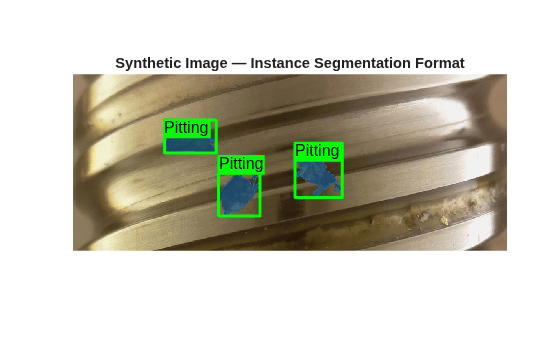
Display Data Set Summary
Display summary information about the data set and synthetic data generation using the displayDatasetSummary helper function. This summary provides a quick overview of the data pipeline that consists of the source image count, annotation count, and number of synthetic images generated. Inspect these quantities to diagnose data imbalance or verify that the generation pipeline has processed all expected files.
displayDatasetSummary(numSourceImages,numel(annotatedImagePaths), ...
    numel(unannotatedImagePaths),annotationPath,numSyntheticImages,className);
=== Dataset Summary === Source images: 1104 Annotated images: 394 Unannotated (background) images: 710 Synthetic images generated: 1000 Defect class: Pitting
Next Steps
Use the generated synthetic images and annotations to train a YOLOX object detector. See the Train YOLOX Object Detector Using Synthetic Data example, which compares training on real data only to a strategy of pretraining on synthetic data followed by fine-tuning on only real data.
Helper Functions
displayDatasetSummary
Display a summary of the source data set composition and synthetic image generation results.
function displayDatasetSummary(numSourceImages,numAnnotated,numUnannotated,annotationPath,numSyntheticImages,className)
disp(" ")
disp("=== Dataset Summary ===")
disp("Source images: " + numSourceImages)
disp("Annotated images: " + numAnnotated)
disp("Unannotated (background) images: " + numUnannotated)
disp("Annotation MAT files: " + annotationPath)
disp("Synthetic images generated: " + numSyntheticImages)
disp("Defect class: " + className)
end
References
[1] Schlagenhauf, Tobias, and Magnus Landwehr. "Industrial Machine Tool Component Surface Defect Dataset." Data in Brief 39 (December 2021): Article 107643. https://doi.org/10.1016/j.dib.2021.107643.

