similarityMatrix
R2026bCompute self-similarity matrix for a set of image features based on bag of words representation
Since R2026b
Syntax
Description
simMatrix = similarityMatrix(bag,features)simMatrix for the ORB or SIFT features
specified by features using the distributed bag of words (DBoW)
representation specified by the bagOfFeaturesDBoW
object, bag.
simMatrix = similarityMatrix(bag,features,StrongestResults=Value)StrongestResults name-value argument. In
each column of the output similarity matrix, the function retains only the similarity scores
for the specified number of top‑ranking image features, and sets all the remaining scores to
0. The default value of StrongestResults is
10.
Examples
This example shows how to create a bag of words vocabulary using SIFT features extracted from images and compute self similarity matrix for all the images. It also shows how to use the computed similarity matrix to visualize images that are most similar to a given query image.
Load a set stop-sign images as an image datastore.
folder=fullfile(toolboxdir("vision"),"visiondata","stopSignImages");
imds=imageDatastore(folder);
Compute the scale-invariant feature transform (SIFT) features for all the images in the datastore.
siftFeatures = cell(numel(imds.Files),1);
for i = 1:numel(siftFeatures)
    img = rgb2gray(readimage(imds,i));
    siftFeatures{i} = extractFeatures(img,detectSIFTFeatures(img));
end
Create a bag of features object for the images using the bagofFeaturesDBoW object. To use SIFT image features while constructing the bag of features vocabulary, specify the FeatureType name-value argument as "SIFT".
bag = bagOfFeaturesDBoW(imds,FeatureType="SIFT");Compute the similarity matrix for all the image features using the similarityMatrix object function. The function returns a sparse matrix that stores similarity scores for only the top visually similar images for each image feature, as specified by the StrongestResults name‑value argument. By default, each column has 10 nonzero similarity scores, and all other entries are zeros. Diagonal entries are 1 because each image is compared with itself, and all other similarity scores fall between 0 and 1, with higher values indicating stronger visual similarity.
You can adjust how many similar images are retained by specifying the StrongestResults name‑value argument.
simMatrix = similarityMatrix(bag,siftFeatures,StrongestResults=10)
simMatrix = 41×41

    1.0000    0.0675    0.0762    0.0600    0.0711         0         0    0.0605         0         0         0         0    0.0382         0         0         0         0         0         0         0         0    0.0594    0.0544         0         0    0.0534         0         0         0         0         0    0.0894    0.0856    0.0536    0.0915    0.0716         0    0.0570         0         0    0.0857
         0    1.0000    0.0891         0         0         0         0         0         0         0         0         0         0         0         0         0         0         0         0         0         0         0         0         0         0    0.0497         0         0         0         0    0.0598         0         0         0         0         0         0         0         0         0         0
         0    0.0891    1.0000         0         0         0         0         0         0         0         0         0         0         0         0         0         0         0         0         0         0         0         0         0         0    0.0488         0         0         0         0         0         0         0         0         0         0         0         0         0         0         0
         0         0         0    1.0000    0.0804         0         0         0         0         0         0         0         0         0         0         0         0         0         0         0         0    0.0612    0.0545         0         0         0         0         0         0         0         0         0         0    0.0549         0         0         0    0.0583         0         0         0
         0         0         0    0.0804    1.0000         0         0         0         0         0    0.0118         0    0.0363         0         0         0         0         0         0         0         0    0.0745    0.0604         0         0    0.0483         0         0         0         0         0         0         0    0.0617         0    0.0737    0.0427    0.0601    0.0286         0         0
    0.0885         0         0         0    0.0668    1.0000         0         0         0         0         0         0         0         0    0.1062    0.0947    0.1018    0.1001    0.1050         0    0.0882         0    0.0515         0         0         0         0         0         0         0         0    0.0986    0.0908         0         0         0         0    0.0537         0    0.1006    0.0906
         0         0         0         0         0         0    1.0000    0.1024    0.0791    0.0172    0.0203    0.0513         0         0         0         0         0         0         0    0.0401         0         0         0         0         0    0.0494    0.0238    0.0063         0    0.0689    0.0619         0         0         0         0         0         0         0         0         0         0
         0         0         0         0         0         0    0.1024    1.0000    0.1072    0.0106    0.0144    0.0355         0         0         0         0         0         0         0         0         0         0         0         0         0         0         0         0         0         0         0         0         0         0         0         0         0         0         0         0         0
         0         0         0         0         0         0    0.0791    0.1072    1.0000         0    0.0124    0.0429    0.0357         0         0         0         0         0         0         0         0         0         0         0         0    0.0514         0         0    0.0714    0.0709    0.0631         0         0         0         0         0         0         0         0         0         0
         0         0         0         0         0         0         0         0         0    1.0000    0.0889    0.0633         0         0         0         0         0         0         0         0         0         0         0         0         0         0         0    0.0075         0         0         0         0         0         0         0         0         0         0         0         0         0
         0         0         0         0         0         0         0         0         0    0.0889    1.0000    0.0760         0         0         0         0         0         0         0         0         0         0         0         0         0         0         0         0         0         0         0         0         0         0         0         0         0         0         0         0         0
         0         0         0         0         0         0         0         0         0    0.0633    0.0760    1.0000         0    0.0260         0         0         0         0         0         0         0         0         0         0         0         0         0    0.0073         0         0         0         0         0         0         0         0         0         0         0         0         0
         0         0         0         0         0         0         0         0         0         0         0         0    1.0000    0.0698         0         0         0         0         0         0         0         0         0         0         0         0         0         0         0         0         0         0         0         0         0         0    0.0558         0    0.0350         0         0
         0         0         0         0         0         0         0         0         0    0.0119         0         0    0.0698    1.0000         0         0         0         0         0         0         0         0         0         0         0         0         0         0         0         0         0         0         0         0         0         0    0.0478         0    0.0566         0         0
         0    0.0699    0.0789         0         0    0.1062    0.0699    0.0674    0.0813         0         0         0         0         0    1.0000    0.1187    0.1276    0.1160    0.1314    0.0385    0.0947         0         0    0.0904    0.0675         0    0.0238         0    0.0781    0.0815    0.0640    0.0969    0.0935         0    0.1016         0         0         0         0    0.1275    0.0966
      ⋮
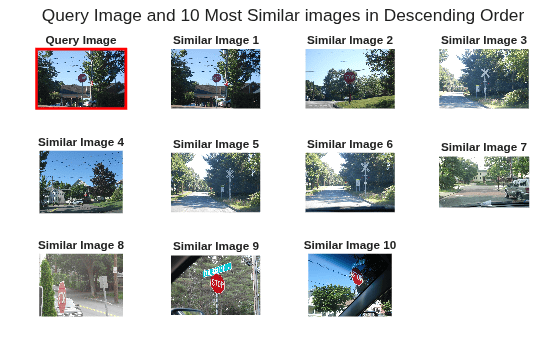
Retrieve the indices of the images most similar to a selected query image. In this example, you extract the nonzero similarity entries for the 15th image, sort them in descending order of similarity score, and return the corresponding image indices.
queryImageIdx = 15;
idx = find(simMatrix(:,queryImageIdx));
[~,order] = sort(simMatrix(idx,queryImageIdx),"descend");
sortedIdx = idx(order)'
sortedIdx = 1×10
15 19 17 40 16 18 6 35 32 41
Visualize the query image and its 10 most similar images in the order of decreasing similarity scores. This helps you qualitatively inspect how well the similarity matrix captures visual similarity among the image features.
figure
tl = tiledlayout(3,4,TileSpacing="compact",Padding="compact");
title(tl,"Query Image and 10 Most Similar images in Descending Order")
nexttile
ax = gca;
imshow(readimage(imds,queryImageIdx))
hold on
rectangle(Position=[ax.XLim(1) ax.YLim(1) diff(ax.XLim) diff(ax.YLim)],Edgecolor="r",LineWidth=2)
title("Query Image")

for k = 1:numel(sortedIdx)
nexttile
    imshow(readimage(imds,sortedIdx(k)))
    title(sprintf("Similar Image %d", k))
end
Input Arguments
Output Arguments
Version History
Introduced in R2026b

